Posted by: kurtsh | October 4, 2012

DOWNLOAD: Springboard Resource Guide for Windows 8

We just released this today!

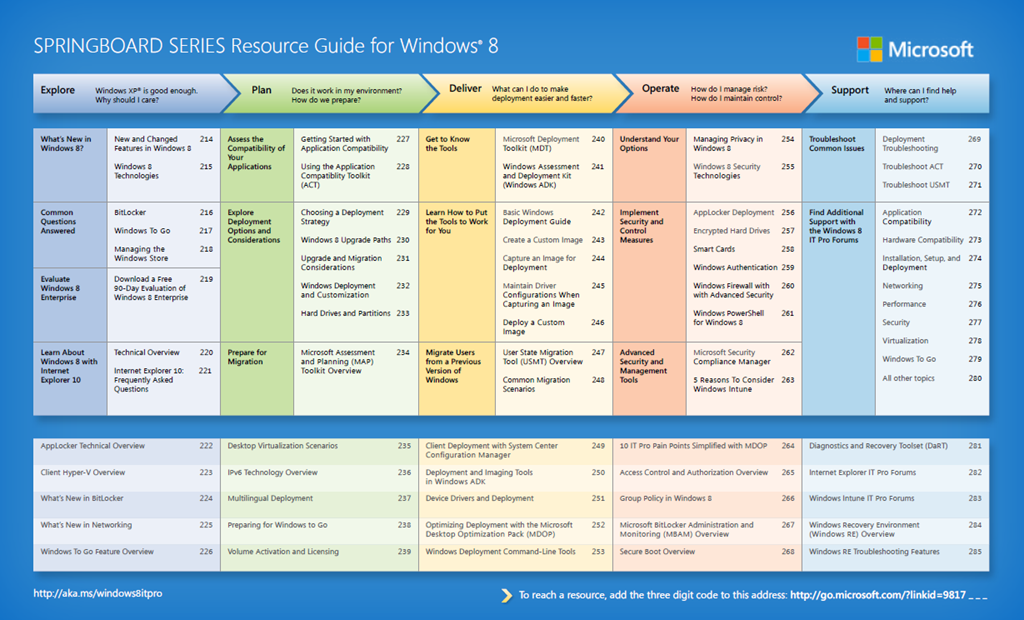
Download a one-page HYPERLINKED guide outlining the top resources for IT professionals interested in exploring, planning for, deploying, managing, and supporting Windows 8 as part of their IT infrastructure.

image

This has everything from ‘Exploring Windows 8’ to ‘Planning for Windows 8’s Deployment’ to ‘Executing a deployment of Windows 8’ to ‘Managing Windows 8’ to ‘Supporting Windows 8’.  It’s all in there.

image

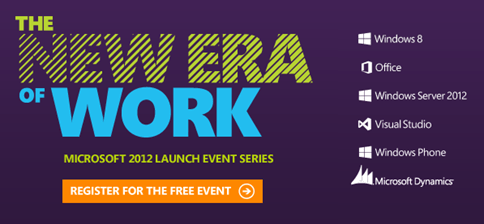
The biggest wave of innovation in Microsoft history is transforming enterprise IT. Join me for a free launch event, and you’ll see how the latest technologies can inspire productivity and increase your value as a strategic leader.

  • Improve business performance and build a real-time enterprise by harnessing innovations in social, mobile, big data, and the cloud.
  • Visit our Experience Lounge to explore Windows 8, the new Microsoft Office, Windows Server 2012, and the latest PC devices with touch and keyboard.
  • See live demos showcasing real customer scenarios and end-to-end solutions for mobile, cloud, and business intelligence.

Attend The New Era of Work Launch Event for Windows 8, Office and More

Are you a server admin?  Do you run a server lab?

If so, you have to try this out.  There’s no reason not to.  This is really amazing and the trial is totally FREE.  Provisioning virtual servers in the cloud and setting them up with storage, networking, processing, memory… all through a web page and booting a template VM is just the start of using Windows Azure Infrastructure-as-a-Service (IaaS).

imageTry Windows Server 2012 on Windows Azure Free for 90 Days
Without downloading an ISO or VHD file or installing anything, you can be up and running in just a few steps. Your free trial includes 750 small compute hours per month, 10 websites, 10 mobile services, 1 SQL database, 35GB with 50 million storage transactions, unlimited

And you can upload your OWN Virtual Hard Drive (.VHD) files to the cloud and host them there.  Windows Azure takes care of the rest.  If you have .VMDKs, you can convert them using the free Virtual Machine Converter.

Just try it.  It costs nothing and it’s the coolest thing in the world.

imageHere’s another great presentation that was done at TechEd 2012 that I’m sure would be news to many.

WCL327: Maximizing Windows 7 Performance: Troubleshooting Tips
Ever thought about what Windows 7 actually is doing while you are waiting? Learn to troubleshoot and analyze a wide range of performance problems including application start times, boot issues, deferred procedure calls and interrupt activity (DPCs and ISRs), system responsiveness issues, application resource usage, and interrupt storms.

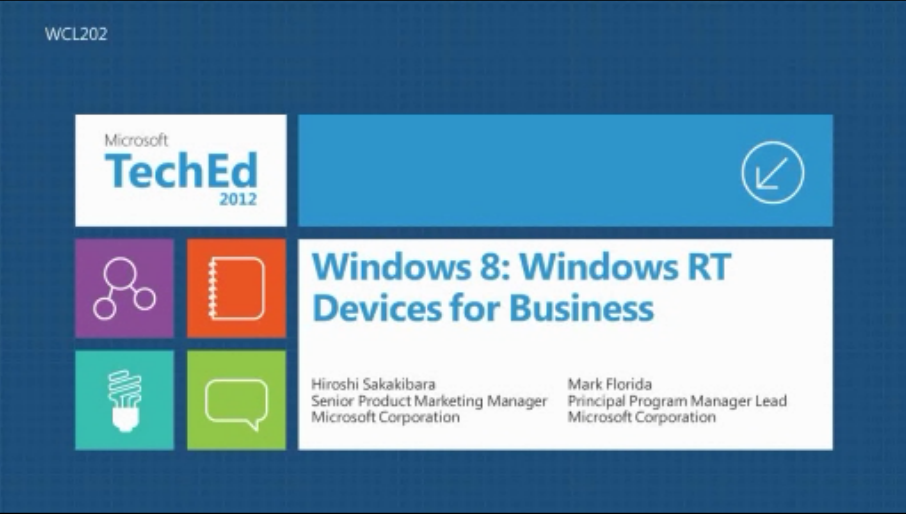
imageI’ve gotten a lot of questions about Windows RT and thought it best just to point to the video from TechEd 2012 that goes over the business capabilities of Windows RT.

WCL202:  Windows 8: Windows RT Devices for Business
In this session we will discuss the business capabilities of Windows RT (Windows on ARM) devices. We will talk about the Windows RT capabilities from business angle – e.g., user experience, productivity, connectivity, security, and manageability – as well as how organizations should assess Windows RT devices for their environment.

ONLINE STREAM: http://channel9.msdn.com/Events/TechEd/NorthAmerica/2012/WCL202 

POWERPOINT: Download WCL202_Sakakibara.pptx

VIDEO FILE: WCL202.wmv

—————————————————————————–

For more videos like this one visit the TechEd 2012 catalog at:
http://northamerica.msteched.com/contentcatalog#fbid=tTT6t7l_hv7

imageToneCheck identifies and flags emotionally charged sentences within email messages. ToneCheck installs quickly and easily into Microsoft Outlook 2007 and 2010.  And it’s FREE.

After installing ToneCheck, upon opening a new message window, look for ToneCheck in two main areas: The ToneCheck Toolbar on the bottom of the message window and a ToneCheck Menu within the menu bar.

  • The ToneCheck Toolbar contains a Tone Alert indicator on the bottom of your message window and was designed to alert you when your message falls outside of your acceptable tolerance level.
  • When the Tone Alert indicator turns red, it means there is a questionable sentence to review.

DOWNLOAD:  ToneCheck – Automatic Emotion Detector for email in Outlook 2010
http://tonecheck.com/marketplace?__lsa=ce9a6f0e

Well now, this is an interesting opportunity.  Taken from the SharePoint IT blog:

imageAre you going to the SharePoint Conference this year?

We are once again offering a limited number of dedicated solution-design sessions for individual customers who are not currently engaged with Microsoft Consulting Services (MCS).

imageThese Design Time sessions are intended to help IT professionals, and in some cases developers, envision and plan a solution based on SharePoint 2013 products.

Sessions will last 60-90 minutes. If you are selected, you will meet with one or more product experts (Microsoft product team members, consultants, or certified subject-matter experts) to discuss your solution goals, get advice on current challenges, and envision how to enhance your solution using SharePoint 2013 products. SharePoint documentation team members (who publish content on TechNet and MSDN) will facilitate the sessions.

We are currently recruiting customers who will be attending the SharePoint Conference for the proposed categories listed in the table below.

Proposed Focus Areas

Description

Business Intelligence
Are you excited about how to implement the new Business Intelligence capabilities into your enterprise environment? Do you want to integrate PowerPivot data models and Power View sheets in your Excel & SharePoint dashboards? Is big data (Hadoop) analysis part of your plan? Do you want to integrate all BI reports and data into a central portal? Come and discuss your plans and challenges for implementing BI solutions in your environment.

Enterprise-scale architectures
Are you planning a SharePoint 2013 solution for an enterprise-scale environment? Are you considering an extra-large farm or a multi-farm environment? We’re looking for enterprise-scale customers who are prepared to discuss architecture, manageability, and design issues for their environments.

Hybrid environments
Come and discuss plans and strategy for your hybrid SharePoint 2013 solution that integrates an on-premises farm with a farm in Office 365. Possible areas of discussion include identity management requirements (Active Directory synchronization, server-to-server [S2S] authentication), search, and Business Connectivity Services (BCS).

Identity management
Come and discuss plans and strategy for an identity management infrastructure for SharePoint 2013. Possible areas of discussion include authentication methods (Windows, FBA, SAML), authentication types (user, app, server-to-server [S2S]), permissions (site, web app, app), and user profile synchronization.

Mobility
Do you have a mobile workforce? How are you planning to take advantage of SharePoint 2013 mobile features such as the new browser-based experiences? Come discuss your organization’s mobile architecture for SharePoint 2013, including deployment goals, features you plan to enable, and any other related questions. Also, tell us what mobile experience your users prefer (mobile app vs. mobile-optimized browser view) and what mobile form factors are prevalent in your organization (phone vs. slate and iOS/Android/Windows Phone/Windows 8).

Office Web Apps server
Do you have a need for browser-based viewing and editing of Office documents from anywhere that you have a connection to your organization’s SharePoint site? Come to this session to review your plans for deploying Office Web Apps Server to enable Office Web Apps on SharePoint 2013.

SharePoint Apps (developer and IT Pro)
The new cloud app model for SharePoint allows organizations to quickly add functionality to the SharePoint sites in their environment. Come talk with us about how you are planning to develop, provide, manage, and govern SharePoint apps in your organization’s environment.

Social computing
Are you planning or already implementing the enterprise social computing features and functionality of SharePoint Server 2013? Not sure how best to plan for the integration of these, such as My Sites, feeds, Community Sites, and the Community Portal? Come share and discuss your plans for your infrastructure and challenges to implementing and adopting enterprise social computing in your environment.

Upgrade
Are you preparing for or in the process of upgrading to SharePoint Server 2013? Come share and discuss your strategy for upgrading your databases and sites, and how you plan to handle customizations in your environment during upgrade. This session is targeted to customers upgrading from SharePoint Server 2010.

Workflow
Come and discuss your plans for workflow in SharePoint Server 2013. Workflow in SharePoint Server 2013 is provided by a product called Windows Azure Workflow. New tasks and actions have been developed for SharePoint Designer 2013 that leverage this new Windows Azure Workflow-based platform. Bring your design ideas and plans for implementing workflow in SharePoint Server 2013 and interact with the product teams for both SharePoint 2013 workflow and SharePoint Designer 2013.

We are also considering adding focus areas for Virtualization and Business Connectivity Services, separate from our Enterprise-scale architectures and Hybrid focus areas. If you would be interested in discussing one of these areas, be sure to list them when you nominate your organization.

If you are selected for a focus area, you will meet with product experts who specialize in your focus area and your session will focus on your design and implementation choices.

To be eligible to participate, you must meet the following criteria:

  • The person(s) you are nominating from your organization must be attending SharePoint Conference 2012 in Las Vegas.
  • Your organization must be planning or maintaining a solution that fits at least one focus area.
  • Your organization must not be currently working with Microsoft Consulting Services.
  • You must bring either a draft of your intended solution or a representation of your existing SharePoint solution. For example, your draft can include the proposed physical topology, logical farm architecture, hierarchy of sites, plan for database sizing and settings, search settings, plan for security and isolation, etc.

To nominate your company or organization for a design session, send e-mail to spcdesign at microsoft dot com by October 5, 2012, and include the following information:

  • Name of your company or organization.
  • Contact information: name and title or role in your organization.
  • One or two focus area(s) you are interested in and any specific questions you have about that area now.
  • Brief description of your solution goals and the challenges you’d like to discuss in the Design Time session.

Due to a limited number of available sessions for each focus area, likely not every nomination will be accepted. We will review nominations and select those that best fit the focus area and that look like they will lead to a meaningful discussion for both the organization and Microsoft.

Information that you share with the product experts and documentation team either in email or during a design session will be treated confidentially. If you are selected, a member of the SharePoint conference team will contact you with the day and time of your session by October 19, 2012.
image“…WS2012 should be the platform of choice, and any preconceived notions about Microsoft versus VMware for the virtualization layer need to be re-examined.”

Yeah, that’s the money quote there.  This is one helluva write up done by Richard Fichera however and it’s clear he gets how revolutionary this release is.  He doesn’t just go through virtualization but all other aspects of flexible datacenter computing, in particular the need for automation, reliability, and scale.

But he spends a bit of time talking about it’s positioning with the cloud which is important. 

imageIf you’re planning on deploying Windows 8 or Windows Server 2012, you can’t miss Microsoft Deployment Toolkit (MDT) 2012 Update 1.

Microsoft Deployment Toolkit (MDT) 2012 Update 1 is the newest version of MDT, a Solution Accelerator for operating system and application deployment. MDT 2012 Update 1 supports deployment of Windows 8, Windows 7, Office 2010 and 365, Windows Server 2012, and Windows Server 2008 R2 in addition to deployment of Windows Vista, Windows Server 2008, Windows Server 2003, and Windows XP.

MDT is the recommended process and toolset for automating desktop and server deployment. MDT provides you with the following benefits:

  • Unified tools and processes, including a set of guidance, for deploying desktops and servers in a common deployment console.
  • Reduced deployment time and standardized desktop and server images, along with improved security and ongoing configuration management.

Some of the key changes in MDT 2012 Update 1 are:

  • Added support for Windows 8 and Windows Server 2012.
  • Support for System Center 2012 Configuration Manager SP1 CTP: Added support in MDT for deploying Windows 8 and Windows Server 2012 with Configuration Manager 2012 SP1 CTP, while supporting all new Configuration Manager functionality (offline BitLocker, UEFI, and Assessment and Deployment Kit).
  • Support for DaRT 8 Beta: Updated MDT to support DaRT 8 for Windows 8 deployments, while continuing to support DaRT 7 for Windows 7 deployments. Added DaRT support for Configuration Manager scenarios.
  • New “Build Your Own Pages” User-Driven Installation (UDI) feature: Enhanced the UDI wizard and designer to enable IT pros to design their own wizard pages with little effort.
  • New System Center 2012 – Orchestrator support: Provided the ability to add steps into an OS deployment task sequence to execute Orchestrator runbooks as part of the deployment process.
  • Other improvements: Added support for Windows PowerShell 3.0, reworked Roles and Features installation logic for Windows 8, improved “boot from VHD” deployment scenarios, and added support for Configuration Manager monitoring.

Grab it here:

imageGet the most out of Windows Server 2012 with new features that help you to quickly identify, classify, and protect data in your private cloud!

The Data Classification Toolkit supports new Windows Server 2012 features, Dynamic Access Control, and backward compatibility with the functionality in the previous version of the toolkit. The toolkit provides support for configuring data compliance on file servers running Windows Server 2012 and Windows Server 2008 R2 SP1 to help automate the file classification process, and make file management more efficient in your organization.

« Newer Posts - Older Posts »

Categories