Posted by: kurtsh | September 7, 2012

HOWTO: Enroll/Activate/Use your Software Assurance Benefits

imageMany of you have Software Assurance benefits.  Some of you even know what they are!

The question that is asked often is,

“So how do I use these benefits?  Is there a set of instructions for each benefit on how to use them, step-by-step?”

Answer:  YES.

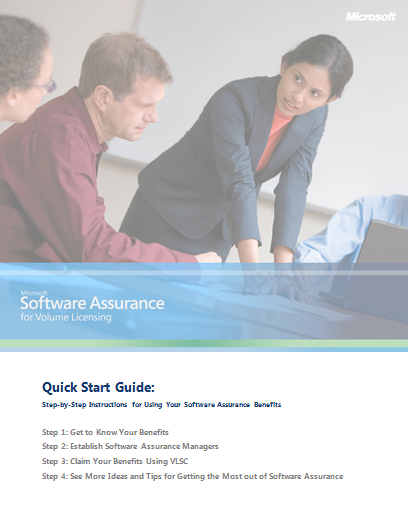
It’s called the Software Assurance Customer QuickStart Guide and it’s an extremely valuable 15 page overview that provides STEP-BY-STEP instructions on how to activate, manage, and use each of the benefits that you have as a result of your volume licensing contract with Microsoft.

Here’s the table of contents:

    • Familiarize yourself with Software Assurance
    • Check your benefits through the Volume Licensing Service Center (VLSC)
    • Tips for choosing Software Assurance Managers
    • Steps to register Software Assurance Managers
        • How to register
    • Follow steps for specific benefits
    • New Products.
        • New Product Versions
        • Step-up Licensing
        • Microsoft Desktop Optimization Pack (MDOP)
        • Windows 7 Enterprise
    • Deployment
        • Planning Services
        • License Mobility through Software Assurance
        • Windows Thin PC
        • Windows Virtual Desktop Access
        • Office Roaming Use Rights
        • TechNet benefits through Software Assurance
        • Microsoft Office Multi-Language Pack
    • Support
        • 24X7 Problem Resolution Support
        • System Center Advisor
        • Extended Hotfix support
    • Training
        • E-Learning
        • Home Use Program (HUP)
        • Training Vouchers
    • Specialized Benefits
        • Cold Backups for Disaster Recovery
        • Enterprise Source Licensing Progra
        • Spread Payments
    • Getting Help for VLSC

Download the paper here – and keep it handy!

SOFTWARE ASSURANCE INTERACTIVE CHART
Additionally, there is an UPDATED CHART of all the Software Assurance benefits that you may be eligible for.
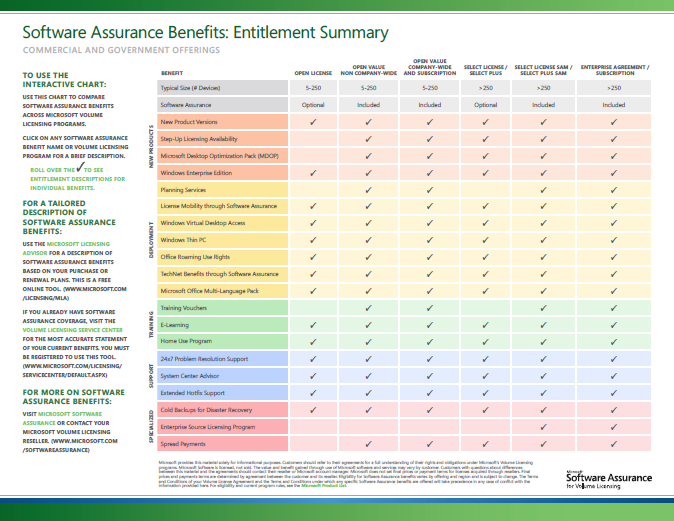
imageThe chart is actually ‘interactive’ in that when you hover over it using Acrobat, you will see a brief description of the benefit.

REQUIREMENTS
It should be noted that none of this is useful if you don’t have actual permissions to manage your company’s Software Assurance benefits.  The “Microsoft Volume Licensing Administrator” for your Volume Licensing Contract can designate you (and others) to be “Software Assurance Benefits Admins” which will empower you to use, distribute, and delegate benefits for your company. 

This “Volume Licensing Administrator” is often the person that negotiated the contract in procurement, but lacking that, if you know your Large Account Reseller contact – the reseller responsible for the caretaking of your agreement with Microsoft (Insight, Softchoice, Dell Licensing/ASAP, Enpointe, SHI, etc.) – can provide you with the appropriate rights assuming they are given the go-ahead to do so by the VL Administrator.

The process for doing this is located here:
http://www.microsoft.com/licensing/existing-customers/manage-my-agreements.aspx

imageMicrosoft Visual Studio Tools for Applications gives you a way to enable end users to customize your existing applications using Visual Basic and Visual C#. You can incorporate a custom integrated development environment (IDE) that is similar to the Visual Studio IDE into the application. End-user developers can use the IDE to customize the application by creating add-ins that extend the functionality of the application to meet their needs.

    image

    Save the date: February 19 – 21, 2013!

    The Lync team is excited to announce the first ever Lync Conference, February 19 – 21, 2013 at the Hotel del Coronado in San Diego. Join Microsoft Lync customers and partners in sunny San Diego as we gather together for this inaugural event. Learn from the best, network with other like-minded attendees, and celebrate the past, present, and future of Microsoft Lync!

    Please Save the Date and stay tuned for more information as we gear up for this exciting event in the coming months.

    imageSign up for updates on registration at:
    http://www.lyncconf.com/

    imageWindows Management Framework 3.0 makes some updated management functionality available to be installed on Windows 7 SP1, Windows Server 2008 R2 SP1 & Windows Server 2008 SP2. Windows Management Framework 3.0 contains Windows PowerShell 3.0, WMI & WinRM.

    Windows PowerShell 3.0
    Some of the new features in Windows PowerShell 3.0 include:

    • Workflow
      Windows PowerShell Workflow lets IT Pros and developers apply the benefits of workflows to the automation capabilities of Windows PowerShell. Workflows allow administrators to run long-running tasks (which can be made repeatable, frequent, parallelizable, interruptible, or restart-able) that can affect multiple managed computers or devices at the same time.
    • Disconnected Sessions
      PowerShell sessions can be disconnected from the remote computer and reconnected later from the same computer or a different computer without losing state or causing running commands to fail.
    • Robust Session Connectivity
      Remote sessions are resilient to network failures and will attempt to reconnect for several minutes. If connectivity cannot be reestablished, the session will automatically disconnect itself so that it can be reconnected when network connectivity is restored.
    • Scheduled Jobs
      Scheduled jobs that run regularly or in response to an event.
    • Delegated Administration
      Commands that can be executed with a delegated set of credentials so users with limited permissions can run critical jobs
    • Simplified Language Syntax
      Simplified language syntax that make commands and scripts look a lot less like code and a lot more like natural language.
    • Cmdlet Discovery
      Improved cmdlet discovery and automatic module loading that make it easier to find and run any of the cmdlets installed on your computer.
    • Show-Command
      Show-Command, a cmdlet and ISE Add-On that helps users find the right cmdlet, view its parameters in a dialog box, and run it.

    WMI
    WMI in Windows Management Framework 3.0 introduces:

    • A new provider development model
      This new model brings down the cost of provider development and removes the dependency on COM.
    • A new MI Client API to perform standard CIM operations.
      The API can be used to interact with any standard WsMan + CIMOM implementation, allowing management applications on Windows to manage non-Windows computers.
    • The ability to write Windows PowerShell cmdlets in native code
      The new WMI Provider APIs supports an extended Windows PowerShell semantics API allowing you to provide rich Windows PowerShell semantics. e.g., Verbose, Error, Warning, WhatIf, Confirm, Progress

    WinRM
    With Windows Management Framework 3.0:

    • Connections are more robust
      Remote connections communicating over WinRM are more robust to transient network failures such as a flaky WAN connection. In the case of a complete network failure, connections are gracefully disconnected and can be reconnected when network connectivity is restored.
    • Remoting is more Standards-compliant
      Standard WS-Management operations, including Create and Delete, can be performed over WMI. Remoting for cmdlets written in native code using the new WMI provider development model uses WS-Management instead of DCOM.
    • Multiple PowerShell sessions can be shared in the same process
      PowerShell sessions from the same user to the same session configuration (WinRM plug-in) can run in a single shared process instead of separate processes. This improves scalability and performance by allowing multiple sessions to share memory and other server resources.

    Management OData IIS Extensions
    Management OData IIS Extension enables an administrator to expose a set of PowerShell cmdlets as a RESTful web endpoint accessible via the Open Data Protocol (OData). This enables Windows and non-Windows clients to discover and invoke PowerShell cmdlets remotely over standard web protocols and interfaces.

    imageServer Manager CIM Provider
    The Server Manager CIM Provider packaged with Windows Management Framework 3.0 allows you to manage your Windows Server 2008 R2 SP1 and Windows Server 2008 SP2 servers from Server Manager in Windows Server 2012 or Remote Server Administration Tools for Windows 8

    References:

    Download:

    image

    This week, Mitch Tulloch and the Windows Server team have released a new updated version of the FREE e-Book for IT professionals: Introducing Windows Server 2012 RTM Edition. With Windows Server 2012 RTM launching on Sept 4th, this book is a great way to get quickly skilled up on all the new improvements in this latest Windows Server – one of the most ambitious releases of Windows Server for IT Pros since Active Directory was released in Windows Server 2000! In this 256-page eBook, you’ll find 5 chapters of detailed technical content covering the following key improvements to building a Private Cloud at your shop with Windows Server 2012:

    • Building a foundation for Private Cloud
      Understand the latest improvements that takes Windows Server 2012 and Hyper-V beyond basic virtualization: Increased VM scalability, Hyper-V extensible network switch, Network Virtualization, Improved Live Migration, Enhanced Quality of Service (QoS), Resource Metering and Hyper-V Replica.
    • Designing a highly available, easy-to-manage multi-server platform
      Includes Failover Clustering Enhancements, SMB Transparent Failover, Live Storage Migration, NIC Teaming, Chkdsk improvements, DHCP Server Failover, Storage Spaces, Thin Provisioning, Server for NFS datastores, new multi-server Server Manager, PowerShell 3.0 and Active Directory enhancements.
    • Deploying web applications on-premise and in the cloud
      Includes improvements to scale, manage and deliver open Web Applications, such as: NUMA-aware scalability, Centralized SSL certificate support, IIS CPU Throttling, Dynamic IP Address Restrictions, FTP Logon Attempt Restrictions, WebSocket and HTML5 Support.
    • Enabling modern anywhere, any-device workstyles
      Unified Remote Access, Simplified VDI deployment, User-Device Affinity, Enhanced BranchCache, Branch Office Direct Printing, Remote FX enhancements, Enhanced USB redirection, User Profile Disks, Dynamic Access Control, BitLocker enhancements and DNSSEC support.

    DOWNLOAD: Introducing Windows Server 2012 RTM Edition (PDF, ePUB, MOBI)
    http://blogs.msdn.com/b/microsoft_press/archive/2012/09/05/free-ebook-introducing-windows-server-2012-rtm-edition.aspx

    imageIf you’re going to deploy Windows 8 and/or Windows Server 2012 in your company using KMS, you’ll need to update the KMS Host Key for activation.

    KMS activation for either Windows 8 or Windows Server 2012 requires that a new ‘KMS Host Key’ associated with the product to be obtained from Volume Licensing Services Center & imported in to your KMS Host Server using the SLMGR.VBS tool.  This is discussed in the TechNet article entitled, “Windows 8: Volume Activation Overview”:
    http://technet.microsoft.com/en-us/library/hh831612

    NOTE:  I’m going to assume you have the rights to, & know how to download the KMS Host Key for your organization from the Volume Licensing Services Center at https://www.microsoft.com/licensing/servicecenter.  If not, you need to find out who the Administrator is for your company’s Volume Licensing Agreement and either have them grant you rights or have them get you the key you need because the rest of this isn’t going to matter if you don’t have at least that.

    THREE THINGS TO KNOW ABOUT UPDATING YOUR KMS HOST
    As an Enterprise KMS service administrator, there’s three important things to know about provisioning an existing KMS host that will activate Windows 8 & Windows Server 2012:

    1. YOU MUST PATCH YOUR WINDOWS SERVER 2008 R2-BASED KMS HOST SERVERS FOR WIN8/WS2012 ACTIVATION
      Before you install the KMS Host Key to begin activating Windows 8 & Windows Server 2012 installations on your corporate network, there is an ‘update’ available for your KMS Host servers if the service is hosted on Windows 7 or Windows Server 2008 R2 known as KB2691583:
      http://support.microsoft.com/kb/2691586
    2. NO PATCH IS AVAILABLE FOR WINDOWS SERVER 2003-BASED KMS HOSTS
      There is no patch to enable KMS Hosts running on Windows Server 2003 to activate Windows 8 or Windows Server 2012.  I’ve been told that the choices for customers in this scenario are as follows:
          1. Leave the current KMS host as is. Install Windows Server 2012 and configure Active Directory Based Activation. This will activate Windows 8/Windows Server 2012. The Windows Server 2003 KMS host will handle everything else that it currently activates.
          2. Decommission the Windows Server 2003 KMS host. Install Windows Server 2012 and configure Active Directory Based Activation (for Windows 8/2012) then setup a Windows Server 2012 KMS host for Windows 7/Windows Server 2008 R2/etc.
          3. Decommission the Windows Server 2003 KMS host. Install Windows Server 2008R2 KMS host, install the KB2691586 update, install Windows Server 2012 KMS host key, and that will activate everything. Configure Active Directory based activation also for Windows 8/Windows Server 2012, or execute this at later date.
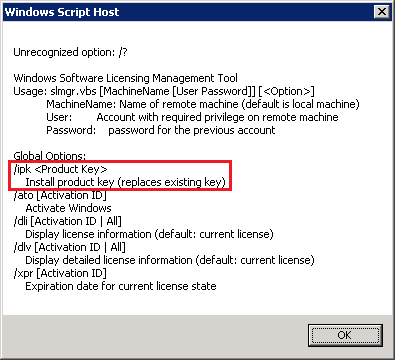
    3. imageA NEW WIN8/WS2012 KMS HOST KEY WILL REPLACE THE OLD WIN7/WS2008R2 KMS HOST KEY
      When you install the new WIN8/WS2012 KMS Host Key on your KMS Server, as stated in the SLMGR script, you will be replacing the old activation host key that you used for Windows 7/Windows Vista and/or Windows Server 2008/R2.

      The new WIN8/WS2012 host key will provide activation for down level operating systems, depending on the type of KMS Host Key being installed.

          1. The Client Product Key for Windows 8 will enable the KMS Host to activate:
            (KMS must be hosted on a Windows 7 or greater installation)
            Windows Vista Business
            Windows Vista Enterprise
            Windows 7 Professional
            Windows 7 Enterprise
            Windows 8 Professional
            Windows 8 Enterprise
          2. The Server Product Key for Windows Server 2012 will enable the KMS Host to activate:
            (KMS must be hosted on a Windows Server 2008 installation or greater)
            Windows Vista Business
            Windows Vista Enterprise
            Windows 7 Professional
            Windows 7 Enterprise
            Windows 8 Professional
            Windows 8 Enterprise
            Windows Server 2008 (all editions)
            Windows Server 2008 R2 (all editions)
            Windows Server 2012 (all editions)

    Here are some other references:

    imageIf you’re interested in downloading recordings of the Virtualization section from the Windows Server 2012 virtual launch this morning, please click the following links:

    Other Launch Videos:

    Posted by: kurtsh | September 4, 2012

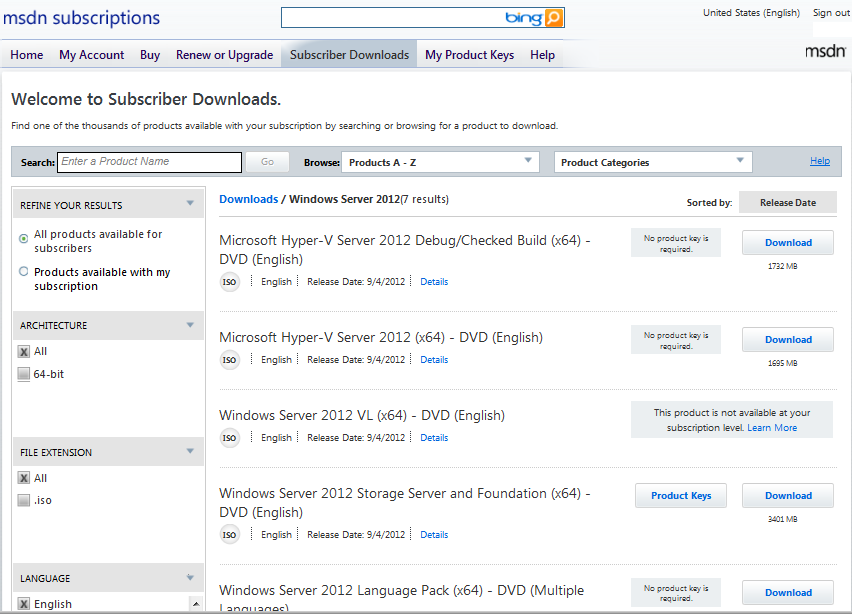
    DOWNLOAD: Windows Server 2012 RTM hits TechNet/MSDN

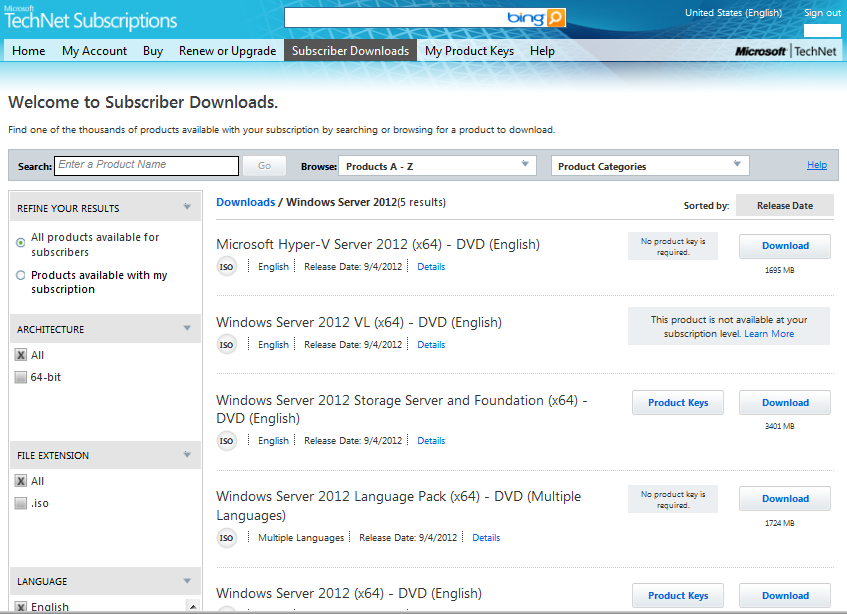
    imageDownload away!  The release software for Windows Server 2012 just hit TechNet/MSDN with the Windows Server virtual online launch happening today at http://www.windows-server-launch.com/Home

    The following .ISO/package files have been posted:

    • Microsoft Hyper-V Server 2012 (x64) – DVD (English) (1695MB)
    • Windows Server 2012 VL (x64) – DVD (English)
    • Windows Server 2012 Storage Server and Foundation (x64) – DVD (English) (3401MB)
    • Windows Server 2012 Language Pack (x64) – DVD (Multiple Languages) (1724MB)
    • Windows Server 2012 (x64) – DVD (English) (3524MB)

    imageProduct keys are available, as usual, on the same page as the downloads.  If you are a TechNet/MSDN subscriber, the software is now available for download!

    Posted by: kurtsh | September 3, 2012

    INFO: Technical print magazines that I STILL subscribe to

    Personally, I love getting a good magazine in the mail.  Do they pile up?  Sure.  But at least I can get to them when I want, leave them around as bathroom reading or on the nightstand as “non-essential"’, read them when the stupid airplane is ‘taking off/landing’, and most importantly, pass the issue on to friends & coworkers when I’m done.

    It’s that last item that I find so compelling about print:  Print is “casually sharable”.  You can give your copy to a friend, tear out the pages of one important article, leave your back issues in the lunch room for others to read, etc.  In this siloed “all-about-me” world we’re transforming into, where everyone isolates themselves to their own narrow their vision & opinions, (including myself) being able to be casually, non-directly educated about theories & different vantage points is critically important to have a broader perspective.

    So here’s the tech magazines I subscribe to.  Enjoy.

    • imageLaptop Magazine (12 issues, $14.99)
      I have issues with their editorial content which is pretty narrow in scope & I’ve found myself referring to the magazine as “iPad & Android” magazine since they’ve been dedicating sometimes 50% or more of their column inches to non-laptop device articles, however no paper publication beats Laptop Magazine for laptop & mobile device reviews.  Hands down, they’re the most detailed, thorough, and consistent out there.  There’s no wiggle room around their process & very rarely do I ever see inconsistency in their evaluation process and that’s great.  Only Maximum PC does as a good a job IMHO.
      https://secure.ablesoftsolutions.com/pdmg/
      SecurePages/NewSub.aspx?n=1&pi=lapt


    • imagePC World (12 issues, $19.97)
      PC World has proven to be a great magazine for timely “topical” articles discussing relevant computing & IT issues – not just products or new technologies – but “solution areas” in print form.  The research they do in these articles could probably by found in bits and pieces elsewhere however PC World ties it all into comprehensive articles of 8-10 pages and that saves me time.  And this way I don’t have to go through all “social consciousness” content of Wired.  Their last publication discussed “privacy” and the different perspectives on the matter, including a well-researched discussion about “device fingerprinting” (cookieless tracking), something that no other magazine has touched as far as I’ve seen and I appreciate that.  Very different from hardcore technology rags like Laptop Magazine or Maximum PC.
      http://pcworld.com/subscribe


    • imageMaximum PC (12 issues, $19.95)
      My favorite magazine – the magazine I leave until last to read, kinda like how I used to leave “Bloom County” for reading last when I’d parse through the daily funnies in the newspaper.  Similar to the Wall Street Journal – except for techs – Maximum PC magazine always has SOMETHING to learn in there around new hardware or software technology.  I have no qualms saying that it helps give me an edge in discussing IT technology because the information is SO CURRENT, but again, it’s pretty niche, low-level technical in nature and focused more for hardware jockeys so it may be appreciated at various levels by different people.
      https://w1.buysub.com/pubs/IM/MAX/MAX-subscribe.jsp?cds_page_id=63027&cds_mag_code=MAX


    • imageComputerworld (24 issues, $129 – or FREE if qualified)
      I really have mixed feelings about Computerworld.  Computerworld has occasionally gotten desperate, writing articles for shock value & occasionally even being dragged through the dirt due to some ethically challenged individuals like Randall C. Kennedy.  Sometimes I even get the feeling that their articles are trending toward the print version of talk radio just for the hype/controversy around the online version.  But just as I often find myself cringing but still forging ahead while listening to TWiT Network’s Tech News Today, I’ll read Computerworld, because it’s pretty much the only game in town left for print news about general computer technology that’s published more than once month.  Ultimately, beggars can’t be choose and besides, the publication is free to most folks in IT.
      http://www.cwsubscribe.com/cgi-win/cw.cgi?ADD


    • imageOfficial Xbox Magazine (12 issues, $24.95)
      Yeah, I know.  This seems like pure fun.  I frankly don’t have time to read IGN or Kotaku or Destructoid or any of the gaming-oriented sites any more sadly – not even via RSS.  I just can’t allocate bandwidth to it.  But I can read a magazine in my totebag or occasionally flip through an issue during lunch or while travelling, and for that reason, I keep my subscription alive, as I have since the magazine first started back in 2001.  The glimpse it provides into new games coming out is good information and provides me with an idea of what the trends are in electronic entertainment gaming techniques – and with gamification becoming a steadily growing business, I think this is a worthwhile investment for any one in IT.
      https://w1.buysub.com/pubs/IM/BOX/OXM-subscribe.jsp?cds_page_id=6258&cds_mag_code=BOX
    Posted by: kurtsh | September 3, 2012

    INFO: Windows Movie Maker 2012 references & links

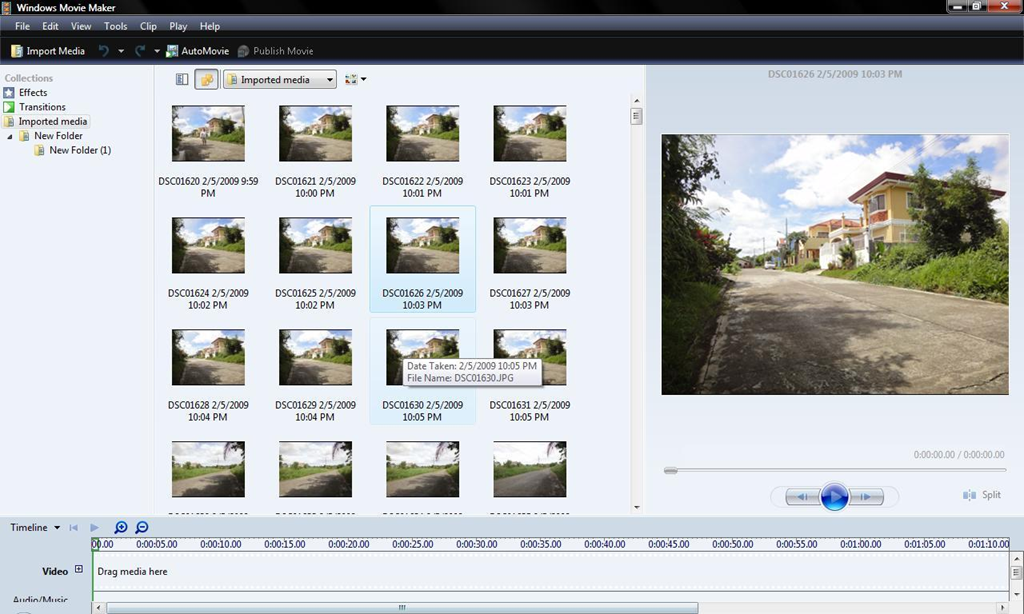
    imageWe released Windows Movie Maker 2012.  Yay.

    If you look at the version information, you’ll see that it lists, “Version 2012 (Build 16.4.3503.0728)”.  According to the site, Windows Essentials 2012 requires the following:

    • Operating system: 32- or 64-bit version of Windows 7, or 32- or 64-bit version of Windows 8 Release Preview, or Windows Server 2008 R2.
    • Processor: 1.6 GHz or higher with SSE2 support. SSE2 is supported on Pentium 4 processors or newer, and AMD K8 processors or newer.
    • Memory: 1 GB of RAM or higher
    • Resolution: 1024 × 576 minimum
    • Internet connection: Online services require dial-up or high-speed Internet access (provided separately—local or long-distance charges might apply). High-speed Internet access is recommended for some features.
    • Graphics card: Windows Movie Maker requires a graphics card that supports DirectX 10 or higher and Shader Model 2 or higher.

    Beyond all of this, finding information about Windows Movie Maker 2012 can be a bit difficult.  So here are a few references for folks looking for more information about the new release:

    « Newer Posts - Older Posts »

    Categories