Posted by: kurtsh | October 25, 2012

HOWTO: Add names to Program Groups in Windows 8

Y’know those groups of apps in the START screen?  Did you know you can NAME them?  Apparently a lot of folks don’t.  Take a look at the screen shot below.  There are 2 things I’ve highlighted: 

  1. I’ve circled the names I’ve given to the program groups you can see on the screen.
  2. I’ve pointed at the bottom right hand corner to a special “minus” button.  When you either click that “minus” button, “pinch-to-zoom” your screen, or “pinch-to-zoom” your touchpad, the START screen will zoom out giving you an overhead view of all your programs.

image

From this overhead or “zoomed-out” view of the START screen, you can do two important things:

  1. Select a program group by:
      1. Right mouse clicking a group or…
      2. Touch & swipe down on a give group
  2. Reveal the App Bar by:
      1. Right mouse clicking the screen or…
      2. Edge swiping up on a touch screen

image

This will reveal, in particular, the “Name Group” button, highlighted below.  When you click on it, it will allow you to name the program group you selected earlier.

image

Type the name of the program group and you’re done!

image

Once you’ve named the group, one other thing you can do is drag & drop the program group to move it around in the START screen, so that you can order them in the way that’s most convenient to you.

You can see below, I’m dragging and dropping a program group called “Modern Apps” around the screen.

image

Posted by: kurtsh | October 25, 2012

DOWNLOAD: Windows 8 and Windows RT Product Guide

imageThe Windows 8 and Windows RT Product Guide describes the many new and improved features in Windows 8 and Windows RT. Whether you’re working or playing, at home, in the office, or on the go, Windows is designed for you.

The reimagined Start screen brings together your sites, people, and apps that you care about. You can get all kinds of different apps for free or to buy in the Store. With Windows 8 and Windows RT, you can get the protection, speed, and reliability you’re used to from Windows and then some.

Posted by: kurtsh | October 25, 2012

NEWS: The early results from the media around Surface

There’s been quite a few posts written about the upcoming Microsoft Surface from most major media outlets now that the embargo has been lifted on reviews for the production device. 

Here’s some of the crème de la crème.

  • imageANANDTECH: Microsoft Surface Review
    (Author: Anand Lal Shimpi, Creator of Anandtech)
    As a device, Surface is incredibly well executed. It makes sense that Microsoft’s OEM partners are feeling the pressure as there’s very little that I would change about Surface from a design perspective. The chassis is well built and the integrated kickstand is seriously one of the most useful features to ever meet a tablet. The optional Touch and Type Covers complete the package. While a full sized notebook is going to deliver a better typing experience, when paired with its Touch/Type covers Surface results in a more productive platform than any other tablet.”
    http://www.anandtech.com/show/6385/microsoft-surface-review 
  • imageENGADGET: Microsoft Surface with Windows RT
    (Author: Tim Stevens, Editor-in-chief of Engadget)
    “If… you’re looking for an impeccably engineered tablet upon which you can do some serious work, a device that doesn’t look, feel or act like a toy, then you should get yourself a Surface with Windows RT.”
    http://www.engadget.com/2012/10/23/microsoft-surface-rt-review/
  • imageBGR: Microsoft Surface Review:  A Tale of Two Tablets
    (Author: Zach Epstein, Executive Editor of BGR)
    “The faster Microsoft can get developers on board, the better — and the early days will be slow-going in some respects as a result of this lack of apps. But even as it stands today, the Surface provides a terrific experience right out of the box and it will only get better over time.”
    http://bgr.com/2012/10/23/microsoft-surface-review-a-tale-of-two-tablets/
  • imageTIME: Microsoft Surface Review: The PC of the Future Needs More Apps
    (Author: Harry McCracken, Editor-at-large of TIME)
    ”The Surface hardware is indeed a beautiful piece of work, one that’s worthy of comparison to Apple’s designs even though many of Microsoft’s specific choices are distinctly un-Applelike.”
    http://techland.time.com/2012/10/23/microsoft-surface-review-the-pc-of-the-future-needs-more-apps/
  • imageMASHABLE: Surface Is a Tablet Windows Users Will Love [REVIEW]
    (Author: Lance Ulanoff, Editor-in-Chief, Mashable)
    ”There’s no doubt that Surface will appeal most to Windows users. In fact this is the tablet for Windows fans. It won’t win over Apple iPad owners, but for all those who hate Apple, find Android confusing and underwhelming, and are ready to enter the world of touch-screen computing this is the alternative you’ve been waiting for.”
    http://mashable.com/2012/10/23/microsoft-surface-review/
  • imageCNET: Microsoft Surface review: Innovative tablet stranded in an app desert
    (Author: Eric Franklin, Senior Editor, CNET)
    ”Metro interface is innovative, elegant, powerful, and versatile. The tablet feels strong and well-built, includes Office 2013, and rich video and music services. Its keyboard cover accessories are the best ways to type on a tablet, period.”
    http://reviews.cnet.com/tablets/microsoft-surface-rt/4505-3126_7-35332494.html
  • imageALL THINGS D: Hardworking Tablet With PC Chops
    (Author: Walt Mossberg, Executive Editor All Things Digital)
    ”I have been testing the Surface almost daily for three weeks and I like it. It’s beautifully and solidly built and it’s the purest expression of Microsoft’s new Windows 8 touchscreen operating system which, like the Surface, goes on sale on Friday.”
    http://allthingsd.com/20121023/hardworking-tablet-with-pc-chops/
  • imageWIRED: Microsoft Dives Deep to Surface a Hit
    (Author: Mathew Honan, Senior Writer, Wired)
    ”Let’s at least get this out of the way: This is one of the most exciting pieces of hardware I’ve ever used. It is extremely well-designed; meticulous even.”
    http://www.wired.com/reviews/2012/10/microsoft-surface/all/
  • imagePC MAGAZINE: Microsoft Surface with Windows RT
    (Author: Joel Santo Domingo, Lead Analyst – PC Magazine Labs)
    ”If you use Microsoft Office for work or school, then it’s a no-brainer: Get a Microsoft Surface (or one of the other upcoming Windows RT tablets). Even though Pages and QuickOffice are pretty good programs, you really can’t beat a real copy of Office when your work is on the line. If you use Office programs constantly, the Surface is the tablet and laptop replacement your inner road warrior has been searching for.”
    http://www.pcmag.com/article2/0,2817,2411249,00.asp
  • imageCNN Money: First look at Microsoft’s Surface tablet
    (Author: David Goldman, Technology Reporter for CNN Money)
    ”It is a gorgeous piece of hardware… this really is a marvelous device to hold look at feel to touch and certainly Microsoft has a real winner on it’s hands.”
    http://money.cnn.com/video/technology/2012/10/25/ts-microsoft-surface-review.cnnmoney/index.html
  • imageBOSTONHERALD: Surface headed for wish lists
    (Author: Jessica Van Sack, Chief Enterprise Reporter)
    ”First, you can print directly from it. It allows multiple users to log on with their own profiles. It also runs Microsoft Office and typing is a breeze. The Microsoft Surface costs about the same as an iPad, but you get more bang for your buck.  This isn’t a pure content-consumption device that you happen to be able to use to snap great photos: That’s the iPad.”
    http://bostonherald.com/business/technology/general/view.bg?&articleid=1061170599
  • imageTGDAILY: Why Microsoft’s Surface Tablet is my new favorite device
    (Author: Rob Enderle, Technology Analyst & head of Enderle Group)
    ”But the real benefit of Surface is its seamless approach to integration for different tasks. Meaning, you can move from work to play, as the device easily allows you to work where you want. One surprising but welcome difference? The kickstand angles the screen so I don’t get anywhere as much glare as I would off a regular tablet, so it is easier to view the screen outdoors. Strangely enough, even though this is a 1.0 product, for once a vendor appears to have learned from the mistakes of others.  The fact that this vendor is Microsoft, a software vendor known for screwing up hardware, is kind of blowing my mind at the moment.  Suddenly I have a new favorite product and it is the Tegra 3 powered Surface Tablet from Microsoft. Go figure.”
    http://www.tgdaily.com/opinion-features/67219-why-microsofts-surface-tablet-is-my-new-favorite-device
  • imageBETANEWS: Microsoft Surface review for real people
    (Author: Robert Johnson, User interface developer & contributing author)
    “Surface is fantastic. There’s no tablet like it on the market. If you’re looking for a mobile device that allows you to play casual games like Angry Birds and write a book report in Word, Surface is your choice. Concerned about apps? Don’t be. The Windows Store is new and surges with quality apps at an alarming rate. Some are even exclusive to the Windows platform. Concerned about viruses and malware? Don’t be. Windows RT comes with built-in security protection. You don’t have to worry about viruses at all.  Surface RT is not a full laptop replacement, but it’s definitely more capable than iPad or Android tablets.”
    http://betanews.com/2012/11/14/microsoft-surface-review-for-real-people/

[Thanks to Brian Larson for helping me seek out & uncover many of these reviews]

Posted by: kurtsh | October 24, 2012

HOWTO: Print from the Windows 8 Reader app

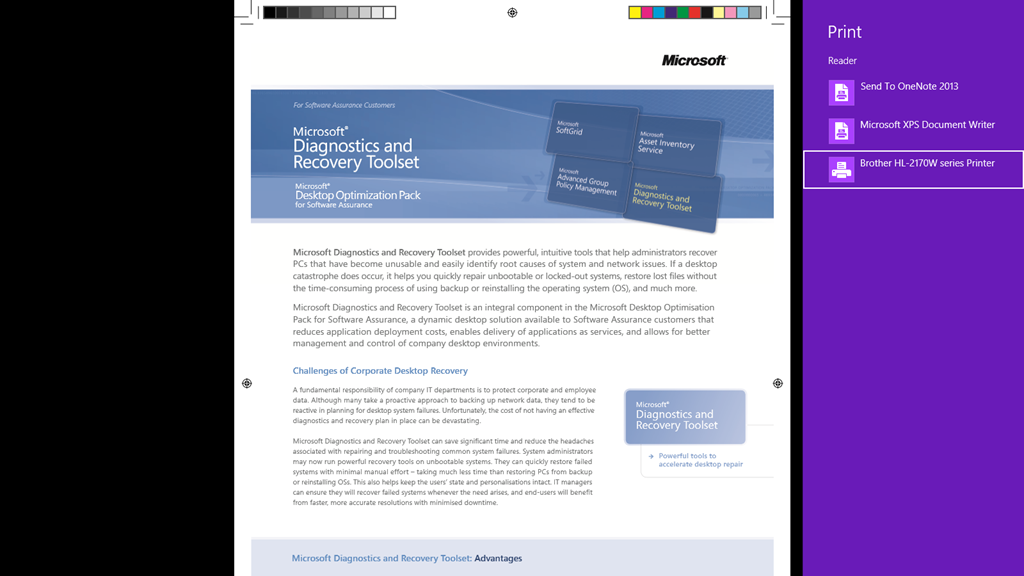
In case there’s anyone else out there using Windows 8 & trying to print documents, like Acrobat PDFs that are rendered in the Reader app in Windows 8… and finding it difficult to figure out how to do so, the quick answer is:

  • YES, the Windows 8 Reader application can ‘print’
  • The quick way to do so is to hit CTRL+P
    You’ll get a menu that appears from the right that allows you to select a printer.
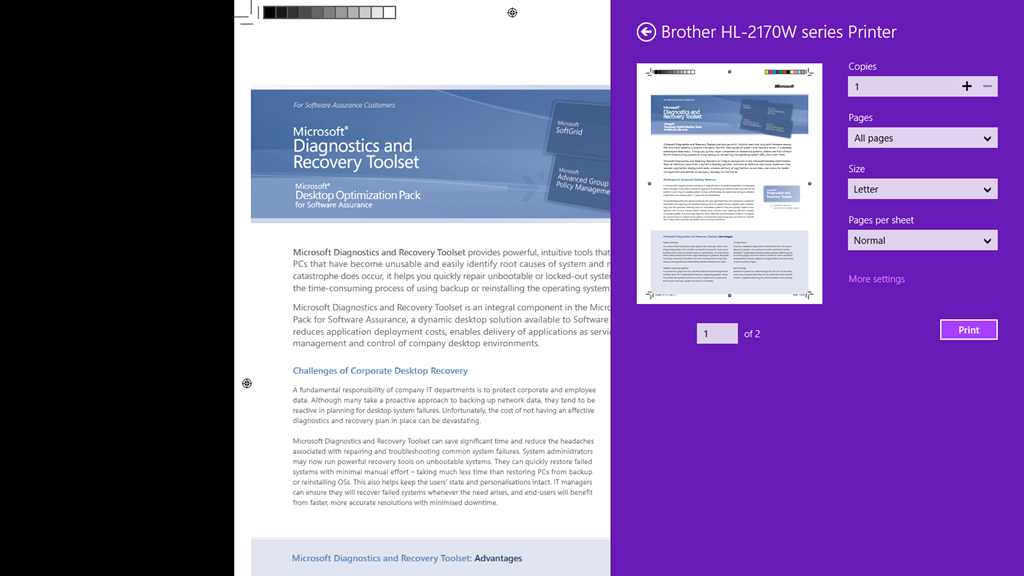
  • After selecting a printer you’ll be provided with the typical printer options. (See below)

image

image

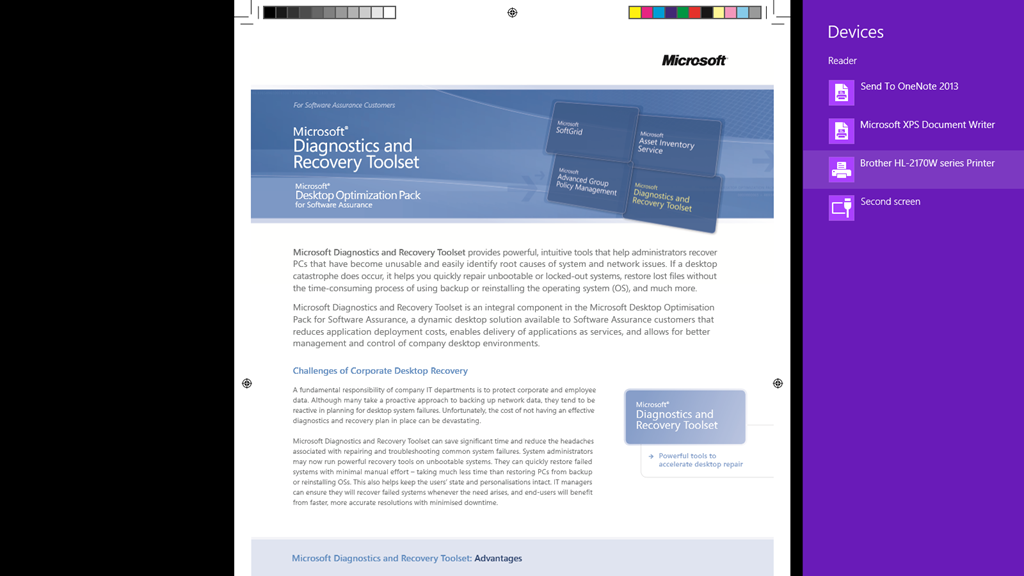
Alternatively, if you open the Charms Bar on the right and select the DEVICES icon, you can select a device (a printer) to send the document to… which will print it. (See below)

image

image

Posted by: kurtsh | October 24, 2012

INFO: The Difference between SkyDrive and SkyDrive Pro

imageThe SharePoint Blog as a recent post on their web site that goes over the differences between SkyDrive and SkyDrive Pro which I found interesting.

SkyDrive is for people to sync their personal files to the cloud and across their devices. SkyDrive is available free to individuals and is included in Office 365 Home Premium. With over 60 million users, SkyDrive has become synonymous with personal cloud storage. It enables access to documents across devices. In the new Office, SkyDrive becomes the default save location, making it easy to create, store, and share files with others.

SkyDrive Pro is a document storage service that organizations provision and manage for their users. It will be available as a service together with many Office 365 plans, and on-premises with the new version of SharePoint.

Like its consumer counterpart, SkyDrive Pro enables people to synchronize their work documents from SharePoint to the cloud, and also take documents offline when they’re on the go. People can access or edit their documents across devices; files are automatically synchronized with SkyDrive Pro when connected online.

After SkyDrive Pro is set up, you can save documents directly to SkyDrive Pro from Office desktop applications, or synchronize them directly from SharePoint.

There are also 4 other FAQ type questions that are answered in this blog post so take a look see.

Posted by: kurtsh | October 24, 2012

VIDEO: Surface with Windows RT Drop Test

Surface with Windows RT Drop Test — from 30" onto hardwood floor. Surface Reliability Lab, Redmond WA, Monday October 15th 2012.  Nice.

Surface with Windows RT Drop Test

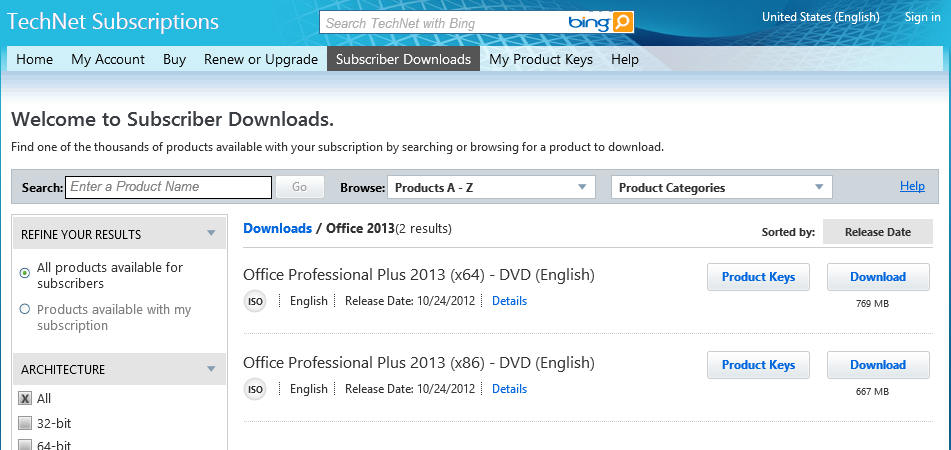
Wow.  That was fast.  Office Professional Plus 2013 (x86/x64) are now available for MSDN/TechNet subscribers.

image

Posted by: kurtsh | October 24, 2012

INFO: Windows Server 2012’s Data Deduplication Feature

imagePaul Clement (MS MVP) wrote a fairly significant & exhaustively documented step-by-step post on the Microsoft Press blog about Windows Server 2012’s new Data Deduplication feature that I think is worth reading for anyone using Windows Server as their file server front end.

Much like the Windows Server 2012 Data Classification Toolkit which provides automatic identification of sensitive information & ‘classifies it’, Data Deduplication provides added value to customers using Windows Server specifically to provide file services for their end users.  This is in contrast to folks using non-Windows-based NAS solutions that are front ended using client-accessed SAMBA based Linux variants:  These cannot leverage either DCT or Data Dedupe.

Paul here! For as long as there has been file servers running in our organizations, there has been the need to control data sprawl to conserve expensive storage space. As disks began getting larger in capacity and less expensive in cost this issue has moved from critical to more of an annoyance for IT staff to manage. Larger disks meant more space to save data and less urgency to deal with duplicate files.

Solutions have existed for many years to deal with what is known as “deduplication,” both in software and hardware; however they were expensive and not always as simple as they claimed to be.

With the newly minted Windows Server 2012, one feature of the exhaustive list of under the hood improvements and additions is a Service called Data Deduplication. Finally, a built-in and free tool that is integrated with the operating system is here for us to realize some pretty significant storage savings without the need to make it a capital project.

Read more at:

image

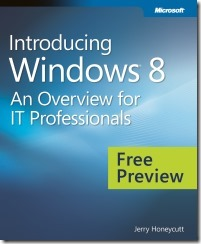
The Windows 8 operating system is the newest member of the Microsoft Windows family. It differs from earlier Windows releases as much for what it does not change as for what it does change. That is, the features that IT pros loved about Windows 7 are still there in Windows 8—just better. The same keyboard shortcuts, management tools, security features, and deployment options are available in Windows 8.

But in many cases, Windows 8 improves them in intuitive and significant ways. Some examples are the ribbon in File Explorer and faster disk encryption when using BitLocker Drive Encryption.

This book describes these enhancements plus many of the new features in Windows 8.

Please enjoy this preview edition that contains Chapters 1-11. We will update this post with a link to the final ebook when it is ready.

Posted by: kurtsh | October 23, 2012

NEWS: The early returns on Windows 8 (Updated 10/23/12)

Many in the media have weighed in on Windows 8 already in just the past week since release to TechNet/MSDN & the Volume Licensing Service Center.

Here’s a few of the reviews:

  • imageZDNET: Windows 8 vs. Windows 7: Benchmarked
    (Author: Adrian Kingsley-Hughes, ZDNet Hardware 2.0)
    ”Benchmark testing suggests that Windows 8 is Microsoft’s fastest Windows to date.”
    http://www.zdnet.com/windows-8-vs-windows-7-benchmarked-7000002671/
  • imageCNET: Windows 8 Release to Manufacturing review
    (Author: Seth Rosenblatt, CNet Senior Editor)
    “We’re giving Windows 8 a strong recommendation in no small part because of its value.”
    http://reviews.cnet.com/operating-systems/windows-8-release-to/4505-3671_7-35321713.html
  • THE VERGE: This is my next: Windows 8
    (Author: David Pierce, The Verge Reviews Editor)
    image”My MacBook Air and my iPad are basically my fifth and sixth limbs… Come October 26th, though, I’m ditching them both…I’m buying a Windows 8 device as my only computer, and I can’t wait.”
    http://www.theverge.com/2012/8/16/3246185/this-is-my-next-windows-8
  • imageZDNET: Installing Windows 8 on your old PC could turn it into Greased Lightning
    (Author: Jason Perlow, ZDNet Senior Technology Editor)
    ”Clearly, they’ve made the upgrade attractively inexpensive, which is a far cry from Vista, which was actually prohibitive in my opinion because not only was the software not cheap, but a great deal of legacy hardware compatibility got left behind and most PCs just weren’t powerful enough to run them. That’s just not the case with Windows 8. Four year-old machines are running on it swimmingly.”
    http://www.zdnet.com/installing-windows-8-on-your-old-pc-could-turn-it-into-greased-lightning-7000002903/
  • imageZDNET:  Windows 8 Enterprise: RTM Preview
    (Author: Simon Bisson, Technology Journalist)
    “Windows 8 is like Windows 7 — just faster and more power-efficient (our test laptops have gained an extra hour of battery life on average after updating with Windows 8). In nearly a year of testing Windows 8 we’ve only found a couple of applications that didn’t work with the OS — and those that didn’t had dependencies on specific hardware APIs that have been deprecated.”
    http://www.zdnet.com/windows-8-enterprise-rtm-preview-7000002989/
  • imageTECHRADAR: Windows 8 Review
    (Author: Mary Branscombe, Technology Writer)
    “Keep an open mind, spend some time getting used to the charm bar and the Start screen. Once you do, we defy you not to be impressed by Windows 8.”

    http://www.techradar.com/reviews/pc-mac/software/operating-systems/windows-8-1093002/review
  • imageBETANEWS:  Windows 8 is a compelling story
    (Author: Robert Johnson, User Interface Developer)
    “Windows 8 simplifies computing in such a way that Apple CEO Tim Cook’s comments reveals Apple could possibly miss the transition to a simplified experience economy in the same way that Microsoft missed the transition to the experience economy back in the early 90’s. The unification of the desktop and Modern UI is a good thing. Microsoft getting into hardware is a good thing regardless of OEM concerns (I’m looking at you Acer).”
    http://betanews.com/2012/09/10/windows-8-is-a-compelling-story/
    See also:
  • imageESQUIRE:  The Idiots Are Coming – And we couldn’t be more grateful. How Windows finally got competitive — and maybe even changed the way we’ll use the Internet
    (Author: Peter Martin, Journalist for Esquire Magazine)
    It’s how the Internet was meant to be experienced. Perfectly uncluttered. Simple. Just like Windows 8.”
    http://www.esquire.com/features/man-at-his-best/windows-8-review-1012?hootPostID=a46f714a86d23c144799917ec65c5000
  • imageTGDAILY:  In defense of Microsoft Windows 8
    (Author: Rob Enderle, Analyst & Journalist for TGDaily & the Enderle Group)
    ”There are three things to remember that will make your Windows 8 experience far better… Honestly, those three things took away 95% of my learning frustration with Windows 8.”
    http://www.tgdaily.com/opinion-features/66829-in-defense-of-microsoft-windows-8
  • imageINFORMATION WEEK: Windows 8 Beats The Mac, Appsolutely
    (Author: Paul McDougall, Editor-at-Large for Information Week)
    ”Microsoft’s new operating system looks how a modern OS should–big, bold, and centered around apps. Suddenly, it’s Apple’s turn to catch up.”
    http://www.informationweek.com/windows/microsoft-news/windows-8-beats-the-mac-appsolutely/240009093
  • imageTHE VERGE: Windows 8 review
    (Author: Tom Warren, Senior Editor for The Verge)
    “If you’ve been waiting for Microsoft to provide better software for a tablet and catch up with the iPad, then this time has certainly arrived… Picking up a tablet PC with Windows 8 makes an iPad feel immediately out of date.”
    http://www.theverge.com/2012/10/23/3537710/windows-8-review
  • imagePCWORLD: “5 ways Windows 8 beats iOS”
    (Author: Jon Phillips, Editor of PC World)
    ”And the iPad has worked for me—despite the fact that it’s never helped me do any real work.  But now there’s a legitimate alternative to the iPad in my life… Windows 8 tablets are the real deal, people, and their unique charms tie directly back to the new OS.”
    http://www.pcworld.com/article/2012280/5-ways-windows-8-beats-ios.html
  • imageABCNEWS: “Windows 8 Requires Microsoft’s Instruction, But Also a Willingness to Accept Change”
    (Author: Joanna Stern, ABC News Technology Editor)
    “I can also attest that the operating system does become second nature after you spend time with it, and the change isn’t just change for the sake of change. There are worthwhile and useful changes that make things faster to use and push the ways we interact with touchscreens.”
    http://abcnews.go.com/Technology/microsoft-windows-requires-combination-instruction-willingness-accept-change/story?id=17531671#.UIWG6Gk-uiF
  • imageZDNET: “Don’t hate Windows 8!”
    (Author: Matt Baxter-Reynolds, SDC & Contributing Author to ZDNet)
    “Windows 8 takes a lot of getting used to, but it’s the best OS made by Microsoft, and could be the best OS ever made by anyone… If you’re new to Windows 8, don’t give it the hate. Sit back, relax, and in a few weeks I’m sure you’ll be loving the whole Windows 8 groove. And definitely, definitely don’t downgrade if you buy a new machine with Windows 8 pre-installed. You’ll be missing out on a fantastic operating system.”
    http://www.zdnet.com/dont-hate-windows-8-7000006297/
  • imageZDNET: “In spite of all the hate, I like Windows 8”
    (Author: Ken Hess, ZDNet Contributor & Systems Administrator)
    ”I don’t know exactly why it is but people seem to resist change, even when it’s good. It must be a human nature thing. I fell prey to it as well. I hated Windows 8 at first. But, I was converted after trying it. I’m one of the people who went from, "Windows 8 sucks" to "Windows 8 is cool."”
    http://www.zdnet.com/in-spite-of-all-the-hate-i-like-windows-8-7000006553/
  • imageTHE ECONOMIST: “Difference Engine: Time to move on”
    (Author: N.V., Contributing Author for The Economist’s Babbage Column)
    ”What impresses most, though, is the radical rethinking of the user interface—with its matrix of “live tiles” that let the user plunge straight into programs already running, and also to see at a glance updates to such things as news feeds, e-mail and text messages as they roll in. By comparison, the plodding, step-by-step mousing around pioneered by Apple and earlier versions of Windows, and persisting to this day in many flavours of Linux and even the latest Macintosh OS X itself, appears staid and so last century.”
    http://www.economist.com/blogs/babbage/2012/11/operating-systems?fsrc=scn/tw/te/tr/timetomoveon
  • imageWASHINGTON POST: “Windows 8 is 84 percent less frustrating than Windows 7, report says
    (Author: John Koetsier, Reporter for VentureBeat.com)
    “Windows 8 crashes 55 percent less and is 84 percent less frustrating than Windows 7, according to a new report… In addition, with the touch-friendliness of Microsoft’s new operating system, Windows 8 is penetrating the tablet market much more effectively than Windows 7… Interestingly, desktop use is also slightly higher, with almost 51 percent of Windows 8 installs being on a desktop PC, versus 48.5 percent of Windows 7 installs being on a laptop.”
    http://www.washingtonpost.com/business/technology/europe-and-asia-adopting-windows-8-at-double-us-rate-plus-more-juicy-windows-8-data/2012/11/08/55ed5ba6-296c-11e2-aaa5-ac786110c486_story.html

« Newer Posts - Older Posts »

Categories