imageWow.  For a limited time, get get a Free in-store Answer Desk Service.*

How to redeem this offer

  • Visit your local Microsoft store to register or;
  • Register online at http://content.microsoftstore.com/store/content/AnswerDesk.
  • Select from one of the following services:
    • Extended Diagnostics
      We’ll analyze, test and diagnose your device.
    • PC Performance Tune Up
      We’ll help improve the speed, performance, and security of your PC.
    • Virus and Spyware Removal
      Removal of any viruses, spyware, and malware from your PC. We’ll then review your security settings, install the latest security updates, and install Microsoft Security Essentials antivirus software.
    • Software Install
      Save time by letting us install and/or remove up to three software titles for you. Software sold separately
    • Hardware Install
      Let us install new hardware for your PC purchased from the Microsoft store to get you up and running quickly.
    • Microsoft Signature Upgrade (Windows 8 upgrade)
      Installation of everything you need and remove the things you don’t, for a faster, more efficient, and more secure PC experience. Windows 8 sold separately.
    • Device Setup
      Installation, set up, and testing of your device.
    • Xbox 360 Hard Drive Data Transfer
      Transfer downloaded games, photos, music, movies, and other files to your new Xbox.
    • Microsoft Signature Upgrade (Windows 8 purchased in-store)
      We’ll install everything you need and remove the things you don’t, for a faster, more efficient, and more secure PC experience. Windows 8 sold separately.
    • Mobile Device Setup
      Installation, set up, and testing of your mobile device.
    • Backup/Restore CD
      Let us back up your files to help keep your information safe.
    • Microsoft Data Migration/Transfer
      Transfer your files from your old PC to your new one.
  • See store associate for more detail.

*Valid January 6, 2013 until February 28, 2013, or while supplies last. Available in select stores in US (including Puerto Rico) and Canada; not valid online. Customers receive up to $99 towards one eligible Answer Desk in-store service. See store associate for available Answer Desk services. Not applicable for warranty plans or software support subscriptions. Redeemable until March 31, 2013; full value must be redeemed in a single visit. Offer cannot be transferred or otherwise redeemed for cash or gift cards. Answer Desk service must be scheduled in advance and additional Answer Desk terms and conditions may apply. Limit 1 per customer.

image

With the rapid evolution of cloud computing, mobile devices and other technologies, user data has become increasingly dependent on the security of software. The amount and types of data available for collection, analysis and dissemination have increased the importance of reducing the risk associated with protecting data.

The second annual Security Development Conference will bring together some of the best and brightest information security professionals from a variety of industries. Attendees will learn about proven security development practices through interactions with peers, industry luminaries and other organizations.

Sessions will cover the latest in security development techniques and processes that can reduce risk and help protect organizations in this rapidly evolving technology landscape.

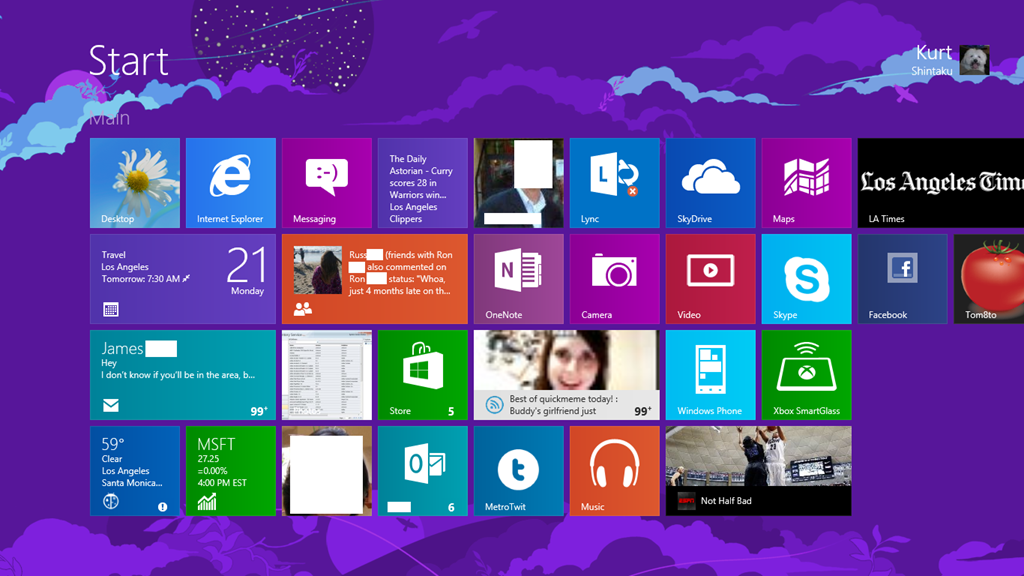
This is the START page on my Surface for Windows RT.  Notice anything different?

imageFour rows of tiles on a Surface for Windows RT Start page

What you need to do is:

  1. Open the Registry via the desktop using REGEDIT.EXE
  2. Create the following key[HKEY_LOCAL_MACHINE\SOFTWARE\Microsoft\Windows\
    CurrentVersion\Explorer\Scaling]
  3. Create the following String value in this key:
    MonitorSize"="12.1
  4. Reboot

Don’t fully know all the side effects of this change, other than the keyboard getting a bit smaller and the fonts looking a little less sharp.  You can however roll back the changes by removing the Scaling key.

More info here: http://support.microsoft.com/kb/2737167

imageMuch to my delight, I believe, sometime toward the end December 2012, the 20MB download limit on Windows Phone was apparently raised to 50MB.  Maybe it started around 2013 but whenever it was, it’s certainly changed now. 

WHO CARES?
Well, I do.  And so does anyone that uses podcasts.  Y’see, this has bothered me primarily because I’m a heavy podcast listener.  Having to drive more than 1hr to many of my customers means that I’m spending a lot of time in the car… and most radio these days no longer captures my interest.  (Except maybe JACK-FM:  Yes, CBS Radio, you guys know what you’re doing because I’m clearly that demographic that you’re losing on ‘the other radio station’)

When podcasts get downloaded to Windows Phone, if it exceeded 20MB, it would get “backed up” in a queue, stating that the user need to connect to a WiFi point to get the download.  So on a regular basis, I’d turn on WiFi just to get a “full download” of my podcasts.

WAIT.  IT’S ALREADY BEEN CHANGED?
Anyway, this has been one of my pet peeves on Windows Phone because, it was frankly so easily fixable.  It was a software limitation, not one enforced on the network by the carriers.  I got to pinging Daniel Rubino, the editor-in-chief of WPCentral, and he informed me that the limit had already been adjusted to 50MB.

Which suddenly made sense… because for the past week or so, I haven’t had any notifications show up on my phone telling me that I had podcasts backed up, ready to download over WiFi.

So looks like we both won:  Daniel wrote up a post for it today & frankly, I think it’s an exclusive because I searched long and hard and couldn’t find any reference to this change in the download limit.

Read the details of the change here, who it applies to, etc.:

image

This 11 page document goes over the management capabilities of SCCM 2012 SP1 & Windows Intune.

  • Using Windows Intune for Direct Management of Windows Phone devices
  • Configuring Windows Intune to Manage Devices
  • Setting up Windows Intune for Windows Phone 8
  • Enrolling Windows Phone Devices in Windows Intune
  • Using System Center Configuration Manager SP1 to manage Windows Phone Devices 9
  • Resources

If you’re using Windows Intune, one step involves the synchronization of your Active Directory with Windows Azure Active Directory to provide external recognition of users & computer objects.  This may be a little involved so read this section carefully. 

For System Center Configuration Manager 2012 users, the release of Service Pack 1 lets you manage Windows Phone 8 devices by using the Windows Intune service over the Internet. Although you use the Windows Intune service, management tasks are completed by using the Configuration Manager console. You can use the Windows Intune connector site system role in the Configuration Manager console to connect to the Windows Intune service.

<original post from WMPowerUser>

imageThis is what we know will happen April 8th, 2014.

  • All patches for Windows XP will cease on this final Patch Tuesday.
  • One last release of patches will be made before the spigot on security patches is turned off for Windows XP.
  • The remaining 15-25% of the world still running on Windows XP will no longer be secure from this day forward.

Now I had a horrible thought the other day about this scenario.  What if, on April 8th, 2014, the following hypothetical scenario occurs:

  • Microsoft turns out to be aware of more bugs in their products than they can patch, and thus they patch opportunistically based on the level of the threat & the imminence of danger.  On April 8th, anything remaining goes unpatched.
  • Having known about April 8th, 2014 for a while, “Black Hats” release malware (viruses, trojans, browser flaws, etc.) that they’ve been saving specifically for this date, knowing that their flaws will not be fixed.
  • Antivirus & traditional thread detection is rendered moot.  Primary attack vectors turn out to be the quickest, most difficult-to-prevent means of infection, such as by browsing a web page with a Javascript threat… or possibly the means with the widest reach on day one: Email attachment executable.
  • To sustain the threat as long as possible, polymorphism will be the default, to attempt to mitigate protection through rapid ‘zero-day’ virus definition updates, knowing that antivirus agents are the only protection XP systems have.
  • Compromised workstations are zombied to initiate infections remotely to peer workstations on the same LAN segments. Network traffic increases to astronomical congestive levels from beaconing infected workstations. 
  • Even if patches were available, networks without managed QoS find themselves unable to emergency patch PCs dues to overwhelming traffic.
  • Antivirus companies are swamped with 911 calls to update definitions.  Response times for analysis are slowed to a crawl.

Again, “what if” in the aftermath:

  • Organizations that have not moved off of Window XP without Microsoft Custom Support agreements, scour the web for ‘renegade’ fixes written by independent organizations.  Illicit public domain patches become the easiest way for blackhats to implement other threats at an administrative level.
  • Meetings are held to estimate the costs of a Windows XP custom support agreement for customers with Premier Support in place that are eligible for CSAs.  Costs for support exceed the cost of simply upgrading Windows XP.
  • Business grinds to a halt for organizations with infected Windows XP PCs.  PC-to-PC manual remediation is found to, at least initially, be the only way to reduce traffic until desktop management software can be effective again.
  • Body shops are called in to assist.  Overnight, round-the-clock shifts are taken to mitigate the threats as they come.
  • Security engagements with white hat/cybersecurity teams skyrocket to investigate more complex threat penetration to key systems such as Domain Controllers.
  • Reports… lots of reports, status, CYA documentation… must be written.

And while the Business section of the newspaper reports the impact to the world, companies with IT depts that migrated off Windows XP look on with a sense of relief.

Posted by: kurtsh | January 17, 2013

NEWS: Office 2013 available on Home Use Program

imageExciting News!  As of January 17th, US customers with qualifying agreements will be able to take advantage of purchasing a copy of Office 2013 for $9.95 via the Home Use Program (HUP)!

HUP provides customers with the latest version of Office that their end-users can purchase for home use.  Therefore Office 2010 will no longer be available on the HUP site for purchase, effective immediately.

Note: If an end-user purchased Office 2010 and they still have an existing agreement in place, that same end user can purchase the new version, Office 2013, without it affecting their license count.  They will need to pay the $9.95 again, as that’s a third party administrative fee.  Please reference the current Product List, Section 7 for additional policy details around this.

Please visit the HUP site for additional information: www.microsofthup.com.

Posted by: kurtsh | January 16, 2013

Been out of town. Sorry.

imageYes, in case it’s not apparent, I’ve been out of town for a VERY long time on vacation.  The posts that I’ve made over the past couple weeks have only been things I could crank out quickly.  I have a few posts coming including my CES 2013 Summary.

In the meantime, here’s news that I found worth reading over the holiday.

Phone

Windows/PCs

image

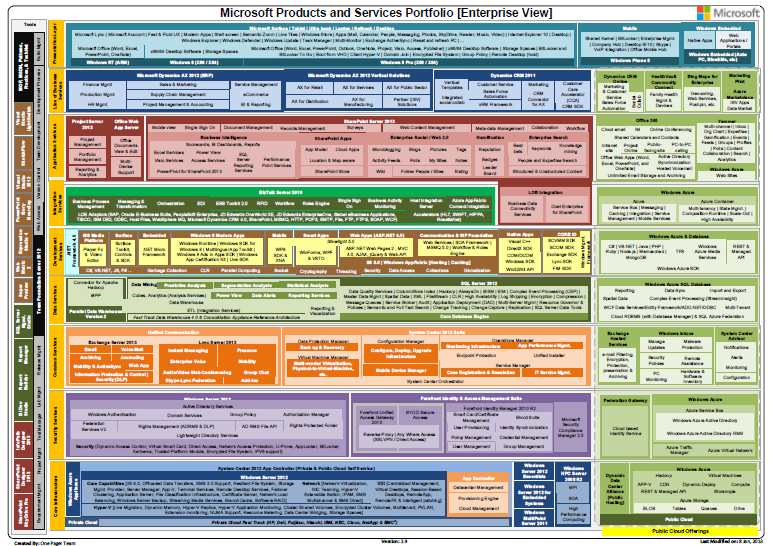
The Microsoft Products Portfolio documents have been updated to version 2.9. 

What got added:

  • Storsimple under Azure
  • eCommerce under Ax 2012
  • MarketingPilot under LOB apps
  • Yammer under Application Services with following capabilities
    • Multi-channel
    • Inbox
    • Org Chart
    • Expertise
    • Gamification
    • Events
    • Private Messages
    • Feeds
    • Groups
    • Profiles
    • Polls
    • Content Collaboration
    • Search
    • Analytics
  • BYOD Secure Access under Forefront Identity & Access Management Suite
  • Dynamic Deploy under Windows Azure
  • Windows Azure Active Directory RMS under Security services (Cloud)
  • Office Web App Server as an entity separate from SharePoint 2013

(Lots of things also got changed & removed.  If you really wanna see all the changes let me know, if you’re a customer of mine.)

Posted by: kurtsh | January 14, 2013

NEWS: Today’s Security Advisory (2757760, MS12-063)

I sent it to all my customers.  And before you skim it without reading it… no, it’s NOT old.  And update to this was issued recently, hence the advisory.

——————-

Today, Microsoft released MS12-063 to protect customers against the issue described in Security Advisory 2757760. The security update resolves one publicly disclosed and four privately reported vulnerabilities in Internet Explorer. The most severe vulnerabilities could allow remote code execution if a user views a specially crafted webpage using Internet Explorer.

Microsoft encourages customers to test and deploy the update as soon as possible.


What is the purpose of this alert?

This alert is to provide you with an overview of the new security bulletin being released (out of band) on September 21, 2012, for new vulnerabilities in Internet Explorer.

Microsoft is also releasing one new security advisory today for Adobe Flash Player in Internet Explorer 10 on Windows 8 and Windows Server 2012.

New Security Bulletin
Microsoft is releasing one new security bulletin (out-of-band) for newly discovered vulnerabilities:

Bulletin Identifier

Microsoft Security Bulletin MS12-063

Bulletin Title

Cumulative Security Update for Internet Explorer (2744842)

Executive Summary

This security update resolves one publicly disclosed and four privately reported vulnerabilities in Internet Explorer. The most severe vulnerabilities could allow remote code execution if a user views a specially crafted webpage using Internet Explorer. An attacker who successfully exploited any of these vulnerabilities could gain the same user rights as the current user. The security update addresses the vulnerabilities by modifying the way that Internet Explorer handles objects in memory.

This security update also addresses the vulnerability first described in Microsoft Security Advisory 2757760.

Severity Ratings and Affected Software

  • This security update is rated Critical for Internet Explorer 6, Internet Explorer 7, Internet Explorer 8, and Internet Explorer 9 on Windows clients.
  • This security update is rated Moderate for Internet Explorer 6, Internet Explorer 7, Internet Explorer 8, and Internet Explorer 9 on Windows servers.
  • Internet Explorer 10 is not affected.

Attack Vectors

  • An attacker could host a specially crafted website that is designed to exploit this vulnerability through Internet Explorer and then convince a user to view the website.
  • The attacker could also take advantage of compromised websites and websites that accept or host user-provided content or advertisements. These websites could contain specially crafted content that could exploit this vulnerability.

Mitigating Factors

  • An attacker would have no way to force users to view the attacker-controlled content. Instead, an attacker would have to convince users to take action, typically by getting them to click a link in an email message or in an Instant Messenger message that takes users to the attacker’s website, or by getting them to open an attachment sent through email.
  • An attacker who successfully exploited this vulnerability could gain the same user rights as the current user. Users whose accounts are configured to have fewer user rights on the system could be less impacted than users who operate with administrative user rights.
  • By default, all supported versions of Microsoft Outlook, Microsoft Outlook Express, and Windows Mail open HTML email messages in the Restricted sites zone. The Restricted sites zone, which disables script and ActiveX controls, helps reduce the risk of an attacker being able to use this vulnerability to execute malicious code. If a user clicks a link in an email message, the user could still be vulnerable to exploitation of this vulnerability through the web-based attack scenario.
  • By default, Internet Explorer on Windows Server 2003, Windows Server 2008, and Windows Server 2008 R2 runs in a restricted mode that is known as Enhanced Security Configuration. This mode mitigates this vulnerability. See the FAQ section for this vulnerability for more information about Internet Explorer Enhanced Security Configuration.

Restart Requirement

This update requires a restart.

Bulletins Replaced by This Update

MS12-052

Full Details

http://technet.microsoft.com/security/bulletin/MS12-063

New Security Advisory
Microsoft published one new security advisory on September 21, 2012. Here is an overview of this new security advisory:

Security Advisory 2755801

Update for Vulnerabilities in Adobe Flash Player in Internet Explorer 10

Affected Software

Internet Explorer 10 on Windows 8 and Windows Server 2012

Executive Summary

Microsoft is announcing the availability of an update for Adobe Flash Player in Internet Explorer 10 on all supported editions of Windows 8 and Windows Server 2012. The update addresses the vulnerabilities in Adobe Flash Player by updating the affected Adobe Flash libraries contained within Internet Explorer 10.

Mitigations

  • In a web-based attack scenario where the user is using Internet Explorer 10 for the desktop, an attacker could host a website that contains a webpage that is used to exploit any of these vulnerabilities. In addition, compromised websites and websites that accept or host user-provided content or advertisements could contain specially crafted content that could exploit any of these vulnerabilities. In all cases, however, an attacker would have no way to force users to visit these websites. Instead, an attacker would have to convince users to visit the website, typically by getting them to click a link in an email message or Instant Messenger message that takes users to the attacker’s website.
  • Internet Explorer 10 in the Windows 8-style UI will only play Flash content from sites listed on the Compatibility View (CV) list. This restriction requires an attacker to first compromise a website already listed in the CV list. An attacker could then host specially crafted Flash content designed to exploit any of these vulnerabilities through Internet Explorer and then convince a user to view the website. An attacker would have no way to force users to view the attacker-controlled content. Instead, an attacker would have to convince users to take action, typically by clicking a link in an email message or in an Instant Messenger message that takes users to the attacker’s website, or by opening an attachment sent through email.
  • By default, all supported versions of Microsoft Outlook and Windows Live Mail open HTML email messages in the Restricted sites zone. The Restricted sites zone, which disables script and ActiveX controls, helps reduce the risk of an attacker being able to use any of these vulnerabilities to execute malicious code. If a user clicks a link in an email message, the user could still be vulnerable to exploitation of any of these vulnerabilities through the web-based attack scenario.
  • By default, Internet Explorer on Windows Server 2012 runs in a restricted mode that is known as Enhanced Security Configuration. This mode can help reduce the likelihood of exploitation by these vulnerabilities in Adobe Flash Player in Internet Explorer 10

More Information

http://technet.microsoft.com/en-us/security/advisory/2755801

Public Bulletin Webcast
Microsoft will host a webcast to address customer questions on the new security bulletin:

Resources related to this alert

Regarding Information Consistency
We strive to provide you with accurate information in static (this mail) and dynamic (web-based) content. Microsoft’s security content posted to the web is occasionally updated to reflect late-breaking information. If this results in an inconsistency between the information here and the information in Microsoft’s web-based security content, the information in Microsoft’s web-based security content is authoritative.

« Newer Posts - Older Posts »

Categories