Clarification around Surface hardware volume purchase details will be made available shortly.
Posted by: kurtsh | February 10, 2013
INFO: Surface Hardware Volume Purchases for Commercial Customers
Comments Off on INFO: Surface Hardware Volume Purchases for Commercial Customers
Posted in Uncategorized
Posted by: kurtsh | February 10, 2013
DOWNLOAD: Surface User Guide (68 pg, 1.35Mb PDF)
 With the release of Surface Windows 8 Pro, we’ve also released the “Getting Started Guide for Surface”, a 68 page document (1.35MB PDF) that is written for BOTH the Surface Windows RT owner or the Surface Windows 8 Pro owner.
- DOWNLOAD: Surface User Guide (PDF)
http://download.microsoft.com/download/B/D/4/
BD44C612-D08E-4586-9345-ACA8AB978BC8/Surface_Getting_Started_guide.pdf
This is not a “reference manual” but rather a guide for individuals new to Windows 8 & the Surface hardware in general. More nuanced configuration & support can be found on the Surface support web site at:
Comments Off on DOWNLOAD: Surface User Guide (68 pg, 1.35Mb PDF)
Posted in Uncategorized
Posted by: kurtsh | February 10, 2013
NEWS: 2013 Windows 8 Device Lineup
If you haven’t seen this photo shoot, you gotta check it out. It highlights this year’s coolest Windows 8 devices. And they start with the HP Envy x2 & they go straight to the Samsung ATIV SmartPC Pro.

- NEWS: Presenting More Than Performance- The 2013 Windows 8 Device Lineup
http://www.microsoft.com/en-us/news/Features/2013/Feb13/02-07OEMFashionWeek.aspx
Comments Off on NEWS: 2013 Windows 8 Device Lineup
Posted in Uncategorized
Posted by: kurtsh | February 10, 2013
NEWS: Windows Phone captures 8% of India’s Smartphone market share to iPhone’s 1%
 To quote BGR, “Windows Phone is hammering iPhone in India”.
The latest Nielsen survey confirms one of the major smartphone trends of 2012: That the Windows Phone operating system showed remarkable strength in India even before the new wave of Nokia (NOK) and HTC (2498) models launched in January. According to Nielsen, Windows Phone grabbed 8% of India’s smartphone market last autumn, far ahead of BlackBerry (BBRY) at 3% and iPhone at 1%.
- BGR: Why the Lumia 620 is so important to Nokia: Windows Phone is hammering the iPhone in India
http://bgr.com/2013/02/08/nokia-lumia-620-analysis-india-322642/
Comments Off on NEWS: Windows Phone captures 8% of India’s Smartphone market share to iPhone’s 1%
Posted in Uncategorized
Posted by: kurtsh | February 8, 2013
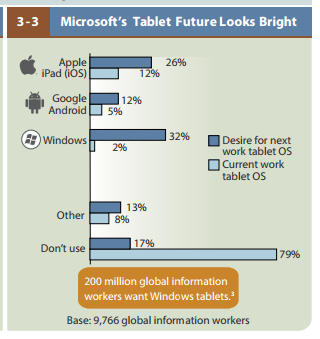
INFO: Forrester Report: 200 Million Workers Want Windows 8 Tablets, Not iPads
UPDATE 2/12/13:
The investment site, The Motley Fool, has weighed in on the Forrester Report now that Surface Pro is clearly in demand by customers nationwide.
- MOTLEY FOOL: A Huge Win for Microsoft
http://www.fool.com/investing/general/
2013/02/11/a-huge-win-for-microsoft.aspx
————————
In what may be a surprise to some, it turns out that the majority of information workers want to the productive when using a tablet OS, and how do they want to do that?
Through Windows-based tablets.
This is based on a ~10,000 person study of office workers as documented in Forrester Research’s report, “2013 Mobile Workforce Adoption Trends”. (Snapshot credited to ReadWrite’s article)
- READ WRITE: 200 Million Workers Want Windows 8 Tablets, Not iPads
http://readwrite.com/2013/02/04/200-million-workers-want-windows-8-tablets-not-ipads - THE REGISTER: Windows tablet is most desired by office workers
http://www.theregister.co.uk/2013/02/07/office_workers_want_microsoft_tablets/ - ZDNET: Forrester: Surface drumming up more demand with global mobile workforce
http://www.zdnet.com/forrester-surface-drumming-up-more-demand-with-global-mobile-workforce-7000010860/
————–
NOTE: The Forrester Research report is a $2500 document with a lot of research behind it – that’s why you won’t find it publicly available, in case you’re wondering. Here’s a description of it if you’re interested:
Have we hit peak bring-your-own-device (BYOD)? Which apps are most important on smartphones? How many employees are interested in Windows tablets? Do employees use mobile devices for work more at home or in a public place? The answers to questions like these form the backdrop for your own firm’s mobile workforce strategy. By starting with a data-driven understanding of which devices, platforms, and apps matter to a global workforce, you will make investment decisions about BYOD and mobile apps, devices, and platforms with your eyes wide open. Read this report to get the story based on Forrester’s Forrsights Workforce Employee Survey, Q4 2012 of 9,766 global information workers.
- REPORT: 2013 Mobile Workforce Adoption Trends
http://www.forrester.com/2013+Mobile+Workforce+Adoption+Trends/fulltext/-/E-RES89442
Comments Off on INFO: Forrester Report: 200 Million Workers Want Windows 8 Tablets, Not iPads
Posted in Uncategorized
Posted by: kurtsh | February 8, 2013
NEWS: The media weighs in on Surface for Windows 8 Pro
Here’s some of the latest articles on Surface for Windows 8 Pro:
 Microsoft Surface Pro: Finally, a Worthy Flagship for Windows 8
Pete Pachal, Mashable
The Surface Pro is the product Microsoft should have debuted to carry the banner of Windows 8 last fall. More powerful than the Surface RT tablet that’s been met with "muted" response from the market, the Surface Pro fulfills the promise of Windows 8: Your PC and your tablet — your entire digital life, really — all on one device you can take anywhere.
http://mashable.com/2013/02/05/microsoft-surface-pro-review/ Microsoft Surface Pro review
David Pierce, The Verge
It’s as fast, consistent, and capable as any ultrabook I’ve tested in the last several months, and from a touch and responsiveness standpoint may be the best I’ve used. It has no confusing app incompatibilies, no weird performance issues.
http://www.theverge.com/2013/2/5/3955130/microsoft-surface-pro-review Surface Pro proves the PC is back
John Biggs, Techcrunch
Surface Pro is so good that it could drive Windows 8 adoption with enough force to make people reconsider Microsoft’s odd new OS … The Surface isn’t supposed to be a tablet you drop on the coffee table and use when you want to look up something on IMDB. It’s a powerful computer with enough speed and graphics chops to give any other manufacturer’s laptop a run for its money … I’ve been using the Pro as my primary laptop for the past week and even travelled with it. As a Mac snob this is a fairly unique turn of events. Usually I would test a laptop for a few days and revert back to my MacBook. As a laptop it is excellent.
http://techcrunch.com/2013/02/05/microsoft-surface-pro-review/ Surface goes from amateur to Pro
Michael Gartenberg, Computerworld
I’ve been a Surface Pro user for a few weeks now, and what I have found is that it is the best articulation of Microsoft’s vision for Windows 8 and how the PC and tablet experiences can meld on one device. But when writing about Surface Pro, it’s essential to decide what constitutes a fair comparison. Surface RT was often compared to the iPad, which I think is an imperfect but legitimate comparison. But it doesn’t work at all for Surface Pro. It needs to be seen as an ultrabook first and a tablet second. That framework helps justify the price of the Surface Pro ($899 and up), but it also accommodates this device’s overall capability. Still, the Surface Pro is not an ultrabook; it’s a lot more versatile.
http://www.computerworld.com/s/article/9236553/
Review_Surface_goes_from_amateur_to_Pro Surface Pro first-impressions review
Joe Wilcox, Betanews
Surface Pro is magnificent. A classic. It’s the Windows experience you longed for but were denied. The tablet is a reference design for what — and what not — Microsoft OEM partners should achieve. The device is the past and future, pure personal computer and post-PC. Simply put: Surface Pro is jack of all trades, both master of many, and (gulp) none. Capabilities astound, yet quirks abound. But even they are endearing, giving Windows 8 Pro personality and dimension.
http://betanews.com/2013/02/05/surface-pro-first-impressions-review/ Microsoft Surface Pro Review
Vincent Nguyen, Slashgear
With a new 128GB iPad with Retina display on the scene, it’s easy to make comparisons between Apple’s tablet and the Surface Pro. In practice, however, they’re very different beasts. The iPad is focused resolutely on the mass market, and if you want one you have to be willing to concede to Apple’s Way: their decision about what apps are worthy of the App Store, their decision about what accessories can be used, their decision about what, exactly, you can do with the tablet you just spent more than a few hundred dollars on. In contrast, the Surface Pro is a paragon of freedom. If you have unusual requests of it, you can probably find the software and/or hardware to achieve them. It is, after all, a touchscreen ultrabook wearing a different costume.
http://www.slashgear.com/microsoft-surface-pro-review-05268210/ It’s a Tablet. No, It’s a PC. Surface Pro Is Both.
David Pogue, New York Times
The Surface Pro is beautiful. It’s clad in matte-black metal, beveled at the edges like a Stealth helicopter. Its connectors immediately suggest its post-iPad capabilities, like a memory-card slot for expanded storage. The screen is bright and beautiful, with 1080p high-definition resolution (1,080 by 1,820) — but when you connect the tablet to a TV or desktop monitor, it can send out an even bigger, sharper picture (2,550 by 1,440). There’s one USB 3.0 jack in the tablet, and a second ingeniously built into the power cord, so you can charge your phone as you work. Or you can connect anything you’d connect to a PC: external drives, flash drives, keyboard, mouse, speakers, cameras and so on. Are you getting it? This is a PC, not an iPad. http://www.nytimes.com/2013/02/07/technology/personaltech/microsofts-surface-pro-works-like-a-tablet-and-a-pc.html?_r=0 Microsoft’s Surface Pro: A better tomorrow (review)
Devindra Hardawar, Venture Beat
The Surface RT gave us a mere glimpse at the future of computing, but the Surface Pro’s combination of power and flexibility brings it right to your fingertips. It may not be for everyone, but it’s worth serious consideration if you’re looking at Windows 8 ultrabooks. I have a feeling we’ll look back at the Surface Pro as the first time Microsoft’s Surface dream was more reality than hype. For once, the future seems bright for Microsoft.
http://venturebeat.com/2013/02/05/microsoft-surface-pro-review/ The MS Surface Pro
Gabe (a.k.a. Mike Krahulik), Penny Arcade
For me the Surface Pro is actually a great piece of hardware. For other digital artists out there looking for a portable solution or maybe a Cintiq 12WX alternative I would highly recommend it. I’m not actually sure how this review hardware stuff works. I don’t know if MS expects me to give this thing back or not. I’ve already decided that if they do want it back I’ll be making a trip down to the MS store to pick up another. Of course if they do want it back they’re going to have to pry it out of my wife’s hands. She just hit her very first golden age.
http://www.penny-arcade.com/2013/02/22/the-ms-surface-pro









Comments Off on NEWS: The media weighs in on Surface for Windows 8 Pro
Posted in Uncategorized
Posted by: kurtsh | February 7, 2013
NEWS: Redbox Instant… now on Xbox 360
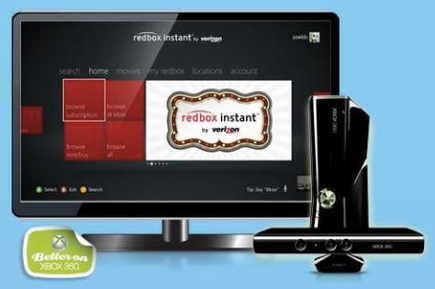 Ever heard of Redbox Instant? It’s an on-demand movie/TV content service that delivers movies & TV episodes on a subscription basis for $8/month. Sound familiar? Yup. Just like Netflix. Or to a lesser extent, Amazon Video.
Well, now it’s on Xbox 360. EXCLUSIVELY.
The only post I’ve seen from us on the matter is from Major Nelson. Read more there.
- NEWS: RedBox Instant coming to Xbox 360 Console Exclusively
http://majornelson.com/2013/02/05/redbox-instant-coming-to-xbox-360-console-exclusive/
Comments Off on NEWS: Redbox Instant… now on Xbox 360
Posted in Uncategorized
Posted by: kurtsh | February 7, 2013
RELEASE: Two apps you MUST own for your Surface for Windows RT – “SkyDrive RT Sync” and “Touchdown”
Two apps released today that are must-haves for Surface for Windows RT users:
 SkyDrive RT Sync
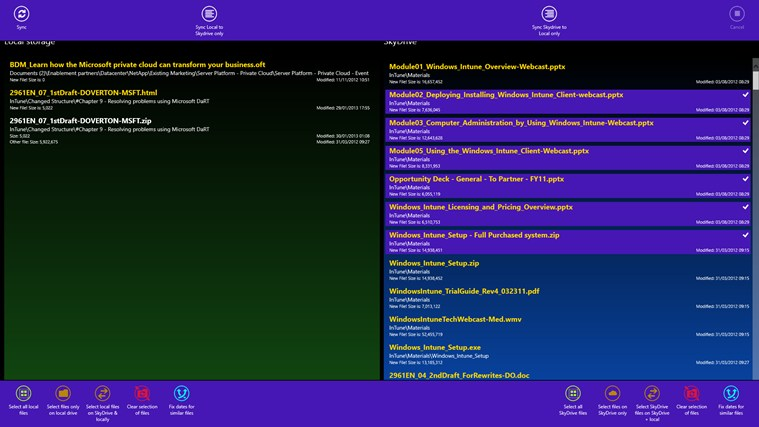
At last, you can automatically synchronize your SkyDrive account to a local folder on your Windows or Windows RT device through the Windows Store App interface rather than the desktop. The application does basic file compare to work out which files match and which need updating. One challenge is that if a file is deleted, this will be seen as a new file, so will be re-synchronized. Note, the first run will be slow which the scan of SkyDrive is done, however a local cache file is then created to speed up the process.
- Scans a local hard disk folder and synchronises it to SkyDrive
- Drag and drop support to move files between SkyDrive and your local system
- The ability through the settings to automatically select and synchronise files on opening
DOWNLOAD: http://apps.microsoft.com/windows/en-US/app/skydrive-rt-sync/dba55c55-efdd-42f9-b249-69945c6fab5b
 Nitrodesk Touchdown – Personal Information Manager
TouchDown email client for Windows and Windows/RT devices, building upon four years of experience building for other platforms.
- Comprehensive : Support for most number of data types (Email, Calendar, Contacts, Tasks) and Notes syncing for Exchange 2010 servers.
Customizable : A variety options to make the app behave just the way you want. - Most Secure: TouchDown supports exchange activesync policies such as PIN, Remote Wipe, Data encryption of corporate data. Hundreds of organizations trust TouchDown to ensure security, privacy and confidentiality of their data. Discerning organizations mandate the use of TouchDown to ensure high usability along with security.
- Corporate Data Separation: TouchDown keeps your corporate data separate from your personal data. Without TouchDown, your employer can actually flatten your device to factory defaults. With TouchDown, they can only remove corporate data belonging to them, leaving behind your personal information.
DOWNLOAD: http://apps.microsoft.com/windows/en-US/app/touchdown/4fb0509f-db65-4938-8a92-7c4d526e24c2
Comments Off on RELEASE: Two apps you MUST own for your Surface for Windows RT – “SkyDrive RT Sync” and “Touchdown”
Posted in Uncategorized
Posted by: kurtsh | February 7, 2013
INFO: Microsoft’s Big Data Strategy
 I’ve patently ripped this from the TechNet Newsletter. It’s that good a reference for Microsoft & Big Data. Please read through it if you have an interest in a our Big Data strategy which is very comprehensive… as you would expect, considering our massive presence & investment in the cloud.
For a couple reasons, it’s time for another look at Microsoft’s Big Data strategy: The Cumulative Update 2 for SQL Server 2012 SP1 was just released with new functionality that simplifies the backup and restore capability of an on-premises SQL Server database to Windows Azure; and Microsoft’s enterprise-ready Hadoop service, HDInsight, is now available on Windows Server or as a Windows Azure service.
HDInsight is built on the Hortonworks Data Platform (HDP) which is 100 percent compatible with Apache Hadoop, allows users to gain business insights from structured and unstructured data of virtually any size, and activate new types of data irrespective of their locations. Such insights can also be combined with the Microsoft BI platform to give users the ability to enrich their models with publicly available data and services using familiar tools like Office and SharePoint.
Key to HDInsight is its deep integration with other enterprise components. For instance, Hadoop connectors for SQL Server and Parallel Data Warehouse appliance enable easy integration of Hadoop with Microsoft Enterprise Data Warehouses and BI solutions. HDInsight also offers integration with System Center to simplify provisioning and management of Hadoop clusters, and integration with Active Directory to secure Hadoop clusters based on security policies.
For an overview of Microsoft’s Big Data solution, check out these two white papers:
Also there’s a post that reviews resources that are available specifically for Big Data on premise & in the cloud
- Big Data on premises or in the Cloud
http://technet.microsoft.com/en-US/jj938060
Microsoft’s Big Data solution allows users to gain business insights from structured and unstructured data of virtually any size and activate new types of data irrespective of its location.
Microsoft’s Big Data solution brief (.pdf)
For organizations, the main challenge is to effectively process both structured and unstructured data without the burden of setting up complex distributed storage and compute clusters.
White paper: From Data to Insights with Microsoft Big Data (.pdf)
Big Data addresses one of the most critical issues facing business today: how to gain value from the growing reams of complex data.
TechNet Magazine: Drilling for data
Big data is poised to overwhelm the capabilities of modern business to analyze and manage, but there are both challenges and opportunities.
Get HDInsight, Microsoft’s Big Data solution
HDInsight, available both on Windows Server or as an Windows Azure service, empowers organizations with new insights on previously untouched unstructured data, while connecting to the most widely used Business Intelligence (BI) tools on the planet.
Comments Off on INFO: Microsoft’s Big Data Strategy
Posted in Uncategorized
Posted by: kurtsh | February 7, 2013
NEWS: Microsoft TechEd North America 2013 announced – New Orleans, LA June 3 – 6
 UPDATE 2/12/13 5:52PM:
Registration is now open. Early Bird Pricing (Register by March 22, 2013) – $1,895 USD
http://northamerica.msteched.com/Registration
———————
ORIGINAL POST:
Microsoft TechEd North America 2013 announced in New Orleans, LA, June 3 – 6.
Microsoft’s Premiere Event for IT Professionals & Enterprise Developers
Hands-on learning, deep product exploration, & countless opportunities to build relationships with a community of Microsoft experts and peers.
Registration Opens on Feb 12, 2013
WEB SITE: http://www.msteched.com/
Comments Off on NEWS: Microsoft TechEd North America 2013 announced – New Orleans, LA June 3 – 6
Posted in Uncategorized
 kurtsh
 Kurt Shintaku's Blog
You must be logged in to post a comment.