We have an exclusive pre-launch event that the Microsoft Store is holding in Century City/Los Angeles to allow people to get a sneak peek at Gears of War: Judgment which releases March 19.
Why come? Well, for you Marcus Fenix fans… you’ll need to learn a new name: Damon Baird. Look it up. Meanwhile, we’ll be offering folks two things:
the opportunity to compete with other Gears fans in the brand new OverRun mode
view never-before-seen maps for multiplayer
meet Gears of War team members from Epic Games!
Fans specifically will have the chance to meet Epic’s Senior Producer Alan Van Slyke (@AlanVanSlyke) and Marketing Assistant Natalie Brickell (@PixelK1tty). You’ll also have the chance to win t-shirts & prizes, including a Project GAEMS case!
A twitter user hit me up the other day (hat tip rickyjr) and pointed me to this tool which I’d actually seen a while back but completely forgot about. I think many of you in the “endpoint services” or “desktop IT” world will find it useful as well.
The tool is called “Double Driver”. In essence what it does is:
List, save, and print drivers details
Backup drivers from current Windows
Backup drivers from non-live/non-booting Windows
Backup drivers to structured folders, compressed (zipped) folder, and self-extracting capability
Restore drivers from previous backup
Available in GUI and CLI application
Portable (no installation required)
The usage scenario is described as such:
One of the main reasons why you would want to collect installed drivers is if you don’t have the Driver CD that came with the computer or they are unavailable online. This comes in quite handy if you purchase a computer and want to backup the initial set of drivers. It can be quite difficulty for example to find drivers for hardware installed in a notebook if the operating system has to be setup again. Luckily Double Driver can now lend you a hand with that and save you a lot of time.
Best of all, it’s completely free. It states it works on Windows XP/Vista/7 (32-bit or 64-bit) but it’s been tested on Windows 8 (32-bit/64-bit) as well.
It’s over! Hope everyone had fun! Attendees can review the content from the event here: http://mylync.lyncconf.com/
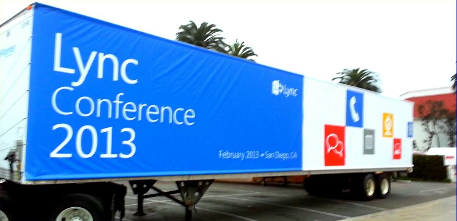
If you missed it, yes, to the left is a photo of some of the fun you missed at the Hotel del Coronado in San Diego. The session list is here: http://www.lyncconf.com/sessions.aspx
Found this awesome post… couldn’t help but repost it.
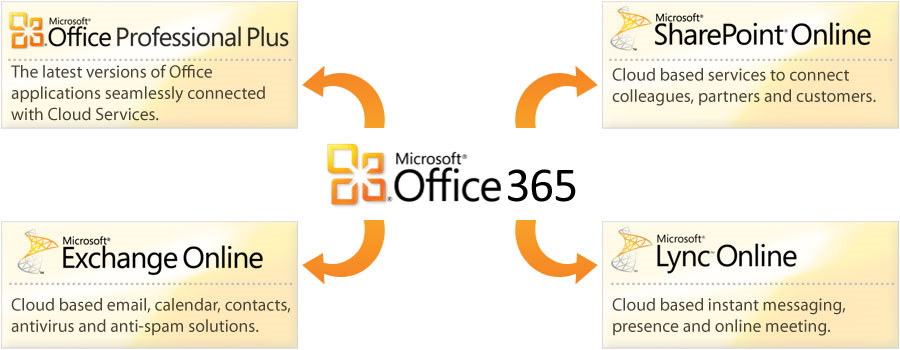
Q: Are you interested in making Lync your turnkey phone system via Office 365?
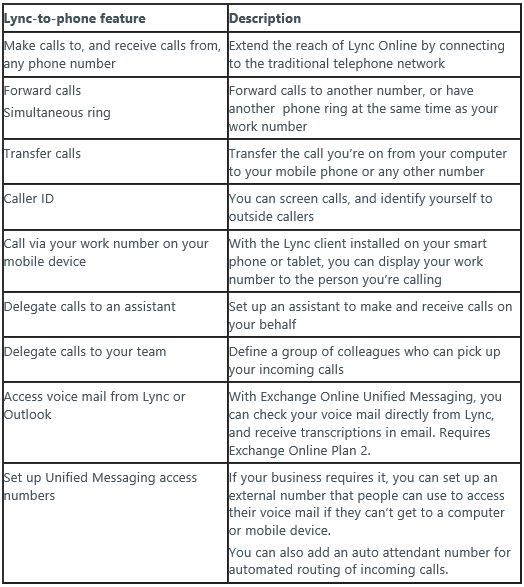
Lync-to-phone for Office 365 gives your business the power of a complete communications system without having to install any costly equipment. With an appropriate Office 365 service plan and a Lync-to-phone provider, you can give your users a complete unified communications experience:
A while back I wrote a post about estimating battery wear using the internal tools within Windows. A fellow named Filipe Lourenço wrote a tool for end users that does this easily without breaking out the command line, while also providing all sorts of interesting battery related information like the number of discharge cycles run,
The tool is called “BatteryCare” for Windows and has numerous interesting features for folks concerned about their laptop’s battery life. Honestly, not all the features appeared to work for me on my Sony Vaio S, but the battery wear feature did display correctly and that was what I was most interested in monitoring. It is stored in your SysTray so it’s easy to check out and has low overhead.
Features
Battery’s discharge cycles monitoring
The advanced algorithm accurately records when a complete discharge cycle is performed.
When the configured number of discharge cycles is reached, a notification balloon pops up to remind that a full discharge is required.
Complete battery information
It calculates the statistical remaining time in laptops that don’t support the battery time left information and only list the charge percentage.
Shows all the detailed information about the battery, such as wear level, capacities, consumption, manufacturer, etc.
CPU and HDD temperature reading
BatteryCare constantly monitors your CPU and hard drive temperature, either in degrees Celsius or Fahrenheit.
Automatic power plans switching
Depending on the power source of the computer, BatteryCare can automatically select the power plan you prefer.
Control over Windows Aero and demanding Services
Automatically disable the graphics accelerated theme in Windows Vista and/or demanding services that degrade battery lifetime. Once the laptop stops running on batteries, the theme is re-enabled and the stopped services are restored.
Notification area information
It features a compact popup with the essential information you need to quickly monitor. Temperatures, charge status, remaining time and power plans
Auto-updates
No need to trouble in downloading new installers, when a new version is available, the program updates itself.
Lightweight in the system
Given the concern about the battery optimization, BatteryCare does not interfere with the system performance. It requires only a mere 0,1% of Processor and Memory resources.
It’s called “Halo 4: Forward Unto Dawn”. And it’s the closest thing Halo fans have that approaches the movie that was on the horizon several years ago.
HISTORY Not too many years ago, there was a movie based on Halo that was being planned. Peter Jackson was the producer signed to the project & the name Steven Spielberg was even bandied about regarding some sort of involvement. For those unfamiliar with the details behind the planned movie, here’s a glimpse at what went down:
…Peter Jackson settled on the novice Neill Blomkamp for director. Blomkamp worked to exhaustion for five months preparing the project, which went as far as constructing props and costumes and producing short Halo-themed films as test footage. The project then collapsed. Jackson allowed Blomkamp a free reign in choosing a new project, which led to District 9. Although Blomkamp is still "creatively interested" in Halo, he does not wish to return to the project after working on it for so long and watching it collapse.
THE CURRENT MOVIE The movie, Forward Unto Dawn, is actually an amalgam of multiple episodes put together. The resulting film is about 90 minutes long and cost a rumors $8.5M to do. The plot is described as such in IMDB:
In 2525, as mankind has begun to colonise space, a group of cadets are training to fight against human insurrectionists. One of these cadets, Thomas Lasky, has doubts about his abilities as a soldier and his convictions for this war. Whilst he struggles with himself, the planet is invaded by an unknown alien race. Reeling under the assault, Lasky and his squad mates are rescued by John-117, one of the UNSC’s legendary SPARTAN-II super-soldiers. John must inspire Lasky to fulfill his potential as a soldier and a leader to fight against an enemy deadlier than any that humanity has faced before.
It isn’t perfect but still an epic film & a great example of what could be done with the Halo universe if a studio were to pick it up. Now that 343 Studios has control over Halo 4, 5 and 6, there’s a good chance that we might actually see the motion picture we’ve all be waiting for.
Until then, there’s always this:
Halo 4: Forward Unto Dawn Trailer
Comments Off on RELEASE: Halo 4: Forward Unto Dawn (DVD)
We’ll take a behind the scenes look at the Azure service & components, dynamic provisioning options and how to design a service that scales.
Webinar Topic: Azure 101 with Architectural Considerations
Featured Speaker: Stephanie Lemus – Microsoft Corp Stephanie has been with Microsoft 10 years and has worked with customers of every size and segment. Before joining the Azure team, she was a Windows Server Technology Specialist.. Read more
We’ll also cover the more common Azure gotchas and how to avoid them while developing cost based architectures.
This is cool. For anyone that has Lync installed for their corporate IM/Presence/Unified Communications, this might be a neat chotchkie. It’s a USB peripheral that plugs into your computer and physically displays your Lync status to the surrounding world.
Do people interrupt you while you’re busy working?
Do you often check to see if a colleague is available to chat?
Have you ever walked to the other side of the office to chat with a colleague only to find they are busy on the phone?
If these issues exist in your workplace you need Blync – the Busy light for Lync.
Synchronize Automatically synchronizes with your Lync Presence displaying:
Q1: Does SharePoint Online provide provisions for allowing external clients to access file shares in the cloud? We need to provide file sharing in the cloud to users to allow them to share files with clients and we don’t want to go with point solutions like BOX or DropBox if we can avoid it.
A: Yes, with SkyDrive Pro in SharePoint Online you can share files securely with external users. You have the option of forcing external users to login using a Microsoft Account ID or you can share using a Guest link without authentication. The following is a good link:http://office.microsoft.com/en-us/office365-sharepoint-online-small-business-help/share-sites-or-documents-with-people-outside-your-organization-HA102894713.aspx?CTT=5&origin=HA102788380
Q2: What is the allocated storage per person on SharePoint Online with the upcoming wave we are releasing?
A: 7GB per person. The following is a link that highlights this allocation of storage per user:http://sharepoint.microsoft.com/blog/Pages/BlogPost.aspx?pID=1033
Comments Off on INFO: Internet/External File Sharing in the cloud with Office 365 (or “how to keep users from using 3rd party cloud storage to share files with clients”)
UPDATE 5/1/13: We just released the Surface Pro Driver Pack for Windows 8, an important component to successfully creating custom installations of Windows 8 for Surface Pro. Take a look at this post for more information.
UPDATE 4/24/13: Well… if you’re reading this, it means you’re payin’ attention. I’m going to have good news to post here soon, so stay tuned. 🙂
UPDATE 2/28/13: I originally wrote a post here that essentially explained how to install “Windows 8 Enterprise” on a Surface Pro device, since Surface Pro comes natively installed with “Windows 8 Professional” & most Enterprise customers deploy the Enterprise edition of our client operating systems.
I’ve since been told that there many issues that can result from the process I originally documented.
Here are a few examples:
Touch cover audible “clicks” will not work.
SDXC cards will not perform as expected.
Using the SDXC card slot can prevent the unit from going to sleep or dramatically reduce battery performance.
The display may have features that fail because while the stock driver will work, the one that ships with Surface Pro is a custom Intel display driver.
…
Consequently, I’m working with the Surface product team on presenting both a complete set of drivers and installation instructions that I’ll be able to publish here at a future date.
I apologize for the inconvenience to readers of this blog.
————————-
[BLOG POST REMOVED]
Comments Off on INFO: Reimaging or Reinstalling Surface Pro with Windows 8 Enterprise (or a Custom Image) [UPDATED 5/1/13]
You must be logged in to post a comment.