 Need Microsoft official books in both print & eBook reader format (MOBI, ePUB, PDF)? Look no further than the Microsoft Press catalog on O’Reilly.
- Microsoft Press at O’Reilly
http://microsoftpress.oreilly.com
Need Microsoft official books in both print & eBook reader format (MOBI, ePUB, PDF)? Look no further than the Microsoft Press catalog on O’Reilly.
Comments Off on INFO: Shop Microsoft Press for books & references
Posted in Uncategorized
 I’ve gotten asked this 3 times now in the past 48 hours:
“What’s with the felt on the back of the black touch/type covers for Surface?”
In case you haven’t noticed, the black versions of both the Type Cover and the Touch Cover have a backside made of a Polartec felt-like material.
I asked the question internally here at Microsoft and received a variety of responses.
If I get an official response, I’ll post it here but right now, it looks like these are the reasons.
Comments Off on INFO: Surface Touch cover… what’s with the “felt”?
Posted in Uncategorized
I was doing some personal documentation and found this photo that was taken of me & others when I received an award called “Circle of Excellence” here at Microsoft.
There are 4 key executives in this photo, two of which are obvious. The other two are Orlando Ayala (FAR LEFT: former President of Worldwide Sales, now head of Microsoft’s Unlimited Potential program) & Kevin Johnson (FAR RIGHT: former VP of North American Sales, now CEO of Juniper Networks)

Comments Off on OT: A Microsoft Executive photo from 2003 (and me)
Posted in Uncategorized
Available for Exchange Server 2010 & 2013:
We’re excited to announce the availability of the Exchange Server 2013 Deployment Assistant at http://technet.microsoft.com/exdeploy2013. The Exchange Deployment Assistant is a web-based tool that helps you deploy Exchange 2013 in your on-premises organization, configure a hybrid deployment between your on-premises organization and Office 365, or migrate to Office 365. It asks you a small set of simple questions and then, based on your answers,
creates a customized checklist with instructions to deploy or configure Exchange 2013. Instead of trying to find what you need in the Exchange library, the Deployment Assistant gives you exactly the right information you need to complete your task.
The first scenarios available show you how to deploy Exchange 2013 in an organization with no previous installations of Exchange and show you how to configure a hybrid deployment between your on-premises Exchange 2013 organization and Office 365. We’re working hard on additional scenarios, such as upgrading from Exchange Server 2007 and Exchange Server 2010. These additional scenarios will be added in the coming months.
The Deployment Assistant for Exchange 2013 is supported on most major browsers and has a completely redesigned interface that’s no longer dependent on Silverlight technology. Here’s a screenshot from the Deployment Assistant after the initial set of questions were answered and the customized checklist was generated.
Of course, we can’t forget about Exchange 2010! If you still need to deploy Exchange 2010, you can access the Deployment Assistant for Exchange Server 2010 at http://technet.microsoft.com/exdeploy2010.
Reposted from:
http://blogs.technet.com/b/exchange/archive/2013/03/04/exchange-server-2013-deployment-assistant-available.aspx
Comments Off on RELEASE: Exchange Server 2013 Deployment Assistant
Posted in Uncategorized
 If you need guidance on setting up Lync 2013 or Exchange 2013, my co-worker, Microsoft Consultant & MTC Architect Dean Suzuki, has been blogging the build out of a complete Lync 2013 and Exchange 2013 deployment on his blog.
Also as he gets customer questions, he’s been answering them and writing the response to the blog. Please send my any recurring Lync and/or Exchange questions/issues that you have to the comments on his blog.
Here are some of the articles that he’s written on Lync 2013 alone:
Check out his blog here:
Comments Off on INFO: Lync 2013 & Exchange 2013 Guidance from Dean Suzuki’s Blog
Posted in Uncategorized
 As we shared at SharePoint Conference, we’re working on native SkyDrive Pro apps for Windows 8 and iOS, both will be coming in summer of 2013. There, too, is a Windows desktop client that ships with Office 2013–and soon this "folder sync" technology will ship as a free, standalone installable client. In addition, the capabilities already come natively in Windows Phone (more on that below in the Office Hub section of this post).
You can use the SkyDrive Pro app for Windows 8 and iOS to:
For more information about our SharePoint Mobile offerings, visit the SharePoint Blog:
Comments Off on NEWS: SkyDrive Pro cloud storage sync… coming to iOS & Windows 8
Posted in Uncategorized
As announced in our press release, Office 365 will be launching a series of commercials to help people understand how they can benefit from the power of Office and the connectivity of the cloud.
Comments Off on VIDEO: Next-generation Office 365 for Business… now available!
Posted in Uncategorized

Wow. Check out the speakers for this gig. Mark Russinovich, Paul Thurrott, Wes Miller… just to name a few.
March 12, 2013 – One day in the cloud that could change the trajectory of your career
The transition to the cloud presents new and increased opportunities for technology professionals around the world. As the IT industry continues to evolve, skilled employees have never been more in demand by hiring managers.
Want to be a leader in Cloud technologies? Need training and tools you can use now? Join us for Certified Career Day on March 12 at 8:30AM PDT, for an interactive LIVE panel discussion with IT industry experts who will discuss how the Cloud is redefining IT recruitment. Then stay for in-depth discussions on Windows Server 2012 and SQL Server 2012 to learn how you need to prepare to get ahead of this inevitable shift in cloud-based technologies.
Comments Off on EVENT: Certified Career Day – March 12, 8:30AM PDT
Posted in Uncategorized
Wanna boil down all the measurements you might get from your cloud operation into some intelligent optimization?
I am excited to announce that we are welcoming cloud monitoring startup MetricsHub – a participant in the Microsoft Accelerator, powered by TechStars – to Windows Azure. As an innovator in Active Cloud Monitoring, a technology that automates cloud performance management, MetricsHub helps customers more efficiently manage their cloud services at a lower cost.
Cloud solutions are compelling for a variety of reasons – scale, flexibility and value – particularly for companies looking to do more with less. However, it’s difficult to understand, monitor and correlate all the application data points that tell you how and when you need to scale your application. Then to get real value out of those data points you need to automate how your application and cloud platform intelligently respond. That’s where MetricsHub’s technology comes in. Their approach to automating performance optimization, with little effort on the part of customers, addresses these issues. It also ensures customers are only paying for what they need and maximizing the services they’re using.
All Windows Azure customers can get started today – with the announcement of a pre-release, no charge, version of MetricsHub’s Active Cloud Monitoring – available now through the Windows Azure Store. We think it’s going to save customers time, money and headaches. You can learn more at the MetricsHub site.
Comments Off on NEWS: Microsoft Acquires MetricsHub, cloud monitoring solution
Posted in Uncategorized
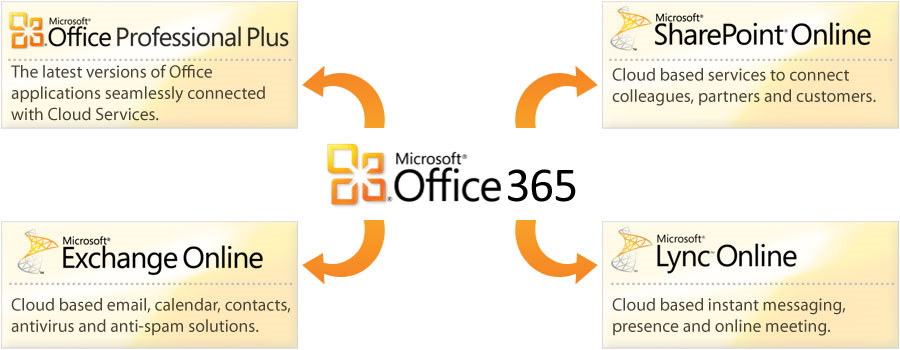
Here are seven simple reasons why Office 365 makes sense for Enterprise customers with Volume Licensing agreements with Microsoft – EVEN IF they aren’t interested in moving their existing files & mail data to the cloud or taking full advantage of the Online Services below:
Comments Off on INFO: 7 Reasons to go with Office 365 even if you’re not ready to move your on-premise data to the cloud
Posted in Uncategorized

 kurtsh
 Kurt Shintaku's Blog
You must be logged in to post a comment.