imageToday, I got asked what the difference was between:

  • TechNet Subscriptions
  • MSDN Subscriptions

TechNet is squarely aimed at IT Professionals.  It provides:

  • the ability to download much of Microsoft’s software library along with Activation keys for a broad array of primarily INFRASTRUCTURE products. 
  • the ability to call Microsoft Professional Support for TWO incidents
  • access to 1 or more “collections” of Microsoft eLearning
  • priority support access to the TechNet Forums – a place to ask technical questions that are monitored by Support Engineers & Product MVPs

The software provided with TechNet Subscriptions is designed for hands-on IT Professionals to evaluate Microsoft software and plan deployments. The software provided in TechNet Subscriptions can be used for evaluation purposes only.  TechNet does not contain any development tools (such as Visual Studio or Expressions), nor does it contain any of our SDKs, platform tools, designer tools, or embedded systems products.  Here is a list of products that are available through TechNet:
http://download.microsoft.com/download/C/7/8/C78DB720-88CB-455E-AA0E-A087CB332A23/TechNet_Product_List.xlsx

MSDN is designed for Developers.  The software provided with MSDN Subscriptions is for design, development, testing, and demonstration of software programs.   It has a lot of older technology as well compared to TechNet to assist developers with regression testing.    It provides:

  • the ability to download most of Microsoft’s software library along with Activation keys for the purposes of development, testing, demonstration.
  • no-charge access to cloud services like Team Foundation Service, Windows Azure,
  • access to 1 or more “collections” of Microsoft eLearning
  • the ability to call Microsoft Professional Support for TWO incidents or FOUR incidents depending on the subscription level
  • priority support access to the MSDN Forums – a place to ask technical questions that are monitored by Support Engineers & Product MVPs

Here’s a list of benefits of MSDN Subscriptions: http://msdn.microsoft.com/en-us/subscriptions/aa718661
More info on MSDN subscriptions:  http://msdn.microsoft.com/en-us/subscriptions/buy.aspx

Both MSDN and TechNet subscriptions are licensed per user.

SOFTWARE:
As far as software goes, there is a 3rd party comparison of the software that is available in each subscription here.  (I can’t guarantee it’s accuracy but it seems like it’s fairly accurate from a faraway glance)
http://geekswithblogs.net/mtreadwell/archive/2011/08/19/146599.aspx

PRICING:

Posted by: kurtsh | March 28, 2013

RELEASE: Office Configuration Analyzer Tool (OffCAT)

imageOn March 8th, we released the Office Configuration Analyzer Tool (OffCAT) to the Microsoft Download Center, replacing Outlook Configuration Analyzer (OCAT), the original diagnostic tool for Microsoft Outlook.

OffCAT was developed by the same team that put together OCAT, so it should be seen as the next generation diagnostics tool for Microsoft Office. There are many new features in OffCAT, but the biggest difference between the two tools is the ability to scan more Office programs than just Outlook.

With OffCAT v1, you can scan Access, Excel, Outlook, PowerPoint, and Word.  With OffCAT, you can take the following actions to help you detect possible problems with your Office programs or the Office programs on other computers you support (in a Help Desk capacity):

  • Scan an Office program configuration
  • Open a previously run OffCAT (or OCAT) scan on your computer
  • Import an OffCAT (or OCAT) scan from another computer
  • Use several reporting formats to view the scan results
  • Send feedback to the OffCAT team
  • Update your OffCAT installation with new detection rules
  • Update your OffCAT installation with new features or application fixes
  • Access resources to help resolve top problems and how-to issues in Office 365
  • Start the Exchange Remote Connectivity Analyzer tool to analyze Outlook connection issues
  • Scan computers using a script that runs a command-line version of OffCAT

Read more about Office Configuration Analyzer Tool at the announcement blog post:
http://blogs.technet.com/b/exchange/archive/2013/03/20/released-office-configuration-analyzer-offcat-tool.aspx

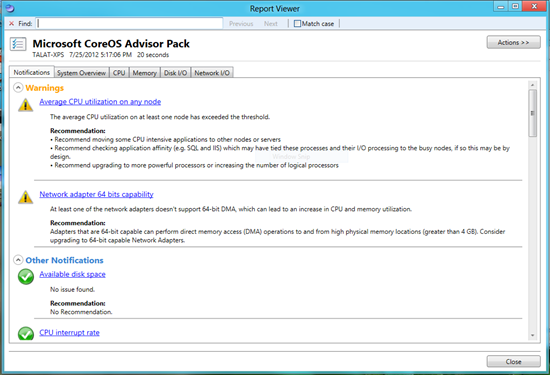
imageIf you’re deploying any amount of Windows Server 2012, you may want to take a look at this addition to our “Best Practices Analyzer in the Cloud” service:

System Center Advisor now supports Windows Server 2012 as well as Microsoft Hyper-V Server 2012 !

By installing the latest version of the Advisor agent on servers running Windows Server 2012 or Hyper-V Server 2012 you will be able to receive configuration analysis for these products.

We hope you can try it out and benefit from the ongoing configuration assessment that Advisor provides.

Later this month we will also be releasing Update Roll-up 3 for System Center Advisor , which will correct a number of bugs on already installed agents.

And in case you didn’t catch our previous post, Advisor is now free !

image

Interested in using Lync for massive scale events?image

This video demonstrates how L+ technology will help you improve ROI on your existing Microsoft Lync licenses. Users can customize, promote, organize, and scale meetings and events beyond the existing Lync capabilities while allowing them to utilize their existing Lync presentation expertise.

Benefits
  • Enhancements add to existing Lync knowledge to increase ROI
  • Maximize the Value of Your Events & Programs
  • Cost effective service for any size event
  • Works with all popular browsers and operating systems
  • Enables attendees to use Macs, iPads, and other mobile devices
  • Deliver large scale events from a standard Lync presentation format
  • Control who can upload and view content and recordings

BLOG POST:
http://blogs.technet.com/b/microsoft_in_education/archive/2013/03/23/high-quality-event-production-with-microsoft-lync-and-event-builder-l.aspx

VIDEO:
https://www.eventbuilder.com/encounter/event_desc.asp?p_event=b029r01k

DATASHEET:
https://www.eventbuilder.com/encounter/getFile.asp?z=7p1c0n&eventID=b029r01k&eventFile=33839745

imageInternet Explorer Administration Kit 10 (IEAK 10) now supports building custom Internet Explorer 10 packages for Windows 7 and Windows 8. IEAK 10 simplifies the creation, deployment, and management of customized Internet Explorer 10 packages.

imageOn March 12, Microsoft Learning hosted Certified Career Day—a live interactive online event for IT Pros on the growing need for a cloud-skilled workforce.

More than 3,200 attendees tuned in to the industry discussion panel on the future of IT jobs in an increasingly cloud-centric business world; and got questions answered during product sessions for SQL Server 2012 and Windows Server 2012, hosted by senior product managers and tech evangelists.

Videos of all the day’s events are now available on-demand.

Posted by: kurtsh | March 26, 2013

RELEASE: Server Performance Advisor 3.0

imageStarting with Windows Server 2008, we have published a server tuning guide each release designed to help system administrators and IT professionals get the best performance out of their server deployments.  For Windows Server 2012 we published the Windows Server 2012 Tuning Guide, but this time there is a twist.  This time we harnessed our performance knowledge from the tuning guide and embodied some of it as part of a newly redesigned Server Performance Advisor (SPA) tool.

Microsoft Server Performance Advisor (SPA) 3.0 helps IT administrators collect metrics to identify, compare, and diagnose potential performance issues in a Windows Server 2012, Windows Server 2008 R2, or Windows Server 2008 deployment. SPA generates comprehensive diagnostic reports and charts and provides recommendations to help you quickly analyze issues and develop corrective actions. This page provides a brief introduction to SPA 3.0 and links to download the SPA 3.0 software and the accompanying user’s manual and development guide.

Read more about it at the announcement post on the Windows Server Blog:
http://blogs.technet.com/b/windowsserver/archive/2013/03/11/server-performance-advisor-spa-3-0.aspx

imageNet net: A 90 patch, 19.8MB (32-bit) or a 31.3MB (64-bit) rollup hotfix patch for Windows 7/Windows Server 2008 R2 is available for download that has all sorts of performance fixes in it.

Hey y’all, Mark here with some great news. A massive Slow Boot Slow Login (SBSL) hotfix rollup for enterprises that includes 90 post Windows 7/2008 R2  hotfixes is available for download. The hotfixes focus on performance (Hooray!) and stability (Hooray again!). There are improvements to the DFSN client, Folder Redirection, Offline Files and Folders, WMI, and SMB client to name a few. There also improvements to Group Policy which gets blamed for pretty much everything when I’m doing a WDRAP. You can read the full list of improvements here.

(read more at the original blog post)

ORIGINAL ANNOUNCEMENT BLOG POST:
http://blogs.technet.com/b/askpfeplat/archive/2013/03/12/slow-boot-slow-login-sbsl-hotfix-rollup-for-windows-7-and-server-2008-r2-available-today.aspx

DOWNLOAD: Slow Boot Slow Login (SBSL) Hotfix Rollup
http://catalog.update.microsoft.com/v7/site/Search.aspx?q=KB2775511

DOCUMENTATION: Slow Boot Slow Login (SBSL) Hotfix Rollup
http://support.microsoft.com/kb/2775511/en-us

Hadoop for Windows Server.  Directly from Hortonworks.

imageDuring the recent Strata 2013 conference, Hortonworks released the beta of the Hortonworks Data Platform (HDP) for Windows, an enterprise-ready and 100% Apache Hadoop-based distribution for Windows Server. This release is the result of a deep engineering partnership between Hortonworks and Microsoft that aims to accelerate enterprise adoption of Hadoop by extending its reach across platforms. Now customers have more options to manage data of any type or size on-premises or in the cloud.

For more details on this release, please see the SQL Server blog or the Hortonworks website.

[taken from the MSOpenness web site]

Posted by: kurtsh | March 26, 2013

BETA: Data Explorer Preview for Excel 2013

imageInterested in connecting Big Data & Hadoop to Excel 2013?

The Microsoft Data Explorer Preview for Excel 2013 addresses this challenge by providing an intuitive user interface for data discovery and refinement. With the Data Explorer add-in, users can now quickly and easily import data from a variety of sources, including relational, structured, and semi-structured data sets. Sources like Facebook, OData feeds, Windows Azure Marketplace, and big data solutions like Hadoop are now within the reach of any user.

« Newer Posts - Older Posts »

Categories