 Doug Symalla, Premier Field Engineer, is writing a series of blog posts on how to plan and upgrading your Windows Server Active Directory environment to 2012.
This is worth paying attention to. He’s got two posts out so far with more to come:
Doug Symalla, Premier Field Engineer, is writing a series of blog posts on how to plan and upgrading your Windows Server Active Directory environment to 2012.
This is worth paying attention to. He’s got two posts out so far with more to come:
Comments Off on INFO: Upgrading or Migrating Active Directory to Windows Server 2012
Posted in Uncategorized
Remote Server Administration Tools for Windows 8.1 Preview enables IT administrators to manage roles and features that are installed on computers that are running Windows Server 2012 or Windows Server 2012 R2 Preview from a remote computer that is running Windows 8.1 Preview.
The tools include Server Manager, Microsoft Management Console (MMC) snap-ins, consoles, Windows PowerShell cmdlets and providers, and command-line tools for managing roles and features that run on Windows Server 2012 and Windows Server 2012 R2 Preview.
In limited cases, the tools can be used to manage roles and features that are running on Windows Server 2008 R2 or Windows Server 2008. Some of the tools work for managing roles and features on Windows Server 2003. For more information, see KB article 2693643: Description of Remote Server Administration Tools for Windows 8 ; Remote Server Administration Tools (RSAT) for Windows Vista, Windows 7, Windows 8, Windows 8.1, Windows Server 2008, Windows Server 2008 R2, and Windows Server 2012 and Manage Multiple, Remote Servers with Server Manager
Comments Off on BETA: Remote Server Administration Tools for Windows 8.1 Preview
Posted in Uncategorized
 Work Smart Guide Zip Download is a set of editable, customizable versions of Work Smart materials to use as samples and reusable templates that specifically address the scenarios and processes in your information worker environment. Think of them as quick reference guides for Microsoft products that were created by Microsoft IT.
Comments Off on DOWNLOAD: Work Smart Guide Zip Download from Microsoft IT
Posted in Uncategorized
Did you ever wonder, what kind of integration persists throughout the Office family of products? Authentication? Identities & Presence? Office Web Apps?
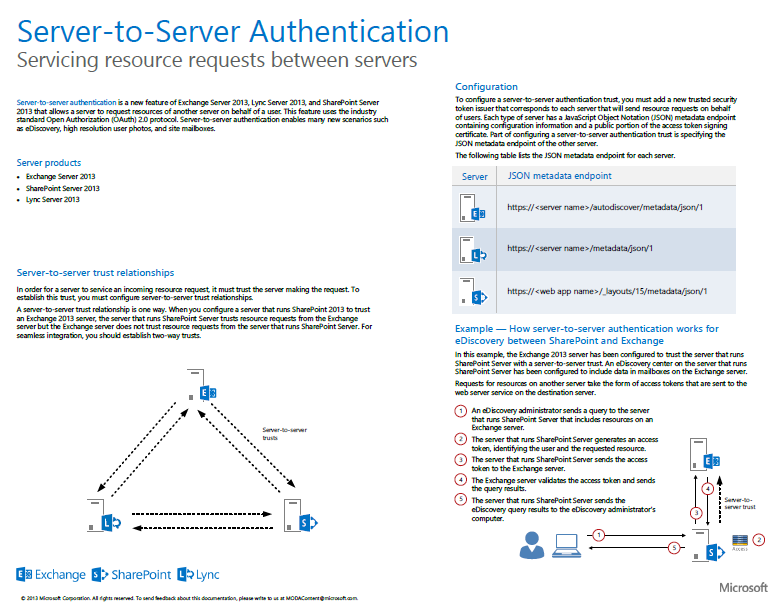 This 10-page document, “Feature Integration Across Microsoft Office Products ”, presents illustrations for cross-server features & client-server features. This multi-tab file includes descriptions and architecture illustrations for features that work across Microsoft Office server products (Exchange Server, Lync Server, and SharePoint Server).
Comments Off on WHITEPAPER: Feature Integration Across Microsoft Office Products
Posted in Uncategorized
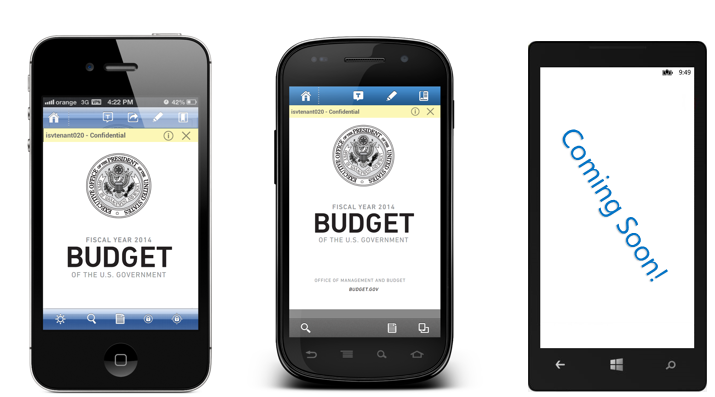 This was some of the biggest news I’ve read in a long time from us and it seems to have gone completely unnoticed by the media. Here’s an English language explanation of what we’re doing in the space of IP protection:
Anyone in any company will be able to securely share any document with anyone else on the Internet. They will also be able to control what other people can do with those documents track the document’s usage. They can also set the document to expire/timebomb after a certain date. The individuals receiving these documents will be able to view them on iOS, Android, Windows RT, Macintosh, & Windows computers.
Rights Management or Intellectual Property Protection at Microsoft enables a user to encrypt file using AEC-256 bit encryption securing data at rest. However what makes it unique is that based on the accessing users credentials, it provides only certain rights to the information store in it. It can:
SUMMARY OF ANNOUNCEMENTS:
Here’s a presentation that was done at TechEd 2013 Europe that explains what was announced:
Microsoft offers Active Directory Rights Management Service (ADRMS) in Windows Server today. Windows Azure Active Directory Rights Management is a new service from Microsoft that is tightly integrated with Microsoft Office and Office 365. These two services combine to support layered information protection offers such as: Office, Exchange DLP, File Classification, SharePoint Secure Libraries, and more. These offers support seven platforms with mobile applications, offer generic protection of all file types, business-to-business secure collaboration, and the ability to quickly deploy information protection services on-premises by leveraging cloud infrastructure. This hybrid offer enables HSM-based key storage, secure B2B collaboration, and enables your organization to maintain their documents on-premise if so desired! This first of two talks covers Microsoft’s overall information protection offer as well as recent advances.
Comments Off on INFO: Strategic roadmap for Intellectual Property Protection technology from Microsoft
Posted in Uncategorized
 This poster illustrates and explains the new world of identity and authentication in Office 2013 and Office 365. Two scenarios illustrate how identities are provisioned and how those identities are authenticated completely in the Microsoft cloud or in a hybrid (on-premises and Microsoft cloud) topology.
Available in both .PDF & .VSD (Visio!)
Comments Off on POSTER: Identity & Authentication in the cloud: Office 2013 & Office 365
Posted in Uncategorized
For whatever reason, someone in Microsoft Windows Phone corporate marketing for thinks that this logo (downloadable at http://www.microsoft.com/en-us/download/details.aspx?id=5014):

…is a good signal to the public that an app is available in the same way that these do:


There. Fixed that for you. (Segoe UI Light & Segoe UI versions)


Comments Off on INFO: There Windows Phone. Fixed That For You. (a.k.a. Changing the Windows Phone Store logo)
Posted in Uncategorized

Microsoft IT is Microsoft’s first & best customer. A product needs to be deployed at Microsoft before it goes out the door.
Interested in knowing how Microsoft deployed a given Microsoft technology you’re interested in? We have case studies for many of these deployments.
(Note: While Microsoft deploys virtually all our products internally for use in production, not all product deployments are documented or case studied. We hire 3rd parties to document our Deployment case studies and it’s not cheap. Often times we only document the most in-demand deployed technologies.)
Comments Off on INFO: Microsoft IT Showcase: How Microsoft Does IT
Posted in Uncategorized
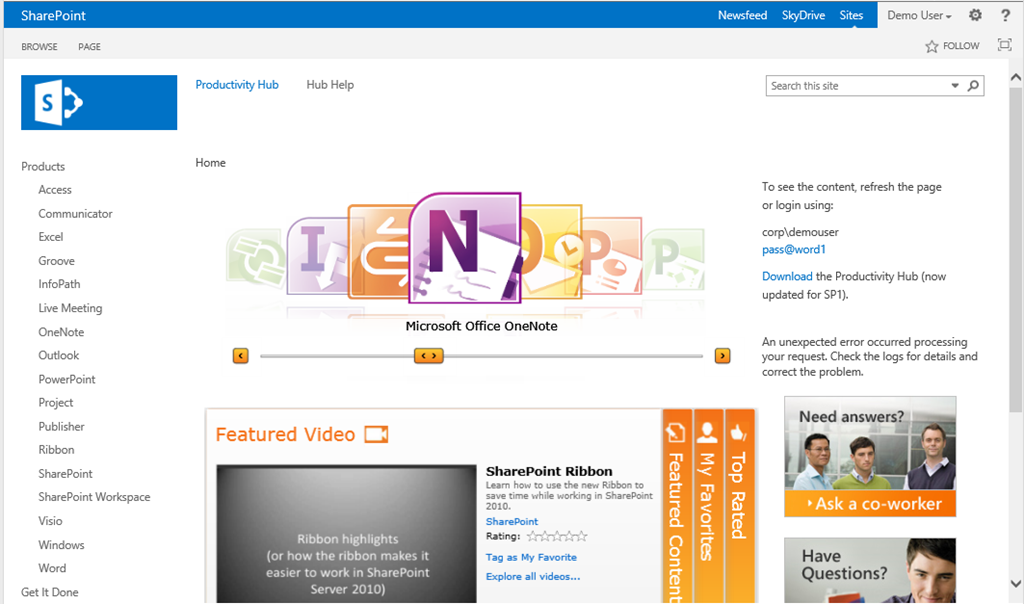 The “Productivity Hub” is a free, downloadable module that plugs into SharePoint Server 2010. (Note: There’s also a version that plugs into SharePoint Server 2007)
It is essentially a massive 2GB+ self-service training web site that provides end users with a place to review training & quick reference content for each of the major Office & Windows products – including Windows 7 & Internet Explorer 9. It provides video training, documentation, as well as Q&A areas featuring “coaches” that a company can designate within your org to help other people.
What makes it unique is that the site is completely extensible by mere mortals. Customers that use Productivity Hub can create new areas for, say, Adobe Acrobat… or Box… or whatever 3rd party application you’d like to provide self-services support for, and publish your own documentation, videos, etc.
There is a demo site for you to peruse to see what the Productivity Hub looks like on your own. The location of where to download all the content packages for Productivity Hub are also listed below:
Comments Off on DOWNLOAD: “Productivity Hub SP1” – Installable Training Module for SharePoint Server 2010
Posted in Uncategorized
I had to take care of some family matters for the past couple weeks. I’m gonna start cranking out the posts really soon. A lot of it will be retread of what you probably already know… reorg… Nokia… 8.1… blahblahblah. But I have a few things that haven’t been shown yet.
Comments Off on Sorry I’ve been OOF. Again.
Posted in Uncategorized
 kurtsh
 Kurt Shintaku's Blog
You must be logged in to post a comment.