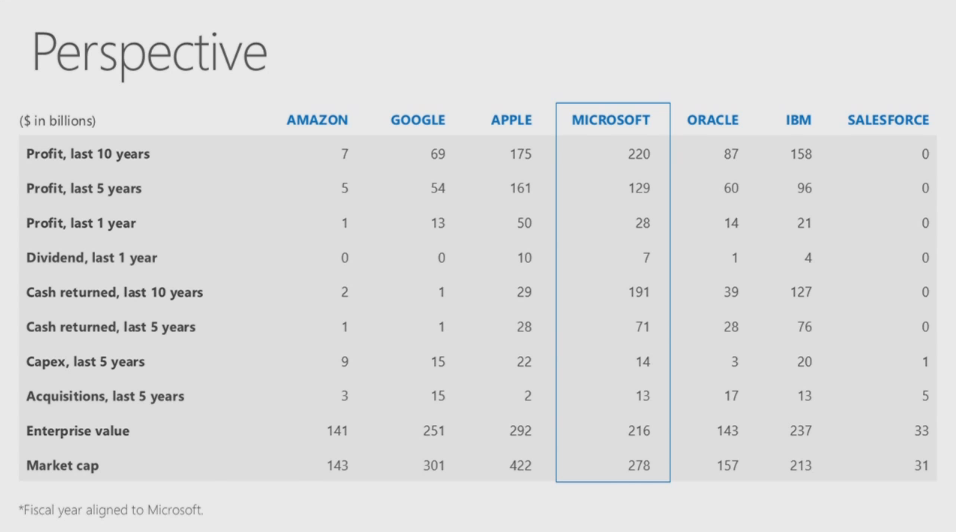
clip_image002Yesterday, our CEO, Steve Ballmer delivered Microsoft’s message to financial analysts.  During the presentation he “clarified” where Microsoft stands in terms of ongoing profit & investor return.

If you really want to understand Microsoft’s business, may I recommend following the money?  This is where you’ll get real insight into Microsoft’s present & future business.

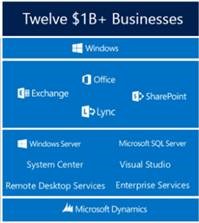
For example, Microsoft sells on volume:  We’re pretty good at it & we do this across 12 different $1B businesses, diversifying how we make money.  See the graphic to the right.

And by the way, I have the say, the slide below presented by Steve is awesome.  And it’s just a taste of what’s in the video recording.  Have look see.
Smile

image

clip_image002

We will be holding the next meeting of the Southern California System Center Users Group at Microsoft in Irvine.

If you’re interested in participating, you’re welcome to join. The agenda & presentation will be delivered by Microsoft Datacenter specialists along with community members leveraging Windows Server & System Center technologies.

We currently have over 25 people registered from various businesses in SoCal so this should be an interesting discussion amongst birds-of-feather.

AGENDA: (September)

  • System Center and Windows Server 2012 R2 Overview
    Join us to learn about the news features coming in System Center and Windows Server 2012 R2- Preview. Windows Server 2012 R2 Preview and System Center 2012 R2 Preview offer a great foundation for our customers to deliver private and hybrid cloud services to their constituents. Learn more about how to make it easy and cost-effective to set up on-premises or hosted cloud infrastructure while meeting critical multi-tenancy, manageability and chargeback requirements. This will includes the following : Service Manager, Operations Manager, Orchestrator, Virtual Machine Manager, App Controller, Configuration Manager, and Data Protection Manager.
  • Windows Azure Pack
    With the Windows Azure Pack, Microsoft is bringing Windows Azure Web Sites to the private cloud. By enabling easy provisioning, deployment, and administration of web sites, hosting service providers or enterprises can now deliver web platform services outside of Azure datacenters. Products covered include Windows Server, Windows Azure Pack, IIS, Application Request Routing, Web Deploy, and Web Farm Framework.

Snacks and refreshments will be provided.

Please be aware that the Microsoft office does not provide parking validation.

DATE:
Monday, September 23, 2013 from 5:30 PM to 8:00 PM (PDT)

LOCATION:
Microsoft Irvine Office
3 Park Plaza Suite 1600
Irvine, CA 92614

REGISTRATION:
http://mscscug-irvine-eorg.eventbrite.com/

Posted by: kurtsh | September 19, 2013

COMMENTARY: Why Touch on a Laptop is so Strangely Useful

image

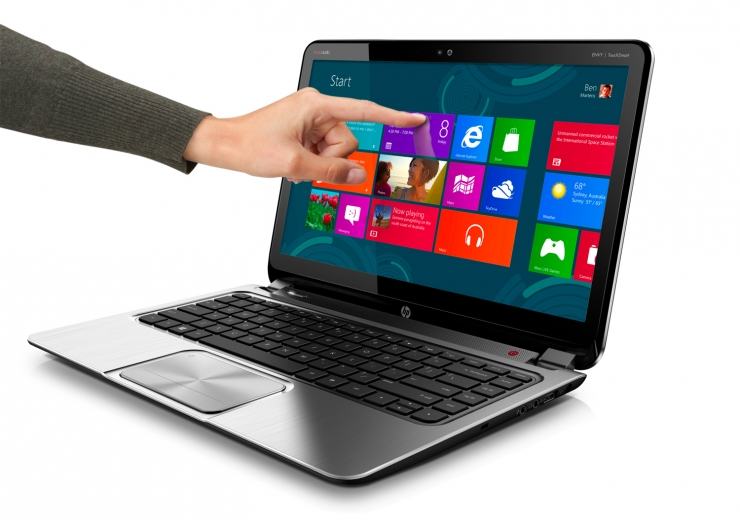
Q: What’s the point of having touch on a laptop display? 

If you’ve ever had a laptop with a touch screen, you’ve probably had the experience of working on a non-touch laptop and intuitively reaching out to the screen to “scroll” down a page, then laughing at yourself when it doesn’t work & resolving to have to find the mouse to accomplish the same task.

But that’s exactly it:  Why’d you reach out to touch the screen?  Why didn’t you instinctively reach for the mouse or press the down arrow on your keyboard instead?

INCREASED PRODUCTIVITY THROUGH NATURAL USER INTERFACE
It’s simple:  Because it’s faster, easier, and more natural to touch a screen when your hands aren’t already on the mouse/keyboard.  The fact is that we don’t always have our hands on the keyboard or the mouse, and during the times when we don’t, by reaching out to the screen and scrolling, we eliminate the process of changing our mind’s context, if ever so slightly, to first suddenly having to find the mouse or the down arrow on the keyboard and then refocusing on the screen to scroll/zoom/slide to where we want.

The simple elimination of this “locate-the-mouse” step is not just gratifying in it’s embrace of the natural user experience – it’s actually more productive, if for just that moment, and our mind’s subconsciously recognize this & appreciate the ease by which we were able to accomplish the scrolling, sliding, zooming, or whatever it is we needed to do on the display.

Personally, I believe this little bit of productivity allows people to work for longer periods of uninterrupted time.

KEYBOARD & MOUSE JOCKEYS:  LET IT GO
I have a Lenovo X1 Carbon Touch (touchscreen laptop) and the freedom to touch the screen and scroll/zoom/slide, as I mentioned, is actually a productivity enhancer.  You know it’s more productive when you use it… you just can’t put your finger on why.

It’s all about eliminating context changes while working.  Refocusing on the mouse.  Refocusing on the display.  Refocusing on the keyboard.  Instead, when you use your finger, you cut short that context change because your brain doesn’t need it.  It’s like a shortcut.

And the proof is in the pudding:  The number of people I’ve talked to that have actually made the transition to a touch laptop and laughed about being one of the “converted” are more than I can count.

This increased productivity during the workday is tangible and a sort of “secret sauce” of Windows 8-based laptops.  This is what a lot of people who cavalierly dismiss touch laptops don’t understand.

imagePlease join us this Sunday, September 22nd at 2pm for our Cre8tive Workshops Launch Event on Film Making.

Aspiring filmmakers will not want to miss actor and Academy Award winning director Adam Davidson as he debuts his digital short film in-store utilizing Windows Movie Maker. Adam is best known for his work as Director of The Lunch Date, which won the Academy Award for Best Short Subject in 1991 and the Short Film Palme d’Or at the 1990 Cannes Film Festival. He is a notable an in-demand director of many television series including Community (NBC), Friday Night Lights (NBC), Entourage (HBO), and True Blood (HBO).

imageWhile there, you’ll get an insider’s look at Hollywood filmmaking with an up close and personal exclusive Q&A with Adam. You can also register to attend a two hour hands-on Cre8tive Movies workshop where you’ll learn how to breathe life into a photographic story by adding motion. Using Windows Movie Maker, learn to bring together photos, videos, art, sound effects and music to make a vivid vibrant animated presentation. Get ready to write your very own Academy Award acceptance speech!

Register today!
http://content.microsoftstore.com/en-us/event/detail/westfieldcenturycity?eid=26793afa-410f-e311-87cf-00155d7d361b

You can also check us out on Facebook! https://www.facebook.com/events/1413102112235422/

imageThe Microsoft Security Intelligence Report Windows application analyzes the threat landscape of exploits, vulnerabilities, and malware using the latest data from hundreds of millions of systems around the world and some of the Internet’s busiest online services.

Readers will find the data, insights, and guidance provided in this report useful in helping them protect their organizations, software, and users.  

Key features of the application include:

  • All content, in one convenient place – includes all 800+ pages of content from Volume 14 of our latest report and is fully searchable.
  • High fidelity charts – Many customers have asked us if they can obtain high resolution versions of the charts. We’ve delivered that in the application and have even included the “save as” functionality so that customers may use them in other applications, such as PowerPoint.
  • Reader friendly – We’ve designed the application with you, the reader in mind. One example of this is the integration of our glossary into the body of a page which appear as mouse-over tool-tips.

More from the Security Intelligence Report at the main SIR web site:
http://www.microsoft.com/security/sir

Posted by: kurtsh | September 11, 2013

TRAINING: Utilizing SysInternals Tools for IT Pros

Microsoft’s Virtual Academy has published a training course specifically for SysInternals Tools, including Process Explorer, ProcessMonitor, PS Tools, PsTools, Autoruns, etc.

Microsoft Premier Field Engineers step through a technical deep dive on utilizing SysInternals tools. This course focuses on key administrative and diagnostic utilities and addresses key insights, and best practices.

Q: What if Outlook had the artificial intelligence to automatically recognize & sort your emails into the right folders after you’ve read them?

image

Folks – that’s exactly what “SimplyFile” does.  After selecting an email within Outlook, it instantly examines:

  • Subject line
  • Individuals on the From:/To:/Cc: lines
  • Content within the body
  • Attachments

image…and automatically shows you the NAME of the email folder on a button in the Outlook Ribbon that it believes the message belongs in.  If it’s correct, you simply press the button, and SimplyFile moves the email to the right folder. 

This process is shockingly accurate & quick.  SimpleFile does two things to figure out where email messages should be sorted:

  • It INDEXES your email to identify & profile each folder.
  • It LEARNS what messages belong to what folders based on where you manually move emails on your own

This is one of the most useful productivity tools I’ve ever used & it’s one of my “secret sauce” products that I use with Outlook to keep efficient.  It’s also something that you imagecan only do if you’re a Outlook user.

Note:  Some people are “filers” – individuals that file emails for archival & referencing later.  Others are “pilers” – individuals that let their inbox just pile up with 1000’s of emails and simply search for what they need.  This tool is obviously for filers so if you’re a piler, more power to you.  Outlook & it’s search folders are still a great tool for you.  But for those of you who are filers… rejoice.

That’s right.  Read it again:
Office 365 for Non-Profit Organizations… COMPLETELY DONATED.

If you operate or work for an eligible non-profit organization in one of the 41 countries the program is offered in & would like the full benefits of:

  • imageProfessional email
  • Shared calendaring
  • Instant messaging (IM)
  • HD video conferencing
  • Screen sharing
  • Online storage
  • Web-based version of Office 2013 apps

Microsoft will donate Office 365’s services to your organization at no cost to you.  This is business class Exchange Online, SharePoint Online, Lync Online, and Office 2013 Web-based Productivity Suite.

And for a discounted price, upgrade to the full Office 2013 productivity suite across 5 devices per person, including Word, Excel, PowerPoint, OneNote, SharePoint, Lync.

Introducing Office 365 for Nonprofits

Here’s the announcement:

image“Today we are donating to nonprofits and NGOs access to Microsoft’s best-in-class cloud-based productivity and collaboration tools, enabling them to spend fewer resources and time on IT and focus on their missions addressing global issues, such as disease eradication, education and literacy, and environmental sustainability,” said Jean-Philippe Courtois, president, Microsoft International. “Nonprofits operate in the same way as any other organization or business; however, many lack the resources to implement the latest technology. The donation of Office 365 allows them to be more effective and efficient in the work they do.”

“In many of the countries served by the International Federation of Red Cross and Red Crescent Societies (IFRC), connectivity can be unreliable and equipment disproportionately expensive. Our Digital Divide Initiative aims to build professional capacity across our global network and help Red Cross Red Crescent National Societies that work in challenging environments to introduce technologies, such as cloud-based email servers, that are suited to their needs,” said Edward Happ, global chief information officer, IFRC. “Building on this, we’ve made available Office 365 as our cloud-based solution. The technology just works; it helps people do what they need to do. This means that the time and energy of the National Society is devoted to helping the vulnerable, not to managing its IT systems. It makes a real difference to humanitarian delivery at minimum cost.”

“Microsoft has a long-standing history of philanthropy, providing nonprofits with software donations and cash grants for the past 30 years,” said Lori Harnick, general manager, Citizenship and Public Affairs, Microsoft. “Office 365 for Nonprofits is a new, critical investment Microsoft is making in the global nonprofit community so nonprofits can streamline their IT and focus on doing more good.”

image

Visit http://www.microsoft.com/office365nonprofits to apply for a donation.

Posted by: kurtsh | September 10, 2013

NEWS: Office 365/Exchange Online mailboxes now 50GB

image

When I moved to Office 365 & Exchange Online, the first thing I did with my 25GB mailbox was get rid of my monster 5GB .PST file by UPLOADING THE ENTIRE THING to my Exchange Online mailbox.  No more worrying about backing up my .PST.  It’s already backed up, archived, and stored in my online mailbox.

Now… it’s 50GB.  What the heck am I gonna do with all this storage?

The size of user mailboxes in all Exchange Online and Office 365 service plans is doubling. Beginning today, the current 25 GB of mailbox storage is increasing to 50 GB. With this increase even the most active email users don’t have to worry about mailbox size limitations-we’ve got you covered! There’s no price increase associated with this change. Our doubling of your mailbox storage is simply part of our promise to continuously deliver value to our Office 365 customers. 

You don’t need to do anything to take advantage of this new mailbox size. Your mailbox size will automatically be increased. The increase starts rolling out to customers today and continues through November.

This increase to a 50 GB mailbox per user benefits Exchange Online and Office 365 service plans, including: Exchange Online Plan 1, Office 365 Small Business, Midsize Business, Enterprise E1, Government G1, and Education A1. If you have one of our premium service plans (Exchange Online Plan 2, Office 365 Enterprise E3 and E4, Government G3 and G4, Education A3 and A4), you already enjoy unlimited email storage through your personal archive, but now your default primary mailbox size is increasing to 50 GB. Kiosk user mailboxes are doubling in size, too-from 1 GB to 2 GB.

In addition to doubling the storage in your users’ primary mailbox, we’ve increased the size of other mailboxes to help you work even more productively. Shared mailboxes and Resources mailboxes are both increasing to 10 GB (more than doubling), so you’ll have plenty of room to store everything you need for your projects and collaborations. The size of Site mailboxes remains unchanged.

Read more here:

OFFICE 365 BLOG: Exchange Online mailbox sizes are doubling
http://blogs.office.com/b/office365tech/archive/2013/08/29/exchange-online-mailbox-sizes-are-doubling.aspx

Come celebrate the launch of the latest Grand Theft Auto at our midnight launch event on September 16th starting at 10:00 PM at the Century City Microsoft Store!

Grand Theft Auto 5 Official Launch Trailer

Please Note: This game and event is for Mature Audiences Ages 17 and Up. Anyone under the age of 17 must be accompanied by a parent or legal guardian for the entire time present at this event.

Midnight Launch Party Details:

  • Compete for fun and bragging rights.
  • Play the game early with your friends!
  • Enjoy food. (A limited supply of pizza will be served on a first come first served basis)
  • Free Drinks (Water & Soda)
  • Free raffle to all attendees!
  • First 50 people in line will receive a special giveaway.

DATE/TIME:

September 16th, 2013 10:00PM

LOCATION:

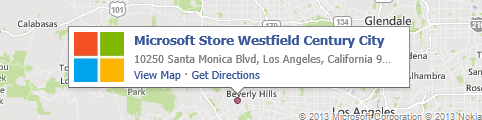
Microsoft Store Los Angeles
(Westfield Century City)

10250 Santa Monica Blvd
Los Angeles, CA 90067
Phone: (310) 228-3550

Pre-order now and receive 1600 Microsoft Points on pickup of full game purchase!

Note: You must pre-order in store by September 15th to be eligible for the 1600 Microsoft Points bonus.

MEETUP:
Join the Meetup group event for the launch!

« Newer Posts - Older Posts »

Categories