People complained a lot that our advertising & showcase videos didn’t highlight what you could actually DO that was special, distinctive, and competitive on Surface.
So we listened. And here’s 3 videos that show precisely that.
People complained a lot that our advertising & showcase videos didn’t highlight what you could actually DO that was special, distinctive, and competitive on Surface.
So we listened. And here’s 3 videos that show precisely that.
Comments Off on VIDEO: Three Surface 2 & Surface Pro 2 clips that highlight “What’s New”
Posted in Uncategorized
A quick 1:34 clip that talks about some of the technological improvements made in Surface 2, featuring Panos Panay, Ralf Groene, Steve Bathiche. Touch Cover & Type Cover improvements & design changes.
Comments Off on VIDEO: “The Making of Surface”
Posted in Uncategorized
We wrote one of our most confusing posts ever on the Windows Blog regarding Windows 8.1 Enterprise Edition, so just to be clear:
FOR VOLUME LICENSING CUSTOMERS:
Yeahyeahyeah, I know. However, it’s at least available & hopefully this clears this matter up. I don’t know for certain why things were done this way however from past experience, I suspect it likely has something to do with the exhaustive process required of posting the .ISO on VLSC Downloads, replicating it through our Content Distribution Network (CDN), and storing it redundantly with the TechNet copy of the .ISO. Understand that these two ‘networks’ are completely & totally separate (there is no overlap at all) and we actually outsource the VLSC to a different company, whereas I believe TechNet is handled internally and consequently a lot more agile.
Anyway, here’s the original post.
Comments Off on INFO: Getting Windows 8.1 Enterprise Edition as a Software Assurance/Volume Licensing customer
Posted in Uncategorized
Here’s a few of the things (but not nearly all) that I learned during the Panos Panay briefing here at Microsoft.
Comments Off on INFO: Things I learned about Surface 2/Pro 2/Surface Accessories
Posted in Uncategorized
[This is part 2 of a post about NFC for Windows Phone & Windows 7/8.]
NFC is a really interesting and potentially useful technology that Windows Phone 8 & Windows 7/8 users can harness. In this post, I go over starting to use NFC specifically for Windows 7/8, because if you read to the end, you’ll understand that even with Windows Phone 8, you might still need to have a Windows desktop to write some NFC tags.

NFC FOR MY WINDOWS DESKTOP/LAPTOP
There’s lots of options for desktop/laptop users. This will become important to understand in just a second. Here are the places I went to for my hardware & software:
There is also a tool from a company called TagStand. I have no idea if it’s any good but they charge $30 for what appears to be built into the the GoToTags Windows NFC app… but the tools is command line which may make it useful for scripting so who knows.
A WORD ON LOCKING/READ-ONLY NFC TAGS
When an NFC tag is locked, the data cannot be modified. Locking a tag is a permanent action and cannot be undone. This is important because without locking a tag however, anyone can change it’s contents when you’re not looking. Imagine the embarrassment of someone changing one of your tags to, say, redirect people to your competitor’s web site. Or overwriting your business card’s tag with something other than your vCard as a prank.
The issue is, locking/Read-only NFC tags is not possible from Windows Phone 8 as the operating system’s libraries don’t support the feature. Therefore in order to create locked, unmodifiable NFC tags, you must do so from another device. This can be accomplished using an USB-connected NFC reader/writer for Windows.
SO… HOW DO I LOCK NFC TAGS USING WINDOWS?
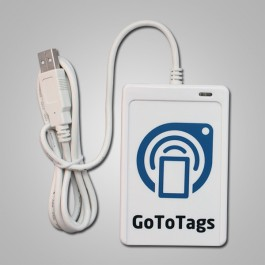
What I did was really simple. I got a USB NFC Reader/Writer – the cheapest one I’ve found is the ACS ACR122U NFC USB Reader and Writer ($45) from GoToTags – and download the FREE GoToTags NFC Windows App.
Then I used my Windows Phone & an NFC writing app to write the NFC tag I wanted. I encoded an NFC tag with a vCard with my contact information in it which was derived by my contact card in Outlook on my Windows Phone. NFC Interactor & Nokia NFC Writer makes doing this very easy.
At this point however, the NFC tag can still be overwritten, so I took the NFC Tag I wrote and used my desktop to read it using the USB Reader I bought & the GoToTags software. The software immediately picked up and loaded the NFC tag’s contents (my vCard) into memory. By default, when you write/encode NFC tags using the GoToTags software, it writes a “read only” NFC tag (something Windows Phone can’t do), so I just simply rewrote what was loaded into memory, write back out to the NFC tag – but this time, it was written “read only”, meaning the tag can’t be changed.
And there you have it. You might ask, why I didn’t just write the vCard on to my NFC tag directly in the first place skipping the Windows Phone process. Well, the GoToTags software doesn’t connect into Outlook so pulling contact data from an Outlook record isn’t possible. Windows Phone’s NFC writing apps however makes that easy.
OTHER WINDOWS PHONE 8 APPS FOR NFC
REFERENCES:
Comments Off on INFO: Near field communications (NFC) for Windows (Part 2 – Windows 7/8)
Posted in Uncategorized
Remember PhoneFactor? That two factor cell phone based authentication solution that we acquired that everyone liked? Ever wonder where Microsoft’s first implementation was?
Enter Windows Azure Multi-Factor Authentication.
Identity and access management is an anchor for security and top of mind for enterprise IT departments. It is key to extending anytime, anywhere access to employees, partners, and customers. Today, we are pleased to announce the General Availability of Windows Azure Multi-Factor Authentication – delivering increased access security and convenience for IT and end users.
Multi-Factor Authentication quickly enables an additional layer security for users signing in from around the globe. In addition to a username and password, users may authenticate via: 1) An application on their mobile device. 2) Automated voice call. 3) Text message with a passcode. It’s easy and meets user demand for a simple sign-in experience.
Windows Azure Multi-Factor Authentication can be configured in minutes for the many applications that require additional security, including:
- On-Premises VPNs, Web Applications, and More — Run the Multi-Factor Authentication Server on your existing hardware or in a Windows Azure Virtual Machine. Synchronize with your Windows Server Active Directory for automated user set up.
- Cloud Applications like Windows Azure, Office 365, and Dynamics CRM — Enable Multi-Factor Authentication for Windows Azure AD identities with the flip of a switch, and users will be prompted to set up multi-factor the next time they sign-in.
- Custom Applications — Use our SDK to build Multi-Factor Authentication phone call and text message authentication into your application’s sign-in or transaction processes.
For more details, read here:
http://blogs.msdn.com/b/windowsazure/archive/2013/09/26/announcing-general-availability-of-windows-azure-multi-factor-authentication.aspx
Comments Off on RELEASE: Windows Azure Multi-Factor Authentication
Posted in Uncategorized
I have a personal longer list than this that I’ll publish some day HOWEVER, here is what they published over at the Office 365 blog about what makes Outlook so much better for business mail than Gmail.
For explanations on each of these, check out the original post here:
Comments Off on ICYMI: 12 reasons why users prefer Outlook over Gmail at work
Posted in Uncategorized
Rights Management is now an implicit service within Office 365, which of course begs the question, “What’s Rights Management?” Here’s a brief explanation:
Have you ever had your email or documents shared or given to other people than you intended, or seen your company’s information shared with people outside the company by accident? Maybe you have information that you want to share confidentially with only a few trusted colleagues for purposes of collecting feedback, but you’re concerned that the information may get leaked inadvertently before you are ready?
Fortunately, with Rights Management in Office 365, you can secure your information and apply an intelligent policy so that only specified internal and/or external people can "act" on your information. For example, you can allow recipients to edit and print, while restricting them from forwarding to others. This policy is attached to the information, so it applies no matter where your information lives-in the datacenter, in transit, or on your laptop, mobile device, or a USB key. Rights Management lets you assign policies to email, SharePoint Online libraries, individual Office documents, and other file types.
Rights Management for Office 365 isn’t just data security or encryption, although you get both with access control and 128-bit AES encryption. Rights Management is about putting you, the creator of content, in control. Now, with you firmly in the driver’s seat, you can confidently share information with anyone.
…
Here’s a quick demo of these functions.
Read more about Rights Management for Office 365 here:
http://blogs.office.com/b/office365tech/archive/2013/09/10/collaborate-confidently-using-rights-management.aspx
Comments Off on RELEASE: Rights Management for Office 365
Posted in Uncategorized
Yes, the products are from a functional standpoint very similar but there are some key differences in the end user experience & the IT administration workloads that people need to know.
Get the break down of the differences in this video from Jeremy Chapman and Tal Krzypow in The Garage video series.
Read more here:
http://blogs.office.com/b/office365tech/archive/2013/09/18/the-garage-series-365-days-later-office-365-vs-office-2013-on-the-desktop-review.aspx
Comments Off on INFO: The Difference between Office 365 & Office 2013
Posted in Uncategorized
Join Microsoft Certified Master and Premier Field Engineer Mike Pfeiffer and senior technologist at Concentrated Technology Jason Helmick to learn what you need to know about deploying Exchange Server 2013 in this one-day course. These high energy instructors will teach how to manage the messaging infrastructure and provide high availability and security through real world demos geared to your business needs.
It’s appropriate for anyone upgrading from earlier versions of Exchange as well as IT Pros new to Exchange but with prior networking experience. If you are pursuing the MCSE: Messaging certification, it will help you prepare for Exam 70-341.
Date: October 8, 2013
Time: 9:00am – 5:00pm
Where: Live, online virtual classroom
Cost: Free!
—————
Comments Off on TRAINING: Free “Core Solutions of Microsoft Exchange Server 2013 Jump Start on October 8” course, Oct 8th
Posted in Uncategorized
You must be logged in to post a comment.