It would appear that Microsoft Research has solved the problem of animated GIF videos and their typically ‘jarring’ lack of fluidity & continuity when repeating.

“Video Loops” is a very comprehensive application that makes it possible for people to generate Animated GIFs that fluidly repeat.  It also allows the creator to select which areas of the video are activated for animation, saving space & providing more focus on specific areas of motion.  As it’s described:

An application to extract a 5-second looping video from a non-looping input video. Also a viewer application to enable both interactive control over the level of dynamism of the output video, as well as manual editing of which regions animate or are static.

Here’s a video explaining how this works:

Automated video looping with proggressive dynamism

For more details, read the following paper:

To try the software, download it here:

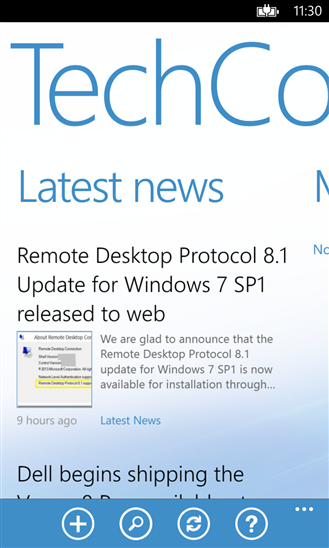
imageThe Microsoft Tech Companion app brings you the latest news on products, features, and upcoming events, virtually anywhere. Customize feeds to surface the content that matter most to you. Search for answers from a consolidated database of Microsoft content.

Key features:

  • Access news and topics from virtually anywhere using either your Phone or Tablet.
  • Stay up-to-date with news and events that interest you
  • Customizable feeds – Define feeds around products, terms, features, and functions. Turn them into live tiles that alert you with updates and customize the tiles with a splash of color
  • Bookmarks – Save a specific news topic, library article or blog in the application to easily find it again in the future (and be alerted when it has been updated)
  • Streaming news – Microsoft news, events, you name it; it all streams to the app’s news reader
  • Always with you – Sign in with your Microsoft ID and your settings will sync to every device installed with the app

Search Microsoft all at once

  • Search through blogs, wikis, and library topics
  • Filter results by source and/or product and version
  • Save your searches for future reference
  • Stay up-to-date on a specific subject that interests you. Turn your searches into custom feeds
  • Share content with friends and colleagues

Visit the following links to download the tool:

Blog Announcement:

Posted by: kurtsh | December 16, 2013

NEWS: Microsoft introduces the “Cloud OS Network”

Imagine a partnership between Microsoft, T-Systems, CapGemini, CSC, Wortmann AG, Dimension Data, Fujitsu, and other global names in cloud implementation, all supporting Hyper-V & Windows Azure.  That’s the “Cloud OS Network”.

Today, Microsoft introduced the Cloud OS Network, a worldwide group of more than 25 leading cloud service providers who have embraced our Cloud OS vision and will deliver hosted services built on the Microsoft Cloud Platform, which includes Windows Server with Hyper-V, System Center and the Windows Azure Pack. This announcement represents important progress against our goals and strategy for Cloud OS. More importantly, it is great news for enterprise customers across the globe.

Read more here:

image

Posted by: kurtsh | December 16, 2013

RELEASE: Internet Explorer 11 for Windows 7

Yeah, I know I’m late posting this, but in case you hadn’t heard…

Building Internet Explorer 11

IE11 for Windows 7 Globally Available for Consumers and Businesses
Internet Explorer 11 (IE11) is available worldwide in 95 languages for
download today. We will begin automatically updating Windows 7 customers to IE11 in the weeks ahead, starting today with customers running the IE11 Developer and Release Previews. With this final release, IE11 brings the same leading standards support–with improved performance, security, privacy, and reliability that consumers enjoy on Windows 8.1—to Windows 7 customers.

And with Windows 8.1, IE11 delivers the best experience of your sites and apps together. IE11 on Windows 8.1 delivers an experience that is fast, fluid and perfect for touch – the best Web experience on any tablet.

Read more here:

Posted by: kurtsh | December 16, 2013

EVENT: BUILD 2014 – San Francisco, April 2nd, 2014

image

We just announced the dates of the annual BUIILD conference, the 3 day event for developers interested in building solutions on Windows, Windows Phone, Windows Azure, Windows Server, Visual studio, etc.

The momentum just keeps building and that is why I’m so excited to announce our next developer conference, Build 2014, which will take place April 2 to April 4 at the Moscone Center in San Francisco. Save the date and mark your calendar for registration, which opens at 9 a.m. PT on Jan. 14 at www.buildwindows.com.

Last year’s event had over 6000 attendees and was sold out in just a couple hours so when the registration opens up on Jan 14th, I’d be prepared with your browser open.

Read more at the Microsoft Blog:

Posted by: kurtsh | December 12, 2013

RELEASE: Security Intelligence Report v15 from Microsoft

Microsoft recently released volume 15 of the Microsoft Security Intelligence Report (SIR) (download PDF), with insights on security vulnerabilities, exploit activity, malware and potentially unwanted software, spam, phishing, malicious websites, and security trends worldwide.

image

Threat awareness can help you protect your organization, software, and people, and the SIR is a great source of data to build that awareness.

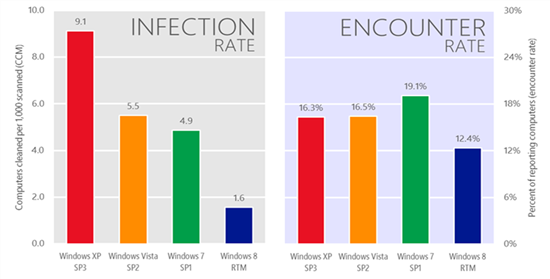
The latest report, SIRv15 includes new information about the security benefits of running a modern operating system. Data shows that while all currently supported versions of Windows (Windows XP, Windows Vista, Windows 7 and Windows 8) are exposed to similar amounts of malware, the infection rate on Windows XP was six times higher than that of Windows 8.

And computers running Windows XP will face even greater security risks once support ends for the operating system in April 2014. Current Windows XP users are strongly encouraged to upgrade to a modern operating system before that deadline.  Trustworthy Computing Director Tim Rains discusses this subject further in a related blog post.

The SIR is the most comprehensive report on cybersecurity threat trends in the industry, and offers prescriptive guidance to help customers manage risk and protect their assets.  It also includes Regional Threat Assessments for more than 100 countries and regions around the world.

Check it out here:

Kinect & Sign Language Translation


What’s on the horizon with Kinect – sign language interpretation.  Note: This is research being done with the original low-resolution Kinect and not the new high resolution, high power Kinect 2.

Posted by: kurtsh | December 12, 2013

RELEASE: Release Management for Visual Studio 2013

imageDevOps is an increasingly important part of application lifecycle management and is a growing area of interest as businesses need to develop and deploy quality applications at a faster pace. As part of this increased focus, we’re excited to announce Release Management for Visual Studio 2013, a solution for .NET and Windows Server applications.

Release Management for Visual Studio 2013 is a continuous delivery solution that works with VS 2010, 2012, and 2013 that automates the release process through all of your environments from TFS through to production, all in one solution, and all integrated with TFS. Here are some resources that will help you get started with this area.

For more on this, read the announcement post at:

Posted by: kurtsh | December 12, 2013

HOWTO: Migrate from Gmail to Outlook.com

By now, it should be common knowledge that Google generates a persistent “dossier” or “profile” on each of its Gmail users to provide rich targeting for the advertising they sell to their advertisers.  If you don’t know about this, you need to read this site carefully:

For folks that would prefer to use a messaging service that DOESN’T DO THIS, we have provided a migration path for Gmail users to Outlook.com… and guess what?  We now do all the heavy lifting for you.

NO COMMITMENT BEFORE OR AFTER
To be clear:  You make NO commitment to moving to Outlook.com even after the migration takes place.  Nothing is changed.  All Microsoft does is:

  • Copy your email over to a new Outlook.com account, including attributes, flags, etc.
  • Provide guidance on auto-forwarding your Gmail to your Outlook.com email

If you want to switch back, there’s nothing you need to do.  You can continue to use your Gmail account like nothing ever happened.  Our bet is that you won’t.

HOW TO SWITCH TO OUTLOOK.COM
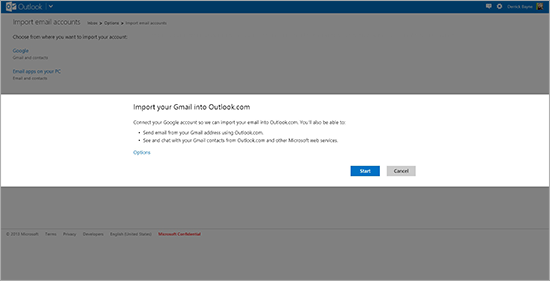
All you need to do is follow a few simple steps to connect your Gmail account (using OAuth) to your Outlook.com account (if you don’t already have one, it’s easy to get). This will import your Gmail emails into your Outlook.com inbox and, because you’ve connected both accounts, your Google contacts will automatically appear in Outlook.com. The structure of your inbox, including read/unread status of your emails, will be preserved. The new tool will even set up your Gmail address as a "send-only" account so you can continue to send email from your @gmail.com address, right from Outlook.com, if you still want to.

image

For more details on this, please visit our announcement page at:

Posted by: kurtsh | December 12, 2013

INFO: Project Conference 2014 full session list

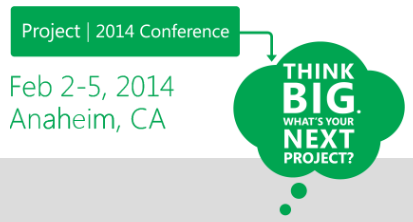
imageNearly 100 sessions are now available at the Project Conference Website, and it’s time to start finding the content that’s best for you. 

Sessions are broken into three tracks–Business, Product, and Technical–to ensure that there is plenty of content for Business Decision Makers, Project Practitioners, and Technical Professionals. Read detailed descriptions and speaker bios are available for our Top 10 Sessions, then review the full session list with helpful filters before you register for the event.

« Newer Posts - Older Posts »

Categories