Posted by: kurtsh | November 18, 2013

DOWNLOAD: “Office Remote” app for Windows Phone 8

imageThis is cool.

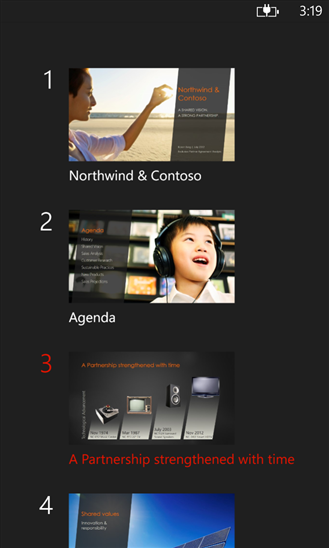
Office Remote turns your phone into a smart remote that interacts with Microsoft Office on your PC. The app lets you control Word, Excel, and PowerPoint from across the room, so you can walk around freely during presentations.

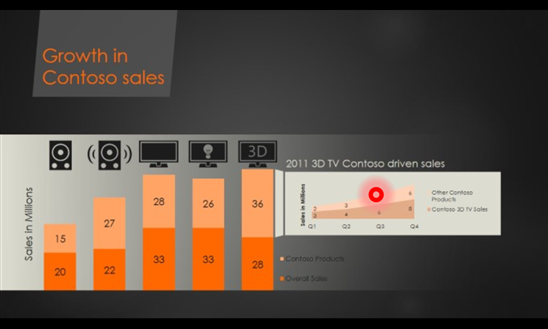
With Office Remote, you can start your PowerPoint presentation, advance the slides, see your speaker notes, and control an on-screen laser pointer with a touch of your finger — all from your phone. You can also navigate between Excel worksheets and graphs, and control data slicers from the palm of your hand. And you can scroll through a Word document or quickly jump to specific sections or comments.

App requirements:

  • Microsoft Office 2013. This app does not work with Office 2013 RT or earlier versions of Office.
  • Bluetooth on your PC
  • The desktop add-in for Office Remote must be installed on your PC http://aka.ms/officeremotepc

imageOffice Remote has the following features:

  • PowerPoint:
      • Jump to the next, previous, and last slide
      • View slide thumbnails and jump to a slide
      • View speaker notes on phone
      • View presentation timer and slide numbers
      • Laser pointer using touch on your phone
  • Excel:
      • Change worksheets by swiping
      • Use Slicers, PivotTable, and Filters
      • Jump to any named object in your workbook
      • Move up or down the worksheet
      • Change the zoom level
  • Word:
      • Jump to headings
      • Jump to comments
      • Screen up/down
      • Line up/down
      • Change the zoom level

Read more about it here:

This was a pretty interesting post so I decided to amplify it a bit.

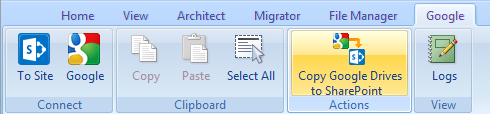
Architect Update: Migrating Google Drive Content to Office 365
We’ve had many requests for the ability to quickly migrate content from Google Apps to Office 365 as companies make the decision to move to the Microsoft cloud platform. So we are pleased to let you know that there is now an easy way to bulk migrate the content stored in your enterprise Google Apps account to SkyDrive Pro used for an Office 365 tenancy.

image

What you get is a simple interactive Wizard that once authenticated to access to your enterprise Google Apps account, will automatically discover Google Drives and SkyDrive Pro areas (note that the SkyDrive Pro accounts must already exist). You can then select the content to copy over, taking metadata and versions, as well as folder structures and permissions. It will also convert content from Google Docs format to Microsoft Office formats.

Interesting?  Read more here:

(Thx Mary Branscombe for the great tip)

image

Midnight on 11/22 will mark the beginning of a new generation of games and entertainment with the arrival of Xbox One.

Over 9,500 retail locations will open at midnight for our fans to pick up their consoles.

An hour long TV special will be aired on Spike TV, Xbox Live and Xbox.com at 11pm EST on Thursday, Nov.  21st, featuring live performances by Macklemore & Ryan Lewis and Deadmau5, along with a variety of stunts that celebrate our games.

…begun, the console wars have…

Posted by: kurtsh | November 17, 2013

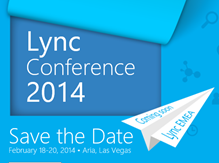
EVENT: Upcoming Microsoft Conferences for 2013-2014

imageimageimage

For those of you involved with Microsoft technologies, looking to budget & book for the upcoming year’s educational & networking events, this is my list of upcoming conferences, registration URLs, and their locations in order of executions based on my own knowledge:

The following events are not listed/unannounced:

  • Security Development Conference
    (Last event was May 14-15, 2013 in San Francisco, CA)
  • BUILD Developers Conference
    (Last event was June 26-28, 2013 in San Francisco, CA)
  • Microsoft Management Summit
    (MMS was officially announced as being merged into TechEd North America 2014 in Houston, TX.  Last event was April 8-12 in Las Vegas, NV)

image

If Identity, Access, Directories, Information Protection, and the Cloud are important to your work, or if the following products ring a bell:

  • Forefront Identity Manager 2010 R2 w/ Role-based Access Control
  • Active Directory
  • Windows Azure & Azure Active Directory
  • Rights Management Services
  • Office 365

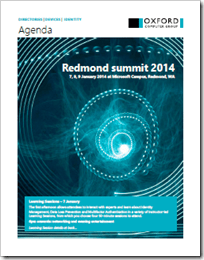
…you may want to consider attending this conference held in part in Redmond, WA on the Microsoft campus called “Directories, Devices & Identity: Redmond Summit 2014” by the Oxford Computer Group.

“Directories, Devices and Identity”
Redmond Summit 2014, Oxford Computer Group
January 7-9, 2014

If your organization needs to offer new services, our summit will help you get you where you need to be. It will show the different ways in which identity can support new business demands.Technical and business discussion sessions will help decision-makers and technicians understand the technology and what it can achieve. The summit has two tracks:

  • The technical track includes in depth presentations by Microsoft product team members, OCG consultants and architects, and others. They’ll address topics including hybrid cloud, FIM 2010 R2, RBAC, Azure AD, information protection, Office 365, and more. 
  • On the business track delegates will learn from other customers’ experiences with a series of case studies. You’ll get an accurate view of the direction of Microsoft identity products helping you plan for the future.

Day one the first afternoon allows attendees to interact with experts and learn about Identity Management, Data Loss Prevention and Multi-factor Authentication in 12 instructor-led learning labs, from which you choose six.

Days two and three are packed with business and technical presentations on subjects including audit automation, Azure, authentication, attestation, hybrid IT given by some of the leading lights in the field. Their knowledge will help you make the right decisions for your organization’s technical wellbeing into the future.

Price per delegate $800.

This should be great event for individuals involved with Active Directory & responsible for integrating the Cloud into their environment, specifically Office 365 & Windows Azure.

I got asked this question just a moment ago and thought I’’d post this:

Q: Where’s the Group Policy Templates (.ADMX) files for Windows 8.1?  You have spreadsheets that are downloadable that go through what each policy is for Windows 8.1 but you don’t have a download for the actual .ADMX files themselves?

Take a look at this on our Springboard Series blog:  (Our Windows Deployment blog)

This blog post we just published talks about the Windows 8.1 policies specifically.  Ben Hunter, the Microsoft writer of the post says in the comments that the ADMX files have not been posted yet.  I have our Client Specialist looking into what is the ETA is for a formal download of the packaged Group Policy Templates for Windows 8.1.

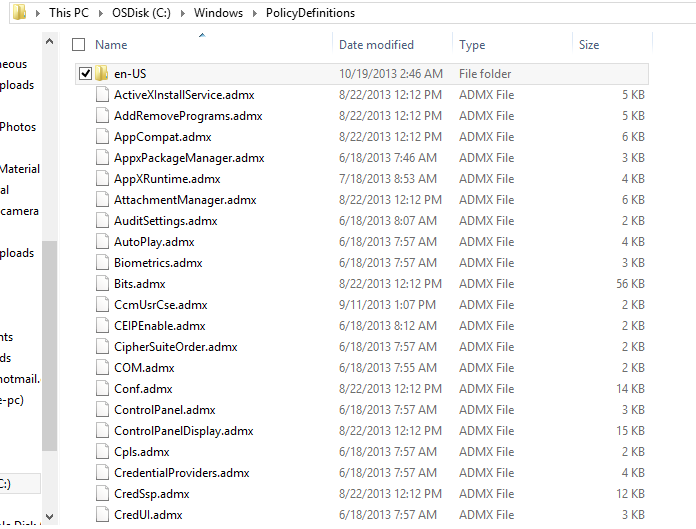
The commenters however point to the C:\Windows\PolicyDefinitions directory on a Windows 8.1 installation for the .ADMX files.  Here’s a snapshot of the directory on my machine so you may want to take a look at that:

image

Xbox One

You're invited to celebrate the launch of Xbox One.


Be part of history when you buy your Xbox One at our launch event at Milk Studios in Los Angeles on November 21. Count down to midnight with great games, entertainment, and special gifts.

Join us at Milk Studios
The first 500 to purchase an Xbox One entertainment system or Xbox One game on-site can enjoy an exclusive VIP concert with deadmau5 and 7Wallace.*

The first 1,000 to purchase an Xbox One entertainment system on-site get exclusive giveaways including:
Powerstar Golf**
LocoCycle**
6-month Xbox Live Gold membership
And more…

LOCATION:
Milk Studios • 855 N Cahuenga Blvd (entrance on Cole Ave)
Los Angeles • Must be 18+
Thursday, November 21
Purchase begins at 10 A.M. • Doors open at 6 P.M.

* Must be 18 years of age or older. Qualifying purchase of Xbox One system or Xbox One game must be made onsite at Milk Studios-LA, 855 N Cahuenga Blvd, Los Angeles, CA 90038. Purchases will begin at 10 A.M Pacific Standard Time and console fulfillment begins at 12:01 A.M. No limit to consoles or games purchased. Doors open at 6 P.M. for gaming and concert. Limit 1 concert invite per person, irrespective of consoles or games purchased. Offer not valid on prior purchases and is non-transferable. Taxes, if any, are the sole responsibility of the recipient.

**    Powerstar Golf and LocoCycle will be provided via a game download card.

Be part of history. Attend our launch event, and countdown to midnight with games, entertainment, and special gifts. | View as web page

We are pleased to announce the beta availability of version 9.0 of the Microsoft Assessment and Planning (MAP) Toolkit. This beta release of the MAP Toolkit helps increase the agility and cost effectiveness of deploying the latest Microsoft technologies. It also enhances usage tracking to include accounting for Remote Desktop Services as well as Server and Cloud Enrollment licensed deployments. MAP 9.0 beta additionally helps organizations assess their environment for Office 2013 and Office 365, track usage of Windows Server 2012, Lync Server 2013, SharePoint Server 2013, Exchange Server 2013, System Center Configuration Manager 2012, and SQL Server 2012. The Windows Azure assessment report has also been updated to include the latest Azure sizing.

New Server and Cloud Enrollment scenario helps to simplify adoption
Server and Cloud Enrollment (SCE) is a new offering under the Microsoft Enterprise Agreement that enables subscribers to standardize broadly on one or more Microsoft Server and Cloud technologies. The MAP Toolkit 9.0 features an assessment scenario to identify and inventory SCE supported products within an enterprise and help streamline enrollment.

New Remote Desktop Services Licensing Usage Tracking scenario creates a single view for enterprise wide licensing
With an increase in enterprises deploying Remote Desktop Services (RDS) across wider channels, RDS license management has become a focus point for organizations. With the new RDS Licensing scenario, the MAP Toolkit rolls up license information enterprise-wide into a single report, providing a simple alternative for assessing your RDS licensing position.

Support for software inventory via Software ID tags now available
As part of the Microsoft effort to support ISO 19770-2, the MAP Toolkit now supports inventory of Microsoft products by Software ID (SWID) tag. SWID enhanced reports will provide greater accuracy and assist large, complex environments to better manage their software compliance efforts by simplifying the software identification process and lowering the cost of managing software assets.

Improved Usage Tracking data collection for SQL Server Usage Tracking scenarios
As part of our ongoing improvement initiatives, Usage Tracking for SQL Server 2012 has been enhanced to use User Access Logging (UAL). UAL is a standard protocol in Windows Server 2012 that collects User Access information in near real time and stores the information in a local database, eliminating the need for log parsing to perform Usage Tracking assessments. UAL vastly improves the speed and helps to eliminate long lead times for environment preparation associated with running Usage Tracking assessments.

Download the MAP Toolkit 9.0 now!

Do you know someone who would be interested in participating in this beta? Use the following link to register for the MAP Toolkit beta program (requires a Microsoft Live ID): https://connect.microsoft.com/site297/InvitationUse.aspx?ProgramID=1668&InvitationID=MAP-B8H8-KMJ2

Well, this is interesting.  If you’re interested in hosting desktops within Windows Azure for what looks to be the first documented solution for VDI in the Microsoft cloud, you’ve come to the right place.

imageWindows Azure Desktop Hosting Reference Architecture Guide

This document defines a set of architectural blocks for using Windows Azure Virtual Machines to create multitenant, hosted Windows desktop and application services, referred to in this document as “desktop hosting.” The primary goal is to enable hosting providers to create secure, scalable, and reliable desktop hosting solution offers for small- and medium-sized organizations with up to 1,500 users. The intended audience for this reference architecture is hosting providers who want to leverage Windows Azure infrastructure services to deliver desktop hosting services and Subscriber Access Licenses (SALs) to multiple tenants via the Microsoft Service Provider Licensing Agreement (SPLA) program. To deliver a desktop hosting solution via Microsoft’s SPLA program, hosting partners leverage Windows Server and the Windows Desktop Experience feature to deliver Windows users an application experience that is familiar to business users and consumers. Although Windows 8, Windows 7, and earlier Windows client versions are not licensed for SPLA, the Desktop Experience feature in Windows Server 2012 provides a similar user experience and application support.

imageWindows Azure Desktop Hosting Deployment Guide

This document provides procedural guidance for deploying a basic desktop hosting solution based on the Windows Azure Desktop Hosting Reference Architecture Guide. This document provides you with a starting point for implementing a Desktop Hosting service on Windows Azure virtual machines. You’ll have to perform additional deployment steps in a production environment to provide advanced features such as high availability, customized desktop experience, RemoteApp collections, etc.

Download both guides here:

This download consists of 6 spreadsheets:

  • WindowsServer2012andWindows8GroupPolicySettings.xlsx
  • WindowsServer2003SP2GroupPolicySettings.xls
  • WindowsServer2008andWindowsVistaSP1GroupPolicySettings.xlsx
  • WindowsServer2008R2andWindows7GroupPolicySettings.xlsx
  • WindowsServer2012R2andWindows8.1GroupPolicySettings.xlsx
  • WindowsVistaGroupPolicySettings.xls

These spreadsheets list the policy settings for computer and user configurations that are included in the Administrative template files delivered with the Windows operating systems specified. You can configure these policy settings when you edit Group Policy Objects.

You can use the filtering capabilities that are included in this spreadsheet to view a specific subset of data, based on one value or a combination of values that are available in one or more of the columns. In addition, you can click Custom in the drop-down list of any of the column headings to add additional filtering criteria within that column.

To view a specific subset of data, click the drop-down arrow in the column heading of cells that contain the value or combination of values on which you want to filter, and then click the desired value in the drop-down list. For example, to view policy settings that are available for Windows Server 2012 R2 or Windows 8.1, in the Administrative Template worksheet, click the drop-down arrow next to Supported On, and then click At least Microsoft Windows Server 2012 R2 or Windows 8.1.

What’s New?
The Administrative Template spreadsheet contains three columns that provide more information about each policy setting’s behavior related to reboots, logoffs, and schema extensions. These columns are the following:

  • Reboot Required: A "Yes" in this column means that the Windows operating systems requires a restart before it applies the described policy setting.
  • Logoff Required: A "Yes" in this column means that the Windows operating system requires the user to log off and log on again before it applies the described policy setting.
  • Active Directory Schema or Domain Requirements: A "Yes" in this column means that you must extend the Active Directory schema before you can deploy this policy setting.
  • Status: A "New" in this column means that the setting did not exist prior to Windows Server 2012 R2 and Windows 8.1. It does not mean that the setting applies only to Windows Server 2012 R2 and Windows 8.1. Refer to the column entitled "supported on" to determine to which operating system the policy setting applies.

——————–

« Newer Posts - Older Posts »

Categories