image

Calling all campers!

Registration is open for free weekly in-store camps.

Camps are broken up into two age groups for Jr. Designers (recommended for ages 8-10) and Designers (recommended for ages 11-13), so choose the camp that fits your student’s interest and sign up today.

  • Smart Movie Making – Junior Designer
    Shoot. Edit. Watch. Capture all the action without the lights or fancy camera. Unleash your imagination and start making real movies right from your phone or tablet. Using Windows Phone and Surface Pro, we’ll teach you how produce, direct, design and animate your own flicks, any time you want. Get ready to impress and share your masterpieces with your family and friends! Camps are 2 hours a day, Monday-Thursday, 10AM-12PM Junior Designers Summer Camp: Recommended for 8-10 years of age Registering for this event will register you for the entire series.
  • imageSmart Movie Making – Designer
    Shoot. Edit. Watch. Capture all the action without the lights or fancy camera. Unleash your imagination and start making real movies right from your phone or tablet. Using Windows Phone and Surface Pro, we’ll teach you how produce, direct, design and animate your own flicks, any time you want. Get ready to impress and share your masterpieces with your family and friends! Camps are 2 hours a day, Monday-Thursday, 1PM-3PM Designers Summer Camp: Recommended for 11-13 years of age. Registering for this event will register you for the entire series.
  • Smart Photo Taking – Junior Designer
    Point. Snap. Perfect. Why do some photos just pop? Learn new tricks for taking great photos from your phone. We’ll teach you how to edit photos, adjust lighting and colors, and even apply filters for more effects. Beyond basic images, we’ll help you build interactive worlds in Photosynth, make yourself into art with Photo Fuse, and create huge panoramas with Gigipixel ArtZoom. Camps are 2 hours a day, Monday-Thursday, 10AM-12PM Junior Designers Summer Camp: Recommended for 8-10 years of age. Registering for this event will register you for the entire series.
  • imageSmart Photo Taking – Designer
    Point. Snap. Perfect. Why do some photos just pop? Learn new tricks for taking great photos from your phone. We’ll teach you how to edit photos, adjust lighting and colors, and even apply filters for more effects. Beyond basic images, we’ll help you build interactive worlds in Photosynth, make yourself into art with Photo Fuse, and create huge panoramas with Gigipixel ArtZoom. Camps are 2 hours a day, Monday-Thursday, , 1PM-3PM Designers Summer Camp: Recommended for 11-13 years of age. Registering for this event will register you for the entire series.

  • imageSmart Game Coding
    Code. Create. Play. Websites and applications come from code, but where does code come from? In this camp for “Junior Designers”, you’ll use the kid-friendly visual programming language Kodu to learn about how creativity, problem solving, storytelling, and programming come together to make something all your own. We’ll then introduce you to TouchDevelop, a mobile app creation platform with a touch-based editor that makes coding from your phone or tablet lots of fun. Camps are 2 hours a day, Monday-Thursday, 10AM-12PM Junior Designers Summer Camp: Recommended for 8-10 years of age Registering for this event will register you for the entire series.
  • imageSmart Game Designing
    Design. Develop. Compete. Want to play a game that doesn’t exist yet? You could simply make it yourself. In this “Designers” camp, go behind the screens with TouchDevelop and ProjectSpark to learn how to build and publish amazing mobile games. As a “game maker” game, ProjectSpark will allow you to make your own virtual world and bring it to life so you can create games, movies, and unique digital experiences. With TouchDevelop, you’ll remix, share and play amazing new games, all right on your phone. Camps are 2 hours a day, Monday-Thursday, 1PM-3PM Designers Summer Camp: Recommended for 11-13 years of age Registering for this event will register you for the entire series.

REGISTER NOW!
http://content.microsoftstore.com/en-us/summercamps/westfieldcenturycity

clip_image002The most common Office 365 subscription package for Enterprise businesses is the “E3” suite, which has:

For reference however, there are FIVE other Office 365 services that are available separately that don’t come included with “E3”: (See chart above)

There is also one suite of services that is available that is related to Office 365, and is focused on Enterprise Mobility that is again, available separately:

clip_image002

Building on the success of live streaming the 2014 Sochi Winter Olympics, Azure Media Services will soon be opening up the underlying technology that made this possible to all of our customers. Join us for a live, in-depth discussion about the exciting new features and key advantages of moving media processing to the cloud. Learn how five major broadcasters expanded their digital audience and reduced the cost and complexity of delivering a broadcast-caliber experience to millions of viewers in twenty-two countries on today’s most popular consumer and mobile devices.

Register to attend this complimentary webinar on Tuesday, June 3rd, 2014 from 11:00 A.M. – 12:00 P.M. PDT.

imageAre you missing Microsoft TechEd North America 2014?  Well, you’re in luck!  90+ sessions have already been posted to the Channel9 web site for you to access on-demand.

And we are making the recording files downloadable for offline viewing in 4 formats:

  • Audio only (MP3)
  • Mobile Video (MP4)
  • Mid-level Video (MP4)
  • High-quality Video (MP4)

Enjoy!  And if you’re a customer of mine, (you know who you are) YES, I will have access to the actual PowerPoint slide decks from each session so let me know if you really need them and I’ll see what I can do.

UPDATE 5/16/14:
Lucky us!  The Office Deployment blog published a post about this new feature they are calling “Application Selection”.

——————

ORIGINAL POST 5/14/14:
VIDEO: Updates to Office 365 ProPlus for admins and first look at upcoming shared computer support

This week Jeremy is joined again by Curtis Sawin to demonstrate the latest admin features in Office 365 ProPlus and Click-to-Run. If you’ve wanted to install the entire Office suite without InfoPath or Access apps, it’s now possible and they’ll walk you through the new admin processes to do so. They also go under the hood to show how the Click-to-Run software update process works and even give a first look of the upcoming Shared Computer Activation capability.
http://youtu.be/Y967vNMy7Fc?t=2m47s

Updates to Office 365 ProPlus for admins and first look at upcoming shared computer support


The Office Garage demonstrates 3 new capabilities:

  • DEPLOY CUSTOM INSTALLATIONS OF OFFICE 365
    They demo deploying Office 365 ProPlus WITHOUT Access, Infopath, & Groove. These are true deployment exclusions & not just “hidden links” or “blocked executables”, i.e. none of the Infopath software is actually installed on the client.
  • UPDATING OFFICE FOR THE USER THAT HAS EXCEL or OUTLOOK OPEN 24/7
    Also, they demonstrate delta update downloads (compressed) being installed while end users are using the application being patched, i.e. how do we patch a user who’s Office installation is perpetually being used & has open documents in them.
  • INSTALL OFFICE FOR VDI/RDS ENVIRONMENTS i.e. SHARE COMPUTER SUPPORT
    Lastly, they demonstrate installing Office 365 ProPlus specifically for RDS or VDI environments, making it possible to ensure that a logged in subscribed user can run Office 365 versus non-subscribed users who cannot – even if they’re Domain Administrators.

(*Note: Requires updated version of Office Deployment Tool.)

For a full rundown of all these demonstrations, visit the Office blog at:
http://blogs.office.com/2014/05/14/the-garage-series-for-office-365-updates-to-office-365-proplus-for-admins-and-first-look-at-upcoming-shared-computer-support/

Posted by: kurtsh | May 6, 2014

NEWS: Kuratas mecha… brought to you by Microsoft

Kuratas! Launch!


Notice the logos and branding on the Kuratas mecha that Japanese voice actor Toru Furuya is getting into?

imageimage

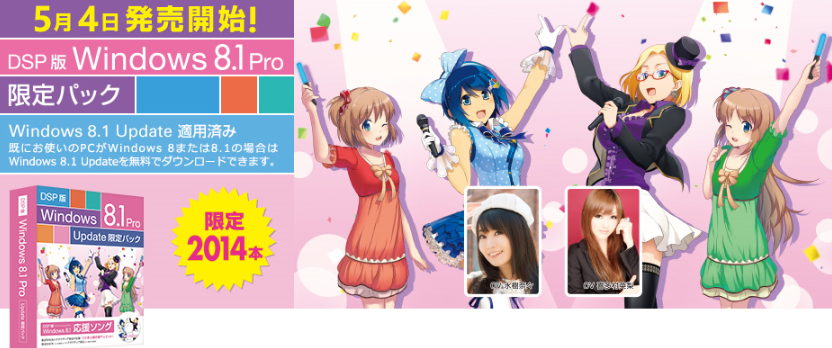
This is part of a larger promotion that we’re doing in Japan around the Windows 8.1 Update during the Microsoft Windows Spring Festival 2014 in Akihabara.

image

There’s more coverage on CNET:

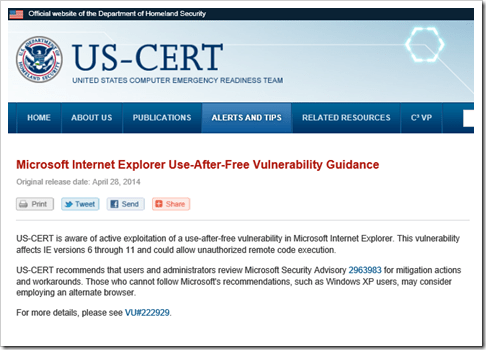
If you need to school anyone that blurts out this nonsense about the Dept of Homeland Security purportedly telling people to “ditch Internet Explorer” or “Stop Using Internet Explorer” or “Don’t use IE”, here’s EXACTLY what the DHS actually said:

image

Seriously.  That’s it.  This is the single paragraph that the media is writing these “dump IE” articles about:

“US-CERT recommends that users and administrators review Microsoft Security Advisory 2963983 for mitigation actions and workarounds. Those who cannot follow Microsoft’s recommendations, such as Windows XP users, may consider employing an alternate browser.”

If you can’t patch, you might want to try another browser:  That’s all they’re saying.  They never say, “don’t use Internet Explorer”.  There’s absolutely nothing here that’s newsworthy written here & this post this could technically apply to ANY piece of software including Chrome, Firefox, & Safari.  Yet somehow, here’s an example of some of the articles that are being written:

Ridiculous ‘eh?

SOURCE:
http://www.us-cert.gov/ncas/current-activity/2014/04/28/Microsoft-Internet-Explorer-Use-After-Free-Vulnerability-Being

imageAnnouncement made about the recent out-of-band patch being issued tomorrow:

At approximately 10 a.m. PDT, we will release an out-of-band security update to address the issue affecting Internet Explorer (IE) that was first discussed in Security Advisory 2963983. This update is fully tested and ready for release for all affected versions of the browser.

The headline grabbing point about this release is that we’re issuing the patch for Windows XP, along with supported versions of Windows, despite XP being out of support.

For more information, read the MSRC post:

To view the webcast on Friday, May 2, 2014 11:00 a.m. PDT, register at:

image

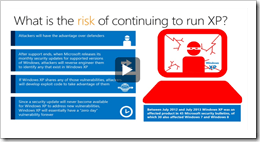
Support for Windows XP ends this month. No big deal you say? Well not so fast my friends. Tune in as Blain Barton interviews Tim Rains, Director of Trustworthy Computing at Microsoft as he lays out the many security risks you open yourself and your organization up to by running Windows XP.

  • [3:44] What are the kind of security risks folks may face as support of XP ends?
  • [4:48] How does Microsoft protect its customers from security threats?
  • [6:11] What exactly does Windows XP end of support mean?
  • [8:38] What is risk of continuing to run XP?
  • [14:48] What motivates cyber attackers?
  • [18:17] What is ransomware?
  • [21:48] What are some typical threats users should expect against Windows XP?
  • [30:26] What should people do if they’re running Windows XP?

One of the things they go over is the key threat of how malware writers reverse engineer vulnerabilities for supported versions of Windows an apply them to Windows XP, which will never be patched.  Thus Windows XP users have a new zero day vulnerability… forever.

Posted by: kurtsh | May 1, 2014

NEWS: Microsoft acquires GreenButton

image

Compute clustering just got a lot more convenient, courtesy of Microsoft.

We announced on our Windows Azure blog today that we acquired New Zealand-based GreenButton, a provider of integrated on-demand solutions that allow customers to manage compute-intensive workloads in the cloud. The existing GreenButton service will no longer be available to new customers & we will launch a new service integrated in Azure later in the year.

image

What is Green Button? (Video)

« Newer Posts - Older Posts »

Categories