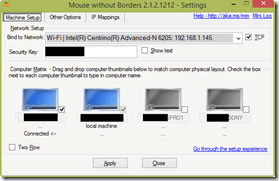
 UPDATE 2/27/17:
I see that this post still gets a lot of hits. Just a mention that I’ve stopped using Mouse without Borders entirely and moved on to using “Stardock/EdgeRunner Multiplicity”, which accomplishes the same thing as Mouse without Borders except it’s supported on Windows 10, provides encrypted PC-to-PC communication, has great tech support, and other improved features.
Please see the following post for more info:
https://kurtsh.com/2017/01/17/tool-kurts-favorite-tools-for-windows/
ORIGINAL POST – 6/24/14:
I found this user guide for Mouse without Borders, aka MagicMouse and in case it’s not published, here it is.
Mouse without Borders Setup and User Guide
Supported operating systems
- Mouse without Borders works in the following operating systems, both X86 and X64: Windows 8, Windows 7, Vista, Windows Server 2008, Windows Server 2003 and Windows XP.
Setup and configure Mouse without Borders
- Download and run the msi file to install Mouse without Borders separately in every machine.
- Mouse without Borders gets launched after installation. You will see Mouse without Borders icon in the system tray (in Windows 7 you might need to click on the small arrow “Show hidden Icons” button on the system tray and pull the Mouse without Borders icon down to keep it visible). Now right click on the icon and choose <Settings>, settings form will show up. Click on the [Help] link on the form to see setup steps.
Features
- The main feature is to use one set of keyboard and mouse to work with multiple machines. When you move the mouse cursor to any machine, you can use keyboard to control that machine.
- You can simply copy text/image/file from one machine and paste to all other machines.
- Drag and Drop file across machines is a plus feature. You can drag and drop a single file only and the file will be dropped to your desktop.
- You can also use Mouse without Borders to get screenshots of other machines. Click on the menu item on Mouse without Borders popup menu to use this feature.
- You can switch to multi mode to control all machines concurrently. Press the Ctrl key fast three times to switch to this mode, do this again to switch to normal mode.
- And a fancy feature for Windows 7. Personalize your Logon Screen using your local copy of photos or Bing home page image.
Usage tips, known issues and FAQs
- You can lock/unlock all machines at one by switching to multi-mode first (hit Ctrl fast three times) then use Windows+L to lock all machines. Assuming you use the same account in all machines so you can then type the same password to unlock them at the same time.
- If you lose keyboard control for any reason then Ctrl+Alt+Del would help.
- TCP protocol is recommended. If UDP protocol is used, Mouse without Borders might not work well with machine with wireless network connection or machine with multiple Network Interface Cards. To configure see type and IP addresses of your network connections, run ncpa.cpl (Windows+R then type ncpa.cpl and hit enter).
- You can configure Mouse without Borders service to start manually in the service control manager. By doing so, Mouse without Borders only starts when you launch it from Start\All Programs\MouseWithoutBorders. To run service control manager, click on Run, type services.msc then hit Enter. Look for Mouse without Borders Service in the list, double click on it then set Start type to manual
Known issue
- Share clipboard sometimes stops working, a workaround is to use Ctrl+C to do copying then it should work most of times.
- Few users found out disabling UAC helps when Share clipboard does not work at all.
- Copy file, drag and drop folder and multiple files across machines are not supported in the current version.
- If the controlled machine has multiple monitors, mouse will move faster than normal in that machine.
- A known issue while using TCP is a little delay of losing control whenever UAC shows up on the controlled machine. A workaround is to configure UAC to show on the user desktop by running the following command in an elevated cmd : reg.exe ADD HKLM\SOFTWARE\Microsoft\Windows\CurrentVersion\Policies\System /v PromptOnSecureDesktop /t REG_DWORD /d 0 /f
FAQ
- How secure is data sent over the network? A: All packages sent between machines are encrypted using the Advanced Encryption Standard.
- How can I add some of my personal photos to have them as an input of the Personalization Logon Screen feature? A: 1. Create one folder named MouseWithoutBorders under Windows\Web\, 2. Drop your photos there (jpg only) and 3. In a cmd windows, run del “%USERPROFILE%\AppData\Local\Temp\Low\MM.Local.Indexer.txt” then restart Mouse without Borders.
- How can I uninstall Mouse without Borders? A: Like other installed applications, you can uninstall Mouse without Borders in Control Panel. Run appwiz.cpl to go directly to Programs and Features where you can uninstall Mouse without Borders.
Create Mouse without Borders dump file for triaging
- If you run the Debug build of Mouse without Borders you can create Mouse without Borders dump file by click on the menu item Generate log from the Mouse without Borders system tray icon. The file contains all information on runtime objects of the process that can be used to help debug any issue found.
Allow Mouse without Borders through Windows Firewall
Mouse without Borders setup automatically adds itself to the Windows Firewall allowed program list. But few users found these steps helpful in some cases to allow and customize the tool through Windows Firewall:
1. Click on the Start button then click on Control Panel.
2. Click on Administrative Tools.
3. Click on Windows Firewall with Advanced Security.
4. Select Inbound Rules on the right tree.
5. Click on the New Rule… in the Actions list on the left.
6. Select Program option and click next.
7. Browse to select Mouse without Borders application (%ProgramFiles%\Microsoft Garage\Mouse without Borders\MouseWithoutBorders.exe) and click Next.
(In X64 machine the path should be %ProgramFiles(X86)%\Microsoft Garage\Mouse without Borders\MouseWithoutBorders.exe)
8. Select Allow the connection and click Next.
9. Select all options for “When does this rule apply?” and click Next.
10. Enter the name for the rule and click Finish.
11. The rule should now show up in the list, you can double click on it to view details and make change.
12. Restart Mouse without Borders.
(If you have multiple network interfaces, wired and wireless, you can also customize to allow the application on the type of interface in step 11 above – In Advanced tab, click on Customize. Mostly you would always want to allow the application through the Local area network).
Comments Off on INFO: Mouse without Borders Setup and User Guide
Posted in Uncategorized
 Several major announcements were made in support of Microsoft’s commitment to encryption & transparency:






 kurtsh


You must be logged in to post a comment.