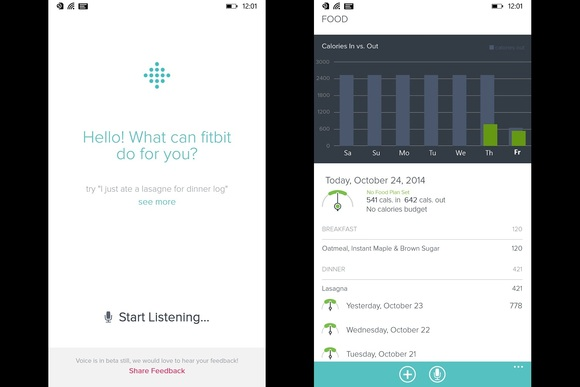
imageOffice Lens for Windows Phone is a tool that, using the phone’s camera & OneNote as a photo store, allows you to capture:

  • Whiteboards
  • Documents
  • Presentation slides

What I want to talk about is capturing projected presentation slides in presentations you are present in because this is a feature that is really excellent and I don’t think it’s fully realized by everyone that has it.

Here’s basically how you capture slides you see projected during meetings:

  • Start Office Lens.  This will turn on your camera.  I recommend turning off the flash by tapping the “lightning bolt” symbol until it is “crossed out”.  I also recommend setting the app to “whiteboard” by touching the icon in the upper right hand corner, which will toggle between “photo”, “document”, and “whiteboard”.
  • Aim your camera at the slide you wish to capture.  The application will automatically attempt to frame the slide using dynamically generated vector lines, setting photo borders.  This may be helpful, but don’t worry about this.
  • Touch the screen image, specifically on the image of the slide you wish to capture.  This will change the brightness & contrast required to focus on the slide and take the photo.  This is very important to reduce glare & eliminate projector light ‘hotspots’. The captured image will appear on the screen.
  • Touch the “framing” icon near the top, if you need to change the boundaries of the slide within the image.  This will allow you to set the borders of the presentation slide that you are capturing.  4 user-adjustable corners allow you rubber band the slide visually if it hasn’t already been “locked on to” via the applications whiteboard auto-detection intelligence.
  • Acknowledge your framing by touching the “save/floppy disk image”.  The slide should be captured as an image.  Your Windows Phone camera roll will store BOTH the original image as well as just the rubber banded slide image as separate photos. 

The images will be stored, saved, and replicated to your OneNote workbook.  A single page will be added to the “Quick Notes” section of your cloud connected OneNote workbook.

Here’s a video on using Office Lens on YouTube:


(taken from http://blogs.office.com/2014/03/17/office-lens-a-onenote-scanner-for-your-pocket/)

Just announced:

Today, we are excited to announce the general availability of Enhanced Mitigation Experience Toolkit (EMET) 5.0. EMET is a free tool, designed to help customers with their defense in depth strategies against cyberattacks, by helping block and terminate the most common techniques adversaries might use in comprising systems. EMET 5.0 further helps to protect with two new mitigations, and with new capabilities giving customers additional flexibility on their deployments.

EMET helps to protect systems, even before new and undiscovered threats are formally addressed by security updates and antimalware software.

Enhanced Mitigation Experience Toolkit–A Customer’s Perspective

Read more here:
http://blogs.technet.com/b/msrc/archive/2014/07/30/general-availability-for-enhanced-mitigation-experience-toolkit-emet-5-0.aspx

imageI have an Xbox Music Pass which provides unlimited access to the entire Xbox Music Library – all the music & content it has available online – and of the greatest features of “XMP” is access to all the Comedy Albums I want.

ALL THE “FUNNY” I’LL EVER NEED
Yup.  Xbox Music Pass isn’t just for “music”.  It’s also excellent for spoken word content, which is a perfect example of the kind of content that I probably wouldn’t want to buy but instead listen to once by either downloading to my device for offline play or streaming to my device on-demand while on the road.

And since Xbox Music Pass works with my Windows PC, my Windows Phone 8, my Xbox 360/One, or even a iPhone/iPad/Android device, I can get my “funny” fix any time I want.

RECOMMENDED COMEDY GENRES
Something that’s also overlooked is the fact that not only do you get the ability to download or stream any of your favorite comedian’s albums – one of mine happens to be Patton Oswalt who has 5 albums available to listen to on Xbox Music – but you also get recommendations as to other comedians that are similar to your favorites.

This is a great way to discover other comedians and listen to their albums – again, at no additional charge.

WHAT COMEDIANS ARE AVAILABLE TO LISTEN TO?
A common question I get is “what’s available?” and the problem is that comedy is really subjective.  What’s funny to me may not be funny to you. 

So, in an effort to provide a large spectrum of what’s available on Xbox Music, here’s a list I manually made of all the artists that have their albums available to download or stream on Xbox Music.

This should give you an idea of how incredibly expansive the comedy library is.  For example:  I’ve hyperlinked Patton’’ Oswalt’s albums below along with the first few comedians on this list:  (http://music.xbox.com/search/Patton%20Oswalt)

  • Patton Oswalt
  • Mike Birbiglia
  • Norm MacDonald
  • Lewis Black
  • Louis C.K.
  • John Leguizamo
  • Jim Gaffigan
  • Carlos Mencia
  • Pablo Francisco
  • Sinbad
  • Steven Wright
  • John Pinette
  • Demitri Martin
  • Mitch Hedberg
  • Bob Newhart
  • Todd Barry
  • Marc Maron
  • Harland Williams
  • Artie Lange
  • Adam Sandler
  • Margaret Cho
  • Brian Regan
  • Ellen Degeneres
  • Kathleen Madigan
  • Jeff Foxworthy
  • The Lonely Island
  • Billy Crystal
  • Louis Anderson
  • Ralphie May
  • Tracy Morgan
  • Ron White
  • Bill Engvall
  • Larry the Cable Guy
  • Cedric the Entertainer
  • Eddie Griffin
  • Wanda Sykes
  • Martin Lawrence
  • George Lopez
  • Frank Caliendo
  • Jim Norton
  • Jerry Seinfeld
  • Daniel Tosh
  • Sarah Silverman
  • Chris Rock
  • Weird Al Yankovic
  • Lisa Lampanelli
  • Mitch Fatel
  • Dave Attell
  • Robert Schimmel
  • Dane Cook
  • Christopher Titus
  • Christian Finnegan
  • Bill Burr
  • Maria Bamford
  • Doug Benson
  • Joe Rogan
  • Jim Breuer
  • Chris Hardwick
  • Kevin Nealon
  • Cheech & Chong
  • Aziz Ansari
  • Brian Posehn
  • Kumail Nanjiani
  • David Cross
  • Eugene Mirman
  • Andrew Dice Clay
  • Eddie Murphy
  • Bob Saget
  • Jimmy Shubert
  • Denis Leary
  • Steve Martin
  • Sam Kinison
  • Doug Stanhope
  • Paula Poundstone
  • Jimmy Fallon
  • Bill Hicks
  • Kevin Pollak
  • Dennis Miller
  • Greg Giraldo
  • Robin Williams
  • Bobcat Goldsthwait
  • Arj Barker
  • Jeffery Ross
  • Dana Gould
  • Greg Proops
  • Harry Shearer
  • George Carlin
  • Redd Foxx
  • Jackie Mason
  • Lenny Bruce
  • Stephen Lynch

imageRemember all those conferences we used to have?

  • TechEd North America
  • Microsoft Management Summit
  • Microsoft Exchange Conference
  • Microsoft SharePoint Conference
  • Microsoft Lync Conference
  • Microsoft Project Conference

On the week of May 4th, 2015, (Star Wars day!) Microsoft will be holding a single event encapsulating all these conferences in Chicago:

May 4th, 2015 – Join us in Chicago for the inaugural unified Microsoft commercial technology event. If you’ve attended TechEd, SharePoint Conference, Microsoft Exchange Conference, Lync Conference, Project Conference or and Microsoft Management Summit, this the place for you to be! More details will be shared in September, follow us on Twitter @MSCloud to stay connected.

For more information, check the announcement blog post:

Posted by: kurtsh | July 18, 2014

INFO: Reference list of Surface Blogs

image

There’s a lot of blogs out there purporting to write about Surface but they’re really just trying to garner clicks for ad revenue.  So here’s a list of good Surface blogs that I’ve been following:

As an Office 365 administrator, you can use the user software page in the Office 365 admin center to allow or not allow users to install Office software from the Office 365 portal. For example, you might want to let users install Word, Excel, and PowerPoint, but not Visio. Whatever you decide to do, your choice applies to all users.

image

For more information, read the TechNet article:

Posted by: kurtsh | July 16, 2014

TRAINING: dotnetConf 2014 recordings now available

image

The dotnetConf 2014 was a two-day virtual event (June 25th-26th) focused on .NET technologies, covering application development for the desktop, mobile and cloud/server. It is hosted by the MVP community and Microsoft, bringing top speakers and great topics straight to your PC.  Get the latest on the state of .NET, Entity Framework, the future of C#, and more.

The event’s keynote starts off with “The State of .NET” by Jay Schmelzer.

imageFor those of you using Office 365’s Exchange Online “Public Folders”, there was a huge increase in the number of folders supported announced yesterday.

We have made investments to scale up the limits for Public Folders in Office 365. Today we are raising the folder count limit to 100,000 folders. This is a 10x increase over the prior limit as defined in the Exchange service description limits. This enables migration of larger existing public folder hierarchies and increased use of the feature in Office 365. Customers can immediately take advantage of this new scale for public folders.

Read more at the announcement blog post:

For folks that drop in to Redmond, WA:  Here’s a map of our main campus. 

image

[taken from http://www.microsoft.com/global/en-us/usability/PublishingImages/RedmondCampus.jpg]

imageSomething many people have been pursuing but not really talking about is:

“Where do I get rechargeable AAAA batteries for my Surface Pro 3 stylus/pen?” 

Ever since the emergence of these batteries in use on the Dell Venue 8 Pro stylus, I’ve been searching for a AAAA rechargeable battery for these ultra-thin form factors. 

Well, it looks like I finally found one and it’s specifically DESIGNED for stylii/pens like that of the Surface Pro 3 or the Dell Venue 8 Pro.  It comes in 3 packages, each with or without a universal charger, modified to fit the smaller AAAA batteries, as well as different quantities of batteries:

So eBay wins again.  This Ni-MH battery very specifically is orderable in a form that will fit the tight confines of a Surface Pro 3 stylus/pen:

imageThe Queentona_4A is "AAAA" size, rechargeable, 1.2V/300mAh, low self-discharge Ni-MH Battery, which length (L = 41.7) and diameter (D = 8.3 mm) corresponds to the dimensions of standard alkaline "AAAA" battery (L = from 41.5 mm to 42.5, D = from 7.8 to 8.3).

This battery is so-called button top battery: its positive (as well a negative) electrode is sticking out of battery’s body, exactly as a standard  alkaline "AAAA" has. So far there is no button top,"AAAA size", rechargeable  Battery on the market. Thus, our battery is the best choice for substitution of non rechargeable alkaline AAAA battery.

If you intend to use the battery for Stylus pen application, then I need to make additional modification of the battery in order that battery will fit Stylus pen battery compartment (simply to remove battery’s plastic cover). Let me know about it with your order. In all other cases this particular modification of the battery is not required.

You can charge the battery using our Power or Sony Charger. Originally the chargers was designed and made for AA and AAA Ni-MH batteries. We’ve modified an AAA charging slot that it now accepts and holds reliably an AAAA size battery for charging procedure. Our Universal Charger accepts all sizes of cylindrical type batteries, including AAAA size.

« Newer Posts - Older Posts »

Categories