Posted by: kurtsh | November 12, 2014

RELEASE: “Clutter” for Office 365

There’s a tier of email between “important” and “junk” that we call “clutter” – stuff that’s simply lower priority but not junk mail – that acts as a distraction within your inbox.  Our announcement today addresses this for Office 365 users:

Today we are beginning the roll out of Clutter to Office 365 business customers, which brings the power of Office Graph to your inbox. Clutter is designed to help you focus on the most important messages in your inbox. It uses machine learning to de-clutter your inbox by moving lower priority messages out of your way and into a new Clutter folder. Ultimately, Clutter removes distractions so you can focus on what matters most.

De-clutter your inbox in Office 365

Clutter is rolling out now to First Release Office 365 users, with deployment to standard users next month.  Read more about Clutter here:

Posted by: kurtsh | November 12, 2014

NEWS: Office 365 Announcements at TechEd Europe

A few weeks ago, a bunch of announcements were made at TechEd Europe.  Here’s a round up of some of the Office 365 bullets:

imageWe announced a ton of news around .NET.  Here’s a quick bulleted list by Scott Hanselman that I’m shamelessly stealing:

  • We are serious about open source and cross platform.
    • .NET Core 5 is the modern, componentized framework that ships via NuGet. That means you can ship a private version of the .NET Core Framework with your app. Other apps’ versions can’t change your app’s behavior.
    • We are building a .NET Core CLR for Windows, Mac and Linux and it will be both open source and it will be supported by Microsoft. It’ll all happen at https://github.com/dotnet.
    • We are open sourcing the RiyuJit and the .NET GC and making them both cross-platform.
  • ASP.NET 5 will work everywhere.
    • ASP.NET 5 will be available for Windows, Mac, and Linux. Mac and Linux support will come soon and it’s all going to happen in the open on GitHub at https://github.com/aspnet.
    • ASP.NET 5 will include a web server for Mac and Linux called kestrel built on libuv. It’s similar to the one that comes with node, and you could front it with Nginx for production, for example.
  • Developers should have a great experience.
    • There is a new FREE SKU for Visual Studio for open source developers and students called Visual Studio Community. It supports extensions and lots more all in one download. This is not Express. This is basically Pro.
    • Visual Studio 2015 and ASP.NET 5 will support gulp, grunt, bower and npm for front end developers.
    • A community team (including myself and Sayed from the ASP.NET and web tools team have created the OmniSharp organization along with the Kulture build system as a way to bring real Intellisense to Sublime, Atom, Brackets, Vim, and Emacs on Windows, Linux, and Mac. Check out http://www.omnisharp.net as well as blog posts by team members Jonathan Channon
  • Even more open source.

Read the full post here as well as Scott’s references for more information:

Posted by: kurtsh | November 10, 2014

RELEASE: Microsoft Work & Play Bundle – $149

image

UPDATED APRIL 2015:
The Work & Play bundle is now $149.  Post modified to reflect the new price.
——————–
ORIGINAL POST NOVEMBER 2014:
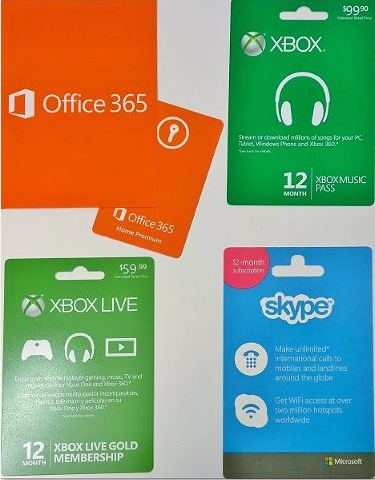
We announced the “Work & Play” bundle, a set of 1 year Microsoft Subscriptions that get you:

  • Office 365 Home ($99 value)
  • Xbox Live Gold ($59 value)
  • Xbox Music Pass ($99 value)
  • Skype Unlimited World + Wifi
    ($150+ value – NOT AVAILABLE SEPARATELY)

All for just $149.

WAIT – “SKYPE UNLIMITED WORLD + WIFI”?
It’s that last one – Skype Unlimited World + Wifi – in the bundle that I’m blown away by.  We NEVER offer this:  This provides unlimited voice calls to any phone imagenumber around the world for a year.  If you’re an International Skype user, (or you’d LIKE to make International phone calls without worry about toll charges) you know that you can EASILY use $149 of Skype voice calls.  If you’re a business traveler, you should know that you can EASILY use $149 of Wifi access on Gogo Inflight or any other Internet service.

How good a deal is this?  Well, basically if you don’t use Skype to call people around the world or you travel and use Wifi Services in hotels, airports, and coffee shops and business lounges, this is potentially a ridiculous money saver.

SO THAT’S SKYPE, BUT WHAT ARE ALL THESE OTHER SUBSCRIPTIONS?

  • Office 365 Home ($99 value)
    This provides the user with the ability to download and install the entire Office Suite on up to 5 of your computers for 1 year with all upgrades during that time being no additional cost as well as UNLIMITED online storage via OneDrive to backup or share your files:

      • Windows – Word, Excel, PowerPoint, Outlook, Access, Publisher, OneNote
      • Mac – Word, Excel, PowerPoint, Outlook
  • Xbox Live Gold ($49 value)
    This subscription enables Xbox users to play multiplayer online games against other human opponents as well as two FREE games every month to be downloaded for Xbox 360, 1 free title for Xbox One, discounts on all sorts of other games.
  • Xbox Music Pass ($99 value)
    My personal favorite:  Xbox Music Pass gives you unlimited streaming & download access to the entire Xbox Music catalog.  All the kids music your kids want without paying a dime more.  All the comedy albums you can listen to at no additional charge.  The Billboard Top 100 all downloadable at the drop of a hat.

Go get it at a Microsoft Store near you!

Posted by: kurtsh | November 10, 2014

BETA: Azure Active Directory Connect

image

We recently announced Azure Active Directory Connect – Beta.  With the new AAD Connect wizard, administrators can connect their on premises and cloud identity infrastructure in a single, guided experience. Choose a solution based on your requirements, and the wizard guides you through the deployment and configuration steps required to get the connection up and running.

Read more here:

imageAt the Professional Association for SQL Server (PASS) Summit, we celebrated SQL Server 2014’s strong momentum and introduced new services that further expand Microsoft’s big data platform.  We announced:

  • A major update coming to our database-as-a-service, Azure SQL Database
  • Easier access to our machine learning service, Azure Machine Learning.

These new updates continue our efforts to bring big data to everyone by delivering a comprehensive platform that ensures every organization, every team and every individual is empowered to do more and achieve more because of the data at their fingertips.

Read more about this announcements on the Microsoft Data Platform blog:

imageThere’s a doc online that explains the benefits and drawbacks of deploying 64-bit Office, and why we recommend the 32-bit version of Office 2013 for most users.

As more and more personal computers run 64-bit versions of Windows, it’s tempting to deploy the 64-bit version of Office 2013 to match. One benefit is that 64-bit Office allows users to work with larger sets of Excel and Project data. But, there are compatibility drawbacks for those users because Office add-ins and solutions might not work. That’s why 32-bit Office 2013 is recommended for most users.

  • 32-bit Office is recommended for most users
  • 64-bit Office has advantages that benefit only specific kinds of users and workloads
  • Review the requirements for deploying Office 64-bit
  • 64-bit Office only works on 64-bit Windows
  • Running 32-bit and 64-bit versions of Office on the same computer isn’t supported
  • When you upgrade to Office 2013, the architecture versions must be the same for the old and new version
  • If you want to switch between 32-bit and 64-bit versions, you must uninstall and then re-install Office 2013
  • Some applications block 64-bit Office 2013 installations
  • Compatibility issues that you’ll have to consider if you deploy 64-bit Office
  • Some 32-bit features aren’t in 64-bit versions of Office
  • Graphics rendering might have performance implications
  • VBA code that uses Declare statements must be updated
  • ActiveX controls and COM add-ins that were written for 32-bit Office won’t work in a 64-bit process
  • Microsoft Access .mde, .ade, and .accde database files that have had their source code removed can’t be moved between 32-bit and 64-bit versions of Office 2013
  • MAPI applications that work with Outlook must be rebuilt
  • In-place OLE activation might not work if the version of Office 2013 doesn’t match registered applications
  • Telemetry Log can help you identify compatibility issues with 64-bit Office

For elaboration on each of the points above, please click the link below:

Posted by: kurtsh | November 10, 2014

DOWNLOAD: Fuzzy Lookup Add-In for Excel

imageThe Fuzzy Lookup Add-In for Excel was developed by Microsoft Research and performs fuzzy matching of textual data in Microsoft Excel. It can be used to identify fuzzy duplicate rows within a single table or to fuzzy join similar rows between two different tables.

The matching is robust to a wide variety of errors including spelling mistakes, abbreviations, synonyms and added/missing data. For instance, it might detect that the rows “Mr. Andrew Hill”, “Hill, Andrew R.” and “Andy Hill” all refer to the same underlying entity, returning a similarity score along with each match. While the default configuration works well for a wide variety of textual data, such as product names or customer addresses, the matching may also be customized for specific domains or languages.

Read the ‘README.docx’ document for further installation and usage instructions.

Begin with the fact that a very relevant portion of your company’s employees will be millenials this decade.  Then begin reading Barkley/Boston Computing Group’s research report, “American Millenials: Deciphering the Enigma Generation”.

BOTTOM LINE: Companies must orient internal communications around social media because Millennials are "hooked" on social media in much the same way older generations are "hooked" on email at work.
http://blogs.technet.com/b/work/archive/2014/10/27/millennials-changing-the-way-business-communicates.aspx?linkId=10411996

Posted by: kurtsh | November 3, 2014

BETA: Skype Translator Preview Program

clip_image002Join the Skype Translator Preview program! Use code “STT2275” to sign up.  Sign up soon because there are only a limited number of acceptances!

Skype Translator Preview
Help shape the future of Skype by using this fantastic new real-time speech translator.

How it works
Speak another language without learning another language. Simply set up a Skype video or voice call with someone who speaks another language to you and start talking.
✔ Your conversation is translated into their language in real time.
✔ And what they say is translated back in your language.
✔ An on-screen transcript of your call is displayed.
✔ Instant message chats in 45 languages can be translated.

« Newer Posts - Older Posts »

Categories