Posted by: kurtsh | December 7, 2014

DOWNLOAD: “Christmas Cam” free for Windows Phone

imageMary Branscombe found this free little Windows Phone app that allows you to, among other things, digitally put a Santa cap on your head for the Christmas season. (Similar to what @darth famously does for well-known Twitter users) 

From the app description:

Overlay your photos an item. Save or share with your friends your photos on facebook, twitter or any other accounts sharing you have!

  • Possibility to move the item on the shot
  • Ability to flip horizontally the item
  • A gallery of item is proposed
  • Share your photo with 6tag (instagram)

And again, it’s free.  (They make their money on add-on content downloads.)

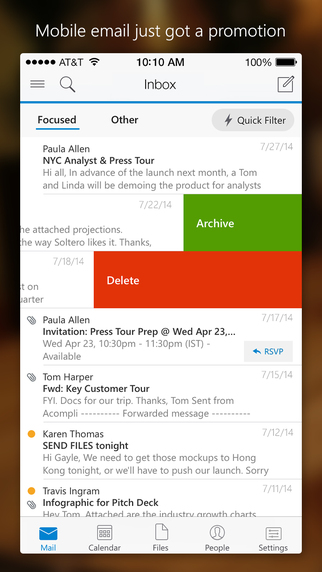
imageAre you tired of the email experience you have on your current non-Windows device?  There’s good news for Apple iOS and Android customers.

I’m pleased to announce that Microsoft has acquired Acompli, provider of innovative mobile email apps for iOS and Android.

This acquisition is part of our company-wide effort to help people accomplish more with their mobile devices. This year we brought Office to the iPad and the iPhone, and we recently announced that we’re bringing Office to Android devices. These are significant steps in our work to deliver the best productivity experiences across mobile platforms, and we’re continuing to push forward.

In a world where more than half of email messages are first read on a mobile device, it’s essential to give people fantastic email experiences wherever they go. The Acompli team is passionate about this quest. Their app provides innovative ways to focus on what’s important in your inbox, to schedule meetings, and work with attachments and files. Users love how it connects to all email services and provides a single place to manage email with a focus on getting things done. It consistently receives enthusiastic feedback from users and strong app store ratings. Reviews have called it “your new best friend,” “brilliant” and “must have for BYOD.”

Read the entire announcement here: http://blogs.microsoft.com/blog/2014/12/01/microsoft-acquires-acompli-provider-innovative-mobile-email-apps/

Acompli CEO Javier Soltero had this to say on their company blog:

I’m incredibly excited to announce that Acompli has been acquired by Microsoft. Our team and products will become part of Microsoft’s ambitious effort to reimagine productivity for the mobile era.

18 months ago we started building a team and a product around the idea that we could make mobile email better. Today that journey continues as part of a larger organization with the technology, talent, and market reach that will help us take the vision of Acompli to hundreds of millions of mobile users across the world.

A lot has happened in the last 18 months. We started as a small team huddled up at Heavybit, quietly juggling the balancing act of delivering a reliable email service while creating a fundamentally new mobile email experience. With the amazing support and patience of our early users we got to a usable email app. Soon after that we were able to show more people what Acompli was and everyone started getting excited. We then launched and earned the love and support of mobile users around the world who both showered us with compliments and also told us (sometimes quite candidly) what we needed to do better at.

Soon after launch we started working with a number of enterprise IT departments who believed, like we do, that great products need to be “Loved by Users, and Trusted by IT.” Right around this time we began conversations with the folks at Microsoft about how we could go farther by integrating the capabilities of their Office 365 platform into our product while continuing to provide amazing support for email and file services from Apple, Dropbox, Google, and Box. Those conversations led to today, where we have decided the opportunity to join forces in pursuit of a better, faster, more powerful email experience is something we can do better as one company.

Read the rest of his statement here:
https://www.acompli.com/fwd-microsoft-acquires-acompli/

Posted by: kurtsh | December 5, 2014

POST: “All you need to know about Microsoft Band”

There’s a Reddit post that’s really excellent in succinctly describing everything you need to know about Microsoft Band.

imageWhat is Microsoft Band?

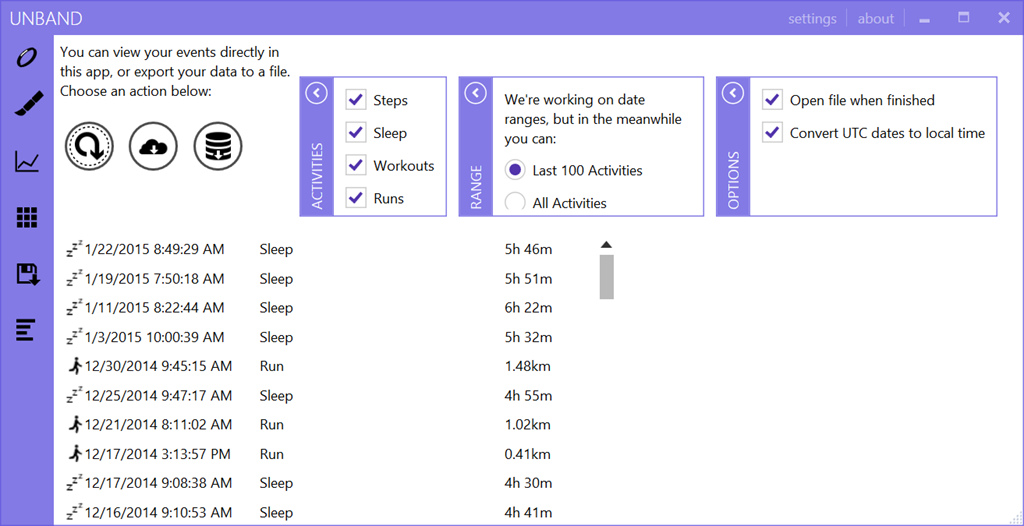
Microsoft Band is a fitness oriented smart watch. Currently available only in US for $199. There are three sizes available; small, medium and large, which equate to wrist height guideline measurements of 39mm, 41mm and 49mm. It weighs in at 60g and measures 19mm x 8.7mm. You can use it as a standalone device since it has GPS built in, so you can sync it with your phone once you’re back home.

  • Microsoft Band specifications
  • Features
  • What’s in the box
  • Official apps

For more details, go to the post:

This is part of the Microsoft Band subReddit:

imageMicrosoft’s annual TechEd North America conference has merged with the Microsoft Management Summit, SharePoint, Exchange, Lync and Project Conference into Microsoft Ignite, to be held May 4-8, 2015 in Chicago, IL.

imageCustomers with Premier Support Agreements can fund their attendance by using Premier hours, similar to past TechEd events.

Early bird price is $1,920 (approximately 8 Premier hours) until 12/11/2014, and $2,220 (approximately 9 Premier hours) afterwards.

Contact your Microsoft Premier Support Technical Account Manager for details on how to execute this transaction.

Posted by: kurtsh | December 4, 2014

INFO: Minecraft Servers added to Azure Gallery/Marketplace

Do you have an Azure account or an MSDN subscription?
Do you or folks in your family play Minecraft?

image

You may want to check out the new addition to the Azure Marketplace.

imageAzure Marketplace:
Minecraft Server
Minecraft is a game about breaking and placing blocks. At first, people built structures to protect against nocturnal monsters, but as the game grew players worked together to create wonderful, imaginative things.

It can also be about adventuring with friends or watching the sun rise over a blocky ocean. It’s pretty. Brave players battle terrible things in The Nether, which is more scary than pretty. You can also visit a land of mushrooms if it sounds more like your cup of tea.

This gallery package will set up a preconfigured Minecraft server running on Ubuntu Server 14.04 LTS. You can connect to it using the DNS name (e.g. name.cloudapp.net) of the virtual machine on port 25565.

http://azure.microsoft.com/en-us/marketplace/partners/microsoft/minecraftserver/

imageComputer Science Education Week (CSEdWeek) is an annual program dedicated to showing K-12 students the importance of computer science education.  Right now around the world most students don’t get exposure to computer science in middle or high school.  

Organized by the Computing in the Core coalition and Code.org, CSEdWeek is held in recognition of the birthday of computing pioneer Admiral Grace Murray Hopper (December 9, 1906).

"Hour of Code” is an introduction to computer science designed to demystify code and show that anyone can learn the basics.  It’s a movement to recruit 10 million students of all ages to try computer science for one hour.

We have several tools & training videos available for educators & students:

Using Touch Develop
TouchDevelop is developed by the Research in Software Engineering group (RiSE) at Microsoft Research.  We want to explore how the future of software development might look like when the most commonly accessible computing devices are mobile devices. We have found that TouchDevelop is a great way to learn or teach programming. 

The TouchDevelop Web App runs on virtually all recent platforms, including iPad, iPhone, Android (phones and tablets), Macs, PC. For the Windows Phone, you can download the TouchDevelop app from the Windows Phone Store.  The TouchDevelop Web App is written in Type Script. Watch this video from the //build/ conference to learn more. 

Using Kodu
Another tool option for your one hour of code is to do visual programming with FUSE Lab Kodu. Kodu lets kids create games on the PC and XBox via a simple visual programming language.  The Kodu team will have an hour of code tutorial and activity up the first week of December located here.

Are you familiar with the announced upcoming security features of Windows 10?  These capabilities alone may make the OS a compelling upgrade for Enterprise clients, in this world of mobility & networked connectivity.

Mary Branscombe wrote a very good article on TechRadar that highlights the valuable business use cases that Windows 10 will address from a security standpoint.  This includes different authenticators, next-generation credential types, file containers, and other inclusions to protect against rootkits, allow only approved applications to run, isolate attackable surfaces, etc.

Read it here:

Posted by: kurtsh | November 24, 2014

HOWTO: Contact Lumia Support/Repairs

imageI’m writing this up and planning on updating it as time progresses.  I’ve found a few resources for getting repairs or replacement parts for Lumia products that might be helpful to others.

  • TWITTER
    The first place I usually go to is the Lumia Twitter account at Lumia Help (@lumiaHelp) Twitter.
  • WEB SITE
    The second place is the Lumia web site on Nokia Support discussions at http://discussions.nokia.com/.
  • PHONE
    You may call the Nokia Careline at 1-888-665-4228 from Mondays to Fridays at 10:00 a.m. – 8:00 p.m. EST (closed on national public holidays) for immediate assistance.
  • REPAIRS
    Repairs are sent to:
    Nokia Repairs
    4330 North Sylvania Dock Door 1
    Fort Worth, TX 76137

imageCalling all Insiders: ISO files of the November Update (build 9879) are now available for download. You’ll still receive this update automatically via Windows Update, but if you prefer a clean install or you want to install on a virtual machine, you can download an ISO file instead.

Download & instructions are here:

Posted by: kurtsh | November 24, 2014

DOWNLOAD: Microsoft Band Sync app for Windows

imageThe Microsoft Band Sync app for Windows seamlessly syncs your Band to the cloud with the same account that you use from your phone companion app.

  • Works on Windows 7 (SP1), Windows 8 (and above).
  • Sync faster than with your phone while your device is charging over USB. 
  • Get updates and restore the software on your Band.

Download it here:

« Newer Posts - Older Posts »

Categories