Posted by: kurtsh | December 4, 2014

INFO: Minecraft Servers added to Azure Gallery/Marketplace

Do you have an Azure account or an MSDN subscription?
Do you or folks in your family play Minecraft?

image

You may want to check out the new addition to the Azure Marketplace.

imageAzure Marketplace:
Minecraft Server
Minecraft is a game about breaking and placing blocks. At first, people built structures to protect against nocturnal monsters, but as the game grew players worked together to create wonderful, imaginative things.

It can also be about adventuring with friends or watching the sun rise over a blocky ocean. It’s pretty. Brave players battle terrible things in The Nether, which is more scary than pretty. You can also visit a land of mushrooms if it sounds more like your cup of tea.

This gallery package will set up a preconfigured Minecraft server running on Ubuntu Server 14.04 LTS. You can connect to it using the DNS name (e.g. name.cloudapp.net) of the virtual machine on port 25565.

http://azure.microsoft.com/en-us/marketplace/partners/microsoft/minecraftserver/

imageComputer Science Education Week (CSEdWeek) is an annual program dedicated to showing K-12 students the importance of computer science education.  Right now around the world most students don’t get exposure to computer science in middle or high school.  

Organized by the Computing in the Core coalition and Code.org, CSEdWeek is held in recognition of the birthday of computing pioneer Admiral Grace Murray Hopper (December 9, 1906).

"Hour of Code” is an introduction to computer science designed to demystify code and show that anyone can learn the basics.  It’s a movement to recruit 10 million students of all ages to try computer science for one hour.

We have several tools & training videos available for educators & students:

Using Touch Develop
TouchDevelop is developed by the Research in Software Engineering group (RiSE) at Microsoft Research.  We want to explore how the future of software development might look like when the most commonly accessible computing devices are mobile devices. We have found that TouchDevelop is a great way to learn or teach programming. 

The TouchDevelop Web App runs on virtually all recent platforms, including iPad, iPhone, Android (phones and tablets), Macs, PC. For the Windows Phone, you can download the TouchDevelop app from the Windows Phone Store.  The TouchDevelop Web App is written in Type Script. Watch this video from the //build/ conference to learn more. 

Using Kodu
Another tool option for your one hour of code is to do visual programming with FUSE Lab Kodu. Kodu lets kids create games on the PC and XBox via a simple visual programming language.  The Kodu team will have an hour of code tutorial and activity up the first week of December located here.

Are you familiar with the announced upcoming security features of Windows 10?  These capabilities alone may make the OS a compelling upgrade for Enterprise clients, in this world of mobility & networked connectivity.

Mary Branscombe wrote a very good article on TechRadar that highlights the valuable business use cases that Windows 10 will address from a security standpoint.  This includes different authenticators, next-generation credential types, file containers, and other inclusions to protect against rootkits, allow only approved applications to run, isolate attackable surfaces, etc.

Read it here:

Posted by: kurtsh | November 24, 2014

HOWTO: Contact Lumia Support/Repairs

imageI’m writing this up and planning on updating it as time progresses.  I’ve found a few resources for getting repairs or replacement parts for Lumia products that might be helpful to others.

  • TWITTER
    The first place I usually go to is the Lumia Twitter account at Lumia Help (@lumiaHelp) Twitter.
  • WEB SITE
    The second place is the Lumia web site on Nokia Support discussions at http://discussions.nokia.com/.
  • PHONE
    You may call the Nokia Careline at 1-888-665-4228 from Mondays to Fridays at 10:00 a.m. – 8:00 p.m. EST (closed on national public holidays) for immediate assistance.
  • REPAIRS
    Repairs are sent to:
    Nokia Repairs
    4330 North Sylvania Dock Door 1
    Fort Worth, TX 76137

imageCalling all Insiders: ISO files of the November Update (build 9879) are now available for download. You’ll still receive this update automatically via Windows Update, but if you prefer a clean install or you want to install on a virtual machine, you can download an ISO file instead.

Download & instructions are here:

Posted by: kurtsh | November 24, 2014

DOWNLOAD: Microsoft Band Sync app for Windows

imageThe Microsoft Band Sync app for Windows seamlessly syncs your Band to the cloud with the same account that you use from your phone companion app.

  • Works on Windows 7 (SP1), Windows 8 (and above).
  • Sync faster than with your phone while your device is charging over USB. 
  • Get updates and restore the software on your Band.

Download it here:

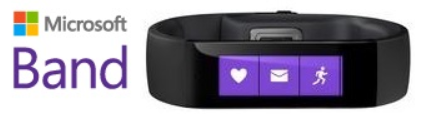
Microsoft Band: Live Healthier


imageIntroducing Microsoft Band, the first wearable powered by Microsoft Health, that keeps fitness and productivity insights a glance away.

This is an AMAZING piece of hardware that contains an astonishing 8 different sensors on it:

  1. Optical heart rate monitor
  2. Accelerometer
  3. Gyrometer
  4. GPS
  5. Microphone
  6. Ambient light sensor
  7. Galvanic skin response sensors
  8. Ultraviolet sensor

I’ve had one since day 1, and it’s been revolutionary for me, but not for the reasons one might think.

  • imageCalls on Microsoft Band
    If you keep your phone in a bag or in your pocket and need to keep the ringer “silent”, Band is for you.

    Band vibrates on your wrist when an incoming call or voicemail comes in and allows you to see notification with the inbound phone number on your wrist.

    You can reply instantly with a standard quick response like “I’ll call you later” or choose one that you’ve created in the Microsoft Health app.
    http://www.microsoft.com/microsoft-band/en-us/support/tiles/phone-calls

  • imageCalendar Notifications on Band
    If you depend on your phone for your calendar, again you’ll like this feature.

    Band vibrates when an upcoming appointment is approaching and shows you what it is on it’s screen.  For Windows Phone users, it also receives early warning notifications from Cortana to let you know when you have to hit the road to arrive at your destination on time based on current traffic.
    https://www.microsoft.com/microsoft-band/en-us/support/email-and-calendar/calendar

  • imageCollecting Sleep patterns & tracking
    I have pretty severe sleep deprivation and sleep apnea.  As a result, Band’s ability to track my sleep patterns night after night is very interesting to me in making sense of the way I feel in the imagemornings.

    Immediately after waking up, I can look at my phone and it will pull up the data that my Microsoft Band collected overnight about my sleep.  This data is viewable as a history and is very useful in understanding how I should prepare for a good night’s rest.
    https://www.microsoft.com/microsoft-band/en-us/support/health-and-exercise/sleep-tracking

  • Microsoft Health app GPS run mapUsing GPS Mapping
    Throughout the day, my Microsoft Band estimates my steps and distance traveled using data from its internal motion sensors (considering height, weight, age, and gender). I can improve the precision of these estimates by using the GPS sensor. My Band will use data collected during GPS-enabled run/walk sessions to better estimate my stride-length for future walks/runs.
    https://www.microsoft.com/microsoft-band/en-us/support/health-and-exercise/gps

Gizmodo had a very insightful article about Microsoft’s strategy around Band.  Here’s a hint:  It’s not about competing in the wearables market necessarily.

One thing however I do have a problem with is that it requires a proprietary cable to charge the device.  And the cable is $19.99.  So I sucked it up and bought 2 extras because depending on how you use it, the battery on the device lasts from 2-5 days between charges.

For more details on Microsoft Band, check out the press release and the press kit:

image

Microsoft Corp. and Docker Inc., the company behind the fast-growing Docker open platform for distributed applications, on Wednesday announced a strategic partnership to provide Docker with support for new container technologies that will be delivered in a future release of Windows Server.

Developers and organizations that want to create container applications using Docker will be able to use either Windows Server or Linux with the same growing Docker ecosystem of users, applications and tools.

Today’s business climate requires higher levels of innovation than before, and distributed applications that support open portability are at the forefront of this demand. Docker is addressing this need, driving developer productivity and agility through a containerization approach that moves application code changes from development to production in minutes, enabling real-time change.

For more information see the following blog post:

image

Join us for the fourth annual SCU, a one-day globally available technical event featuring Microsoft product gurus and community experts.

The 2015 event will include two full breakout tracks to allow for more speakers, topics and content.  The live event will be centered at the Irving Convention Center, with a live-streaming broadcast for all virtual attendees and simulcasts. Don’t miss out on this cosmic experience of knowledge and community interaction.

(Side note:  Take a look at the presenters list.  Holy mackerel, it’s like a who’s who of the System Center ecosystem.)

DATE:
February 4th, 2015

LOCATION:
Irving Convention Center
500 West Las Colinas Boulevard
Irving, TX 75039

More event details to be released soon at:
http://www.systemcenteruniverse.com/

imagePrepare to have your childhood relived.

Last summer, a team of excavators, archaeologists, filmmakers, and video game fans unearthed the industry’s biggest secret. And today, exclusively on Xbox One and Xbox 360, you can see the story of the biggest buried not-quite-treasure in gaming: E.T.: The Extra-Terrestrial for the Atari 2600.

The new documentary “Atari: Game Over” tells the real-life tale of one of video game’s biggest urban legends: that, in 1983, Atari dumped thousands of unsold copies of the notoriously bad E.T. video game in a New Mexico landfill.

« Newer Posts - Older Posts »

Categories