Posted by: kurtsh | May 5, 2015

INFO: Maintaining focus w/ “Music to Code By”

imageTotally off topic, but it relates to a few posts I made 5-10 years ago. 

INFOMANIA. ALIVE & WELL.
One of my interests is the study of “Infomania”, a syndrome described by Hewlett Packard Research in Cambridge as follows:

The abuse of “always-on” technology has led to a nationwide state of “Info-Mania” where UK
workers are literally addicted to checking email and text messages during meetings, in the evening and at weekends. Mobile technology offers massive productivity benefits when used responsibly, but inappropriate use can be negative
.

I’ve written about this a fair amount in the past 10 years:

SHORT TERM MEMORY LOSS & A.D.D.?
The issue is that my mind tends to get easily distracted, flitting from task to another, just to satisfy an itch or an on-demand desire.  How one focuses their mind or at least gets their mind to stay “on track” has been a conundrum for me because our minds are trained to context switch constantly, whether it’s due to:

  • Phone calls
  • Text messages
  • Email
  • Instant Messaging
  • Coworker interruptions
  • Notifications
  • Appointments

Our brains, after being conditioned to move from one context to another, very easily “dumps” what we were working on for something else.  This results in symptoms similar to short term memory loss & attention deficit disorder according to what I’ve read.

MAINTAINING FOCUS THROUGH MUSIC
Over the past couple weeks, I’ve been trying something called “Music to Code By”, a set of 25min songs created by Carl Franklin explicitly created to raise one’s productivity.  (I’m listening to it right now as I type this post) 

The idea is simple:  By adhering to a set of rules in music, such as:

  • staying between 60-80 beats per minute
  • emphasizing harmony more than melody
  • eliminating distracting, attention grabbing runs
  • loops & phrase repetition for predictability
  • staying within 25 min increments
  • etc.

…one can listen to this type of music and find themselves able to slip into a “zone”, or what Carl and other programmers called “flow”.

THE SCIENCE OF FLOW
“Flow” (or “getting into a zone” as sports athletes call it) is what keeps people locked into what they are doing and avoiding the common pitfalls of distractions and lost productivity.  In fact, Carl calls the album a “productivity tool” and not “music”.

This is not science fiction:  It’s backed by real research.  Here’s some of the very studies/articles that Franklin cites on his web site:

WANNA TRY IT?
Here’s sample audio from the title, “Green”, which happens to be my favorite:

Now, if you like what you hear, and you’re interested in the other songs, check out Franklin’s site.  The album “Music to Code By” was actually a Kickstarter campaign that garnered him $10,000 to create the album and was essentially crowd-built, using the actual feedback of the hundreds of contributors as he created each song.

imageImagine sending a Word .DOCX document out to co-workers.  Now, what if:

  • You could track the name & identity of every individual that opened (or attempted to open) that document… as well as the time & location of the attempt
  • You could self-destruct that document if you didn’t want it read any more because it contained old or confidential information

That’s called Document Tracking & Revocation, and it’s a shipping technology (in Public Preview) that comes with Azure Rights Management Services (ADRMS).

(And yes, you folks with Office 365 E3?  You get all of this at no additional cost.)

Here’s some words from Dan Plastina, the long time god of Rights Management Services here at Microsoft:

imageThe premise here is simple: You, the IT professional, have very little understanding of what constitutes good sharing, bad sharing, or even abuse of a sensitive document. It’s true. Many like you have said that you do not sit in front of monitors all day watching the several hundred documents leaving your organizations per hour (or second)! Don’t laugh, some vendors are in fact focused on building consoles for the IT staff where they show "document ABC.XLS was opened on an iPad by user Jane". While most of you perform data loss prevention (DLP) and monitoring (SIEM) in the broader parametric domain, you can’t monitor the specific flows of all documents.

The good news is that the users in your organization, those doing the sharing, are actually very well equipped to know both the intent and possible abuse of the documents they share. They are the ones – the only ones – that know which documents were meant for limited use but are being over-circulated (abused).

Simply stated, today we’ve extended our base document protection promise to now be these 4 core points:

  1. Your users can protect documents and share them both internally as well as with other businesses.
  2. They can limit who gets access to their documents and can set a document expiration date.
  3. The sender can (now) monitor the use, and thus abuse, of each of these documents shared using a variety of views.
  4. If the senders does not like what they see, they can (now) revoke access to the document regardless of where it is stored.

The last two promises are new as of today while the first two are the Azure RMS offer that has been in market for a while now.

Read more about this technology here:

image

Nick Wingfield from the New York Times wrote a very interesting article about how Microsoft has changed, and change so dramatically in such a small period of time.

It talks to the decisions that Microsoft CEO Satya Nadella has made as well as the decisions that were made prior to his ascendance as CEO.

It also talks to the role that Microsoft Research plays in advancing the state-of-the-art for the benefit of the technology industry, as well as Microsoft.

This is a small sample of the opening paragraphs of the article:

The HoloLens team members were confident in their creation. But they worried that Mr. Nadella, a two-decade Microsoft employee then looking at cost-cutting measures and mass layoffs, would kill it for being too risky and far-out.

Mr. Nadella didn’t flinch.

“He said right away, ‘This is something that we’re going to do,’ ” Mr. Holmdahl said. “We are going to create a new product category, and this is the type of thing that Microsoft should be working on.”

But he also says later in the article:

“I don’t want to overhype it like Google Glass and say this is the next,” he says, trailing off. “I want us to be deliberate about what it is.”

After talking about the change in attitudes & Microsoft’s new direction around innovative excellence & leadership, there are 3 sections of the article, each with a different theme:

  • ‘A Decent Batting Average’
    Microsoft is very much successful to date.  The question is how to take that success & make Microsoft breakthough with excellence & attention to detail.
  • Translating Innovation Into Sales
    Microsoft has one of the largest R&D organizations in the world.  How does Microsoft plan on monetizing that research?
  • Changing the Game
    Where is Microsoft planning to invest to leap frog the current state of the art?

Read more here:

imageIn Chicago this past Monday, Satya Nadella and other executives delivered keynotes at Microsoft’s first Ignite event, announcing a range of new products and services, including the next generation of hybrid cloud infrastructure, SQL Server, Office and Windows management.

Satya and José Ángel Sánchez, chief executive officer, Real Madrid, discussed his football club’s digital transformation with Microsoft.

The weeklong event will host more than 22,000 attendees, and Satya’s keynote was webcast live for general audiences via the event website and the Ignite microsite on Microsoft News Center.

An Official Microsoft Blog post and press release announced the news on Monday and a broader set of Office, Server & Cloud, Enterprise Mobility, SQL Server, Windows for Business blogs and others posted, providing more depth on the news.

I will try to provide a summary of announcements for both this event as well as BUILD 2015 as soon as I can come up for air.

Posted by: kurtsh | May 5, 2015

VIDEO: Office training and tutorials

imageOur support site has a bunch of training for Office in the form of videos that your end users can use to get up to speed. 

The following are the types of videos shown:

  • Office 365 training
  • Office training for your PC
  • Office training for your Mac
  • Office for Android tablet training
  • Office for iPad training
  • Office for iPhone training
  • Training for previous versions of Office
  • SharePoint training
  • Free 15-minute webinars

View the training videos here:

IE11 will be the default browser for enterprise customers in Windows 10. Beginning 1/12/16, it will be the only version supported on Windows 7 & 8 per the announcement here from August 7, 2014:

If you are a customer of mine looking for a path to Internet Explorer 11, you may want to consider IE Migration Proof of Concept, something that Microsoft or Microsoft partners can help orchestrate.

image

This is prescriptive guidance for our Enterprise customers that we at Microsoft have put together to identify and remove deployment blockers caused by common IE app migration challenges.

For more details on the Internet Explorer Migration POC, visit:

If you’ve experimented with Microsoft Azure, or are already using it for some of your IT functionality, you may be ready to take that next step and integrate your infrastructure with Azure so you can use it as an extension to your on-premises infrastructure. Finding all the information that helps you do this can be very time consuming.

To help decrease the amount of time required to extend your datacenter to Azure, we’ve published the Datacenter extension reference architecture diagram, shown below.

image

The diagram illustrates how an organization can extend its on-premises datacenter to Microsoft Azure.  It’s an interactive diagram.  Download the file and open it in your browser.  If Internet Explorer asks you if you want to allow blocked content, you’ll need to allow it to enable the interactivity.  This message appears because the page contains script that enables the interactivity.  Hovering your mouse over most objects in the diagram will provide additional details about the implementation of the object.  Clicking on many of the objects will open a relevant design or implementation article about the object.

If you already have some experience with Azure, this will help you understand how to use it as a true extension to your on-premises datacenter.  If not, it’s recommended that you gain a basic understanding of Azure before using this diagram.  The example data and links within the diagram should save you countless hours of searching for all the information you’ll need to extend your on-premises datacenter to Azure.  A video walkthrough of the diagram is also available. The editable Visio diagram and spreadsheet (with data) used in this interactive diagram are available as separate downloads.

clip_image001

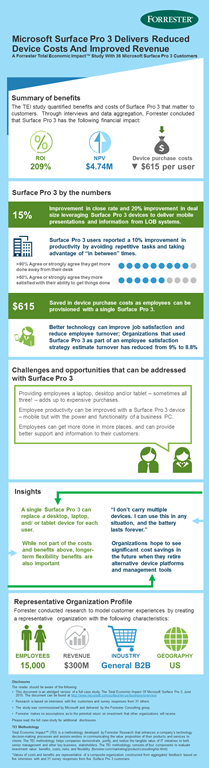
I just received the following regarding the Surface 3 launch at the Microsoft Store in Century City – May 5th, starting 9:00AM:

Join us in the morning for Surface 3 Mini Launch Tuesday, May 5th at 9am where we’ll provide Continental Breakfast, Nespresso Coffee, first 50 will receive swag as well as a chance to enter into a Raffle giveaway for a HP Stream 7.

Our Team will showcase Surface 3 throughout the day as well as provide light snacks, drinks and special Surface 3 swag.

Our product advisors will continue to show the exciting Surface 3 and assist with any questions you may have about the device as well as free workshops on “Build an App in an Hour” from 12pm-1pm & Power Up Your Business with Surface Pro 3 from 630p-730p.

Location:
Microsoft Store Westfield Century City
10250 Santa Monica Blvd, #616
Los Angeles, CA 90067
(310) 228-3550

imageI got asked the question:

“What the heck is a Data Lake? And what’s an Azure SQL DW?” 

We opened the Microsoft BUILD 2015 keynote with a discussion around something called “Data Lakes” and “Azure SQL DW”. (I believe Richard Campbell from the .NET Rocks podcast joked, that we start with Data Lakes because there’s an Ocean of data that is going to be hitting everyone – a result of Internet of Things (IoT).)

In a nutshell, a Data Lake allows every type of data to be kept without discrimination regardless of its size, structure, or how fast it is ingested. Organizations can then use Hadoop or advanced analytics to find patterns of the data. Data lakes can also serve as a repository for lower cost data preparation prior to moving curated data into a data warehouse.

Build 2015: Data Lake


As for Azure SQL Datawarehouses, developers building software-as-a-service (SaaS) applications can now leverage SQL Database to gain the flexibility to support both explosive growth and profitable business models. For workloads with unpredictable resources demands, our elastic database technology provides you with the ability to create a pool of database and allocate resources which can be shared across the database pool.

Build 2015: SQL Data Warehouse


Read more here:

imageThink of this as kinda like “Tron” for your network.

Imagine a program that roams your network and monitors for activity that doesn’t look like it should be happening.  Then imagine that program tracking the activity & alerting you, your security team to initiate action.

This is Microsoft Advanced Threat Analytics (Public Preview)… and it’s awesome.

Microsoft ATA is an on premises, non-intrusive solution that leverages deep packet inspection (DPI) technology to analyze Active Directory related network traffic, as well as information from Security Information and Event Management (SIEM) and Active Directory.

ATA analyzes this information to create dynamic behavioral profiles for each entity in your organization and builds an Organizational Security Graph (an entity interaction map representing the context and activities of the users, devices and resources).

After building this interaction map, it identifies abnormal behavior of entities, advanced attacks and security risks without the need to create rules, policies, or install desktop and server agents. Microsoft Advanced Threat Analytics focuses on three areas:

  • Abnormal Behavior: ATA uses Machine Learning algorithms to identify normal and abnormal entity behavior and will detect anomalous logins, abnormal resource access, and even unusual working hours.
  • Advanced attacks in near real-time based on TTPs: ATA uses DPI and information from other sources to identify advanced attacks such as Pass-the-Hash, Pass-the-Ticket, Overpass-the-Hash, Forged PAC (MS14-068), Golden Ticket, and Remote Execution on the Domain Controllers, Skeleton Key Malware, Honey token activities and more.
  • Known security issues and risks: ATA will identify known security issues and risks such as service account expose passwords in cleartext over the network, broken trust, weak protocols and protocol vulnerabilities.

Here’s the announcement and more:

« Newer Posts - Older Posts »

Categories