Posted by: kurtsh | July 6, 2015

INFO: Preparing for Office 2016 for Mac

imageWith the coming release of Office 2016 for Mac, the following resources are available for folks diving into the new product for their users.

Posted by: kurtsh | July 6, 2015

RELEASE: Skype for Business for Windows Phone

imageToday we’re pleased to announce the availability of the Skype for Business app for Windows Phone.

Most people who have the Lync 2013 app on their Windows Phone will be automatically updated to the new Skype for Business app, but here are the particulars depending on which version of Windows Phone you use:

  • If you have a Windows Phone 8.1 and higher but do not have the Lync 2013 app, you can download the new Skype for Business app in the Windows Store.
  • imageIf you have Windows Phone 8.1 and higher and currently have the Lync 2013 mobile app, the new Skype for Business app will replace your existing app and tile automatically.
  • If you have Windows Phone 8.0, you will continue to use Lync 2013 or Lync 2010, which remains compatible even if your organization is running the new Skype for Business Server.

Download at:

Read more at:

imageEveryone running Windows 7, 8, 8.1 & 10 needs to upgrade to Internet Explorer 11.  Customers have until January 12, 2016 which leaves, at the time of this post, 6 months remaining.  The deprecation of versions prior to IE11 was announced back in August 2014 by Roger Capriotti, Director of Product Development for Internet Explorer:

…After January 12, 2016, only the most recent version of Internet Explorer available for a supported operating system will receive technical support and security updates. For example, customers using Internet Explorer 8, Internet Explorer 9, or Internet Explorer 10 on Windows 7 SP1 should migrate to Internet Explorer 11 to continue receiving security updates and technical support. For more details regarding support timelines on Windows and Windows Embedded, see the Microsoft Support Lifecycle site.

(This has been repeated by most media outlets here, here, here, here, here, here, and here, so hopefully, as a savvy IT professional, this does not come as a surprise to you.)

Windows 10 browsing
Now that that’s out of the way, here’s guidance around what to do about browser compatibility & the direction you should move your users toward – specific to customers looking to move to Windows 10.  It includes:

  • Enterprise guidance
  • Internet Explorer 11
  • Microsoft Edge

Read about your options and what to do here:

imageWith four weeks to go before Windows 10 is generally available, Terry Myerson ‒ EVP, Windows and Devices Group (WDG) disclosed new information about customer upgrades, VL availability and a new Enterprise Trial download in his latest blog post:

News Summary:

imageThe question was asked recently:

What do we do to get to Windows 10 if we’re using Windows 7 Enterprise Edition?

I got the following information from Microsoft Devices Solution Specialist, Nathan Mercer:

Active Software Assurance customers have rights to Windows 10 Enterprise through new version rights. 

Customers on Enterprise Edition without active SA have three options:

  • Revert to underlying Windows Pro Edition, and take advantage of the free upgrade to Windows 10 Pro.  This requires installing original OEM Pro media, or using the Volume Licensing “Pro” image if they have the rights and access.
  • Purchase Windows Upgrade & Software Assurance through Volume Licensing to access Windows 10 Enterprise Edition w/ full rights
  • Purchase a Windows 10 Enterprise Upgrade w/o SA for rights to the Windows 10 Enterprise Long Term Servicing Branch

Additional information including upgrade editions is available on the Windows 10 Specification page:

WANT.  Coming this July 29th…

imageToday, Lenovo announced their first compute stick, the Lenovo ideacentre Stick 300. Designed for consumer usage in the home and on-the-go, the new pocket-sized compute stick is powerful enough for entertainment and web browsing, while affordable enough for existing PC owners to justify owning a second or third mobile PC option. The ideacentre Stick 300 features an Intel Atom Processor Z3735F and the familiarity of Windows, initially shipping with Windows 8.1 but will be eligible for a free upgrade to Windows 10 starting July 29.

The ideacentre Stick 300 expands the mobile computing experience and options for savvy shoppers and is suitable for use in the home, dorm or office, while simultaneously offering portability and convenience for travelers. For the wallet friendly starting price of US $129, this plug and play technology can transform almost any HDMI compatible TV or monitor into a fully functioning Windows-based PC. The ideacentre Stick 300 does not look like a traditional computer, but it performs like one once a 2.4GHz wireless keyboard and mouse are added.

The Lenovo ideacentre Stick 300 will be available on www.lenovo.com and will hit retail shelves starting in July. Pricing will start at US $129.

Original article here:

As taken from the Lenovo post:

Worthy of being crowned the “mini-me” of the traditional desktop PC, the pocket-sized ideacentre™ Stick 300 measures only 15 mm thin, boasts Intel® Atom™ Processor Z3735F, 2G of memory and 32G of storage. It will initially ship with Windows 8.1 but will be available for a free upgrade to Windows 10 starting on July 29. Fully enabled with WiFi and Bluetooth 4.0, the ideacentre™ Stick 300 provides the connectivity you need to power up at any time.

If you’re like me, you’ve had to change the credit card number you’ve used for renewing your Xbox Live and other purchases a couple times.

The place to do this is not obvious.  You’d think it’d be off of Xbox.com, but it’s not. Instead it’s off some “commerce.microsoft.com” web site or something like that.  #rollseyes

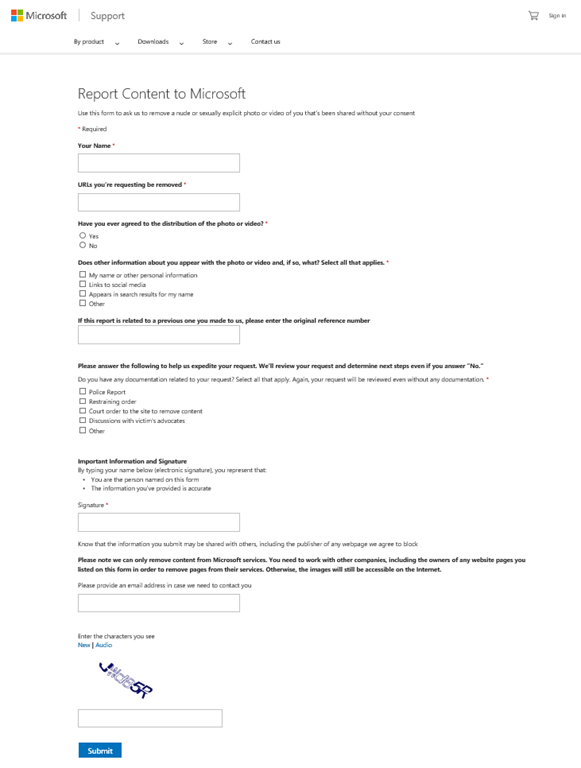
If you want to change it, follow the instructions at this link below.  The page you ultimately need to go to is snapshotted below:

image

imageWe’re happy to announce the release of our newest free ebook, Microsoft System Center Data Protection for the Hybrid Cloud (ISBN 9780735695832), by Shreesh Dubey, Vijay Tandra Sistla, Shivam Garg, and Aashish Ramdas; Mitch Tulloch, Series Editor.

Here’s the intro:

If you are responsible for architecting and designing the backup strategy for your organization, especially if you’re looking for ways to incorporate cloud backup into your business continuity scenarios, this book is for you. With the increasing trends in virtualization as well as the move to the pubic cloud, IT organizations are headed toward a world where data and applications run in on-premises private clouds as well as in the public cloud. This has key implications for data protection strategy, and it is important to choose the solution that provides the same level of data protection you have afforded so far while allowing you to harness the power of the public cloud.

We will cover how the Azure Backup service has evolved into a first-class platform-as-a-service (PaaS) service in Microsoft Azure that integrates with the on-premises enterprise class backup product, System Center Data Protection Manager (DPM), to provide a seamless hybrid cloud backup solution. Current backup products treat the cloud as a storage endpoint, which we see as a limited-use case for the public cloud. The approach we describe in this book allows you to exploit the full power of the public cloud and gives you the flexibility to manage your backups in a hybrid world.

We have made a steady set of investments in DPM over the last 18 months, and, as of this writing, we have released six update rollups, including customer hot fixes as well as new features in the areas of private cloud protection, storage optimization, and workload support. The last chapter focusses on the most recently released protection for infrastructure-as-a- service (IaaS) virtual machines, which went to preview release in March 2015 and is expected to be generally available by Q3 of calendar year 2015.

This book covers improvements added in DPM 2012 R2 as well as the integration with Microsoft Azure Backup service and assumes you have working knowledge of the DPM 2012 version. To get familiar with older versions of DPM, refer to the following:

Grab the free eBook here:

image

If you own a Nokia phone or a Surface, you may want to check out a pair of these highly durable, well-made, and fashionable stereo headsets made by Nokia.

These Nokia COLOUD in-ear stereo headsets are very durable and put out great sound.  Most importantly, unlike bluetooth headsets, the audio is perfect for conference calls, and since the microphone is well positioned, your voice always comes through cleanly. 

Meanwhile, the headset is perfect for listing to podcasts, Audible audiobooks, or music.  And they wrap very nicely for portability & convenience.  And at $12.99 a pair, these are a nobrainer.  I like them so much, I bought 12 sets – 4 of each color.

It comes in cyan, yellow, and red.

Incidentally, Nokia also has two other items. 

Posted by: kurtsh | June 19, 2015

RELEASE: KMS Server Update for Windows 10

If your organization is using KMS to activate your currently deployed Windows systems, we’ve released a new patch to prepare your KMS server to activate Windows 10 installations.

Read more here:
https://support.microsoft.com/en-us/kb/3058168

« Newer Posts - Older Posts »

Categories