Posted by: kurtsh | January 10, 2018

INFO: Microsoft’s Spectre, Meltdown, & Windows Systems

We sent the following to our Enterprise Support customers about Spectre, Meltdown, & Windows Systems a week ago and I thought I’d share it:

Alert – Guidance to protect against the speculative execution side-channel vulnerabilities

What is the purpose of this alert?

This alert is to provide you with guidance concerning CPU Microcode vulnerabilities being reported in press starting on Wednesday, January 3, 2018. To get all available protections, customers will need to install updates from both software and hardware vendors.

Executive Summary

Microsoft is aware of a new publicly disclosed class of vulnerabilities referred to as “speculative execution side-channel attacks” that affect many modern processors and operating systems including Intel, AMD, and ARM. Note: this issue will affect other systems such as Android, Chrome, iOS, MacOS, so we advise customers to seek out guidance from those vendors.

Microsoft has released several updates to help mitigate these vulnerabilities. We have also taken action to secure our cloud services. See below for more details.

Microsoft has not received any information to indicate that these vulnerabilities have been used to attack customers at this time. Microsoft continues working closely with industry partners including chip makers, hardware OEMs and app vendors to protect customers. To get all available protections, hardware/firmware and software updates are required. This includes microcode from device OEMs and in some cases updates to AV software as well.

This advisory addresses the following vulnerabilities:

  • CVE-2017-5715 (branch target injection)
  • CVE-2017-5753 (bounds check bypass)
  • CVE-2017-5754 (rogue data cache load)

Recommended Actions – Consumers

For consumers, the best protection is to keep your computers up to date. You can do this by taking advantage of automatic update. Learn how to turn on automatic updates here. In addition to installing the January 2018 Windows security updates, you may also need to install firmware updates from your device manufacturer for increased protection. Check with your device manufacturer for relevant updates.

If automatic updates are enabled, the January 2018 Windows security update will be offered to the devices running supported anti-virus (AV) applications. Updates can be installed in any order.

  1. If you have automatic updating enabled and configured to provide updates for Windows, the updates are delivered to you when they are released, if your device and software are compatible. We recommend you verify these updates are installed. If automatic update is not enabled, manually check for and install the January 2018 Windows operating system security update.
  2. Install applicable firmware update provided by your OEM device manufacturer.

Recommended Actions – Enterprise

Security Advisory 180002 has sections that provide specific guidance for Windows clients, Windows servers,  and Microsoft Cloud platforms. Additional guidance provided in the security advisory includes answers to frequently asked questions, guidance for how to verify that protections are enabled.

Associated Support Articles and Additional Resources

Regarding Information Consistency

We strive to provide you with accurate information in static (this mail) and dynamic (web-based) content. Microsoft’s security content posted to the web is occasionally updated to reflect late-breaking information. If this results in an inconsistency between the information here and the information in Microsoft’s web-based security content, the information in Microsoft’s web-based security content is authoritative.

Much of this and more is reflected on this post from our Support database:

More discussion is available from our Security web sites:

MICROSOFT SECURE BLOG
Refer this blog to understand the performance impact of Spectre and Meltdown mitigations on Windows Systems.

MICROSOFT SECURITY RESEARCH CENTER
For more technical details, please see:
https://portal.msrc.microsoft.com/en-US/security-guidance/advisory/ADV180002


Did you ever wonder what the deal was with using:

  • Microsoft Accounts with your Corporate Email (john@contoso.com tied to a Microsoft/Live ID account used for MSDN)
  • Work Accounts tied to Azure Active Directory (john@contoso.com tied to Azure AD)

Well, there’s a post that Alex Simons did a while back that summarizes what happened & what we’ve been doing about it:

Why am I writing about this now?

Because I believe the Volume Licensing Service Center will be transitioning to use Work Accounts, i.e. Azure Active Directory accounts and I’m not sure that Microsoft Accounts with work email addresses will work after this with all administrative services.  It sounds like MSDN/Visual Studio subscription administration might not work if you stay.

image

So if you’re still using a Microsoft Account that has a work email address tied to it as it’s unique name, you may want to start using your Work Account.

The GDPR imposes many requirements and obligations for organizations not only within the EU, but around the world.

This paper from Microsoft discusses how to initiate and organize a GDPR program to begin or continue the path to compliance with the GDPR.

imageThe GDPR imposes many requirements and obligations for organizations not only within the EU, but around the world. GDPR compliance will require significant investments in data management and data protection for a large number of organizations and enterprises.

Microsoft customers who are subject to the GDPR, whether processing data in house, in the cloud, or in hybrid configurations, must ensure that personal data within their systems are properly processed and protected according to the principles of the GDPR. This means that many customers will have to revise or modify their data processing procedures, the implementation of these processes, and the security of these processes as stipulated in the GDPR.

Microsoft has significant experience in managing the principles of data protection and in complying with complex regulations. We have committed to sharing this experience with customers to help them meet the objectives and privacy requirements of the GDPR. In this context, this paper discusses how to initiate and organize a GDPR program to begin or continue the path to compliance with the GDPR.

Download the paper here:

Posted by: kurtsh | December 15, 2017

BETA: Microsoft Whiteboard (Preview)

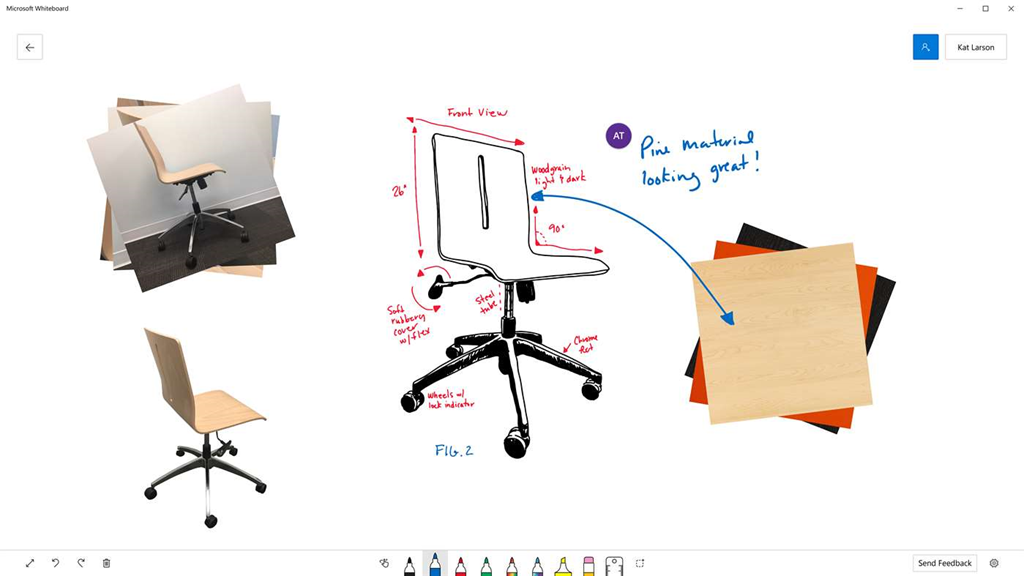
imageMicrosoft Whiteboard is a new Windows 10/Office 365 product that is kinda like a online collaborative version of OneNote. You can drop anything you want into whiteboard like you can OneNote, but it’s designed for lots of people to work on simultaneously.

The content is persistent – as in you can save & come back to it, which is important for iterating through brainstorming sessions.  And it works on all sorts of Windows 10 devices & is digital ink aware – in other words, it accepts pen/eraser input extremely well.

Microsoft Whiteboard Preview

Microsoft Whiteboard is a freeform digital canvas where people, ideas, and content can come together for creative collaboration. The app is built for anyone who engages in creative, freeform thinking before getting to their final output. It’s designed for teams that need to ideate, iterate, and work together both in person and remotely, and across multiple devices.

Collaborate Effortlessly
The limitless surface ensures that imagination has room to grow, and there’s always space for everyone’s ideas. Bring in teammates whether they’re across the hall or in a different part of the world with real-time collaboration across multiple devices. You can see where everyone is on the board and the updates they’re making – whether they’re adding images, putting up sticky notes, or creating diagrams. Now even remote workers can easily join in and contribute to the discussion.

Work Naturally
Microsoft Whiteboard lets you create in whatever way feels most natural to you. The pen-first, touch-first technology lets you make fluid gestures with your fingers or draw out finer details with your pen. Using your pen, you can jot down notes, draw precise illustrations, or search for images on the web. Using your fingers, you can swipe to different sections of your board, turn the virtual ruler to the angle you want, and drag and drop images to create a photo stack. Whether you use pen or touch, Microsoft Whiteboard recognizes your intent and delivers your desired outcomes in an instant.

Create Digitally
With Microsoft Whiteboard, you can use intelligent ink that recognizes your freeform drawings and turns them into standard shapes so it’s easy to create great-looking tables, diagrams, and flowcharts. And unlike traditional whiteboards, the app automatically saves your boards so you can pick up where you left off or share links to your boards so others can build on top of your work. No more need to take photos of your canvas or to email photos to others when you need to get them up to speed.

OFFICE 365 SUBSCRIPTION REQUIRED TO COLLABORATE
There’s one asterisk in the announcement page that’s pretty important:

The Microsoft Whiteboard Preview is rolling out to all English versions of Windows 10 within the next 24 hours, and will roll out to additional languages in the coming months. The app is free to use for anyone with a Windows 10 device, but one participant with an Office 365 personal, work, or school account is needed for multi-party collaboration. For SurfaceHub customers, the Microsoft Whiteboard Preview will eventually replace the native whiteboard app currently running on your SurfaceHub. In the meantime, you can install the preview of the Microsoft Whiteboard alongside your existing app. 

USING WORK OFFICE 365 ACCOUNTS:
I’ve also found the following comment in the Product Site FAQ, that’s rather important:

I am using an Office 365 work account from my organization. Why can’t I log into the Microsoft Whiteboard Preview?

While Microsoft Whiteboard is in Preview mode, your IT administrator will have to enable the app for use in your organization. They can do this in the Office 365 administrator portal where they enable or disable apps for users.

Read more about Microsoft Whiteboard here:

We are pleased to announce this year’s Microsoft Education Exchange (E2) event will be held in Singapore, from March 13 through March 15, 2018. We chose Singapore as host country because of its highly regarded education system, quoted to be “the world’s best education system,” according to an OECD-led study. Singapore is rated first in math and science and has one of the highest literacy rates in the world. E2 2018 will be hosted in Singapore with the support of local and international governments.

Watch as Anthony Salcito and Eve Psalti announce the details for the 2018 Education Exchange (E²) event. The event will be held in Singapore on March 13 -15 and will celebrate our global community of educators and thought leaders, plus get the latest and greatest news from Microsoft Education product experts and VP of Education, Anthony Salcito.

E2 2018 Microsoft Education Singapore

Read more about the event here:

Posted by: kurtsh | December 10, 2017

VIDEO: “3D Holiday” – Microsoft’s Holiday Message

Here’s Microsoft’s holiday message for 2017:

Watch the :60 message here on Youtube and the :15 digitals: Lizard and Pirate and Three Eyed Monster.

If you’re interested in learning more about 3D Holiday, we have some details here.  And if you’re interested in creating some of this yourself on Windows 10, visit Remix3D.com to create your own world with the characters featured in the spot.

imageFACEBOOK PHOTO FRAME:
We are also sponsoring a Facebook photo frame.

Starting Monday, go in to your Facebook account and click “Update your profile picture”, then “Add frame”, where you will find our holiday frame. Select and publish!

Posted by: kurtsh | December 10, 2017

INFO: Office 365 Update – December 2017

Wanna hear what the latest updates are in Office 365?  Check out the December 2017 update video below.

https://youtu.be/SbqFWwnZD4Y

RESOURCES:
If you’d like to keep track of past & future updates, here’s some means of subscribing to them:

Posted by: kurtsh | December 9, 2017

EVENT: Microsoft Ignite 2018 Pre-Registration

Jimageoin us September 24 – 28, 2018 in Orlando, FL for Microsoft Ignite.

Sign up now for early registration access and have first choice of hotels in March.

Posted by: kurtsh | December 8, 2017

INFO: Yammer Vision & Roadmap for FY18 (2017-2018)

The video below is a recording of the 1 hour “Yammer Vision & Roadmap” presentation as delivered at Microsoft Ignite on 9/25/17. (BRK2103)

The content is also available in more detail at the Microsoft Ignite site – including references to OTHER Yammer-related sessions delivered at Ignite:

BRK2103: Connecting your company with Yammer: Vision and roadmap

Posted by: kurtsh | December 8, 2017

DOWNLOAD: Office 365 Teamwork Guides

imageWe’ve published 4 new guides to help folks understand how to leverage the technology within Office 365 to enhance TEAMWORK.

  • Unblocking workplace collaboration
  • 5 tips to improve collaboration
  • 5 faces of today’s employees
  • The ultimate guide to chat-based tools

Download the guides from here:

(My apologies if you initially received a weird notification about a post called #SavePlayer1. This post originally & accidentally contained content targetted for my personal blog.  I’ve replaced the content of this post with the actual content that was supposed to be here)

« Newer Posts - Older Posts »

Categories