Posted by: kurtsh | December 5, 2018

HOWTO: Customize Microsoft 365 usage analytics reporting

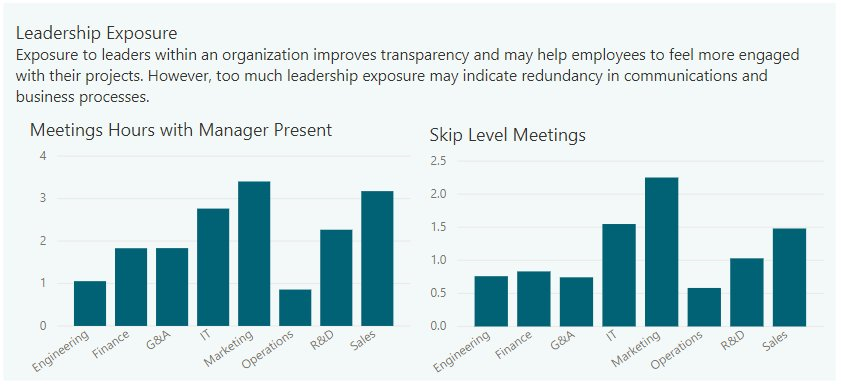
imageMicrosoft 365 usage analytics provides a dashboard in Power BI that offers insights into how users adopt and use Office 365. The dashboard is just a starting point to interact with the usage data. The reports can be customized for more personalized insights.

You can also use the Power BI desktop to further customize your reports by connecting them to other data sources to gain richer insights about your business.

For instructions on how to customize the existing PowerBI reports, read the documentation at:

imageWe are very excited to announce a Microsoft Teams ‘Ask Microsoft Anything’ (AMA) for Microsoft Teams!

The AMA will take place on Wednesday, December 12th, 2018 from 9:00 a.m. to 10:00 a.m. PT in the Microsoft Teams AMA Space. Add the event to your calendar and view in your time zone here.

———-

An AMA is a live online event similar to a “YamJam” on Yammer or an “Ask Me Anything” on Reddit. This AMA gives you the opportunity to connect with members of the product engineering team who will be on hand to answer your questions and listen to feedback.

clip_image002Scheduling meetings is painful, time-consuming, and complicated. 

By now, however, you’ve hopefully heard of & used Microsoft FindTime™, Microsoft’s self-service solution for Office 365 users that facilitates meeting scheduling between both internal & external participants by automating the process of sending inquiries regarding each person’s availability for a meeting.  This solution has been readily available for Exchange Online/Outlook 365 & delighted Office 365 users for more than 2 years!

Introducing Calendar.help (Preview)
Move over FindTime.  There’s a new assistant in town to both automate & expedite the scheduling of meetings for Office 365 users and it’s called Calendar.help. 

Calendar.help does one thing really well:  Quickly schedule meetings for you with other people based on everyone’s availability.  You simply put “Cortana” on the cc: and instruct her in the email body as to what you want to schedule.

  • “Cortana, can you help us book a 30 minute call next week?”
  • “Cortana, can you find us an hour for coffee at Starbucks at 5th Ave and Broadway?”
  • “Cortana, schedule Tuesday at 3pm for us to Skype.”

Calendar.help’s intelligence addresses most meeting scenarios:

Why Calendar.help?

  • Saves you time – To use Calendar.help, cc: Cortana in an email with other people and ask her to schedule a meeting. Cortana handles all the back-and-forth emails to find a time when everyone can meet and then sends out an invite on your behalf.
  • Schedules intelligently – With the speed of artificial intelligence and the personal touch of a human assistant, it’s the best of both worlds. Cortana communicates with your contacts by email to provide a natural, almost human, scheduling experience.
  • Knows your calendar – Calendar.help works with your Office 365, Outlook.com, or Google calendar. Cortana, using Calendar.help, knows your meeting preferences and uses them to find the best times.

Here’s a video demonstration of Calendar.help:

Calendar.help comes with Office 365 & requires that your mailbox be in the cloud. (i.e. Exchange Online)  Interested in giving it a try?  Here’s the sign up page:

  • Calendar.help – An artificially intelligent agent for Office 365 users from Microsoft
    https://calendar.help/

(Note: This technology accesses user’s calendars for availability as well as others in your organization.  Usage of Calendar.help is predicated on your IT organization’s participation.  In order to facilitate this process, an Office 365 Administrator needs to kick off this authorization process by going to: https://calendar.help/AdminConsent/Microsoft?bp=Auth)

imageWe are acquiring FSLogix, a company that reduces the computation required to execute applications within virtual desktops.  It will specifically speed up Microsoft’s Office 365 ProPlus in multi user situations leveraging virtual desktops & deliver faster load times.

To help extend our virtualization capabilities and provide an even richer experience for Microsoft 365 customers, we are excited to announce the acquisition of FSLogix.

FSLogix is a next-generation app-provisioning platform that reduces the resources, time and labor required to support virtualization. From small businesses to very large global enterprises across numerous industries, FSLogix solutions enhance customer experience and productivity, while reducing support requirements for IT departments.

Read the entire announcement here:

New security baseline for our OSs was released:

Microsoft is pleased to announce the final release of the security configuration baseline settings for Windows 10 October 2018 Update (a.k.a., version 1809, “Redstone 5” or “RS5”), and for Windows Server 2019.

For now, download the content here: Windows-10-1809-Security-Baseline-FINAL. It will be posted to the Security Compliance Toolkit download site very soon.

Read the entire blog announcement here:

imageRegister for this webinar to learn how to quickly migrate all your on-premises apps, data, and infrastructure to Azure in a single motion. Find out why Azure is the right choice for your assets, providing you with free tools that automate the cloud migration journey while minimizing downtime.

You’ll also learn how to:

  • Save money with a cost-effective migration experience.
  • Migrate assets at your own pace and receive hybrid support.
  • Use free Azure tools to simplify the migration process.

Read the entire article here:

imageThis document will help you get a more secure posture using the capabilities of Azure Active Directory by using a five-step checklist to inoculate your organization against cyber-attacks.

This checklist will help you quickly deploy critical recommended actions to protect your organization immediately by explaining how to:

  • Strengthen your credentials.
  • Reduce your attack surface area.
  • Automate threat response.
  • Increase your awareness of auditing and monitoring.
  • Enable more predictable and complete end-user security with self-help.

https://docs.microsoft.com/en-us/azure/security/azure-ad-secure-steps

imageLearn about Azure IoT solutions, platform services and industry-leading edge technologies.

See how you can connect devices to create powerful IoT applications on the flexible Azure IoT platform. See how Azure IoT simplifies IoT development—use your preferred language, tools and existing developer SDKs to start building IoT right away.

Get started quickly with solution accelerators such as Remote Monitoring, Predictive Maintenance and Connected Factory for common IoT scenarios.

Learn how to use Azure IoT Hub to easily create, customize, and manage all aspects of your IoT application, and IoT Edge to deploy cloud apps on the edge—creating more intelligent solutions, whether in the cloud or on-premises.

Create visualizations of IoT time-series data and create insights from your IoT application with other Azure platform services.

imageCloud-based advanced services, like machine learning, artificial intelligence, and data analytics, open new opportunities for technical teams to drive business value. Find inspiration and guidance about what kind of transformational changes are possible and how you can achieve them. Download this free e-book, Designed to Disrupt: Reimagine Your Apps and Transform Your Industry, to help you:

  • Use cloud technology to give your company a competitive edge by accessing new markets, enhancing your customers’ experience, and increasing operational efficiency.
  • Learn from companies who have successfully used innovative technologies—such as cognitive services, Internet of Things (IoT) and bots—to grow their businesses. 
  • Create a digital journey roadmap, with envisioning sessions to reimagine your company’s goals and practical tools to bring your visions to life.

Get the ebook here:

We released a tool a few months ago via “The Garage” that I was recently made aware of called “Fast Data Transfer” for customers looking for a tool to accelerate the uploading of large amounts of data.

imageFast Data Transfer is a tool for fast upload of data into Azure – up to 4 terabytes per hour from a single client machine. It moves data from your premises to Blob Storage, to a clustered file system, or direct to an Azure VM. It can also move data between Azure regions.

The tool works by maximizing utilization of the network link. It efficiently uses all available bandwidth, even over long-distance links. On a 10 Gbps link, it reaches around 4 TB per hour, which makes it about 3 to 10 times faster than competing tools we’ve tested. On slower links, Fast Data Transfer typically achieves over 90% of the link’s theoretical maximum, while other tools may achieve substantially less.

For more information, visit:

« Newer Posts - Older Posts »

Categories