Posted by: kurtsh | June 18, 2019

DOWNLOAD: Microsoft Research Songsmith

imageWhat is Songsmith?
Songsmith generates musical accompaniment to match a singer’s voice. Just choose a musical style, sing into your PC’s microphone, and Songsmith will create backing music for you. Then share your songs with your friends and family, post your songs online, or create your own music videos.

For a quick demonstration of Songsmith in action, check out our quick tutorial video about creating your first song!

Songsmith is also free for teachers to use in their classrooms.

Where can I get it?
A free trial download is available on our download page.

What if I don’t know how to write music?
Songsmith is for you. Get your first taste of songwriting just by singing into a microphone, then explore different styles and arrangements, even if you don’t know the first thing about music theory.

What if I do know how to write music?
Songsmith is for you too. Songwriters can use Songsmith as an “intelligent scratchpad” to work with new melodies, quickly turning your scratch recordings of new ideas into richer, deeper explorations. Musicians can also play instruments right into Songsmith, instead of singing.

Visit the main web site here:

imageJoin us on Wednesday, June 19 at 10am PST for the Azure security expert series: Cloud Security Best Practices with Ann Johnson

As computing environments move to the cloud, the responsibility for security also shifts. Find out what this means for your own environment and learn about security best practices when using Microsoft Azure, by attending the June 19th launch of the Azure security expert series. The series kicks off with a tech talk led by Ann Johnson, Corporate VP of Cybersecurity at Microsoft, during which you’ll have the opportunity to chat online with Microsoft cloud security experts.

You’ll also have access to new on-demand sessions covering a variety of different security topics and related Microsoft Azure security services, including Azure Sentinel, Azure Security Center, and networking security—all led by Microsoft security product experts.

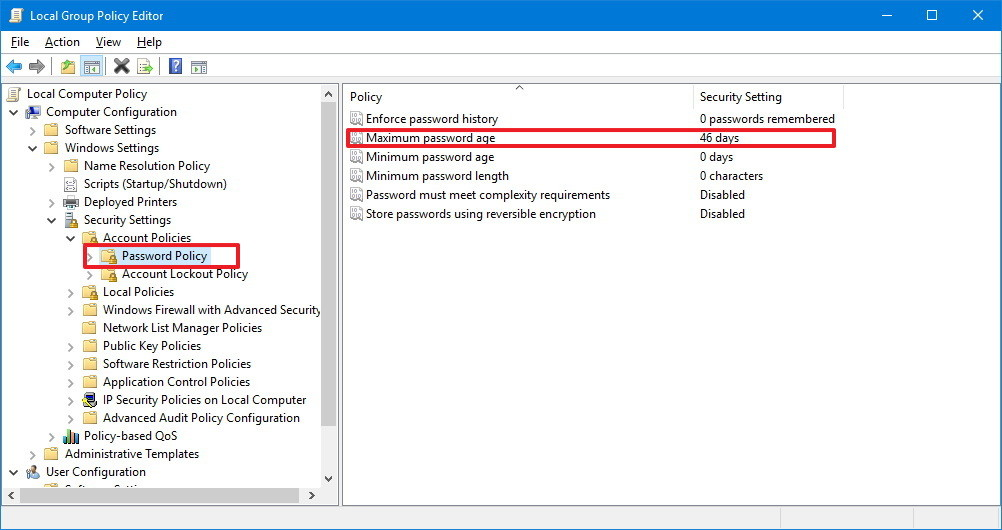
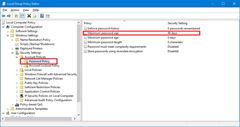
imageWe are not “dropping the ability to enforce a password expiration policy in Windows 10 1903”.  Not via Group Policy (.ADMX), not on the local computer policy.

MISINTERPRETING A MICROSOFT SECURITY BLOG POST
I believe there’s been a bunch of articles incorrectly interpreting Aaron Margosis’ blog post about “Security Baselines for Windows 10 1903” which explains that we’re no longer making password expiration part of the “Security Baseline” compliance check for Windows 10 1903.

(Again, Aaron’s talking about the Security Baseline for Windows 10 1903.  He never says anything about the Windows 10 1903 operating system itself)

WHAT’S A SECURITY BASELINE?
For those unaware, “Security Baselines” are sort of like checklists that can be automated to see if the implementation of a Microsoft software product adheres to the policies in the list.  They’re like a “minimum bar or threshold of compliance” that a company should be maintaining on their computers to ensure that they comply with Microsoft’s recommendations for Enterprise security.  They’re useful for audits, readiness reports, etc.  We have “Security Baselines” for not just Windows, but also SQL Server, Office, etc.

Here’s a line from the post highlighting that we’re talking about the Security Baseline for W10, not Windows 10 itself:

Periodic password expiration is an ancient and obsolete mitigation of very low value, and we don’t believe it’s worthwhile for our baseline to enforce any specific value. By removing it from our baseline rather than recommending a particular value or no expiration, organizations can choose whatever best suits their perceived needs without contradicting our guidance.

CONFIRMATION FROM AARON MARGOSIS, AUTHOR OF THE ORIGINAL POST
Aaron responded to a similar misinterpretation here:

[Aaron Margosis] I think you might be misunderstanding what we’re doing. You can still configure password expiration if you want (where “want” can include “we’re forced to by some regulation”). The password-expiration security option is still in Windows and will remain there. We are simply no longer recommending it as part of our GPO-centric security baselines. And as the post says, we recommend better alternatives including MFA and Azure AD Password Protection but those recommendations can’t be expressed within these baselines. As far as “all compliance standards” go, we have no control over them or their timelines, and it doesn’t make much sense for us to wait for them all. We need to be the last to change?

BTW, none of these controls will help with passwords shared across multiple environments.

(Oh, and one more thing, to really double click on this matter: I’ve actually talked with Aaron Margosis about this internally here at Microsoft & he confirmed that indeed, his blog post has been misinterpreted and that no such changes have been made to Windows 10.  I get the feeling however he doesn’t have time to correct everyone that’s misreported his comment about the changes that were made to the Window 10 Security Baseline.)

SO WHAT EXACTLY HAS CHANGED IN WINDOWS 10 1903:
If you want to see what in fact did change in Windows 10 1903, we have that documented online here:

(You’ll note it never says anything about “removing password expiration policies”. Smile)

I read this article with a bit of incredulity:

imageXbox Game Pass is normally $14.99/mo but the process described claimed to upgrade the ENTIRE existing subscription term of a user’s “Xbox Live Gold” to “Xbox Game Pass Ultimate” for just  $1.

In other words, if you have a subscription of 36 months of pre-paid “Xbox Live Gold” – this would convert it ALL to Xbox Game Pass for $1.

To be clear, this would be a massive savings.  Xbox Game Pass Ultimate is normally $14.99/mo or $540/3yrs.  For a massive savings of $360.

VERIFIED:  IT WORKS!
It’s simple.

  1. Sign into your Microsoft account at https://accounts.microsoft.com
  2. Click on Services & Subscriptions in the menu bar. (May be hidden in a drop down list in the menu)
  3. Verify that you have as much “Xbox Live Gold” subscription credit as possible.  Try to purchase as close to 3 years as you can since that credit is what will be provided a free upgrade to “Xbox Game Pass Ultimate”.
  4. Click “Upgrade to Xbox Game Pass Ultimate” for $1.

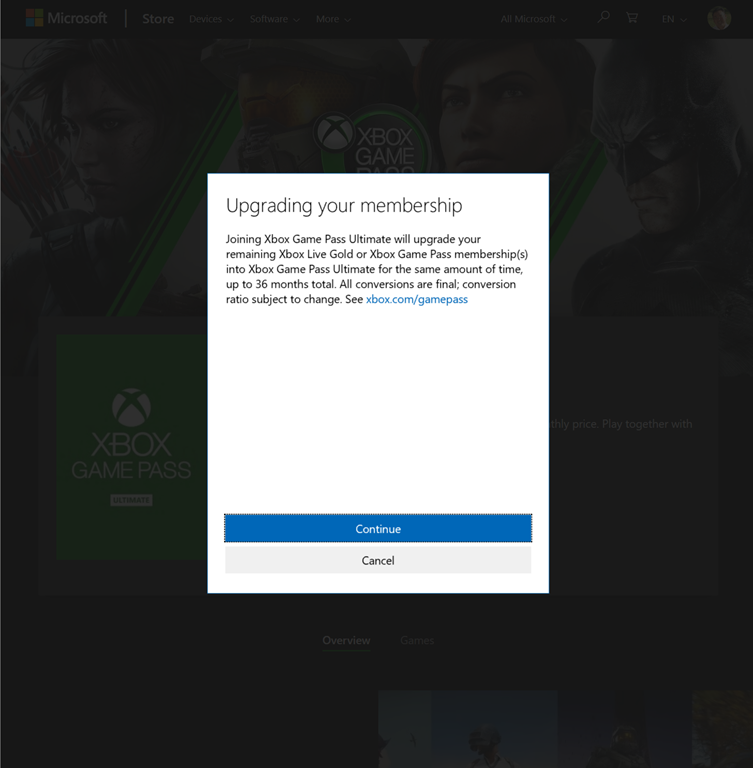
When you do this, you will eventually see this dialog box below explaining the offer to automatically upgrade whatever Xbox Live gold credit you have in the bank.  Note: The offer dialog only gets displayed if you proceed with the subscription “upgrade” with an existing Xbox Live Gold subscription:

image

HOW LONG WILL THIS LAST?
I have no idea how long this offer is going to be exist so y’might want to get on it.  This is literally a giveaway for anyone that has an existing Xbox Live Gold subscription.

NOTE ON UPGRADING A CHILD ACCOUNT TO XBOX GAME PASS ULTIMATE
This is a little more difficult.  If you have a child that needs to get their Xbox Live Gold subscription upgraded through this deal to “Xbox Game Pass Ultimate”, you can’t do it from their account if they are prevented from making purchases.

If you attempt to do so, you’ll be greeted by a dialog box that says that the child can’t upgrade the subscription and that a request can’t be sent to the parent.

In order to execute the upgrade for the child account, the parent needs to do the following:

  1. Log in to your Account and click “View your Family”
    https://account.microsoft.com
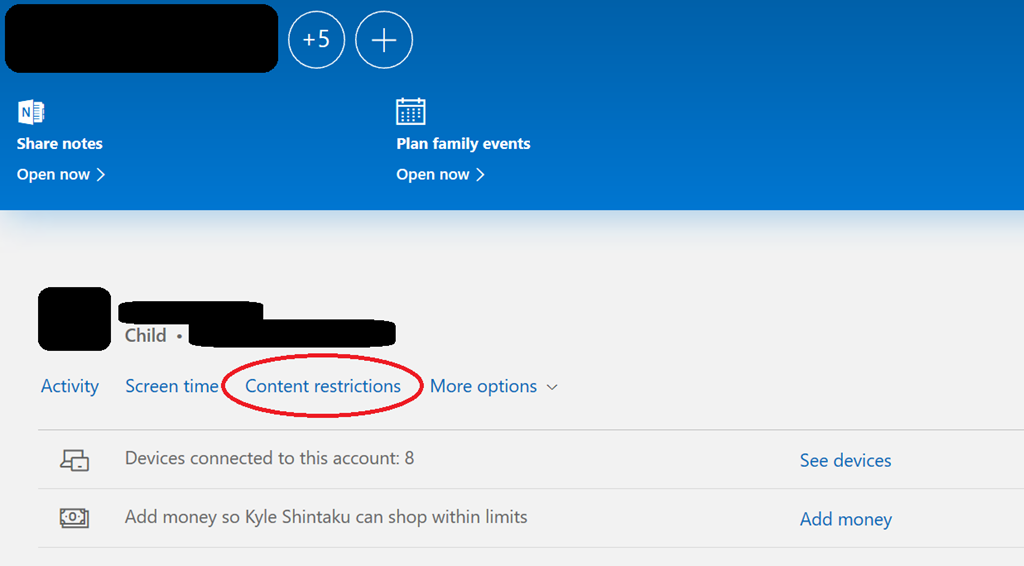
  2. Click the “Content Restrictions” menu item:
    https://account.microsoft.com/family/?fref=home.card.familyimage
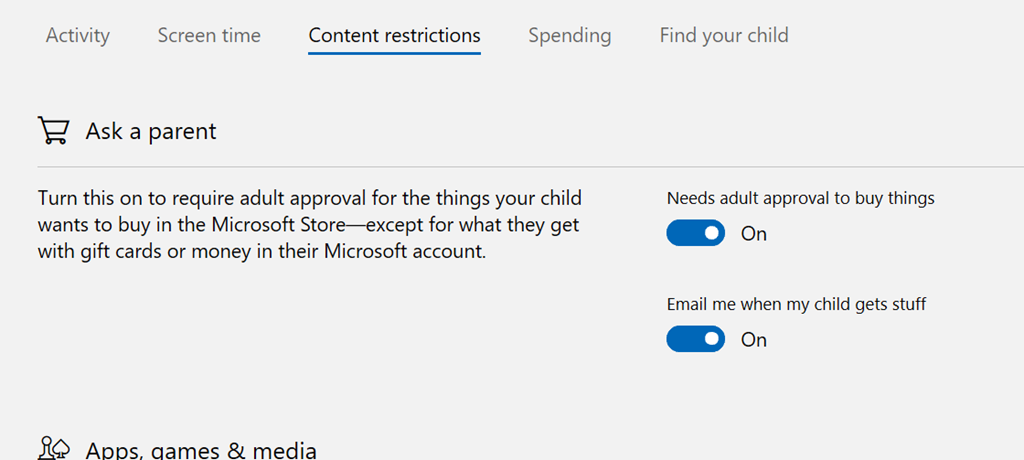
  3. From there, they will be able to go to “Needs adult approval to buy things” and flip the switch to temporarily permit purchases by the child account.
    https://account.microsoft.com/family/settings/content-restrictions/-4255669869033100790

  4. image

  5. Use an InPrivate/Incognito session in another browser window to go to https://account.microsoft.com and log in as the child account.
    Follow the upgrade process.
Posted by: kurtsh | June 17, 2019

INFO: Office 365 Advanced Threat Protection Plan 2

imageToday I learned some name changes & some licensing changes we made to Office 365.

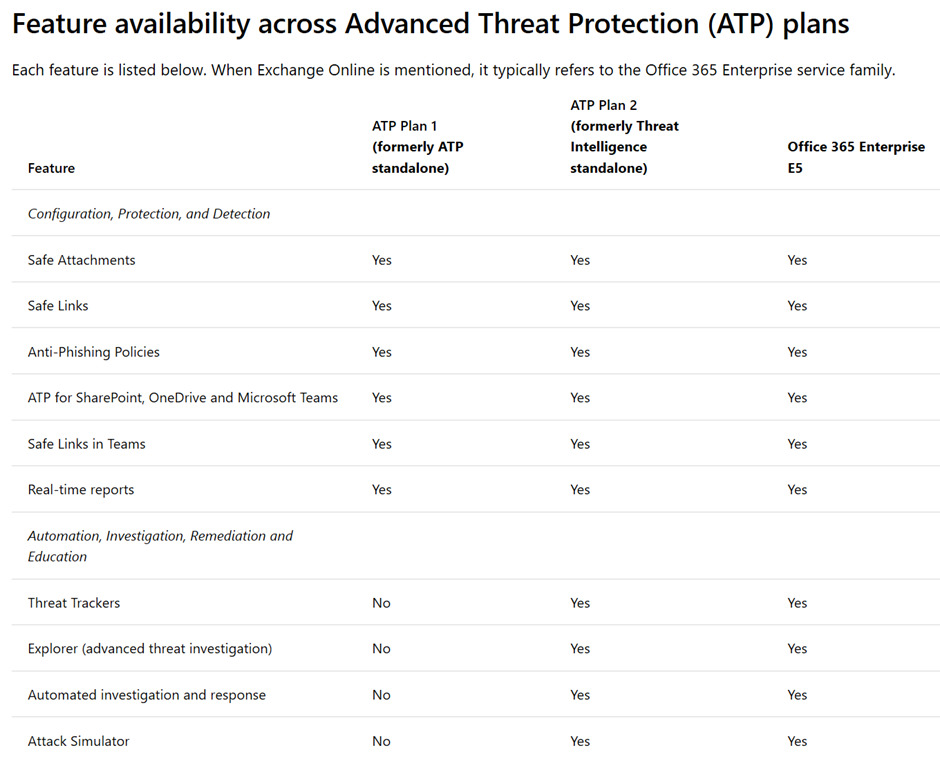
tl;dr:  Microsoft no longer offers “O365 Threat Intelligence” separately.  The service is now only available added on & connected into Office 365 ATP as part of the “Office 365 ATP Plan 2” license or the “Office 365 E5” license.

————————————–

Here’s the changes in detail:

  1. Microsoft renamed
    “Office 365 Threat Intelligence”
    to
    “Threat Investigation & Response”
    (https://docs.microsoft.com/en-us/office365/securitycompliance/get-started-with-ti)
  2. Microsoft now has 2 Office 365 Advanced Threat Protection offerings:
        1. Office 365 Advanced Threat Protection Plan 1
          (Same as the original Office 365 Advanced Threat Protection)
        2. Office 365 Advanced Threat Protection Plan 2
          (Combo of Office 365 Advanced Threat Protection + Threat Investigation & Response)
          (https://docs.microsoft.com/en-us/office365/securitycompliance/office-365-ti)

  3. Office 365 E5 now includes Office 365 Advanced Threat Protection Plan 2
    (https://docs.microsoft.com/en-us/office365/servicedescriptions/office-365-advanced-threat-protection-service-description#feature-availability-across-advanced-threat-protection-atp-plans)

Taken from https://docs.microsoft.com/en-us/office365/securitycompliance/office-365-ti:

Office 365 Advanced Threat Protection and Threat Investigation and Response (previously known as Office 365 Threat Intelligence) are now Office 365 Advanced Threat Protection Plan 2, along with additional threat protection capabilities included in in certain subscriptions, such as Microsoft 365 E5, Microsoft 365 Business, Office 365 E5, Office 365 A5, etc. If your organization has a subscription that does not include Office 365 ATP, you can potentially purchase ATP as an add-on. For more information, see Office 365 Advanced Threat Protection plans and pricing and the Office 365 Advanced Threat Protection Service Description.

imageLooks like we automated the process of deploying the perpetual click-to-run versions of Visio 2016 & Project 2016 for IT organizations using Office Deployment Tool:

Usually you deploy volume licensed versions of Project 2016 and Visio 2016 by using the Windows Installer (MSI) installation technology. But that won’t work if you’re trying to install volume licensed versions of Project 2016 and Visio 2016 on the same computer as Office 365 ProPlus. That’s because Office 365 ProPlus uses Click-to-Run as its installation technology, and in this case, having MSI and Click-to-Run installations on the same computer isn’t supported.

To help you deploy volume licensed versions of Project 2016 and Visio 2016 on the same computer as Office 365 ProPlus, we’ve provided an alternative installation method: you can use the Office Deployment Tool to do the installation of Project and Visio. The Office Deployment Tool uses Click-to-Run to do the installation, instead of using Windows Installer (MSI). But, Project and Visio are still activated by volume activation methods, such as Key Management Service (KMS) or Multiple Activation Key (MAK).

To begin, download the most current version of the Office Deployment Tool from the Microsoft Download Center. Then, edit the Product element in the configuration.xml file, using the appropriate ID from the following table. To use a Generic Volume License Key (GVLK) for volume activation with KMS, use the appropriate value in the table for the PIDKEY attribute.

Product ID PIDKEY
Project Standard 2016
ProjectStdXVolume
D8NRQ-JTYM3-7J2DX-646CT-6836M
Project Professional 2016
ProjectProXVolume
WGT24-HCNMF-FQ7XH-6M8K7-DRTW9
Visio Standard 2016
VisioStdXVolume
NY48V-PPYYH-3F4PX-XJRKJ-W4423
Visio Professional 2016
VisioProXVolume
69WXN-MBYV6-22PQG-3WGHK-RM6XC

This probably compliments the post I’d originally written on this:

Read more on the docs site for deploying Project/Visio using Office Deployment at:

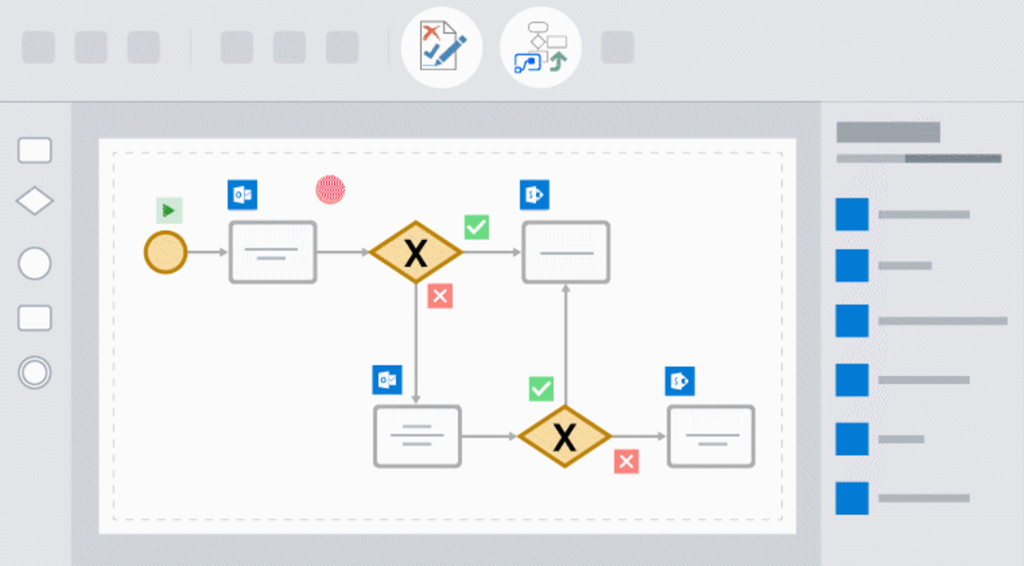
imageinterested in creating business process flows in Visio and quickly exporting them to Flow for automation—all in just a few clicks?

We’ve spent months bringing Visio & Flow together and are excited to announce that Visio and Flow integrate to help you automate your processes in next to no time.

Note: Visio-Flow integration is only available for Visio Online Plan 2 subscribers.

imageInterested in configurating Data Loss Prevention policies to prevent sensitive information – credit card numbers, social security numbers, or health records – from being shared in Microsoft Teams chat/messaging?

A NOTE AROUND LICENSING DLP FOR MICROSOFT TEAMS
There are TWO types of Data Loss Prevention (DLP) available to Microsoft Teams:

  • DLP for Teams files/documents
    (included with Office 365 E3)
  • DLP for Teams chat/messaging
    (not included with Office 365 E3;
    requires “Office 365 E5” or separate licensing of “Office 365 Advanced Compliance” or corresponding Microsoft 365 suite licensing)

It is my understanding that DLP is available for files/documents for Microsoft Teams just as it is for SharePoint file folders & OneDrive for Business for Office 365 E3 licensees.  DLP is not available for chat/messages in Microsoft Teams in Office 365 E3 & requires additional licensing if needed:

  • Office 365 E5/A5
  • Microsoft 365 E5/A5
  • Microsoft 365 E5/A5 Compliance
  • Office 365 Advanced Compliance

BACKGROUND
For more background on this, visit the following URLs:

imageMicrosoft Corp. and Oracle Corp. on Wednesday, June 5th, 2019, announced a cloud interoperability partnership enabling customers to migrate and run mission-critical enterprise workloads across Microsoft Azure and Oracle Cloud.

As a result of this expanded partnership, the companies are today making available a new set of capabilities:

  1. Connect Azure and Oracle Cloud seamlessly, allowing customers to extend their on-premises datacenters to both clouds. This direct interconnect is available starting today in Ashburn (North America) and Azure US East, with plans to expand additional regions in the future.
  2. Unified identity and access management, via a unified single sign-on experience and automated user provisioning, to manage resources across Azure and Oracle Cloud. Also available in early preview today, Oracle applications can use Azure Active Directory as the identity provider and for conditional access.
  3. Supported deployment of custom applications and packaged Oracle applications (JD Edwards EnterpriseOne, E-Business Suite, PeopleSoft, Oracle Retail, Hyperion) on Azure with Oracle databases (RAC, Exadata, Autonomous Database) deployed in Oracle Cloud. The same Oracle applications will also be certified to run on Azure with Oracle databases in Oracle Cloud.
  4. A collaborative support model to help IT organizations deploy these new capabilities while enabling them to leverage existing customer support relationships and processes.
  5. Oracle Database will continue to be certified to run in Azure on various operating systems, including Windows Server and Oracle Linux.

Read more about this newly announced collaboration here:

imageMicrosoft business apps fans rejoice!

You can now watch all the PowerApps, Power BI and Microsoft Flow sessions from Microsoft Business Applications Summit on demand.  Explore 200+ sessions from Microsoft Business Applications Summit, available now in the PowerApps Community.

Here’s some recommended Sessions:

Check out the on-demand sessions here:

  • TRAINING: PowerApps, Power BI & Flow sessions from Microsoft Business Applications Summit now available on-demand
    https://aka.ms/mbasonline

« Newer Posts - Older Posts »

Categories