Posted by: kurtsh | November 1, 2019

RELEASE: Windows Virtual Desktop now generally available

imageWe finally released Windows Virtual Desktop – the highly scalable, available, and globally accessible remote desktop solution, delivered through Microsoft Azure.  Creating & managing both Remote Desktop Services as well as VDI/Virtual Machine-based desktops, Windows Virtual Desktop provides a great solution for Enterprises that need to stop managing & supporting the infrastructure required for a similar on-prem solution.

Today, we’re excited to announce that Windows Virtual Desktop is now generally available worldwide. Windows Virtual Desktop is the only service that delivers simplified management, a multi-session Windows 10 experience, optimizations for Office 365 ProPlus, and support for Windows Server Remote Desktop Services (RDS) desktops and apps. With Windows Virtual Desktop, you can deploy and scale your Windows desktops and apps on Azure in minutes.

Since we announced Windows Virtual Desktop last September, and through the public preview announced in March, thousands of customers have piloted the service and taken advantage of the Windows 10 multi-session capability—validating the importance of this feature as a core part of the service. Customers also represented, all major industries and geographies, helping us get feedback from different customer types and locations. As a result, as of today the service is now available in all geographies. In addition, the Windows Virtual Desktop client is available across Windows, Android, Mac, iOS, and HTML 5.

imageWatch the Microsoft Mechanics video on Windows Virtual Desktop’s general availability here:

Read more off the Microsoft 365 Blog from our Corporate VP, Brad Anderson:

Or from Jonathan Frederico, Sr PM for Azure:

Posted by: kurtsh | October 31, 2019

TRAINING: Microsoft Security Webinars for November 2019

imageInterested in Microsoft’s security technologies?

Please note that the registration links will be made available approximately two weeks before the webinar. Until then, all dates are tentative. 

Want to join our email list to be notified about future webinars?  Visit https://aka.ms/SecurityCommunity.


Upcoming Public Community Webinars:

Date & Time in PST

Product: Topic

Webinar Registration

Nov. 12, 2019 at 08:00

Azure Network Security: DDoS Protection

Link 

Nov. 13, 2019 at 08:00

Azure Sentinel: Post-Ignite | Understanding Azure Sentinel features and functionality deep dive

Link 

Nov. 14, 2019 at 08:00

Azure Network Security: Introduction to WAF

Link

Nov. 19, 2019 at 08:00

Azure Security Center for IoT: End-to-End security for IoT

Link

Nov. 20, 2019 at 08:00

Azure Sentinel: Cloud & on-prem architecture

Link

Dec. 09, 2019 at 08:00

Azure Advanced Threat Protection: Post-Ignite webinar deep dive

TBA

Jan. 22, 2020 at 08:00

Azure Sentinel: End-to-End SOC scenario

TBA

Jan. 29, 2019 at 08:00

Azure Sentinel: Threat Hunting – revisited

TBA


Recordings of Past Webinars:

Date & Time in PST

Product: Topic

Recording

Deck

Oct. 07, 2019 at 08:00

MCAS: Extending real-time monitoring & controls to any app

MP4

YouTube

Link

Sep. 24, 2019 at 08:00

AATP: Identity Security Posture assessments

MP4

YouTube

Link

Sep. 18, 2019 at 09:00

Azure Sentinel: Threat Hunting

MP4

YouTube

Deck 1


Deck 2

Sep. 16, 2019 at 07:00

AATP: Deployment and Configuration

MP4

YouTube

Link

Sep. 10, 2019 at 08:00

ASC: Secure Score

TBA

TBA

TBA

Aug. 05, 2019 at 08:00

ASC for IoT: ASC for IoT basics and latest announcements

MP4

YouTube

Link

Jul. 15, 2019 at 08:00

AATP: Detections part 2 of 2 

MP4 

YouTube 

Link

Jun. 24, 2019 at 08:00

AATP: Unified SecOps Portal 

MP4 

YouTube 

Link

May 23, 2019 at 07:00

AIP: Unified Labeling in AIP

MP4

YouTube

Link

Apr. 29, 2019 at 08:00

AATP: Detections part 1 of 2 

MP4 

YouTube 

Link

Apr. 18, 2019 at 12:00

AIP: MIP SDK | How to leverage the SDK

MP4

YouTube

Link

Apr. 16, 2019 at 12:00

MCAS: Automation and integration with Microsoft Flow

MP4

YouTube

Link

Apr. 11, 2019 at 12:00

AIP: Monitoring | Visibility into who is accessing data

MP4

YouTube

Link

Apr. 9, 2019 at 12:00

MCAS: Connecting 3rd party Applications

MP4

YouTube

Link

Apr. 4, 2019 at 12:00

AIP: Protection | Protect data at rest and in motion

MP4

YouTube

Link

Apr. 2, 2019 at 12:00

MCAS: App Discovery and Log Collector Configuration

MP4

YouTube

Link

Mar. 28, 2019 at 12:00

AIP: Classification | Label taxonomy and recommendations

MP4

YouTube

Link

Mar. 26, 2019 at 12:00

MCAS: Conditional Access App Control

MP4

YouTube

Link

Mar. 21, 2019 at 12:00

AIP: Discovery | Discover data at rest

MP4

YouTube

Link

Mar. 19, 2019 at 12:00

MCAS: Threat detection

MP4

YouTube

Link

Mar. 14, 2019 at 12:00

MCAS: Introduction | AIP basics and latest announcements

MP4

YouTube

Link

Mar. 12, 2019 at 12:00

MCAS: Information Protection

MP4

YouTube

Link


[taken from https://aka.ms/SecurityWebinars]

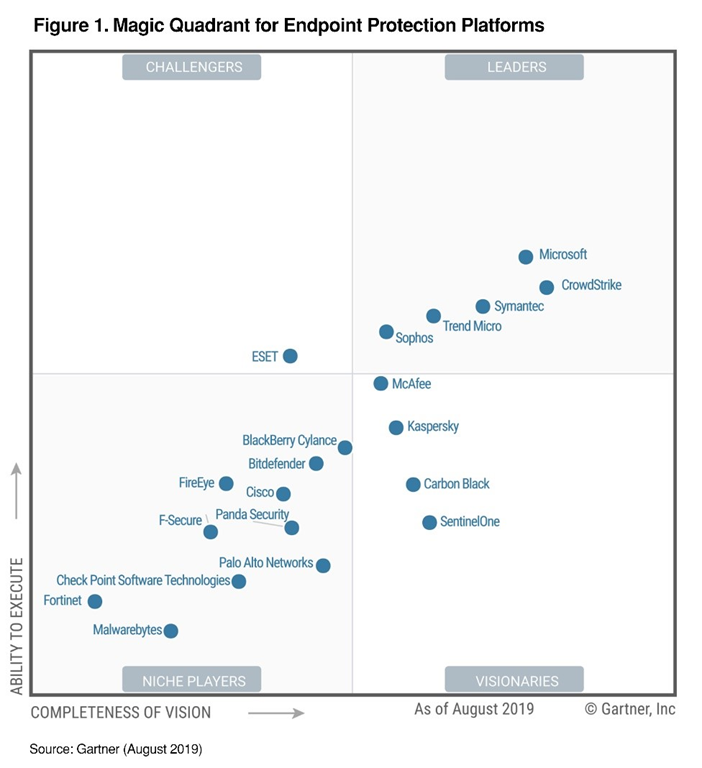
imageOur mission as a company is to empower every person on the planet to achieve more. We deliver on that mission through products that achieve the highest marks in the industry, which we believe is inclusive of Gartner’s Magic Quadrant. We have been on a journey for the last several years working hard to offer our customers leading endpoint protection so they can defend against increasingly sophisticated attacks across a variety of devices, which is why we are so proud to have placed in the Leaders quadrant for this year’s 2019 Gartner EPP Magic Quadrant and positioned highest in execution!

According to Gartner, “Leaders demonstrate balanced and consistent progress and effort in all execution and vision categories. They have broad capabilities in advanced malware protection, and proven management capabilities for large enterprise accounts.” Our latest product offerings prove that we’ve risen to the challenge that today’s threat landscape presents. This achievement represents our ability to provide best-in-class protection and deliver on innovations that learn and evolve just as attackers change their tactics.

Read more about why Microsoft was positioned so highly at the post here:

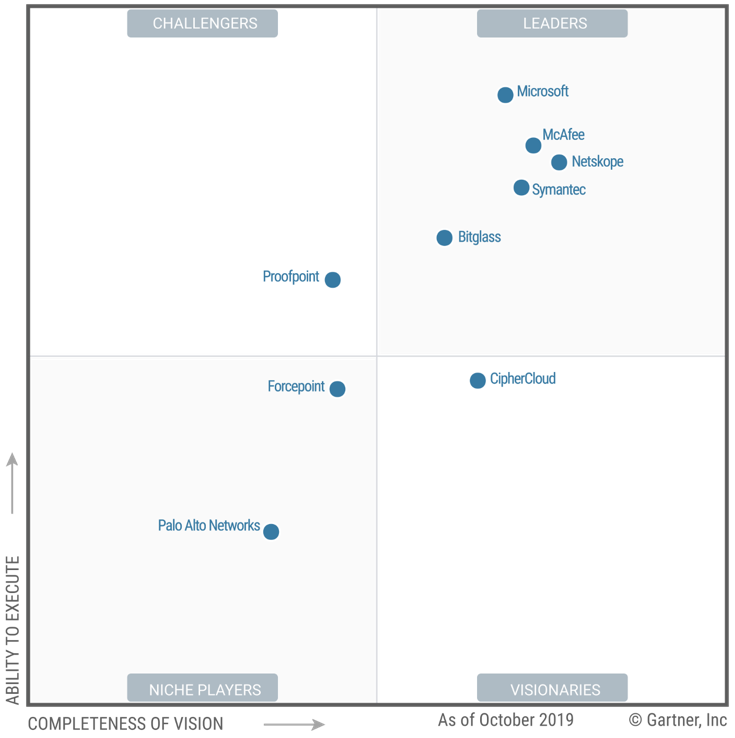
imageIn Gartner’s third annual Magic Quadrant for Cloud Access Security Brokers (CASB), Microsoft was named a Leader based on its completeness of vision and ability to execute in the CASB market. Microsoft was also identified as strongest in execution.

Gartner led the industry when they defined the term CASB in 2012. We believe their report points out a key fact for the market, that Microsoft currently has the largest customer base of all participating vendors. We believe that this, along with being ranked as a Leader, reflects our continued commitment to building the best possible solution for our customers and our goal to find innovative ways of helping them better protect their Microsoft and third-party cloud apps and platforms.

Read about why Microsoft was positioned so highly at the post written here:

imageAdvanced data security for SQL Servers on Azure Virtual Machines is a unified package for advanced SQL security capabilities.

It currently (in Public Preview) includes functionality for surfacing and mitigating potential database vulnerabilities and detecting anomalous activities that could indicate a threat to your database.

This security offering for Azure VMs SQL servers is based on the same fundamental technology used in the Azure SQL Database Advanced Data Security package.

For more information, visit:

imageThis document explains the following aspects of Azure Active Directory:

  • Azure AD Components: What are the different components of Azure AD. This will help you to understand the later sections of the document.
  • Core Data and Location: What customer data is used by Azure AD and where is it located.
  • Data Protection: How is the directory data protected at transit and at rest.
  • Data Flow: How data from various sources such as on premises directories and applications flows to and from Azure AD.
  • Data and Operations: What data and operational procedures are used by the Azure AD engineering team to manage the service.

The target audience of this document is enterprise security evaluators, identity, and access management (IAM) architects, policy makers and regulators, as well as customers with compliance requirements or regulated environments.

If you have DFARS, ITAR, FedRAMP, CJIS, IRS and other regulatory requirements, and are trying to understand what Microsoft 365 service fits your company, this article is for you.

imageThis article is the second of a series in the Microsoft Tech Community Public Sector Blog and touches on several  key principles for compliance, including data residency versus data sovereignty.  For the first article in the series, please refer to History of Microsoft Cloud Service Offerings leading to the US Sovereign Cloud for Government.

We will focus on each of the US-based cloud offerings from Microsoft and compare the differences in compliance. 

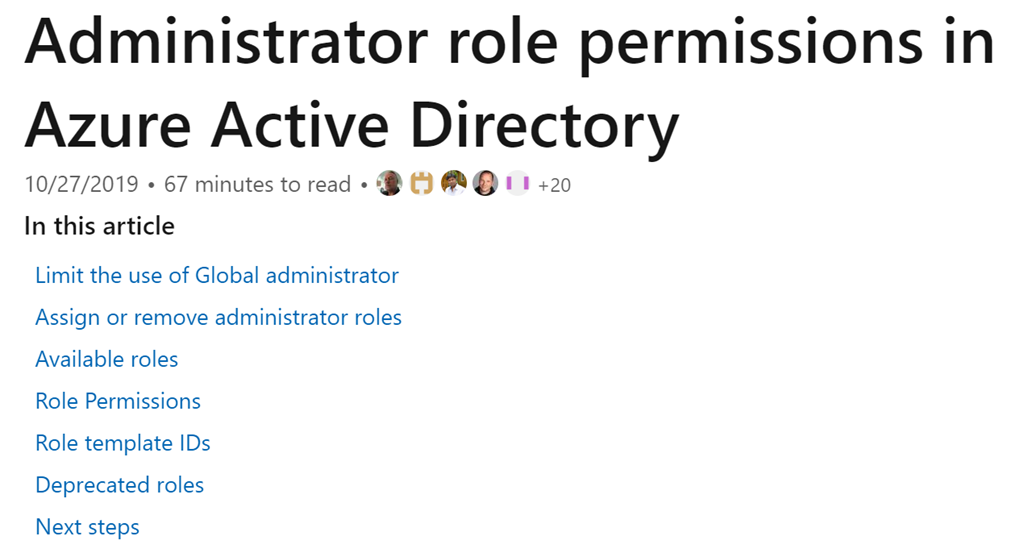
imageCorporations with 100,000+ users can operate with just 3 Global Admins.

One of the best documents Microsoft has shows the minimum permissions needed to perform a task in Azure Active Directory.

Here’s some interesting roles & their permissions requirements:

Learn how to take advantage of Azure virtual machines (VMs) to better manage your infrastructure and DevOps tools and pipelines.

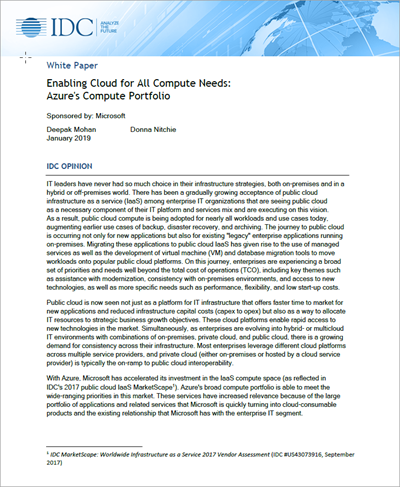
imageDownload this white paper by International Data Corporation (IDC) to determine which factors you should consider when choosing virtual machines for your cloud computing needs.

This resource gives an overview of Azure VMs, which are available for every workload and use case, from entry-level test environments to high performance computing (HPC).

Discover how Azure not only offers competitive pricing, but also provides industry-leading security and hybrid capabilities. 

Download the whitepaper from the link below:

AUTOMATICALLY BLOCKING NOTIFICATIONS
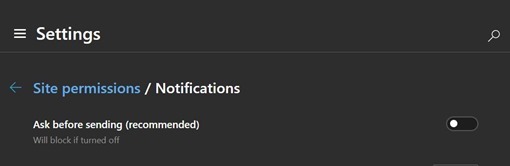
Did you know that there’s an Edge Chromium setting to automatically block all website requests from sending notifications?

  1. Click “…” in the upper right hand corner
  2. Go to Settings
  3. Select Site Permissions
  4. Click Notifications
  5. Turn OFF the switch for “ask before sending”

EdgeDevNotificationSettings_thumb1

STOP VIDEO AUTOPLAY
There is a plug in you can install on Edge Chromium through the Chrome web store that will automatically stop video for auto-playing.

  1. Click “…” in the upper right hand corner
  2. Click "Extensions
  3. Turn ON the switch for “Allow extensions from other stores”
  4. Go to:
    https://chrome.google.com/webstore/detail/autoplaystopper/ejddcgojdblidajhngkogefpkknnebdh
  5. Click the Add to Chrome button

AUTO-DISMISS COOKIE WARNINGS
There is a similar plug in that works on Edge Chromium that dismisses Cookie Warnings.

  1. Follow the above steps 1-3 for STOP VIDEO AUTOPLAY
  2. Go to:
    https://chrome.google.com/webstore/detail/i-dont-care-about-cookies/fihnjjcciajhdojfnbdddfaoknhalnja
  3. Click the Add to Chrome button

« Newer Posts - Older Posts »

Categories