Nuff said.

Nuff said.
Comments Off on DOWNLOAD: Microsoft Teams Conference Call Bingo Card
Posted in Uncategorized
 The following represents 4 articles that highlight the limitations of the Power Platform in the US Government Cloud (GCC).
Many of these Power Platform for US Govt issues are roadmapped for incorporation into GCC however no timeline is publicly available beyond what is posted to the Power Platform US Government page.
These articles are updated as features are made available.
Comments Off on INFO: Power Platform limitations in the Government Cloud (GCC)
Posted in Uncategorized
If you create a new team within Microsoft Teams, you’ll find that the icon/photo representing the new Team is simply a square with the group’s initials in it: 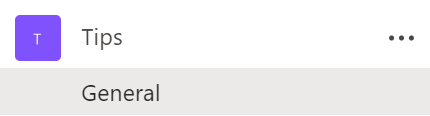
My team in the photo above is called “Tips” . The team icon/photo is just a purple square with the initial, “T” in it. Let’s change that!)
Here’s how to change the icon/photo in a Microsoft Team:


See the gray circle in the icon/photo above? This circle only appears when you hover your mouse pointer over the purple icon/photo. Yeah… I know. Just go with it.

Note: The icon should be a SQUARE. Teams will automatically scale the photo you use but it needs to be a square if you want the entire image to be represented, otherwise, if the photo is a rectangle, Teams will cut off the sides or tops of your photo.
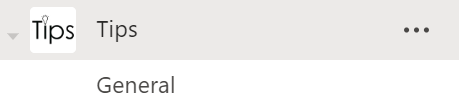
Your logo should now be in the icon/photo for the Team.
Hope this helps!
Comments Off on HOWTO: Change the icon/ photo for a Microsoft Team
Posted in Uncategorized
|
Comments Off on EVENT: Microsoft Virtual Security & Compliance Summit – June 11, 2020
Posted in Uncategorized
 Transforming the way government agencies communicate
Microsoft Teams is the collaboration and communication hub that helps government agencies achieve joint missions in new and exciting ways. Designed for working both internally and with the public, Microsoft Teams was built with IT in mind, and provides management capabilities for shared workspaces, meetings, calls, and apps, all in one place and with simple administration.
We invite you to join us for a webcast featuring Microsoft experts who have supported US Government agencies, and who will share actionable best practices for deploying Microsoft Teams within your own organization.
You will come away from this webcast with:
 All this and more government-specific information about Teams await you. It’s time to accomplish larger and more complex workforce missions, through simplified collaboration and communication.
Featuring the Teams Government folks:
Register here for the on-demand recording:
Comments Off on HOWTO: Deploy Microsoft Teams in Government Agencies (On-demand)
Posted in Uncategorized
 Microsoft Bookings is an online and mobile app for businesses who provide services to customers on an appointment basis.
Unfortunately, everything you read about Microsoft Bookings says that it’s “available to use by default for Office 365 Education A3, Office 365 A5, and Office 365 Business Premium subscriptions.”
Q: Did you know it’s coming to Office 365 Enterprise subscriptions as well?
Beginning May 12, 2020, Microsoft Bookings will be available as on by default to Office 365 Enterprise E3 and Office 365 Enterprise E5 customers.
If you purchased Office 365 Enterprise E3/Office 365 Enterprise E5 through a Microsoft Enterprise agreement or through volume licensing, you have to get the Microsoft Bookings add-on through the Volume Licensing Service Center (VLSC). Once you get the free add-on, you you can assign licenses to users in your organization. Work with your channel partner or reseller to place a zero dollar purchase order for the add-on. Once you’ve purchased the add-on in Volume Licensing Service Center, follow these steps to get licenses and assign to your users in the Microsoft 365 admin center.
(Note: Microsoft 365 GCC tenants will have Bookings available in the future, however, as expected with all services published to Government Community Cloud, availability is pending Federal approval.)
Read more about this feature here:
Comments Off on HOWTO: Get Access to Microsoft Bookings
Posted in Uncategorized
 We are very excited to announce an ‘Ask Microsoft Anything’ (AMA) event for “Microsoft 365 Apps”!
<ks> “Microsoft 365 Apps” is the new name for “Office 365 ProPlus”. Yeah, I know.
The AMA will take place on Wednesday, May 27th, 2020 from 9:00 a.m. to 10:00 a.m. PT in the Microsoft 365 Apps AMA space in the Microsoft 365 Community. Add the event to your calendar with this link.
Comments Off on EVENT: Microsoft 365 Apps “Ask Microsoft Anything” (AMA) – May 27th, 2020
Posted in Uncategorized
[Note: The following is targeted toward end users who are enthusiastic advocates for Microsoft 365 services & would like to participate in a birds of feather program. While IT Pros may join, it’s focused on business users.]
You are a champion. You are passionate and curious by nature. You believe there is a more effective way to accomplish your day to day tasks. Your knowledge of Office 365 helps you achieve more. People recognize you as a go-to person. You are in the right place.
We have created this program for Office 365 users like you to connect with like-minded people who not only love using our product but also seek new and more efficient ways to tackle their everyday tasks. We want to make sure that you are getting the most out of Office 365 and enable you to help bring more people to your level of passion and knowledge, to work better together.
The Office 365 Champion program exists to support you with regular communication, connection to peers and thought leaders, and a center of gravity for your Office 365 education journey. Let’s get started today. Fill out the below registration page to get started.
By signing up for this community, you’ll have access to following opportunities:
(Please note that at this time all program communications will be in English.)
Comments Off on OFFER: Office 365 Champions Program – End User Advocates
Posted in Uncategorized
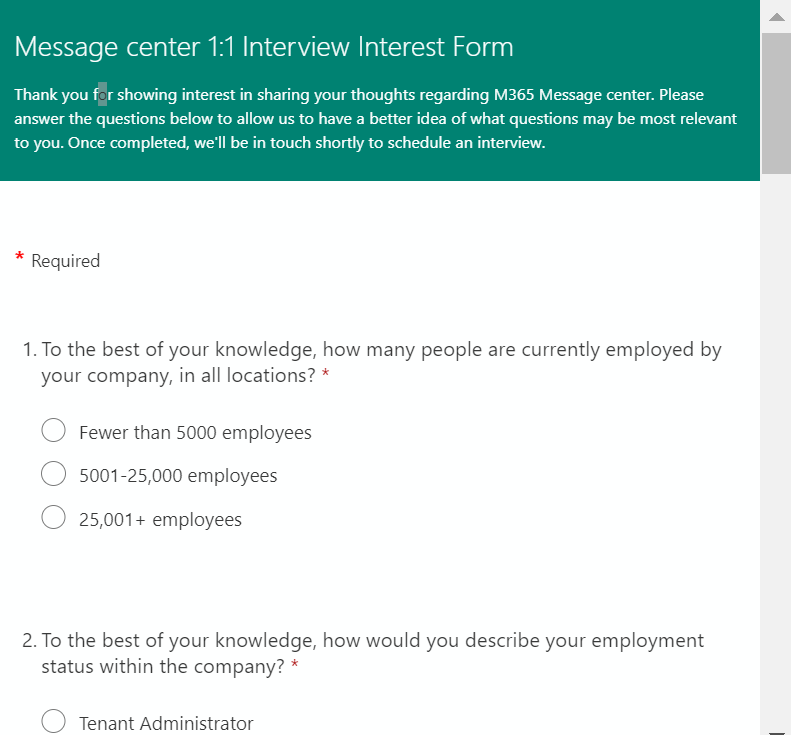 Are you a Microsoft M365 Admin? The Microsoft M365 Message center is built for IT Admins as a convenient location to keep track of new and upcoming changes, including new and changed features, planned maintenance, and other important announcements that let you take a proactive approach to change management.
Our team is constantly looking to evolve the user experience of M365 Message center, and we want to know what you think about it! We’re looking to speak one-on-one with qualified IT Admins who are active or former users of Message center and are willing to share their experience with Message center. This is a great opportunity to help develop the future of Message center.
To indicate your interest in participating in this research, please fill out the survey.
Comments Off on OFFER: Apply for “Microsoft 365 Message Center” feedback interviews
Posted in Uncategorized
L earn how to bring the benefits of low-code app development—such as increased innovation, improved efficiency, and reduced development costs—to your organization while mitigating the risks.
In this white paper, you’ll get the answers to key organizational questions such as:
Download the whitepaper here:

Comments Off on WHITEPAPER: Understanding the Impact of Low-Code Development with Power Apps + Power Automate
Posted in Uncategorized


 kurtsh
 Kurt Shintaku's Blog
You must be logged in to post a comment.