imageIf there is one constant in compliance, it’s that the rules always change. With evolving regulations, plus new ones being passed, how are businesses to keep up? Technology like AI or cloud-based solutions can make it easier to know the regulations and decide how to enforce them, but it’s up to fallible human employees whether they will comply, knowingly or unknowingly. Small mistakes or lapses in judgment can expose companies to major vulnerabilities.

By taking a smart approach to modern compliance with AI, you can effectively use technology to protect your company’s critical asset—its reputation.

If compliance decision-making is your responsibility, our new e-book can help you manage the risk. In The Modern Compliance Playbook: A Smart Approach to Artificial Intelligence, you’ll learn about:

  • The speed of regulation and what it means for today’s companies.
  • Implementing and communicating compliance in an ever-changing landscape.
  • Getting to know the explosion of data that’s now available to you.
  • The future of AI and compliance.

Download the e-book now.

Posted by: kurtsh | September 13, 2020

TRAINING: Azure Government Video Catalog

imageThere’s an incredible repository of videos available specifically for Azure Government if you’re interested in learning.

Most are 20-30min long and with over 60+ videos, there’s a tremendous amount to learn.  Topics include:

  • Overview of Open Source DevOps in Azure Government
  • Overview of VS Code Extensions for Azure Government
  • Overview of Azure Database for MySQL in Azure Government
  • QnA Maker in Azure Government
  • Azure Maps in Azure Government
  • Azure Stream Analytics in Azure Government
  • Cloud Shell in Azure Government
  • Azure DevOps in Azure Government
  • Secure Azure Computing Architecture in Azure Government
  • Azure Batch in Azure Government
  • Azure Data Lake Storaage Gen2 on Azure Government
  • Terraform on Azure Government
  • Cost Management on Azure Government
  • Azure blueprints and compliance on Azure Government

Check out the playlist here from the Azure Government Engineering team:

Posted by: kurtsh | September 11, 2020

BETA: Anti-malware for Azure Files (Preview)

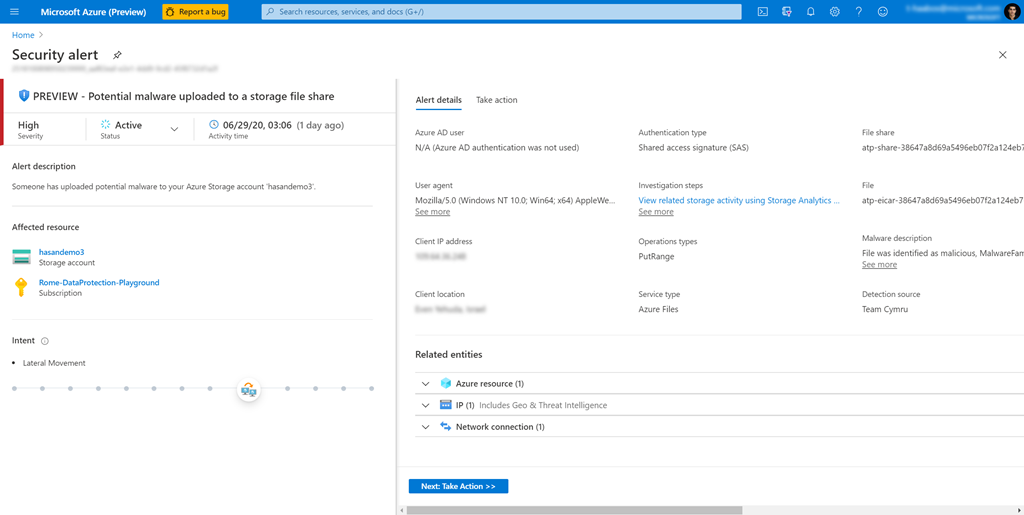
imageGood news – if you have content stored in Azure Files, we now have a public preview of “Advanced Threat Protection for Azure Files”.  In English, that means there is first tier anti-malware solution available that you can enable “in the cloud” that will scan from suspicious files stored in Azure Files.

This new “Azure Files support” is technically the same engine that is used to currently protect Azure Storage in the same way so you’ll see the ATP service used interchangably between Azure Storage and Azure Files.

For more information on the public preview, visit the following:

We’ve made available a new add-on called “Advanced Communications” for Microsoft Teams users/owners that improves scale, manageability, and customization for organizations that require them.

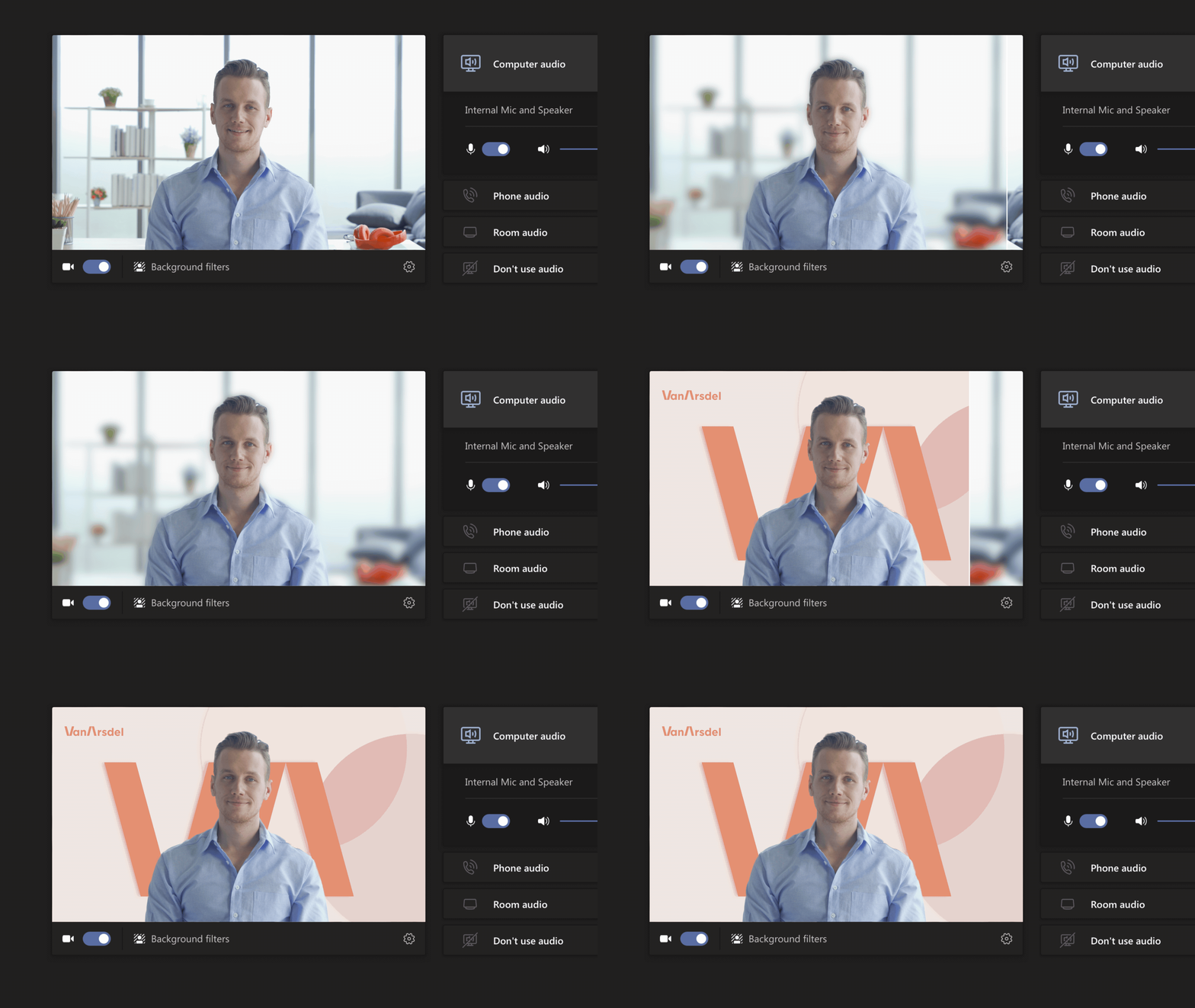
An animated image of the Custom branded background.Advanced Communications provides enhanced calling and meeting capabilities that address a spectrum of communication needs, including the following:

  • Reach larger audiences: Help your users stay connected with live events for up to 20,000 participants and interactive meetings for 1,000 participants with the capability to enable up to 20,000 participants in a view-only meeting experience.
  • Tailor and customize meetings: Drive standardization across meetings for your internal and custom-facing scenarios, with features such as custom branded meeting lobby. Implement with flexibility across your organization’s departments.
  • Connect meetings and calling to workflows: Integrate workflows to your communication system. For example, have your compliance recording policy automated, and become part of the communication workflow, without the need for manual intervention.
  • Manage your organization communications: Monitor, track, and analyze data on users and devices to ensure a smooth experience.

A COMPLETELY SEPARATE SKU:
Advanced Communications is available in all Microsoft 365 markets as an add-on to any paid Microsoft 365 or Office 365 subscription. Features included in Advanced Communications won’t be added to other Microsoft 365 or Office 365 plans and can’t be purchased separately. To get the features, you must purchase the add-on.

REGARDING GCC CUSTOMERS:
The Microsoft Teams “Advanced Communications” add-on isn’t yet available for Microsoft 365 Government Community Cloud (GCC), GCC High, or Department of Defense (DoD) environments. We’re planning on making it available later.

PRICING:
Pricing is $12 list and only meeting organizers need a license. Meeting attendees don’t need a license.

For more information read the following:

Posted by: kurtsh | September 11, 2020

OFFER: Microsoft Teams Audio Conferencing for free & more

Image result for microsoft teams audio conferencingIf you have an Enterprise Agreement & have Microsoft Teams, you may have the opportunity to take advantage of a set of new offers.
New Microsoft Teams promotional offers:

  • Get Audio Conferencing for free, available now for Enterprise Agreement customers1 and starting October 1st, 2020 available for customers purchasing via partners and web2.
  • Get 35% off Advanced Communications3, available now for Enterprise Agreement customers, and will be available before the end of the calendar year for customers purchasing via partners and web.
  • For Skype for Business customers, we offer FastTrack support along with great pricing offers to help you move to Teams in a cost-effective manner.  Contact your account representative for more details.

People that take advantage of this offer for free access to Audio Conferencing in Microsoft Teams will have it for the duration of their Enterprise Agreement.  The offer is available until January 31st, 2021.

1 Get Audio Conferencing for free until the end of your enrollment. Eligible for Microsoft Enterprise Agreements customers with paid Microsoft 365 or Office 365 licenses with Microsoft Teams without Audio Conferencing add-on or Microsoft 365 E5. Available now through January 31st, 2021.

Note: GCC customers can take advantage of the “Audio Conferencing” offer but not “Advanced Communications”, which has not been released to GCC yet.  Please see this blog for more information about what the “Advanced Communications” add-on is.

Q: Are the offers available for education (EDU), GCC, DoD, or GCC High customers?
A: Audio Conferencing Offer1,2: available for GCC and EDU (A3 only) but is not available for DoD and GCC High customers.
Advanced Communication offer3: The offer is not available for EDU customers. Advanced Communications add-on is not yet available to US GOV clouds (DoD, GCC, GCC High).

For more information, check out the announcement page:

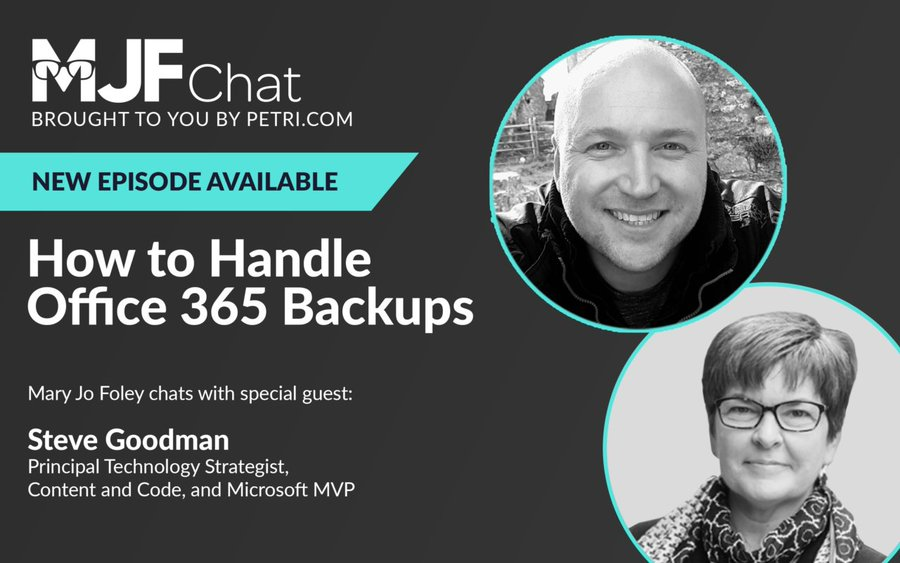
imageMary Joe Foley had a specific podcast episode dealing with Office 365 Backups.

It’s a cursory overview which discusses the scenarios in which you may want to consider 3rd party/additive backup solutions for your Office 365 tenant.

My special guest is Steve Goodman, a Petri.com contributor, Microsoft Most Valuable Professional and Principal Technology Strategist with Content and Code.

Steve is ready to discuss anything and everything you’re curious about, in terms of Office 365 backups: When, how and if you should worry about them; how best to plan for them; ways to stay current about what’s happening in this area and more.

Listen here:

Posted by: kurtsh | September 7, 2020

RELEASE: Microsoft Tasks (replacing “Planner”)

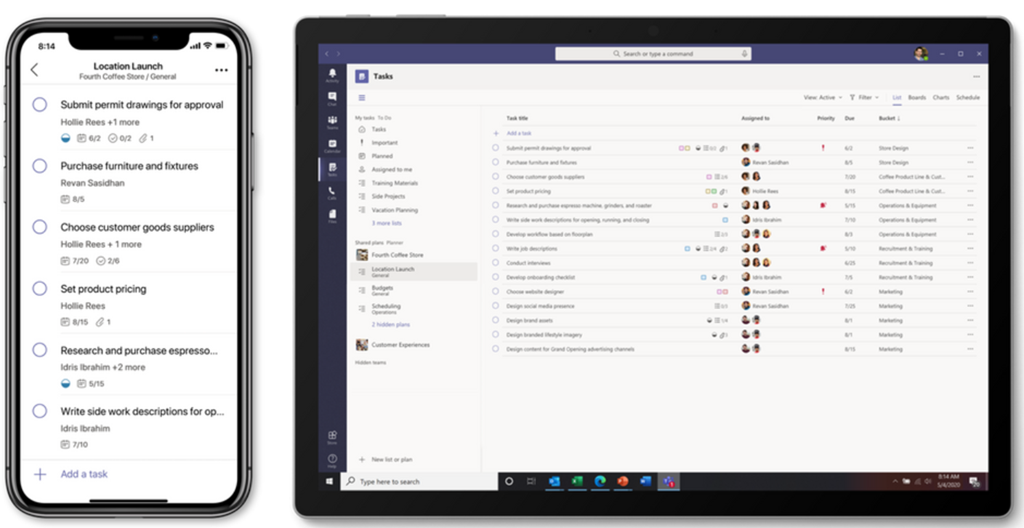
We’ve released Microsoft Tasks to the general public and it’s an evolution of Microsoft Planner, and replacing Planner in your Office 365 tenant.

imageTasks are the building blocks of our work. They help us keep track of what to do now and what needs to be done next. But tasks are hard to manage, especially when you have to flip between different places to see them all.

That’s why we’re thrilled to begin rolling out Tasks in Microsoft Teams, a coherent task management experience in your hub for teamwork. The new Tasks experience brings together Microsoft Planner and Microsoft To Do into Teams, giving you one place to manage your team plans and individual tasks.

We’re starting to roll out Tasks in Teams on desktop today to a small group of users, and that rollout will continue through September. The Tasks in Teams mobile experience will not be available until the desktop rollout is complete.

Here’s the key item:

To get the Tasks in Teams app when it’s available, click the ellipses in the Teams left siderail and select Planner. No, that’s not a typo: as we roll out the new Planner experience in Teams desktop, the app name will initially remain Planner. It will then briefly change to Tasks by Planner and To Do. Finally, it’ll be simplified to Tasks. On Teams mobile clients, users will always see the app name as Tasks.

Summary:
Microsoft Planner has evolved to do more than just plan & orchestrate action items.  It’s about managing tasks, assigning them to individuals, setting due dates, collecting activities moving the tasks forward, etc. – and more importantly doing so consistently across all Microsoft 365 services, including:

  • Teams
  • Outlook
  • Todo
  • Office Apps

For more details, see the following:

imageWell, well, well. It’s that time of year again. No, I am not referring to my annual workout. That was last week, and I can assure you that I will be making it a biennial affair from now on. Obviously I can only be talking about one thing: Minecraft Live! Tune in on October 3 at 12 ET on Minecraft.net/live for what the Minecraft Live team are not-so-humbly calling “an event that will happen”!

Minecraft Live is the new version of our annual live show, which has had many names such as MINECON Live and MINECON Earth. Why the name change? Would you ask rap superstar and underrated actor Sean Combs a.k.a P. Diddy a.a.k.a Puff Daddy that? No, you would not. What you will do instead is tune in to Minecraft Live on October 3rd at 12 ET to get answers to pertinent questions about what the rest of Mojang Studios have been working on all year. Will Seanothy and I be there? Maybe. I need to check our schedule. 

Join us on Minecraft.net/live for updates, mob votes, news, and delightful banter. Oh, and chickens. Lots and lots of chickens.

Read below for more details:

imageMicrosoft’s Security teams released 2 new updates & 2 new tools for folks maintaining security baselines for their organization systems & users through the Security Compliance Toolkit.

This set of tools allows enterprise security administrators to download, analyze, test, edit and store Microsoft-recommended security configuration baselines for Windows and other Microsoft products, while comparing them against other security configurations. 

  • LGPO v3.0 (Local Group Policy Object utility)LGPO.exe is a command-line utility that is designed to help automate management of Local Group Policy. It can import and apply settings from Registry Policy (Registry.pol) files, security templates, Advanced Auditing backup files, as well as from formatted “LGPO text” files and Policy Analyzer “.PolicyRules” XML files. It can export local policy to a GPO backup. It can export the contents of a Registry Policy file to the “LGPO text” format that can then be edited, and can build a Registry Policy file from an LGPO text file.

  • Policy Analyzer v4.0
    Policy Analyzer is a lightweight utility for analyzing and comparing sets of Group Policy Objects (GPOs). It can highlight when a set of Group Policies has redundant settings or internal inconsistencies and can highlight the differences between versions or sets of Group Policies. It can also compare one or more GPOs against local effective state. You can export all its findings to a Microsoft Excel spreadsheet.
    Policy Analyzer lets you treat a set of GPOs as a single unit, and represents all settings in one or more GPOs in a single “.PolicyRules” XML file. You can also use .PolicyRules files with LGPO.exe v3.0 to apply those GPOs to a computer’s local policy, instead of having to copy GPO backups around.
    Treating a set of GPOs as a single unit also makes it easy to determine whether particular settings are
    duplicated across the GPOs or are set to conflicting values. You can capture an initial set and then
    compare it to a snapshot taken at a later time to identify changes anywhere across the set.

  • GPO2PolicyRules (Included in the Policy Analyzer v4.0 package/zip)
    You can now automate the conversion of GPO backups to Policy Analyzer .PolicyRules files and skip the GUI. GPO2PolicyRules is a new command-line tool that is included with the Policy Analyzer download. It takes two command-line parameters: the root directory of the GPO backup that you want to create a .PolicyRules file from, and the path to the new .PolicyRules file that you want to create.

  • SetObjectSecurity v1.0
    SetObjectSecurity.exe enables you to set the security descriptor for just about any type of Windows securable object (files, directories, registry keys, event logs, services, SMB shares, etc). For file system and registry objects, you can choose whether to apply inheritance rules. You can also choose to output the security descriptor in a .reg-file-compatible representation of the security descriptor for a REG_BINARY registry value.
    Use cases include:

    • Restoring default security descriptor on the file system root directory (which sometimes gets
      misconfigured by some system setup tools
    • Restricting access to sensitive event logs that grant access too broadly (examples include
      AppLocker and PowerShell script block logs that grant read or read-write to NT
      AUTHORITY\INTERACTIVE)
    • Locking down (or opening access to) file shares, directories, registry keys

Note: The downloadable package also includes Security baselines for:

  • Microsoft Edge v85
  • Office 365 ProPlus Sept 2019
  • Windows 10
    • 2004, 1909, 1903, 1809, 1803, 1709, 1607, 1507
  • Windows Server
    • 2004, 1909, 1903, 1809, 1607, 2012R2

Download & read about the tools here:

imagePASS Summit 2020 has gone virtual! Join us, November 10-13, 2020.

Announcement:

We are excited to offer our global community PASS Virtual Summit 2020. Over 200 hours of expert-led content, on-demand access and PASS networking opportunities for just $599 – $200 less than our standard non-attendee download price. Don’t miss the chance to connect and learn with a global community of data professionals just like you. Join us November 10-13!

PLUS, the first 1,500 registrants for PASS Virtual Summit 2020 will receive a complimentary copy of Bob Ward’s latest eBook "Azure SQL Revealed: A Guide to the Cloud for SQL Server Professionals".

This is not officially a Microsoft conference however it is highly staffed by Microsoft data leadership, product group members, and experts from with Microsoft & the Microsoft community.

« Newer Posts - Older Posts »

Categories