imageMicrosoft Teams Principal PM Rima Reyes and Senior Technical PM Nolene LaNeve share the top 5 Security questions for Microsoft Teams in US Government.

Here’s some of the questions Rima answers:

  • How can I securely collaborate and share files with other trusted organizations inside of a Team?
  • What is the best way to chat with another trusted organization in Teams without having to share files?
  • How is content encrypted in Teams?
  • Why is VPN split tunneling important for just Teams media traffic? How can US Gov organizations champion for this change?
  • How can customers be assured they know who is in their meetings and not have any ‘uninvited guests’?
  • What is the fastest way I can deploy Teams in my organization without missing anything important, all while focusing on security?

Read the post here:

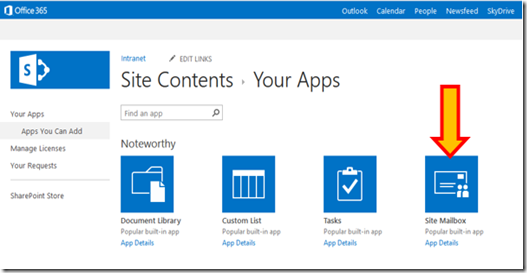
imageBack in 2017, we announced that site mailboxes in SharePoint Online were being deprecated, and that new organizations would no longer have access to the feature and existing organizations would no longer be able to create site mailboxes. Since that announcement, we have seen site mailbox usage drop consistently as customers move to alternative solutions. There are still a few customers who have site mailboxes with some activity, as well as customers who want to archive and delete site mailboxes that are no longer in use.

As an alternative to site mailboxes, we had previously recommended Microsoft 365 Groups (formerly Office 365 Groups) and today, when you create a team site in SharePoint, a Microsoft 365 Group is created automatically. You can also connect classic team sites to a Microsoft 365 Group. This gives you a new shared mailbox and other group features and modernizes your classic sites.

Before we retire (and ultimately delete) all site mailboxes in SharePoint Online, which will happen in April 2021. We’ll post another update as we get closer to April 2021. In the meantime, you can back up the data in your existing site mailboxes using this instruction guide.

Read original post here:

image2020 has brought many changes for all and we are thrilled to come together with you to host another online Power Platform Community Conference this year.  

Join us on October 22 for an all-day event full of inspiration and information!

Our opening and closing sessions will feature senior leadership from Microsoft with all other program sessions by the community – Power Addicts, Flow Fam, Less Code More Power, MVPs, RDs, students, citizen developers and professional developers. Earlier in the day sessions will be more beginner/100 level heading to 300 level as the day ends. And don’t miss our closing AMA session where you can submit questions to our Microsoft panel.

AGENDA: (Adjusted for Pacific Time)

  • 6:00 AM – 6:25 AM – Welcome & Keynote: The Community Revolution (Microsoft Corporate VP James Phillips & Charles Lamanna)
  • 6:30 AM – 6:55 AM – Getting Started with Building Power Platform Solutions for Microsoft Teams
  • 7:00 AM – 7:25 AM – A Conversation with My Younger Self: 10 Things I Wish I Knew When I Started with Power Automate
  • 7:30 AM – 7:55 AM – Building a Beer Bot – Introduction to Power Virtual Agent
  • 8:30 AM – 8:55 AM – Power Automate Desktop 101
  • 9:30 AM – 9:55 AM – Innovation at the Edge of Business with Power Platform
  • 10:00 AM – 10:25 AM – PowerUp With Power Automate
  • 10:30 AM – 10:55 AM – 10 Design Principals We Can Learn from Game Design
  • 11:00 AM – 11:25 AM – Tips & Tricks to Power-Up Canvas App Designs
  • 11:30 AM – 11:55 AM – Monitor and Document Your Power BI Environment in Power BI with Power BI
  • 12:00 PM – 12:25 PM – Power Virtual Agents and Power Automate: A Match Made in Heaven!
  • 12:30 PM – 12:55 PM – How the Power Platform Keeps Me Alive!
  • 1:00 PM – 1:25 PM – Evolving Your Power BI Architecture Using Dataflows and Shared Datasets
  • 1:30 PM – 1:55 PM – Power BI Adoption Steps for the Pro or Premium Tenant
  • 2:00 PM – 2:25 PM – More Power to Power Apps Portals
  • 2:30 PM – 2:55 PM – Closing Thoughts with Amir Netz

Register here:

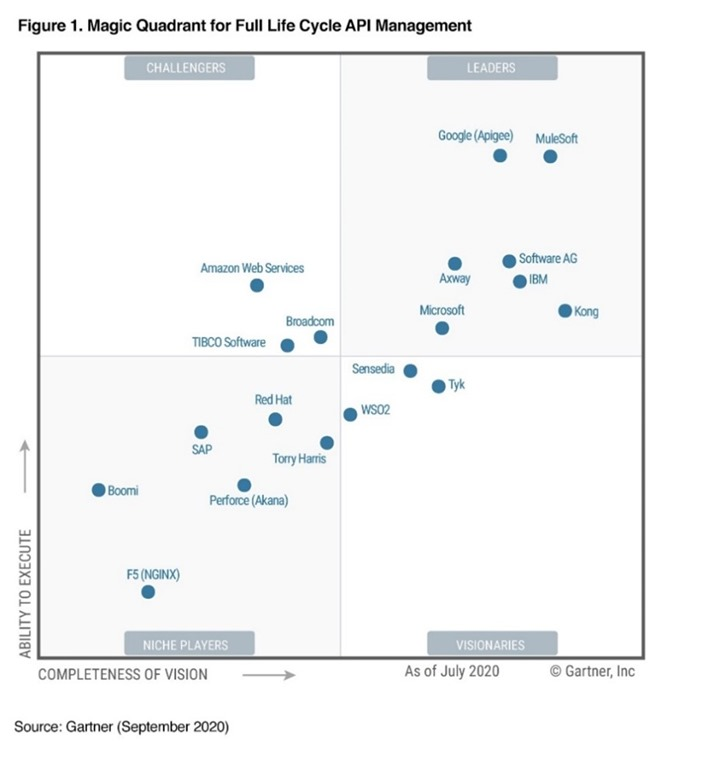
imageWe are excited to share that Microsoft has been named a Leader in the Gartner Magic Quadrant for Full Life Cycle API Management 2020 based on the ability to execute and completeness of vision. Our placement is a testament to our continued innovation in enterprise API management capabilities and broad customer adoption of Azure API Management.

With the rapid shift to and increasing adoption of digital channels for all business transactions, APIs are becoming increasingly important for organizations, enabling them to innovate, increase agility and take advantage of new business opportunities by building thriving API ecosystems. Azure API Management helps organizations of all sizes to design, secure, publish, scale, and observe APIs across clouds and on-premises and make them discoverable and consumable by internal, partner, and public developers.

Azure API Management is available in more than 50 regions worldwide. Thousands of global enterprise customers across every major industry vertical use Azure API Management including Alaska Airlines, CEMEX, SwissRe, Chipotle, Finastra, Bosch, Zeiss, Legrand.

Posted by: kurtsh | October 11, 2020

VIDEO: .NET Microservices with DAPR

imageDAPR is a portable, event-driven runtime that makes it easy for developers to build resilient microservice applications that run on the cloud and edge.

In this episode, Aman Bhardwaj joins Cecil to talk about the what DAPR types of problems Dapr is trying to solve for developers building microservices. We also get some demos of how to use the .NET SDK for Dapr.

image

This is the schedule of Ask Microsoft Anything events coming up in the next month.

imageAzure Data & Analytics AMA – October 13, 2020
We are very excited to announce an Azure Data and Analytics AMA on October 13! This is the first in a series of AMAs around Azure, all held here in the Tech Community in this discussion space, coinciding with the Microsoft Azure Hack for Social Justice event
Read more here:
https://techcommunity.microsoft.com/t5/azure-ama/announcing-an-azure-data-and-analytics-ama-on-october-13/m-p/1754969

Microsoft 365 Apps imagePost-Ignite AMA – October 14, 2020
Announcing a Microsoft 365 Apps Post-Ignite AMA!  Learn more about some of the recent Microsoft Ignite news, and discuss any other questions you have about deploying Microsoft 365 Apps with the Microsoft 365 Apps experts on Wednesday, October 14th, 2020 from 9:00 a.m. to 10:00 a.m. PT in the Microsoft 365 Apps AMA space in the Microsoft 365 Community. Add it to your calendar!
Read more here:
https://techcommunity.microsoft.com/t5/microsoft-365-apps-ama/announcing-a-microsoft-365-apps-post-ignite-ama/m-p/1695898

imageAzure Data Explorer AMA – October 28, 2020
We are very excited to announce the first monthly Azure Data Explorer ‘Ask Microsoft Anything’ (AMA)! The AMA will take place on Wednesday, October 28, 2020 from 9:00 a.m. to 10:00 a.m. PT in the Azure Data Explorer AMA Group. Add the event to your calendar and view in your time zone here. Add it to your calendar! 
Read more here:
https://techcommunity.microsoft.com/t5/azure-data-explorer-ama/bd-p/AzureDataExplorerAMA

—————————

Full list of upcoming “Ask Microsoft Anything” (AMA) events:

imageAre you an IT professional or a developer looking to skill-up on the latest technologies, add to your toolbox, or help drive change in your organization?

These 1 and 2 day virtual events will give you the opportunity to expand your skillset and connect with Microsoft experts. Save your seat at an upcoming event in Microsoft Azure, Microsoft 365, Microsoft Dynamics 365, or Microsoft Power Platform. Find out how Microsoft is your trusted partner in envisioning the future—and watch your organization transform.

Here are some examples of online, instructor-led courses being delivered:

  • Azure
    • “Azure Fundamentals”
    • “Intelligent Decision Making Through Modern Data Warehousing”
    • “Migrating Server Infrastructure”
    • “Modernizing Web Applications Data”
  • Power Platform
    • Power Platform Fundamentals”
  • Microsoft 365
    • “Journey to Teams”
    • “Securing Your Organization”
    • “Meeting Organizational Compliance Requirements”

Read more here:

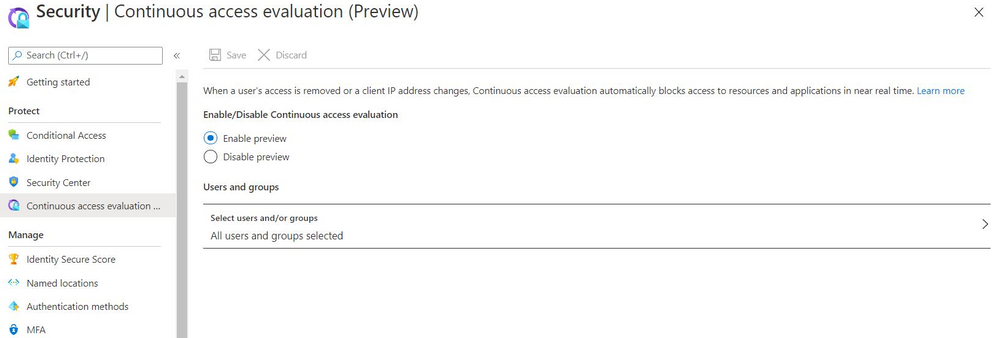
Aimage few months back, we introduced Continuous Access Evaluation (CAE) for tenants who had not configured any Conditional Access policies. CAE provides the next level of identity security by terminating active user sessions to a subset of Microsoft services (Exchange and Teams) in real-time on changes such as account disable, password reset, and admin initiated user revocation.

Today marks an important milestone in bringing this capability to everyone – now CAE is available in public preview for Azure AD tenants who have configured Conditional Access policies. Microsoft services, like Exchange and SharePoint, can terminate active user sessions as soon as a Conditional Access policy violation is detected. More Microsoft services, such as Dynamics and Azure, will be enabled in the future. You can turn on CAE to improve the security posture in your tenant with just a few clicks!

Read more here:

imageGartner once again recognizes Microsoft as a Magic Quadrant Leader in enterprise low-code application platforms.

In this report, you’ll learn about Gartner’s assessment of the products in this market and explore the features and capabilities that set each of them apart.

Discover how integrated Azure services and more than 350 data connectors, intuitive drag-and-drop design tools that anyone can use, and pre-built AI models contributed to customer satisfaction and helped position Microsoft as a Magic Quadrant Leader among enterprise low-code application platforms.

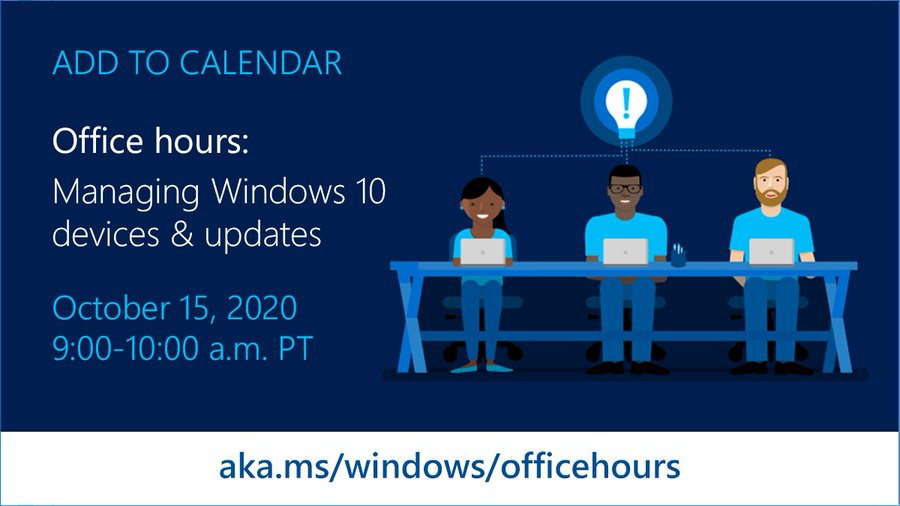
imageOur monthly Windows10 Office Hours series resumes next Thursday, October 15th on MSTCommunity! Have questions or need support with managing updates, deployments, and devices? We’ll be ready to help!

To support your efforts to deliver and deploy updates to the Windows 10 devices being used by remote, onsite, and hybrid workers across your organization, and manage those devices effectively, we are continuing our series of weekly "office hours" for IT professionals here on Tech Community.

During office hours, we will have a broad group of product experts, servicing experts, and engineers representing Windows, Microsoft Endpoint Manager (Microsoft Intune, Configuration Manager), security, FastTrack, and more. They will be monitoring the Windows 10 servicing space and standing by to provide guidance, discuss strategies and tactics, and, of course, answer any specific questions you may have.

« Newer Posts - Older Posts »

Categories