image

As you move toward bringing employees back, give your teams the tools to help them stay safe and productive on the job with solutions from Microsoft.

Reopen and manage physical locations

Open and operate your locations responsibly to provide employees with a safer environment, while ensuring your organization can quickly respond to—and communicate—changing circumstances.

Return while supporting employee safety and wellbeing

Protect your employees with new safety protocols and intelligently monitor the health of your entire organization to help make data-driven decisions about who should work where.

Engage your teams—remotely and onsite

Support the flow of work wherever it happens—remotely, onsite, or a combination of both. Help everyone stay connected, productive, and secure.

Read more at Microsoft’s Resilience site about returning to the workplace:

image

The following 4 podcasts focus on Security from Microsoft’s best and brightest security minds.

—————–

Uncovering Hidden Risks Podcast

Introducing our new podcast series: Uncovering Hidden Risks! Join us to learn how organizations handle insider risk and implement best-in-class technology and processes.

imageWe’ll take you through a journey on insider risks to uncover some of the hidden security threats that Microsoft and organizations across the world are facing.  We will bring to surface some best-in-class technology and processes to help you protect your organization and employees from risks from trusted insiders.  All in an open discussion with topnotch industry experts!

Learn all about Microsoft M365 Compliance solutions here. Stay up to date by following our Insider Risk blog here.

Subscribe here:

Security Unlocked

imageSecurity Unlocked explores the technology and people powering Microsoft’s Security solutions. In each episode, Microsoft Security evangelists Nic Fillingham and Natalia Godyla take a closer look at the latest innovations in threat intelligence, security research, and data science, with a special focus on demystifying artificial intelligence and machine learning. Be sure to listen in and subscribe!

Afternoon Cyber Tea

imageAnn Johnson, Corporate Vice President, Business Development, Security, Compliance & Identity at Microsoft, talks with cybersecurity thought leaders and influential industry experts about the trends shaping the cyber landscape and what should be top-of-mind for the C-suite and other key decision makers. Ann and her guests explore the risk and promise of tools and systems powered by AI, IoT, machine learning, and other emerging technology, as well as the impact on how humans work, communicate, consume information, and live in this era of digital transformation. Please note, the opinions expressed by guests on this podcast are their own and are not endorsed by, nor do they necessarily reflect opinions of, Microsoft or Ann Johnson.

Azure Security Podcast

Join our experts twice a month for the Azure Security Podcast, dedicated to #security, privacy, compliance and reliability on the Microsoft Cloud Platform.

imageA twice-monthly podcast dedicated to Security, Privacy, Compliance and Reliability on the Microsoft Cloud Platform. Hosted by Microsoft security experts Michael Howard, Sarah Young, Gladys Rodriguez and Mark Simos. Meet the team.

imageIf you’re interested in downloading some or all of the session video recordings and PowerPoint decks from Microsoft Ignite 2020, you’re in luck:  There’s a PowerShell script available to do just that!

It’s called the “Microsoft Ignite Resource Downloader” script and is a small .ZIP file that contains a README doc for instructions and command line parameterized to limit what sessions you want to download.

Download the script here:

Posted by: kurtsh | October 12, 2020

BETA: Microsoft Edge on Linux

imageStarting next month, we’re bringing preview builds of Microsoft Edge to Linux for the very first time.

Join Sean Larkin and Christina Warren for an overview of what you can expect from Microsoft Edge on Linux!

Posted by: kurtsh | October 11, 2020

RELEASE: SharePoint Syntex

Introducing SharePoint Syntex. Use advanced #AI and machine teaching to amplify human expertise, automate content processing, and transform content into knowledge. This will be available to purchase for Microsoft 365 commercial customers on October 1.

imageSharePoint Syntex, the first product from Project Cortex, will be available to purchase for all Microsoft 365 commercial customers on October 1, 2020. In addition to SharePoint Syntex, other innovations from Project Cortex will become generally available later this year.

SharePoint Syntex uses advanced AI and machine teaching to amplify human expertise, automate content processing, and transform content into knowledge.

Machine teaching accelerates the creation of AI models by acquiring knowledge from people rather than from large datasets alone. Any information processing skill, that an expert can teach a human, should be easily teachable to a machine.

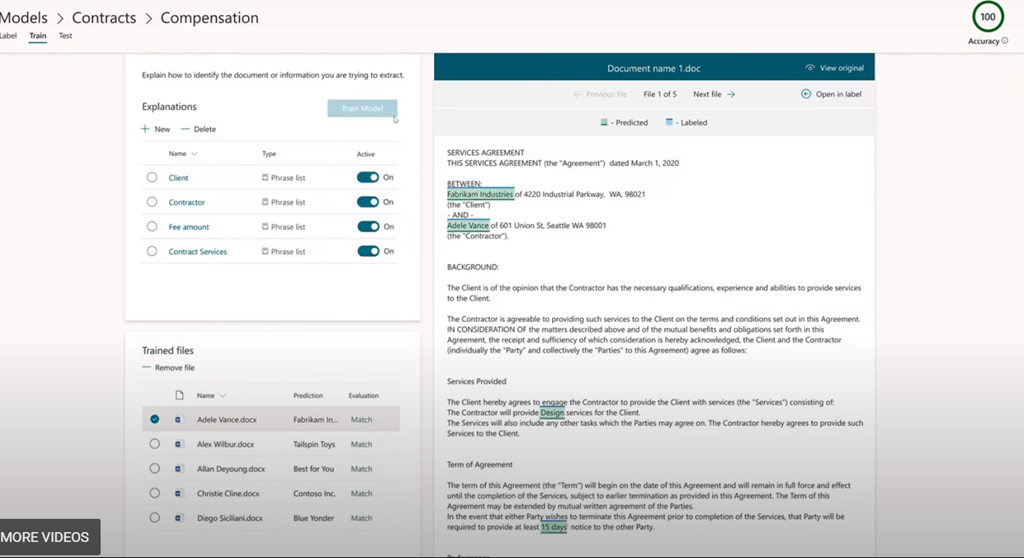
SharePoint Syntex mainstreams machine teaching, enabling your experts to capture their knowledge about content in AI models they can build with no code. Your experts train SharePoint Syntex to understand content like they do, to recognize key information, and to tag content automatically. For example, a contract processing expert can teach SharePoint Syntex to extract the contract’s value, along with the expiration date and key terms and conditions.

SharePoint Syntex then uses your models to automate the capture, ingestion, and categorization of content, extracting valuable information as metadata. Metadata is critical to managing content, and seamless integration with Microsoft Search, Power Automate, and Microsoft Information Protection enable you to improve knowledge discovery and reuse, accelerate processes, and dynamically apply information protection and compliance policies.

The example given that Syntex can add value in is “Contract Processing”:

Digitally Read & Identify key information

  • image“Have your contract specialists teach Syntex to read contracts & recognize key information and automatically tag contracts… with no code.”
  • “Teach Syntex to identify the contract value, the expiration date and key terms and conditions – and place that in a repeatable model"
  • image“With that model, Syntex can automatically process your documents, capture that important information as metadata – simply by dragging and dropping your contracts into SharePoint.”

Automatically Align Information to Business Processes

  • “The extracted metadata is viewable in table columns for each document, enabling users, for example, to compare and contrast the terms and conditions of all the contracts in your organization.”
  • “This view can be used to change processes – for example, prioritizing expiring contracts and routing them for renewal.  Or automatically applying sensitivity and retention labels based on the type of contract – to reduce risk and adhere to compliance rules.”

Reuse Models for Broaden Efficiency

  • “Take and apply models to different departments or users to increase value, improve efficiency and scale your knowledge.”

Read the details here:

imageJoin an October 14th event to hear about the great new features, announcements, and collaborations for Azure Data Explorer – Azure’s fast service for real-time analysis of telemetry big data streaming from apps, websites, IoT devices, and more!

Join us to hear all about the great new features, announcements, and collaborations for Azure Data Explorer – Azure’s fast, fully- service for real-time analysis of telemetry big data streaming from apps, websites, IoT devices, and more.

One of Azure’s most used services and the foundation of Microsoft’s telemetry platform, Azure Data Explorer , combines broad data exploration and powerful analytical queries with lightning-fast interactivity.

Use Azure Data Explorer to:

  • Monitor mission-critical systems.
  • Analyze IoT data from thousands of devices.
  • Explore and identify trends and anomalies in your data.
  • Tune up customer experience.
  • And many more exciting capabilities!

Join us to learn how to harness the growing volume of telemetry data to drive business success while keeping costs at bay with the super cost-efficient Azure Data Explorer service.

Read the announcement here:

Have you considered moving your virtual desktop infrastructure to the cloud? Discover how a cloud-based VDI could help.

Spoiler alert: it’s more than just improved security *and* reduced costs.

imageEmpower your employees to work securely from anywhere with a cloud-based virtual desktop infrastructure (VDI). Cloud desktops provide the cost-savings and scalability that on-premises VDI may not offer. Evaluate cloud desktops that help to improve security, simplify management, and reduce costs.

Read this Forrester report to:

  • Find out how cloud virtualization provides employees with more freedom to work securely from anywhere than on-premises VDI. 
  • Get details about the top business needs—like improving security and lowering IT costs—that are driving cloud virtualization adoption. 
  • Match cloud desktop offerings to address your needs and explore options from different providers including Microsoft Azure. 

Download the licensed Forrester report here:

MICROSOFT & CLOUD VIRTUAL DESKTOP INFRASTRUCTURE
Do you need a cloud Virtual Desktop Infrastructure solution in the Public Cloud that:

  • Works with VMware Horizon or Citrix XenDesktop?
  • Leverages your Enterprise Agreement Windows 10 Enterprise licensing?
  • Optimized for Microsoft Teams, Office 365 apps, Outlook & OneDrive for Business VM caching?

The most efficient, economical & hybrid VDI solution for organizations is Microsoft’s Windows Virtual Desktop which is the only cloud VDI solution that addresses all 3 of the enterprise points above and more.

Check out Windows Virtual Desktop here:

imageBuried in our larger announcement about Microsoft Defender for Endpoint (formerly Microsoft Defender Advanced Threat Protection), was the announcement that our Android client is now released!

Microsoft Defender for Endpoint on Android is generally available, delivering the rich set of capabilities we announced in public preview, which include phishing and web protection, malware scanning, and additional breach prevention through integration with Microsoft Endpoint Manager and Conditional Access. These capabilities offer protection against some of the most sophisticated malware threats we’ve seen on the platform.

Since our public preview announcement, we have also updated how users can get the Microsoft Defender for Endpoint app on their Android devices. Now, eligible users can download Microsoft Defender for Endpoint from Google Play.

For additional information on how to get started, check out the documentation.

And yes, we also snuck in our announcement about the public preview/beta of the iOS client for Microsoft Defender for Endpoint.

imageWe’re excited to share that in the coming weeks, Microsoft Defender for Endpoint will be arriving in public preview for iOS.

For devices running iOS 11.0 and higher, Microsoft Defender for Endpoint offers:

  • Anti-phishing: Access to unsafe websites from SMS/text, WhatsApp, email, browsers, and other apps is instantly blocked. To do this, we leverage the Microsoft Defender SmartScreen service to help determine whether a URL is potentially malicious. If access to a malicious site is blocked, the device user gets a notification about this with the options to allow the connection, report it safe, or dismiss the notification. Security teams are notified about attempts to access malicious sites via an alert in the Microsoft Defender Security Center.
  • Blocking unsafe connections: The same Microsoft Defender SmartScreen technology is used to also block unsafe network connections that apps automatically might make on the user’s behalf without them knowing. Just as in the phishing example, the user is immediately informed that this activity is blocked and is given the same choices to allow it, report it as unsafe, or dismiss the notification. When these connections are attempted on a user’s device, security teams are notified of this via an alert in the Microsoft Defender Security Center. 
  • Custom indicators: Security teams can create custom indicators, giving them more fine-grained control over allowing and blocking URLs and domains users connect to from their iOS devices. This can be done in the Microsoft Defender Security Center and is an extension of our custom indicators capability already available for Windows.

Read the full announcement here:

imageForrester Research recently released their Wave report for Notebook-based Predictive Analytics and Machine Learning. Microsoft Azure is named a leader in this Wave, receiving the highest score possible in the ability to execute criteria and rated highest in the strategy category. You can download a complimentary copy of The Forrester Wave™ for Notebook-based Predictive Analytics and Machine Learning Solutions, Q3 2020 …. In this post we’ll look at why Forrester rated Microsoft Azure as a leader.

Forrester evaluated Azure Machine Learning, recognizing its ‘full suite of enterprise PAML capabilities, from centralized model registries to hyperparameter tuning and modular model training and deployment pipelines.’ Forrester gave Azure Machine Learning the highest possible score in 13 evaluation metrics, the most in the report.

Read the announcement and download the full report here:

imageResilience is working freely and staying secure. Secure remote access and digital security is a big part of building resilience in your organization.

To meet today’s needs without overwhelming your security team you need to enhance your cybersecurity capabilities.

Download our Solution Guide series eBook, “Security: A Guide to Building Resilience”.

« Newer Posts - Older Posts »

Categories