For customers renewing their Enterprise Agreements or agreements involving Software Assurance, the Software Assurance Benefits policies have changed in 2020.

Here are some details around what has happened to Software Assurance Planning Services:

What are the key changes that occurred with Software Assurance Benefits earlier this year?
Below are key changes that occurred with Software Assurance Benefits in early calendar year 2020:

  • February 1, 2020: DPS cloud engagements retired and all cloud customers will be directed to FastTrack programs. For DPS cloud engagement vouchers created before February 1, 2020, customers have 180 days to redeem and use the cloud engagement voucher. Customers have until January 2022 to use their deployment planning days for on-premises planning.
  • Due to impacts from COVID-19, Microsoft is extending active vouchers for an additional 90 days for those vouchers created before 1 April 2020. This applies to all active Deployment Planning Services vouchers for cloud and on-premises engagements. To help our customers and partners work as efficiently as possible while remote, we’re also waiving the onsite requirement policy for delivery partners and allowing for remote Deployment Planning Services engagements through June 30, 2020. We still expect partners to provide customers with collaborative consultative sessions resulting in a comprehensive and actionable deployment plan.
  • February 1, 2021: Customers will no longer accrue DPS days.
    • New contracts won’t have any DPS days assigned and existing contracts won’t receive any additional DPS days.
    • Current customers can continue to use any accrued DPS days until January 1, 2022.

For more details on this and other Software Assurance Benefits, visit:
imageMicrosoft Teams has become the new way to work for over 115 million daily users who come together every day to meet, call, chat, and collaborate.

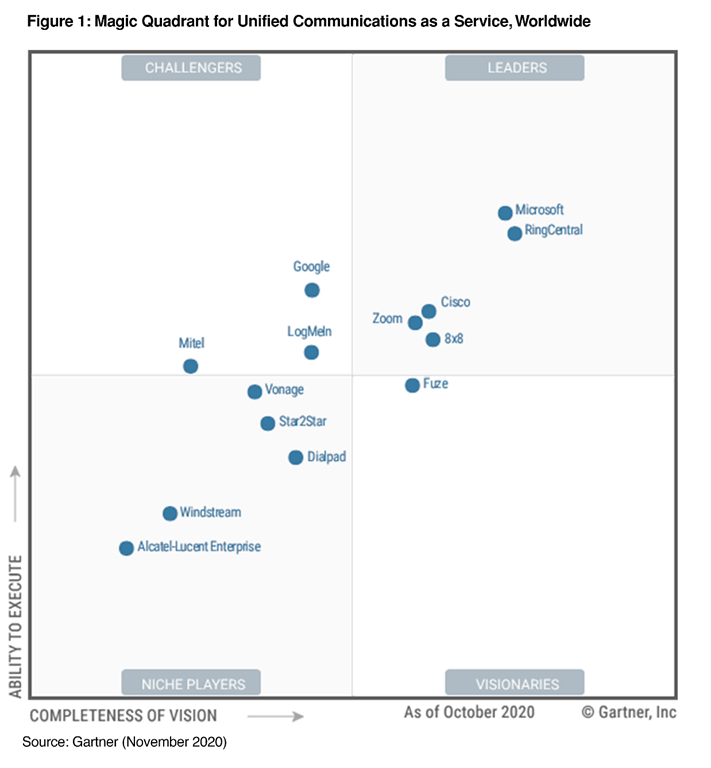
Today, we are honored to be recognized by Gartner as a Leader for both Meeting Solutions and Unified Communications as a Service in their latest Magic Quadrants. Microsoft was positioned highest among all vendors for ability to execute in both reports. This is Microsoft’s second consecutive year as a Leader for Unified Communications as a Service and the 14th time in which Microsoft has been recognized as a Leader for Meetings Solutions.

Read and download the full report here:

For organizations deploying Microsoft Teams looking for guidance on how to plan & structure Teams and Channels in their organization, the following may be useful:

The presentation goes over different structures that can be applied to Teams and Teams Channels when deploying, however it also talks to how these structures can be implemented at the same time to encourage cross-organizational sharing.

When organizing the content of the Teams themselves, the following “Best Practices” guidance may be useful:

clip_image002

Your data has the power to help your business build long-term agility and resilience, no matter what the future brings. But to realize its full potential, you need to have a strategic, unified framework for using data and analytics to gain insights, make decisions, and improve business outcomes.

Join us at this digital event with Microsoft CEO Satya Nadella to learn how to create a flowing continuum of trusted, accurate data that produces timely, actionable insights. Register to:

  • Understand why prioritizing data and analytics now is critical to building future agility and resilience.
  • Get guidance from industry leaders and customers on how to develop a strategic view of your analytics initiatives and create a framework for implementing successful solutions.
  • Be the first to learn about the new Azure data governance service and take an in-depth look at how it works together with Azure Synapse Analytics to provide a unified, end-to-end platform for data and analytics.
  • Ask questions and get expert answers during live Q&A.

Register below:

  • Shape Your Future with Azure Data and Analytics
    Thursday, December 3, 2020
    9:00 AM–10:30 AM Pacific Time (UTC-8)

clip_image004

imageCustomers with SQL Server with Software Assurance on Microsoft licensing contracts like Enterprise Agreements are uniquely entitled to use their SQL Server licensing in Microsoft Azure to reduce their cloud operations costs by upwards of 50%. (And up to 80% using Azure Reserved Instances or “reservations”)

(I emphasize the word “uniquely” because this is exclusively a benefit for SQL Server customers moving to Azure. The following “Azure Hybrid Benefit” cannot be applied to AWS, GCP or other cloud services)

HOW TO SAVE COSTS ON SQL DATABASE LICENSING IN AZURE
Azure Hybrid Benefit for SQL Server provides the following:

  1. 4-TO-1 LICENSE RIGHTS IN AZURE
    Providing 4 cores of SQL in Azure General Purpose SKU licensing for every 1 core of SQL Server Enterprise on Software Assurance (Yes, this is 4-to-1 and unique to Azure, i.e. not available in AWS or GCP)
  2. LICENSING RIGHTS FOR AZURE SQL PAAS
    Providing the ability to move to either
      • Azure VMs running SQL Server (IaaS)
      • Azure SQL Managed Instance (PaaS)
        (Yes, applying your SQL Server licenses to a cloud “scalable/elastic” SQL database aka SQL PaaS is unique to Azure and not available in AWS or GCP)

HOW TO TAKE ADVANTAGE OF AZURE SQL HYBRID BENEFIT
The following instructions can dramatically reduce your Azure billing costs – by as much as 50% – for these VMs running SQL Server.

Posted by: kurtsh | November 27, 2020

BETA: “QnA Managed" – Public Preview

Check out the next version of QnA Maker featuring cutting-edge deep learning and advances like better relevance and precise answering.

imageThe next version of QnA Maker advances several core capabilities like better relevance and precise answering, by introducing state-of-art deep learning technologies. In addition, it also simplifies resource management by reducing the number of resources deployed. The latest version will enable customers with strict geo requirements to deploy the service in the region of their choice end-to-end.

Watch the video:

Posted by: kurtsh | November 26, 2020

WEBCAST: Best Practices for Enterprise-Wide DevOps Adoption

Adopting DevOps at an enterprise scale? Get tips to make sure you’re setting up the right environment for your developers to innovate:

imageAlthough many organizations are adopting DevOps, implementing effective practices at enterprise-scale can be difficult. Read the Enterprise DevOps Report 2020–2021, a Microsoft and Sogeti research study of more than 250 cloud and DevOps implementations. From the report, learn how to scale your DevOps practices to improve business metrics, customer satisfaction, and Developer Velocity—creating the right environment for developers to innovate. Use the study’s recommendations as a blueprint for your successful adoption of enterprise DevOps.

You’ll learn about:

  • Six key areas of enterprise IT, including governance, that face significant challenges as part of an enterprise DevOps transformation.
  • Common ideologies and patterns followed by top performing adopters to address the challenges of enterprise DevOps.
  • Strategies implemented by successful enterprises to build continuous governance, security, quality, and compliance into their engineering processes.
  • DevOps best practices to enable your organization to support distributed teams and remote work.

Watch the webcast here:

Microsoft has been selected to provide the underlying cloud technology platform for the Air Force’s top modernization priority, “Advanced Battle Management System”.

As a measure of our support for the mission of flying, fighting and winning in air, space and cyberspace, our Microsoft Federal team is honored to be selected to support the Advanced Battle Management System (ABMS), the U.S. Air Force’s top modernization priority. We join other companies that have been collectively awarded $950 million in indefinite-delivery/indefinite-quantity contracts to compete for future efforts enabling Joint All–Domain Command and Control.

Our trusted Microsoft Azure Government cloud will serve as the underlying technology platform for these needed solutions, providing the ability to fuse data from disparate sources to generate a more robust operating picture and operations across the battlespace. From leveraging GitHub tools to adding Azure Cognitive Services smart API capabilities, developers will be able to create integrated, intelligent apps enabling rapid human decision–making, even without having direct AI or data science skills or knowledge. 

Read the entire announcement here:

Posted by: kurtsh | November 26, 2020

RELEASE: Polls for Teams Meetings using Microsoft Forms

Setting up impromptu or planned polls/surveys within Microsoft Teams meetings just got really easy with the release of “Polls in Teams Meetings”

As we had announced at Ignite, Forms’ integration with Teams brings the power of polls to your meetings. We are delighted to inform you that we are rolling out Polls in Teams Meetings.

These polls leverage the infrastructure and capabilities of the Forms product to enhance your virtual meeting experiences. Whether you are running a large-scale training session, leading your monthly all hands, or teaching in a remote classroom , Polls in Teams meetings enables meeting presenters to get real time feedback and turn attendees into active participants.

Prepare Poll.gif

For more on how to use this new feature, visit:

Posted by: kurtsh | November 26, 2020

DOWNLOAD: eBook, “OneNote for Meetings”

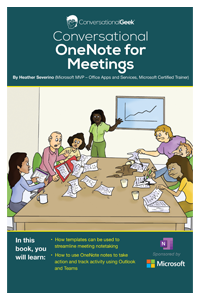
imageThis August 2020, we released a new series of eBooks for OneNote.  One of them is entitled, “OneNote for Meetings”.

In this eBook, you’ll learn:

  • How templates can help to streamline note-taking in meetings

  • How to take notes in meetings with OneNote

  • How to share and track meeting notes in OneNote, Outlook, and Teams

Get the free ebook here:

Note:  There are also other free downloadable eBooks available for the following:

« Newer Posts - Older Posts »

Categories