A fun little Easter Egg: When you see “Mico”, the avatar from the consumer version of Microsoft’s Artificial Intelligence app “Copilot” (https://copilot.microsoft.com) while:
- logged into a Microsoft account (hotmail.com, outlook.com, live.com, msn.com, etc.)
- voice mode is active
…you can tap on Mico’s image rapidly about 12 times & it’ll turn into Clippy. 🤪
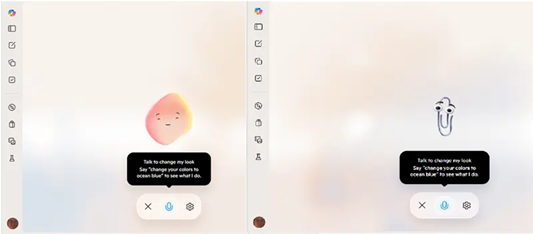
ALSO WORKS ON MOBILE
This also works on the consumer “Copilot Mobile app” as well if you turn on “voice mode”. Note that even if you have “voice mode” on, Mico needs to be displayed for this to work. If you don’t see Mico on the screen, click the “gear” icon to open the Setting for Copilot and turn on “Show Mico”. #clippysrevenge
NOT AVAILABLE FOR BUSINESS
This is exclusive to the consumer version of Copilot & does not work for “Microsoft 365 Copilot”, the business version of Copilot.
 kurtsh


You must be logged in to post a comment.