 Attention Surface or Windows 8 / RT tablet owners:
You have Bluetooth 4.0! You have a mouse pointer on your device! Why not use them both… and avoid the USB dongle?
Get a small portable Bluetooth mouse for use with your Surface or Windows-based Tablet! I keep one with me all the time. My all-time personal favorite is the Microsoft Wireless Notebook Presenter 8000 which we sadly do not sell any more, however the following mice are really nice alternatives, especially if you have a Windows Tablet!
All our mice – including Bluetooth enabled ones – are located here:
- LINK: Microsoft Hardware
http://www.microsoft.com/hardware/en-us/mice
The Bluetooth mice that you will want to look at are the following:
- Microsoft Wedge Touch Mouse
http://www.microsoft.com/hardware/en-us/p/wedge-touch-mouse/3LR-00004#details - Microsoft Sculpt Touch Mouse
http://www.microsoft.com/hardware/en-us/p/sculpt-touch-mouse#details - Microsoft Bluetooth Notebook Mouse 5000
http://www.microsoft.com/hardware/en-us/p/bluetooth-notebook-mouse-5000/69R-00025#details

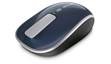

Having the scroll wheel on your mouse is revolutionary when you start using it with Windows 8 / RT. And when you’re seated, you can feel your productivity go into turbo when you’re using the mouse & keyboard instead of poking around.
I’ve used the Bluetooth Notebook Mouse 5000 for a quite a while. It’s been around for a long while and is reliable as all heck. The Bluetooth receiver on the mouse maintains a solid BT connection (unlike a lot of other mice) and so you will probably appreciate that. The other two mice are brand-spanking new (less than a month old) and are designed for the next-generation of tablets & Windows-laptops so you can’t really go wrong.
 kurtsh
 Kurt Shintaku's Blog