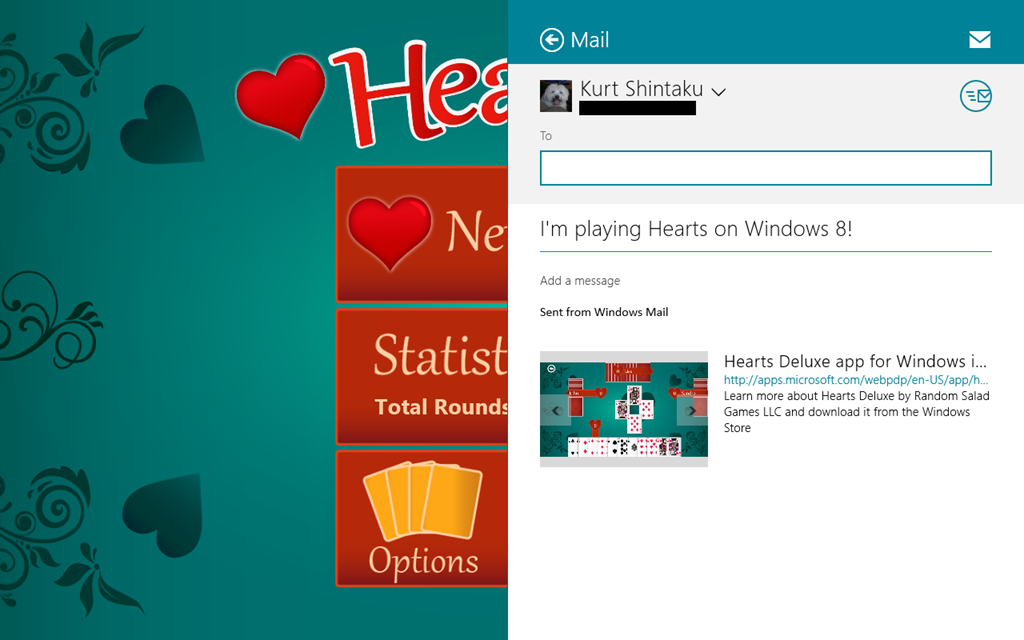
 Have you ever wanted the direct URL for an app within the Windows Store?
There’s unfortunately not a real clear cut way to do it. Here’s the way I’ve found how to get to it via the “SHARE” charm in the Windows 8 Charms menu.
Say for instance you love the game “Hearts” for Windows 8 and you want to get the direct URL to the app in the Windows Store to post it in your blog or something. The way to do this is:
- Run the app (“Hearts”)
- Open the Charms Bar (WinKey-C)
- Select the SHARE charm
- Select “Mail” – an email will be created with the direct URL for the app in it
- Send the email to yourself
And you’ll have the URL in the mail in seconds. In this case, the URL for “Hearts” is: http://apps.microsoft.com/webpdp/en-US/app/hearts-deluxe/6e7be2d2-e586-460e-add1-fc3858ee0c8e
 kurtsh
 Kurt Shintaku's Blog