 I got the following question from a volume licensing customer:
- “Where’s Windows XP Multilanguage User Interface pack?”
The Windows XP Multilanguage User Interface (MUI) pack installs over volume licensed versions of Windows XP Professional.
It reconfigures the Windows user interface for the language of the user logged in. One machine can provide an English, French, Spanish, Japanese, and Arabic interface and the language can change depending on the user that is logged in. (Note: Windows XP MUI usage requires Volume licensing & Windows Client Software Assurance.)
The software download for the MUI is somewhat hidden. To locate the Windows XP MUI download on the VLSC website:
- Sign in to the VLSC site at https://www.microsoft.com/licensing/servicecenter/ using your Windows Live ID.
- Click on downloads and Keys
- On the Left hand side check off the Box that states Archive.
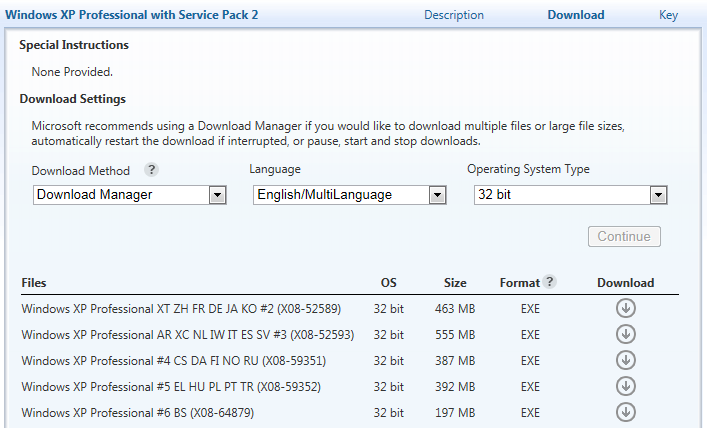
- Locate the download labeled as Windows XP Professional with Service Pack 2 and then click on the download button to the right of the product name.
- Here you will need to choose your download settings. You will need to change the Language from English to English/ Multilanguage.
There will be multiple options for you to download depending on the language you are looking for.
(Note: You specifically have to go into “Windows XP Professional with Service Pack 2” – not Service Pack 3.)
 kurtsh
 Kurt Shintaku's Blog