imageCheck out this detailed guidance for investigating and remediating common attack methods that attackers employ every day:
  • Phishing
  • Password spray
  • App consent grant

Each playbook includes:

  • Prerequisites: The specific requirements you need to complete before starting the investigation. For example, logging that should be turned on and roles and permissions that are required.
  • Workflow: The logical flow that you should follow to perform the investigation.
  • Checklist: A list of tasks for the steps in the flow chart. This checklist can be helpful in highly regulated environments to verify what you have done.
  • Investigation steps: Detailed step-by-step guidance for the specific investigation.

Review the content here:

Join this webinar featuring Forrester Consulting to learn about the potential benefits of moving your virtual desktop infrastructure (VDI) workloads to Windows Virtual Desktop on Azure based on a commissioned study by Microsoft and Intel. You’ll learn best practices and more from Forrester’s Total Economic Impact study.

You’ll also:

  • Understand the key factors that will affect your investment decision to move your VDI solution to Windows Virtual Desktop on Azure.
  • See the before and after journey of customers who invested in Windows Virtual Desktop, and the benefits they experienced post-migration.
  • Learn how customers realized significant cost savings and business benefits by modernizing their VDI solution with Windows Virtual Desktop.
  • Get a complimentary copy of The Total Economic Impact™ of Microsoft Azure for Windows Virtual Desktop.

Register for the webcast here:

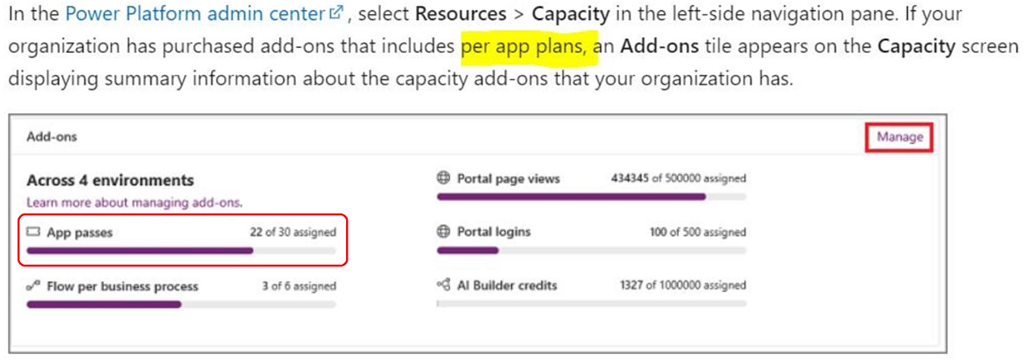
imagePower Apps per app plan allows individual users to run two applications and one portal for a specific business scenario in a specific environment based on the full capabilities of Power Apps. This plan provides an easy way for users to get started with Power Apps before broader scale adoption.

After purchase, you allocate per app plans to environments. If you have multiple environments like test and production, you need to allocate per app plans capacity to all these environments appropriately.

In the Power Platform admin center, select Resources > Capacity in the left-side navigation pane. If your organization has purchased add-ons that includes per app plans, an Add-ons tile appears on the Capacity screen displaying summary information about the capacity add-ons that your organization has.

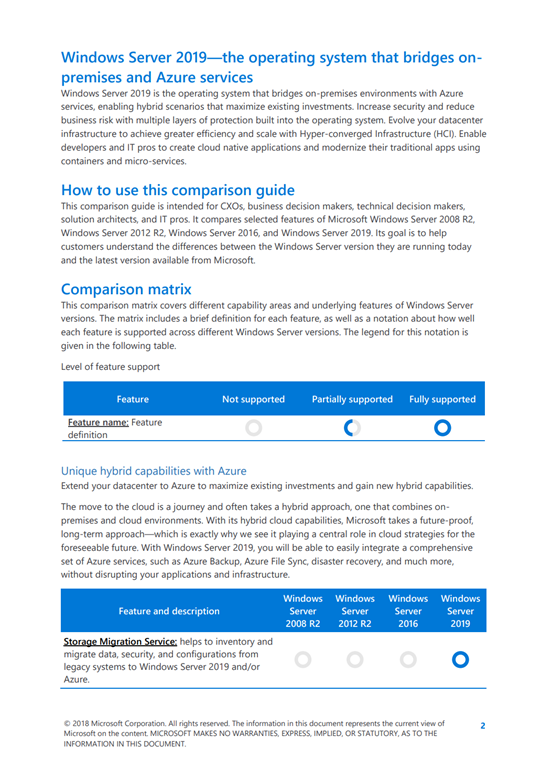
imageWindows Server 2019 is the operating system that bridges on-premises environments with Azure services, enabling hybrid scenarios that maximize existing investments. Increase security and reduce business risk with multiple layers of protection built into the operating system. Evolve your datacenter infrastructure to achieve greater efficiency and scale with Hyper-converged Infrastructure (HCI). Enable developers and IT pros to create cloud native applications and modernize their traditional apps using containers and micro-services.

How to use this comparison guide
This comparison guide is intended for CXOs, business decision makers, technical decision makers, solution architects, and IT pros. It compares selected features of Microsoft Windows Server 2008 R2, Windows Server 2012 R2, Windows Server 2016, and Windows Server 2019. Its goal is to help customers understand the differences between the Windows Server version they are running today and the latest version available from Microsoft.

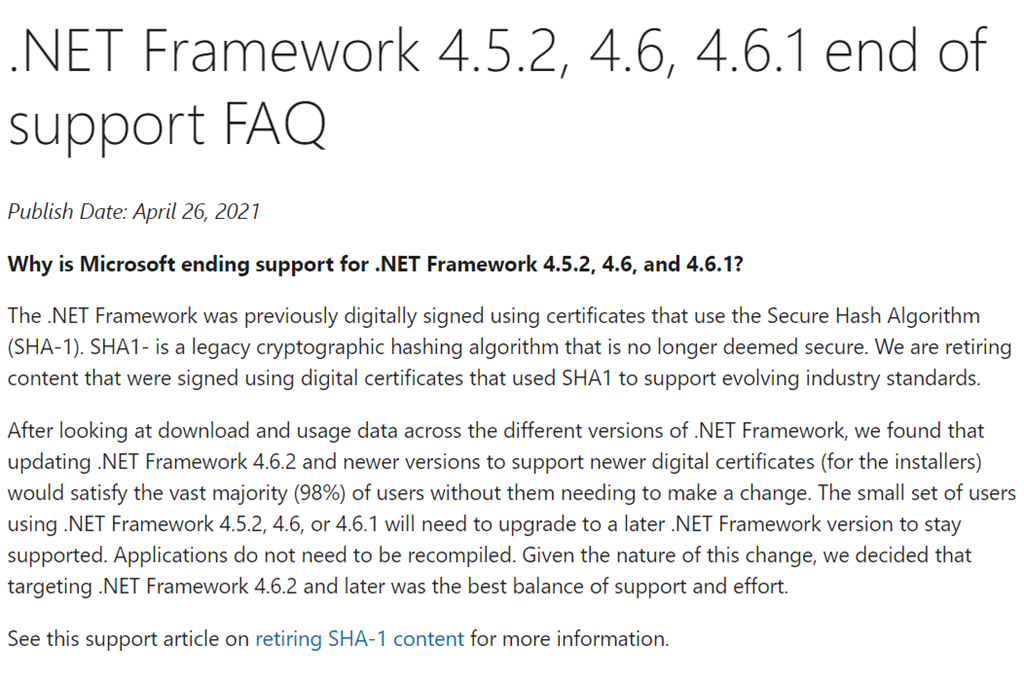
image.NET Framework 4.5.2, 4.6, and 4.6.1 will reach end of support on April 26, 2022. After this date, Microsoft will no longer provide updates including security fixes and technical support for these versions. There is no change to the support timelines for any other .NET Framework version, including .NET 3.5 SP1, which will continue to be supported as documented on our .NET Framework Lifecycle FAQ.

Please check out the public content and guidance related to this topic.

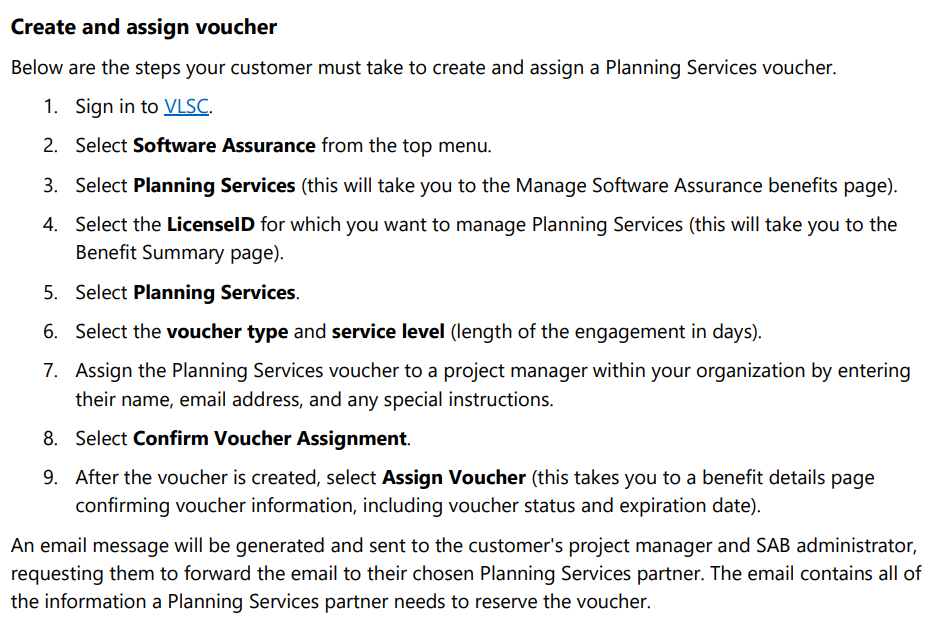
imagePlanning Services are being fully retired from Software Assurance benefits, but customers can continue working with partners to use Planning Services days for engagements while the vouchers are valid. These are the significant dates leading up to program retirement:

  • February 1, 2020: Planning Services cloud engagements were retired.
  • February 1, 2020: Training vouchers can no longer be converted to Planning Services days.
  • February 1, 2021: Customers no longer accrue Planning Services benefits.
  • June 30, 2021: Last day for customers to create/assign Planning Services vouchers. All remaining Planning Services days will be removed July 1, 2021.
  • January 1, 2022: Last day for partners to redeem Planning Services vouchers. Partner will have 60 days after redemption to complete the payment request process.

See the following to understand how to use your Planning Services benefit:

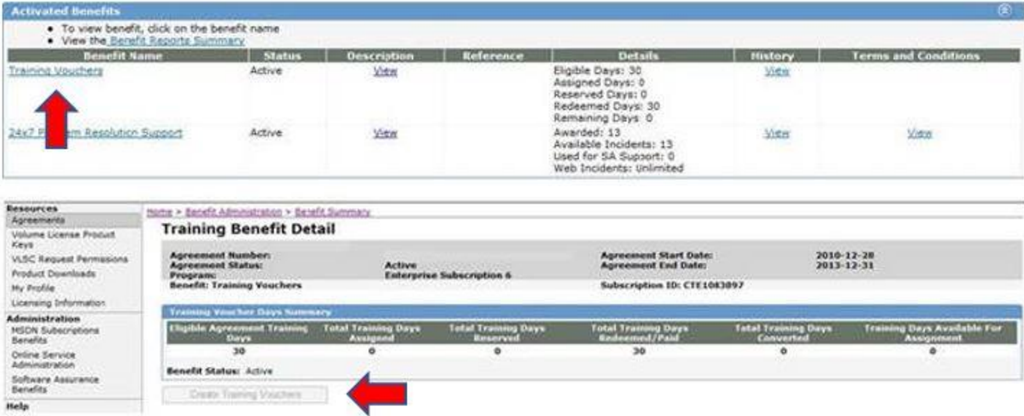
imageTraining Vouchers are being fully retired from Software Assurance benefits, but customers can continue to use voucher days for instructor-led training while the vouchers are valid. These are the significant dates leading up to program retirement:

  • February 1, 2020: Azure training retired from the training voucher catalog.
  • February 1, 2020: Training Vouchers can no longer be converted to Planning Services days.
  • February 1, 2021: Customers no longer accrue training benefits.
  • June 30, 2021: Last day for customers to create/assign Training Vouchers. All remaining Training Voucher days will be removed July 1, 2021.
  • January 1, 2022: Last day for partners to redeem Training Vouchers. Partner will have 60 days after redemption to complete the payment request process.

For more details, visit:

Posted by: kurtsh | April 27, 2021

BETA: Viva Learning – Public Preview

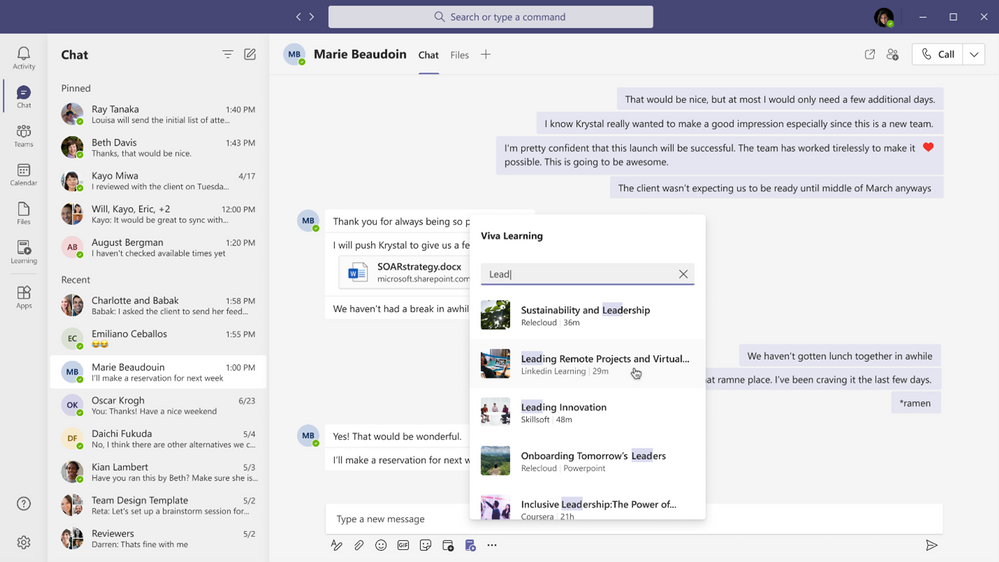
imageSince we announced Microsoft Viva in February, we’ve heard consistently from customers, industry analysts, and our own internal users how important learning is to them. Everyday we hear examples of creative learning – not just as an important aspect of personal and professional growth – but also as an avenue for social engagement, helping people feel more connected in a largely virtual work environment. These scenarios are top of mind as we get closer to launching Viva Learning – a central hub for learning in Microsoft 365 where people can discover, share, recommend, and learn from best-in-class content libraries to help teams and individuals make learning a natural part of their day.

At Microsoft Ignite in March, we shared a new set of product features and admin capabilities, derived from our private preview customer feedback and internal use scenarios. With this feedback we’re continuing to build Viva Learning to seamlessly integrate learning into the tools you already use everyday – you can share learning via chat, pin learning content in existing Teams channels, recommend learning, see all your available learning sources in a personalized view, search across available sources, and so much more.

Viva Learning enters public preview today

There are a few items to keep in mind as we kick off public preview:

  • Eligibility
    Viva Learning public preview is open to all organizations with paid subscription access to Microsoft Teams, with the exception of Education or Government customers. We’ll have additional information to share when Viva Learning is available to those audiences in the future.
  • Approval from your IT admin
    Public preview onboarding requests should either come from your IT admin directly or have the support of your IT admin. In the Teams Admin Center, your IT admin will have the ability to configure who within your organization has access to the Viva Learning app in preview – this can range from the entire organization to just a small subset of users.
  • Onboarding timelines
    We expect a high volume of public preview requests and will manage requests as they come in through a rolling onboarding process. Expect it to take a few weeks from request submission to tenant activation.
  • Product features in preview
    As with any product in preview or beta stages, please be aware that we are still hard at work building the final version. The preview product will not initially include all the features that will be available at product general availability. We will roll out additional features to our preview customers continually as we lead up to general availability later this year.
  • Submitting feedback
    As you start to use Viva Learning we want to hear your feedback! Please use the “Help” button in Teams (bottom of the left nav rail) and select either “Suggest a feature” or “Report a problem”

Enrollment in Public Preview
Complete our onboarding request form with the required information. Completing this form should take about 5 minutes.

After submitting your request, please stay tuned for a confirmation email within 24 business hours. Later, you will receive a notification email once your tenant is activated which will include setup and usage documentation.

imageFind out how to secure your Windows Virtual Desktop environment when migrating your virtual desktop infrastructure (VDI) to Azure. Read this security handbook to get technical hands-on guidance on how to help protect your apps and data in your Windows Virtual Desktop deployment.

Download the handbook to:

  • Familiarize yourself with Windows Virtual Desktop architecture.
  • Understand which Microsoft tools and Azure security services are automatically configured and which are your responsibility.
  • Implement appropriate security measures for your organization’s data, apps, user identities, session hosts, and network access.
  • Learn best practices for using Azure Security Center and improving your Azure Secure Score.

Get the handbook here:

imageMicrosoft commissioned Forrester Consulting to conduct a Total Economic Impact™ (TEI) study and examine the potential return on investment (ROI) enterprises may realize by deploying Azure Sentinel. 1 The purpose of this study is to provide readers with a framework to evaluate the potential financial impact of Azure Sentinel on their organizations. Azure Sentinel reduces SIEM costs at scale, simplifies SIEM management, and improves the efficiency and effectiveness of security operation center (SOC) teams.

To better understand the benefits, costs, and risks associated with this investment, Forrester interviewed four customers using Azure Sentinel. For the purposes of this study, Forrester aggregated the experiences of the interviewed customers and combined the results into a single composite organization.

Prior to using Azure Sentinel, interviewed customers used on-premises SIEM solutions utilizing and maintaining multiple sites and servers, or they used internal, custom-built solutions managed by a managed service provider (MSP) to replicate SIEM infrastructure. However, prior attempts yielded limited success, with customers unable to scale these laborintensive solutions in cost-effective ways, and they invested significant resources in maintenance activities and investigating false positives.

After the investment in Azure Sentinel, the customers were able to benefit from the cloud-native SIEM infrastructure that Azure Sentinel provides, saving costs and enabling their SOC teams to detect and investigate threats more effectively. Key results from the investment include increased SOC team efficiency including reduced MTTR, avoided legacy SIEM costs, improved management efficiencies, and a reduced time to deploy and configure with Azure Sentinel.

« Newer Posts - Older Posts »

Categories