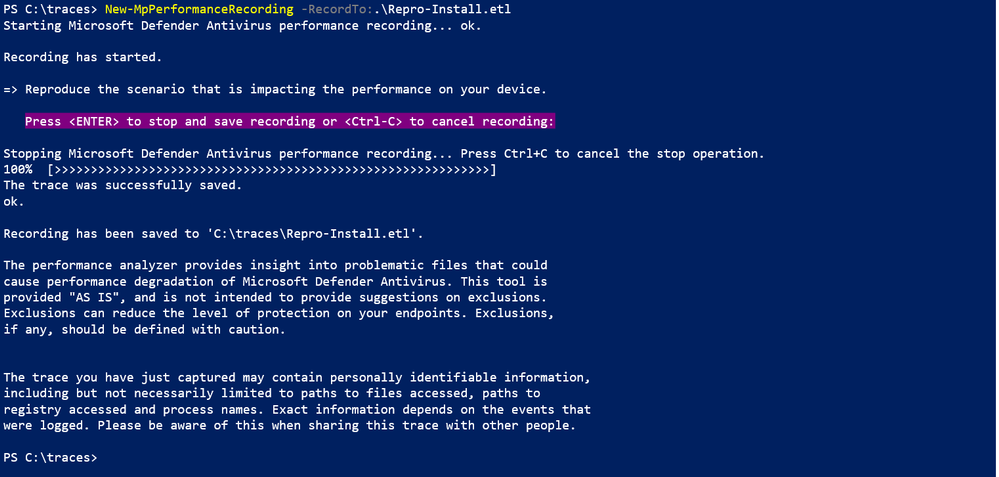
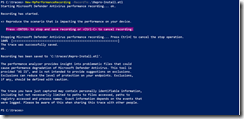
This is the tool we just released for Microsoft Defender for Endpoint/Antivirus.
Posted by: kurtsh | September 9, 2021

INFO: What counts as a “Teams Meeting”?

Microsoft customers that have an interest in monitoring their overall Teams Meetings usage for contractual reasons may be interested in knowing how Teams Meetings are measured per tenant:

The components that count towards the Teams Meetings metric are:

  1. Number of distinct users that participate in at least one scheduled meeting or group call* or Calling 1:1 Or VOIP or Phone System (PSTN) or Walkie Talkie call in the last 28 days.
  2. Excludes guest users/direct dial-in users.
  3. Includes Teams free and trial seats.
  4. Excludes calendar actions like scheduling/accepting.
  5. Calling MAU includes 1:1 Ad-hoc calls (joined by 2 participants) or Voice IP (VOIP) or Phone System PSTN users
  6. Walkie Talkie calls are joined by users into Walkie Talkie Channel

* Group calls are calls joined by three or more participants.

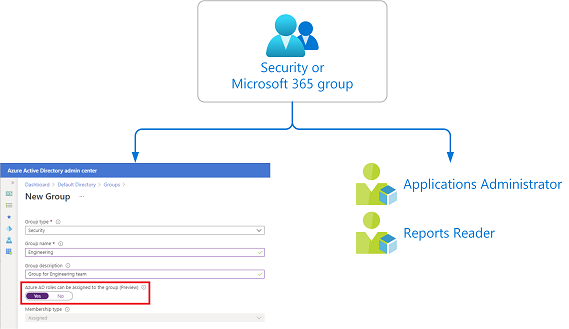
Assigning Azure AD roles to cloud groups is generally available now. isAssignableToRole attribute on group object is in Graph v1.0 and latest version of AzureAD PowerShell.

imageAzure Active Directory (Azure AD) lets you target Azure AD groups for role assignments. Assigning roles to groups can simplify the management of role assignments in Azure AD with minimal effort from your Global Administrators and Privileged Role Administrators.

Why assign roles to groups?

Consider the example where the Contoso company has hired people across geographies to manage and reset passwords for employees in its Azure AD organization. Instead of asking a Privileged Role Administrator or Global Administrator to assign the Helpdesk Administrator role to each person individually, they can create a Contoso_Helpdesk_Administrators group and assign the role to the group. When people join the group, they are assigned the role indirectly. Your existing governance workflow can then take care of the approval process and auditing of the group’s membership to ensure that only legitimate users are members of the group and are thus assigned the Helpdesk Administrator role.

..

Read how to implement this here:

Posted by: kurtsh | September 8, 2021

INFO: Azure Security Podcast

imageThe Azure Security Podcast is a twice-monthly podcast dedicated to Security, Privacy, Compliance, Governance and Reliability on the Microsoft Cloud Platform. Hosted by Microsoft security experts Michael Howard, Sarah Young, Gladys Rodriguez and Mark Simos.

Here’s some of the subjects from the last 35 episodes:

  • AZURE DEFENDER FOR SQL – THREAT PROTECTION

  • STUDY GUIDE FOR SC-200: MICROSOFT SECURITY OPERATIONS ANALYST

  • ZERO TRUST

  • AZURE SENTINEL SOC PROCESS FRAMEWORK

  • AUTOMATING SECURITY

  • MICROSOFT THREAT INTELLIGENCE CENTER – MSTIC

  • AZURE DATA EXPLORER

  • AZURE PURVIEW

  • APPLIED DATA SCIENCE, AI AND MACHINE LEARNING IN SECURITY

  • AZURE BASTION

  • AZURE SECURITY QUESTIONS

  • SECURITY NEWS DUMP FROM IGNITE

  • NETWORK SECURITY

  • AZURE RED TEAM

imageRiskIQ helps customers discover and assess the security of their entire enterprise attack surface—in the Microsoft cloud, AWS, other clouds, on-premises, and from their supply chain. With more than a decade of experience scanning and analyzing the internet, RiskIQ can help enterprises identify and remediate vulnerable assets before an attacker can capitalize on them.

Today, Microsoft is announcing that we have entered into a definitive agreement to acquire RiskIQ, a leader in global threat intelligence and attack surface management, to help our shared customers build a more comprehensive view of the global threats to their businesses, better understand vulnerable internet-facing assets, and build world-class threat intelligence.

Read about the acquisition here:

imageMicrosoft has acquired “CloudKnox”, a cloud Infrastructure Entitlement Management solution that provides role & access permissions management across both on-prem & cloud, while also providing granular visibility, automated remediation, and continuous monitoring.

The combination of CloudKnox + Azure AD will give enterprise customers unmatched multi-cloud identity security and governance!

The acquisition of CloudKnox further enables Microsoft Azure Active Directory customers with granular visibility, continuous monitoring and automated remediation for hybrid and multi-cloud permissions. We are committed to providing our customers with unified privileged access management, identity governance and entitlement management including:

  • Automated and simplified access policy enforcement in one integrated multi-cloud platform for all human and workload identities.
  • The widest breadth of signal-enabling, high-precision machine learning-based anomaly detections.
  • Seamless integration with other Microsoft cloud security services, including Microsoft 365 Defender, Azure Defender and Azure Sentinel.

Read about the acquisition here:

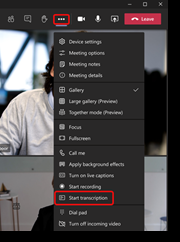
imageWe are pleased to announce that Live transcription in Teams meeting is now available in GCC. During a scheduled Teams meeting, you can start a live transcription of participant speech. The text appears alongside the meeting video or audio in real time, including the speaker’s name and a time stamp.

Live transcription can make your meetings more productive and inclusive for participants who are deaf or hard-of-hearing or have different levels of language proficiency. Participants in noisy places will also appreciate the visual aid.

After the meeting, the saved transcript is available for reference and download in Teams on the desktop and web.

Details are available for:

  • Enabling Transcription in Microsoft Teams GCC (or setting Teams Meeting policy to enable support for transcription using PowerShell)
  • Limitations around Live transcription
  • Starting, hiding & stopping a live transcription
  • Hiding the identity of speakers in transcription
  • Download the transcript
  • Permissions around transcription start/stop/view/download
  • Features available based on client type
  • etc.

For more information, visit:

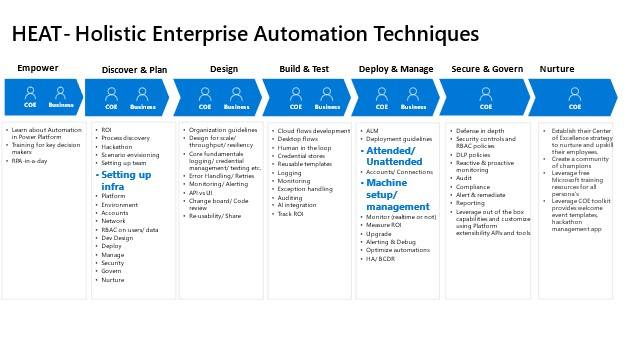
imageEarlier this year we launched HEAT (Holistic Enterprise Automation Techniques), sharing our learnings from customers building robust automation solutions on Power Automate.

Today, we are pleased to announce a special series around managing Power Automate Desktop on Windows at scale throughout your organization. This has been designed for Automation CoE’s (Center of Excellence)/ admins looking to enable and govern the roll out of Power Automate Desktop throughout the organization.

imageThis series includes 8 episodes that introduces you to the concept of managing lifecycle for Power Automate Desktop, leveraging Microsoft Endpoint Manager tools such as Intune, SCCM and ring deployment techniques to deploy, monitor and audit Power Automate Desktop.

Watch the video series on YouTube and get your copy of the playbook today.

image

Like delivery but prefer to cook yourself? Try 90 days of the eMeals app, with weekly recipes connected directly to online groceries, a benefit of your Microsoft 365 Family or Personal subscription.

Here’s some examples of what’s available:

  • imageeMeals Meal Planning & Grocery List
    Take the guesswork out of planning and shopping for groceries with eMeals. Our meal planning app streamlines your week by providing new recipes each week that directly connects to online grocery.
  • imageExperian – Control your identity and credit
    Enjoy complimentary identity theft protection — and access to your Experian Credit Report and FICO® Score — for 1 year from Experian®. Plus, you can try instantly raising your credit scores with Experian BoostTM

    • imageFUJIFILM Wonder Photo Shop
      Receive 25 free 4×6 prints (including free standard shipping) from the FUJIFILM Wonder Photo Shop – where we believe your photos were meant for more. Hold (literally) on to your special memories by taking the photos off your device and bringing them into your home. Printed on high quality Fujifilm Crystal Archive Paper.

    • …and more!

    Learn more at:

    Posted by: kurtsh | September 6, 2021

    INFO: Azure Security Newsletter

    imageSubscribe to our Azure Security Center and Azure Defender Newsletter to keep up to date on helpful tips and new releases.

    Sign up here:

    « Newer Posts - Older Posts »

    Categories