clip_image002
Ease the pain of Corporate Financial Reporting
Reduce time and inefficiencies of your financial close process

Many public companies expend a great deal of manual effort generating their 10K, 10Q and Earnings Release statements to meet SEC filing deadlines. If you are uncomfortable with the speed, effort, cost or quality of your reporting process, please join this webcast to learn how to prepare your corporate financial reports with greater ease and efficiency.

Please join accountant, audit and risk specialist David Freeman from RDA Corporation to learn about a solution leveraging familiar Microsoft tools like Excel, Word and SharePoint that will automate the content creation, review and approval process.

You will learn how to:

  • Enable document version control with the ability to roll back to a prior version and compare any prior versions if necessary
  • Increase focus on document reviews and approval via automated workflow processes 
  • Facilitate self-service, real time access to the latest document version available
  • Provide a secure and auditable environment whereby all approvals, comments and changes to the documents can be captured

Date: November 7, 2008
Time: 9:00 a.m. – 10:00 a.m. PST
Cost: Complimentary
Who Should Attend: Finance, Legal, and Investor Relations managers and executives responsible for corporate financial reporting

About the Speakers:

  • David Freeman is an Account Manager at RDA Corporation. He has been with RDA since 1995 and served in various capacities with RDA during this time.  Prior to RDA, David spent sixteen years at Arthur Andersen’s London office in the firm’s Audit and Business Advisory Practice.  David is a Fellow of the Institute of Chartered Accountants in England & Wales and a Member of the British Computer Society.
  • Andrew Crowder has been a Project Manager in the field of information technology for the past five years.  Prior to RDA, Andrew worked for Northrop Grumman as a Project Manager and Senior Software Engineer.  He specializes in delivering custom MOSS and BI solutions to meet organizations critical business needs.  Andrew is a certified Project Management Professional (PMP) and holds several MOSS certifications.

To Register:
http://www.clicktoattend.com/?id=132220

Posted by: kurtsh | October 6, 2008

INFO: Why do Microsoft’s search incentives work?

image There’s a been a fair amount of press recently about the success of the Live Search Cashback program.

For the uninitiated, Live Search Cashback is a special program that discounts products that you find through Live Search, and then buy.  Discounts vary but the ultimately, the result is that if you use Live Search, you get the opportunity to save money on every purchase you make when you search for it on http://search.live.com. (For more details, check http://search.live.com/cashback/howToUse)

Well, after mocking the program, several industry pundits are finding themselves conceding that, hey – people apparently like saving money and they’re willing to search using a specific search engine in order to get a unique discount.  Need more convincing as to why this works?  Here’s a good example: 

Now those same industry pundits are mocking the Live Search SearchPerks program which give people credit toward gifts for their searches.  Anyone want to take bets on if this program’s going to be successful as well?

Posted by: kurtsh | October 6, 2008

HOWTO: Save 30% on eBay purchases… using Live Search

image Did you know that if you search for a product on Live Search and find it listed with an eBay-sponsored ad, you can get a whopping 30% off almost anything you buy, particularly all BuyItNow purchases?

One of things to know is to type the words “cheap Xbox” to get the discount on an Xbox 360 purchased from eBay.  Know that the discount will only apply to the first item you select, and will not apply to subsequent purchase selections during a 60 minute online session.  Also be sure to enroll in the cashback program at http://search.live.com/cashback and sign in using your Windows Live ID.

Here are some instructions on how to orchestrate the discount once you’ve searched for it.
(Also, read more here from the Live Search blog.)

——————–

LiveSearch Blog:  Live Search cashback now live on eBay
(as taken from http://blogs.msdn.com/livesearch/archive/2008/06/12/Live-Search-cashback-now-live-on-eBay.aspx)

Now all of eBay’s "Buy it Now" offers will be eligible for cashback rewards. With eBay’s expansive catalog of products, from jewelry to electronics, you’ll start to see more cashback ads appearing in our search results. That means more ways for you to save.

You’ll see three primary differences between this user experience and other cashback user experiences:

  1. There’s an eBay ad with a cashback gleam (the cashback icon in the image here).
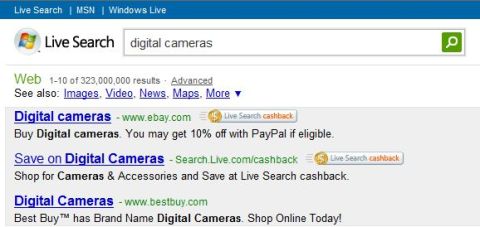
    Image of eBay ad in Live Search results
  2. Instead of going into the Live Search cashback experience, you now go directly to the advertiser’s website, which in this case is eBay.
  3. The cashback gleam follows you throughout your eBay shopping experience. This is good continuity for the consumer and something we want to do more of, but it takes a bit of work on the advertiser side to enable this.
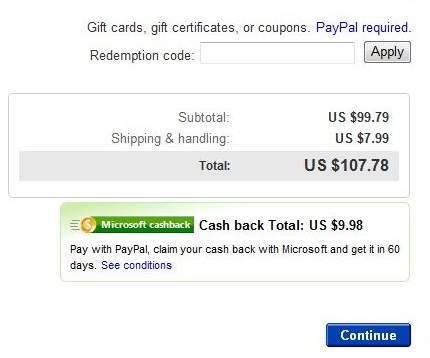
Image of portion of cashback checkout on eBay

We want to learn from two experiences in the cashback program. Depending on customer and advertiser feedback, we’ll make the necessary changes to deliver the best user experience over time.

Destination site experience  This is the experience that went live last month. Consumers research a product category on Live Search and then click a Live Search cashback ad to head over to cashback for the best deal. We’ve had a lot of feedback that we should do a better job integrating our product research capabilities with our cashback experience. So we’ll work hard to do that over the next few releases.

Direct-to-merchant experience  The other experience we envisioned for cashback would integrate directly with advertisers from the search results page. In this experience, advertiser’s ads will appear with a cashback gleam. When shoppers click the gleam in the ad, they head directly to the advertiser’s site. Obviously, this streamlines a bit of the purchasing process but requires some custom development on the partner website to enable it. We took this approach with eBay and are exploring it with other advertisers as well.

We’re excited to offer consumers more money-saving cashback rewards with eBay and look forward to hearing from you on how best to implement new features and functionality to the cashback experience. 

——————–

eBay:  How does the Microsoft Cashback Rebate Program work?
(as taken from http://pages.ebay.com/help/
buy/questions/cashback.html
)

imageeBay and Microsoft Live Search are teaming up to offer eBay buyers cash back on their purchases.
Here’s how it works:

  1. Visit Microsoft Live Search:  http://www.live.com

  2. In the Live Search box, enter your search for a product.

  3. Click on any eligible eBay-sponsored ad. This brings you to the eBay site.
    Important: Your cashback offer will be good for 60 minutes from the time you click the ad and arrive on eBay.com. You must complete a purchase on eBay of any eligible items within 60 minutes of clicking the ad. For definition of eligible items and conditions, see Terms of Use.

  4. Look for your cashback rebate percentage at the top of the eBay page.

  5. After you purchase an eligible item and pay for it with PayPal, go to My Messages in My eBay for an email with instructions on how to claim your cashback.
    Important: You must click the Get cashback button in the email.

  6. You now need to use the link in your My Messages to link a PayPal Account with your Microsoft Rebate Center Account.
    Once you have linked these accounts, it may take a few days for the eBay purchase to be seen in your Microsoft Rebate Center account.

  7. Microsoft will deposit your cashback redemption into your PayPal account 60 days after the eBay transaction has successfully completed including payment. Once payment is requested, it may take up to 14 days to show up in your PayPal account.

———————–

eBay:  Terms & Conditions:
http://pages.ebay.com/cashbackoffer/terms.html?_trksid=m37

clip_image002[4]

clip_image002[6]

Catch the Buzz:  The Future of Virtualization
Citrix, Microsoft & Dell: The Future of Virtualization

Los Angeles

Virtualization of applications, desktops and servers represents an exciting new frontier for IT. Join Citrix® , Microsoft® and Dell®  to learn how their combined forces offer the leading virtualization solution that is highly interoperable, transforms your data center into a delivery center, and lowers IT costs. Citrix’s server virtualization technology, next-gen desktop virtualization offerings and Microsoft Windows Server® 2008 and Windows Server® 2008 Hyper-V on Dell’s hardware platform make an unbeatable combination that many customers are choosing as their virtualization solution today.

“Hear directly from virtualization experts from each company about how the value of Citrix, Microsoft and Dell solutions can benefit you today and into the future.”

Agenda:

  • 8:30 – 9:00  Breakfast/Registration
  • 9:00 – 9:10  Welcome and Introductions
  • 9:10 – 9:55  Collaboration in Virtualization – The Microsoft Vision
                        An inside look at Hyper-V
  • 9:55 -10:40  Citrix’s Server and Desktop Virtualization solutions
  • 10:40 – 11:15  Dell’s Server and Storage approach to Virtualization
  • 11:15 – 11:30  Closing remarks and Raffle

clip_image002

Win an 80GB Zune!
1 lucky person will be a winner. Attendees must complete an evaluation form to enter drawing.  This contest is open to customers and prospects. Partners, Citrix employees and their families are strictly prohibited.

Date/Time:
November 12th, 2008
8:30AM Registration

Location:
Microsoft – Los Angeles
333 South Grand Ave
Suite 3300
Los Angeles CA 90071

Register:
http://www.registerandcompute.com/west/user

clip_image001[6]

Driving Business Value with Microsoft® Office SharePoint® Server 2007
An inside look at creating compelling business solutions with Microsoft Office SharePoint Server

Join Ascentium, Microsoft’s 2008 Portals and Collaboration Partner of the Year, for an exclusive hands on workshop designed to provide you with the insight to succeed in today’s competitive environment.
Our workshop will consist of a variety of hands on exercises to build out potential solutions in business case scenarios around product and inventory management. We will emphasize SharePoint best practices, specifically focusing on the following capabilities:

  • Business intelligence
  • Forms
  • Workflow
  • Search
  • Integration
  • Document and Records Management

Audience:
Solution Architects, Power Users, Business Unit Influencers, Individuals looking to understand how to successfully utilize SharePoint to impact their business!

When:
Wednesday, November 5
8:30 a.m. – 4:00 p.m.
(check in at 8:00 a.m.)

Where:
Microsoft Corp. Irvine Office
3 Park Plaza, Suite 1600
Irvine, CA 92614

(949) 263-3000

Workshop includes lunch and validated parking.

Register now with a Windows Live ID: http://www.clicktoattend.com/?id=132306
or please email Ascentium directly: laoffice@ascentium.com

clip_image001[4]Microsoft invites you to an exclusive, no-cost training opportunity:
Microsoft® SQL Server® 2008 Hands-On Lab

Learn about the new features in SQL Server 2008 in this one day hands-on lab. Topics include:

  • Resource Governor: Learn how you can prevent less important applications from using system resources needed by mission-critical applications
  • Transparent Data Encryption: Implement a security solution that will help protect sensitive information from possible theft while not requiring significant application redevelopment
  • New Spatial Capabilities: Gain experience working with the new spatial capabilities GEOGRAPHY data type.
  • Analysis Services: Implement the management and maintenance of an OLAP database.
  • Managing the Reporting Services Infrastructure: Learn how to configure the subscriptions for reports and security feature and how to integrate reports with Microsoft Office SharePoint Server 2007.

What is a hands-on-lab?
This isn’t your typical IT class. This hands-on lab is for experienced IT Pros who want to "try it out." You’ll spend most of the day getting hands-on practice and experience with the new product features and scenarios in your own lab environment with very little instructor presentation.

Who Should Attend:
This hands-on lab is for IT Professionals with experience with SQL 2005 and who are focused on database and business intelligence.

Prerequisites:
To get the most from this course, you will need knowledge of SQL Server 2005, including administration experience, experience creating a database, and database security.

RSVP:
This special, no charge training event will fill quickly and space is limited, so be sure to register as soon as possible to reserve your seat.  Contact me for registration details if you are a customer of mine.

Location:
MICROSOFT IRVINE OFFICE
3 Park Plaza, Suite 1600 Irvine, Ca. 92614
(949) 263-3000

Date/Time:
November 6,2008
8:30am – 4:30pm

Course Modules

  • Resource Governor for Predictable Performance
  • Transparent Data Encryption
  • Using the new Spatial Capabilities GEOGRAPHY data type
  • Managing Analysis Services
  • Managing the Reporting Services Infrastructure

Posted by: kurtsh | October 2, 2008

BETA: Expression Blend 2 SP1 Preview Released

image Today, we have released a preview of Expression Blend 2 Service Pack 1 that allows you to create content for the release candidate of Silverlight 2.

This Service Pack provides you with all of the functionality you had with our earlier Expression Blend 2.5 June 2008 Preview. Besides allowing you to create new projects for WPF, Silverlight 1, and Silverlight 2 RC, we are also exposing new platform functionality like Font Embedding / Subsetting for Silverlight 2 projects. More on this new functionality in future blog posts.

One thing to note, which is different from how we handled releases in the past, is that Expression Blend 2 SP1 Preview will install on top of Expression Blend 2. This will not be a side-by-side installation. This service pack is also an evolution of Expression Blend 2.5, so there will be no future Expression Blend 2.5 releases.

You can find more information on the FAQ page we have created for Expression Blend 2 / SP1.

BLOG:
http://blogs.msdn.com/expression/archive/2008/09/25/expression-blend-2-sp1-preview-released.aspx

DOWNLOAD:
http://www.microsoft.com/downloads/details.aspx?FamilyId=3AE4DC3A-61AA-41F4-A9B8-4334A76FA447&displaylang=en

image Whoa.  This is a cool paper.

I only found it because of this blog article, “SQL Index defrag and maintenance tasks for Search” that goes over various tasks to keep Sharepoint Server 2007 moving.

My goal for this was to follow the recommended SQL guidelines while minimizing the impact that these maintenance jobs have on Crawling and Queries.  We know from the SQL Monitoring an I/O post that Search is extremely I/O intensive .  As it turns out so is all of the regular maintenance that SQL recommends, so finding the right balance between the two is an interesting scheduling task.

http://blogs.msdn.com/enterprisesearch/archive/2008/09/02/sql-index-defrag-and-maintenance-tasks-for-search.aspx

Honestly, this is all database stuff that’s over my head but I assume that you Sharepoit & SQL Admins know what to do with this information.  And there’s a lot of it.

image This is crazy.

…so I guess if you own a Nintendo Wii, and really want to use the controller as your Powerpoint slideshow controller, this is how to do it.  It’s tricky however, and not really that easy to set up so reader beware.

Near as I can tell, the device connects via Bluetooth and requires some extra lighting on the projection screen.

Using a REAL Wireless Mouse
image Me personally? I use this:

It’s super portable and it shows up on Woot every so often too.

image

The folks at the Outlook team blog wrote a wicked tutorial for people that have no idea on how to send out emails to large groups of people without having all those people appear on the To: line.

Email blasts that go out to each recipient individually is called Mail Merge and it’s a somewhat hard to understand capability within Outlook 2007.

So check out this tutorial.  It’s well worth the 5 minutes.

LINK:
http://blogs.msdn.com/outlook/archive/2008/09/23/mail-merge-how-to-send-a-personalized-e-mail-to-many-people-at-once.aspx

« Newer Posts - Older Posts »

Categories