clip_image001

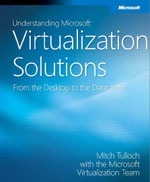
Great news for anyone interested in Virtualization! Understanding Microsoft Virtualization Solutions from Microsoft Press is available to you as a FREE download.

This 15MB E-Book is over 400 pages long, so it is quite comprehensive. It covers all current Microsoft Virtualization technologies  even the newest, such as the Microsoft Enterprise Desktop Virtualization (MED-V), and VDI. Definitely a worthwhile addition to your library.

Synopsis:
This guide will teach you about the benefits of the latest virtualization technologies and how to plan, implement, and manage virtual infrastructure solutions. The technologies covered include: Windows Server 2008 Hyper-V, System Center Virtual Machine Manager 2009, Microsoft Application Virtualization 4.5, Microsoft Enterprise Desktop Virtualization, and Microsoft Virtual Desktop Infrastructure.

The book also provides insight into the Core Infrastructure Optimization model, and how implementing virtualization technologies can help move a company further along toward the goal of building an efficient, reliable Dynamic IT infrastructure.

DOWNLOAD:
Register at http://csna01.libredigital.com/?urmvs17u33

NOTE: Once you’ve authenticated using your Passport/Live ID the only required fields for registration are: name, country, role, and an email address. You’re taken directly to the download from there (you will need to temporarily allow Pop-Ups for the download window).

This is a limited time offer, (Seriously… It’ll be gone in a few weeks) so if you want it, you should download it now.

Digg This

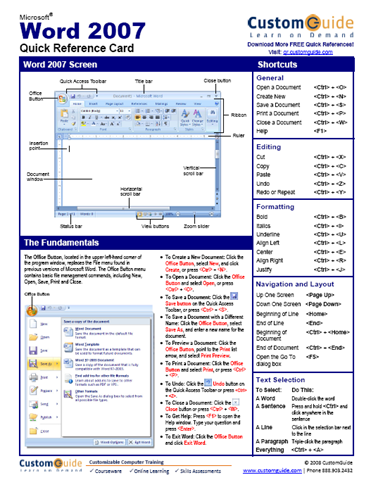
image Many of you have asked for Office 2007 Quick Reference sheets that can be handed out to end users to allow them to refer to something for guidance when they first start using the new ribbon interface of Office 2007.

A company I use called “Custom Guide” provides freely distributable COLOR quick reference guides in PDF form that you can download and distribute to your end users for no charge.  They can be hosted internally for download within your organization’s support site, and duplicated as many times as you like.

The quick references sheets include, among other things:

…and they also have downloads for previous versions of many of the products as well.

BUT WHAT IF I WANT TO CUSTOMIZE THEM?
Well, if you want to put your company’s logo on the sheet (to hide the fact that you didn’t actually make the sheet yourself <ahem>), you need to license the sheets from CustomGuide.  You can then put your company logo on the sheet and make it appear a little more professional.  The licensing fees to do so incidentally are really minimal – something like a few hundred bucks I think for your whole organization.

They do NOT allow you to copy the content and modify it outside of the logo, however.  They might allow this with another licensing type or something but I don’t know how that works.

Digg This

clip_image001[4]
Microsoft is delighted to announce SharePoint Conference 2009 at the Mandalay Bay Events Center in Las Vegas, Nevada on October 19-22, 2009.  Don’t miss your chance to attend the premier worldwide conference dedicated to SharePoint and related technologies!

SharePoint Conference 2009 will be the conference to learn about SharePoint “14”.  Be the first to learn about the improvements we’ve made to the platform and how many of those investments can be quickly implemented to add value to your organization and businesses.

clip_image004clip_image005

If you’re an IT Professional, an IT Decision Maker, an Architect or a Developer you will find a deep set of technical content to give you a kick start for SharePoint “14” and further your skills and knowledge with SharePoint Server 2007. 

In addition to the session content you will have ample opportunities to network with technical and industry experts including many of the Microsoft staff that helped in building SharePoint, Microsoft Most Value Professionals and many of our top Certified Partners.

clip_image006Early bird registration is open today for a $300 discount for the first 500 registrations only.   Don’t miss out on the biggest SharePoint event of the year!  Register today to save over 25% and secure your spot at this monumental event!

For more information please visit the SharePoint Conference website at www.MSSharePointConference.com.

Thank you again for your interest in the Conference. We hope to see you in October!

– The Microsoft SharePoint Conference 2009 Team | SPC@Microsoft.com

Digg This

Posted by: kurtsh | February 2, 2009

RELEASE: IT Professional Resources for Windows 7

image In a keynote address at the 2009 International Consumer Electronics Show (CES), Microsoft Corp. Chief Executive Officer Steve Ballmer announced the beta availability of the Windows 7 operating system as well as the availability of the latest version of the Windows Live, a suite of personal communications services and applications.

The beta version of Windows 7, Microsoft’s next-generation PC operating system, can be downloaded today by MSDN, TechBeta and TechNet customers. Consumers who want to test-drive the beta can also download the beta at http://www.microsoft.com/windows7.

Digg This

image Does your organization have an Enterprise Agreement with Microsoft?  Do you have Sharepoint licensing on the contract?

If so, you likely have available to you a ton of Sharepoint resources that you and your staff may not even know about.

————

Microsoft Sharepoint eLearning

Using the Microsoft E-Learning extranet site, you can access a current list of Microsoft SharePoint E-Learning pre-sorted by role for IT Pro, Developer and Information Worker. Want to learn more about Software Assurance?

IT Pro

Developer

Information Worker (IW)

Collection 3376: Implementing Enterprise Search

Collection 5403: Implementing Microsoft Windows SharePoint Services 3.0

Collection 5404: Implementing Microsoft Office SharePoint Server 2007

Collection 6306: Designing a Microsoft Office SharePoint Server 2007 Solution

Collection 2286: Implementing Microsoft Windows SharePoint Services

Collection 5385: Developing Solutions with Microsoft Windows SharePoint Services

Collection 5392: Developing and Extending Microsoft Windows SharePoint Services

Collection 6071: Developing Solutions with Microsoft Office SharePoint Server 2007

Clinic 5045: Inside Look at Developing with Microsoft Windows SharePoint Services 3.0

Clinic 5046: Inside Look at Building and Developing Solutions with Microsoft® Office SharePoint® Server 2007

Collection 5266: Core Training for Windows SharePoint Services 3.0
Collection 6285: Working With Microsoft Office SharePoint Server 2007

Collection 6301: Working with Microsoft SharePoint Designer 2007

Course 4001: Team Collaboration Using Microsoft® Windows® SharePoint® Services

Course 4114: Doing More with Microsoft Windows SharePoint Services 2.0

Course 4115: Getting Started with Microsoft Windows SharePoint Services 2.0


SharePoint Deployment Planning Services

SharePoint Deployment Planning Services (SDPS) is designed to help your organization plan an effective deployment of Microsoft Office SharePoint Server. SDPS includes a broad range of planning tools and services that help optimize the effectiveness of the Office SharePoint Server core capabilities, help lower the cost of deployment, and help improve the productivity of your organization.

Customers with Enterprise Agreements that have Sharepoint licensed, usually have SDPS available to them which essentially acts as an allocation of consulting funds for getting a Sharepoint deployment moving in the right direction.

Learn more…

image “I have found Windows 7 a pleasure to use…”
– Walter S. Mossberg, Wall Street Journal

LINK:  http://online.wsj.com/article/SB123258632983004629.html

Although he focuses on how much it improves over Vista, Mossberg gives a solid review of Windows 7, amongst which he states “It’s … a serious competitor, in features and ease of use, to Apple’s current Leopard operating system.” The features receiving the greatest focus include:

  • Multitouch Screen Navigation: “[This] may eventually redefine how people user computers…. It is smart enough to distinguish between various gestures and combinations of fingers.”
  • More customizable and useful taskbar: “[Icons which]… can be “pinned” anywhere… [and] “jump lists”….”
  • Compatibility: “[A] wide variety of hardware… all worked fine.” “I.. successfully installed and used popular programs from … rivals…. All worked properly.”
  • Cutting nag dialogs: “[Notifications] are consolidated in a single icon [on] the taskbar.”

Among the downsides he points out includes the “unbundling” of what now exists as Live Services from the OS install. He felt having to download Windows Live services serves to remove out-of-the-box functionality from Windows.

Digg This

Posted by: kurtsh | January 27, 2009

BETA: Internet Explorer 8 Release Candidate 1 releases

image I am pleased to announce that we have released Internet Explorer 8 Release Candidate 1 (RC1) in 25 languages for Windows Vista, Windows XP, and Windows Server. 

I encourage you to install it and use it on your non-Windows 7* machines at home and at work.

There is no question that IE 8 is the best browser.    More than 80% faster than IE7 in common micro-benchmarks and designed for the way people really use the web, IE8 is:

  • Faster for accomplishing tasks, from mapping a location to checking the status of an auction.  In side-by-side measures of speed, IE8 was as fast or faster than Firefox in opening top websites more than 50% of the time.  The rest of the time you need an ultra-slow motion video camera to catch the difference between IE8, Firefox and Google Chrome.
  • Easier to find information, to navigate, to search, to work with tabs.  Accelerators and Web Slices blur the lines between the online services that make each person’s browsing unique and the browser itself, making the IE8 experience richer.
  • Safer and more reliable with advanced privacy protection that no other browser can match.

Now is the time for you to start running IE8 at home and at work.  Get IE8 RC1 at http://www.microsoft.com/ie8.

Digg This

Posted by: kurtsh | January 27, 2009

CES2009: Expo Show Floor – Day 3

Here’s a quick summary of the technology I saw as I wandered the show floor on Day 3 – last day,

  • Altec Lansing/Plantronics
    • DISCOVERY 925 – New headset
      • Multipairing
      • New fashionable design with as little plastic as possible
      • Comes with carrying case for recharging
      • 4 different colors
  • AstoundStereo
    • 3D SOUND SIMULATION
      • Software-based 3D environment generations – provides depth to music
      • Windows Media only… will be virtual driver based later this year
      • 20% off – show special.  astoundstereo.com.  Use code ASE-E3N7-CES until 2/5/09
  • ThermalTake
    • TAI-CHI S – Fanless cooling for silence
  • Novint
    • FALCON – gun simulator
      • Simulates gun motions
      • Provide force feedback for shots
      • USB connected
      • Works with Left4Dead
      • To work with WoW soon
      • $199
  • Nero
    • LIQUID TV – “TiVo” for your PC
      • Actually uses the TiVO brand, TiVO menuing, and the TiVo encoding format – licensed
      • $200 – comes with a TiVo controller
      • USB to coax connectivity, HD antenna, 1 year subscription to TiVo service
      • Allows burning to disk!
      • Can pull content from other TiVos in the house!
    • SHOW special… 30% off Nero 9, Nero MoveIT, Nero LiquidTV. Nero.com. Use coupon code: AT-CES-PMGV. Ends Jan 31.
  • Shuttle
    • X50
      • has dual core Atom. Only one on market. $300
    • H7 5800
      • Only shipping Core i7 PC. Up to 16GB ram expandable. Chassis is $540.
  • Nvidia
    • GEFORCE 3D VISION
      • Glasses. $199.
      • TV needs to be DLP 3D ready TV.
      • PC only.
      • Released at show. Best of CES 2009 finalist.
  • Garmin, Blackberry/RIM, Real, Lexar, Daneelec, IBM
    • NOTHING
  • Zoombak
    • 3 MODELS
      • Pets, People, Cars
      • Pet model has 3-5 day charge
      • Car model will also use triangulation with T-Mobile cell towers
      • $199 with $50 rebate off of Zoombak.com until Jan 31st
Digg This

clip_image002
When:
Tuesday, February 24, 2009
8:30AM-12:45PM

Where: Microsoft Irvine
3 Park Plaza, Suite 1600
Irvine, CA 92614

Content:  Microsoft Defense in Depth:  Today and Tomorrow
Come see how Microsoft can help you secure and manage your complex infrastructures. We will discuss the latest security threats that you are facing along with compliance and regulatory challenges and how to deal with them. This session will go through the different layers of protection from the client operating system to the network edge. We will also review the roadmap for the future and how Microsoft is improving upon the security landscape.

Agenda:

  • 8:30 – 8:45 am Coffee and pastry welcome
  • 8:45-9:00am Kickoff, lead by Jim Roemer & Dan Takahashi
  • 9:00 – 10:30am Microsoft Security strategy overview session, lead by Sean Lewis
    • Threats, challenges, current landscape.
    • MSIT security strategy
    • Windows Vista/Server 2008 security
    • Network Access Protection
  • 10:30 – 10:45 Break
  • 10:45 – 12:15 Forefront today and tomorrow, ‘Stirling’ overview, and roadmap session
    • Forefront overview
    • Integrated edge (IAG/ISA)
    • Forefront Server Security
    • Forefront Client Security
    • Information Rights Management   
    • Identity and Access management
    • Defense in Depth the complete picture
  • 12:15 – 12:45 Q&A and Interactive Discussion over Lunch

About Sean Lewis:
Sean is presently serving as Security Advisor for Microsoft’s Southwest District.  Sean has held a number of technical leadership positions in global organizations, including as Security Architect for Microsoft Consulting Services’ Security Center of Excellence and Lead Consultant for the Southwestern United States in Verisign’s Global Security Consulting practice.  Sean has more than 6 years of experience in the Information Security industry geographically oriented in Southern California, previously holding positions such as Information Security Manager for a large healthcare provider (Sharp Healthcare) and Principal Network Architect for a large B2B/B2G clearinghouse. 

Registration:
If you are interested in attending and are a customer of mine, please contact me for registration details.

Digg This

image
Project 2007 Hands-On Training with UMT Consulting
on February 3rd, 2009 in Los Angeles

Join us for this one-day hands-on training which will highlight Microsoft Project best practices. This event will cover several useful tips for improving your productivity with Microsoft Project including:

  • How to Reduce project schedule maintenance time by:
    • Defining calendars
    • Setting project options
    • Defining resources
    • Defining the project summary task
  • Constraint Types – What are they and how to use them:
    • Properly setting constraint types
    • Deadlines vs Constraints
    • Improving CPM analysis by accurately identifying dependencies
  • Best Practices
    • Views: selecting views and splits
    • Filtering and grouping
    • Auto indent/hiding the view bar
    • % Complete vs % Work complete (Actual Duration/Duration or Actual Work/Work)
    • Methods for analyzing over allocations
  • And more!

Location:  Microsoft – Los Angeles
333 S Grand Ave
Suite 3300
Los Angeles CA 90071

Date:  February 3, 2009

Time:  9:00am – 12:30pm

Cost:  *Free!*

Course Highlights

  • Hands-on training
  • Tips on improving your project schedule
  • Learn how to use constraints in Microsoft Project
  • Hear about best practices from the instructor and your peers

Who Should Attend: This course is for Project Managers, Project Coordinators, or Project Task Owners who would benefit from learning how to better utilize Microsoft Project.

Prerequisites: To gain the most from this event, attendees should have a working knowledge of basic Project Management practices and terminology. Attendees should also have some experience working in Microsoft Project.

Registration: If you’re a customer of mine and you’re interested in registering, please contact me for details.  Note: This special, no charge training event will fill quickly and space is limited, so be sure to register as soon as possible to reserve your seat.

Sincerely,
UMT Consulting Group

Digg This

« Newer Posts - Older Posts »

Categories