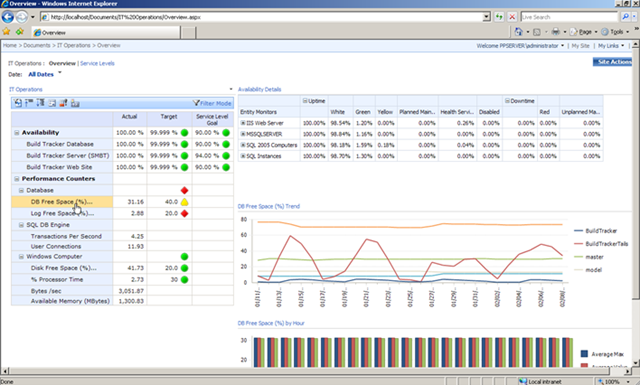
We’ve posted a whitepaper & FREE solution accelerator designed to help IT Pro’s build a complete performance management solution for monitoring the health of their IT infrastructure.  IT professionals can now go beyond canned operational reports with interactive performance dashboards, comprehensive scorecards, and powerful analytics – all built on Microsoft platform components including Microsoft® SQL Server®, Systems Center, Microsoft Office SharePoint® Server 2007, and Microsoft Office PerformancePoint® Server 2007.
image

The solution consists of a detailed whitepaper as well as preconfigured SQL Server Integration Services packages, cubes, and PerformancePoint dashboards to extract data from Systems Center and deliver it through PerformancePoint Server.  
imageAgain, we are offering this content as a free download to help customers maximize the value of the data they are currently collecting through Systems Center, and in the process showcasing the value of our products in a manor that’s relevant to the IT Pro audience.

 DOWNLOADS:

Find the solution posted on the BI and PPS external websites.

Digg This

image We released a new site to beta test that allows people to test their Exchange Server 2003/2007 environment for remote connectivity.

  • Microsoft Exchange ActiveSync Test
    This test will simulate the steps a mobile device uses to connect to an Exchange Server using Exchange ActiveSync.

  • Microsoft Exchange ActiveSync AutoDiscover Test
    This test will walk through the steps a Windows Mobile 6.1 device (or another AirSync licensed device) uses to connect to the AutoDiscover Service

  • Microsoft Office Outlook 2007 AutoDiscover Connectivity Test
    This test will walk through the steps Microsoft Office Outlook 2007 uses to connect to AutoDiscover

  • Microsoft Office Outlook 2003 RPC/HTTP Connectivity Test
    This test will walk through the steps Microsoft Office Outlook 2003 uses to connect via RPC/HTTP

  • Inbound SMTP Email Test
    This test will walk through the steps an Internet e-mail server uses to send inbound SMTP email to your domain

LINK:
https://www.testexchangeconnectivity.com/

Digg This

<Credit goes to my friend Jerry for pointing this out>
image For those of you looking for stocking stuffers this Christmas/Holiday/Winter Solstice, Gamefly is selling used Xbox 360 games.

Here are some examples:

$10 and below: 

  • Timeshift = $9.99
  • Conan = $9.99
  • MLB2K8 = $9.99
  • NBA2K8  = $9.99
  • Quake Wars: Enemy Territory = $9.99

$20 and below:

  • Unreal Tournament 3 = $14.99
  • Devil May Cry 4 = $12.99
  • Guitar Hero: Aerosmith = $19.99
  • Army of TWO = $19.99
  • Rainbow Six: Vegas = $16.99
  • Ironman = $14.99
  • Tiger Woods PGA Tour 08 = $12.99

$30 and below:

  • Grand Theft Auto 4 = $29.99
  • Soul Caliber 4 = $29.99
  • Lego Indiana Jones = $29.99
  • Guitar Hero 3: Legends of Rock = $27.99

And so on and so forth…

LINK:
http://www.gamefly.com/products/search.asp?pf=1070&s=1&cat=10&

Digg This

Posted by: kurtsh | December 17, 2008

DOWNLOAD: Free Tools for Windows-based Twitter users

It dawned on me that if I’m going to post something on Facebook, I should probably do it for the other service that I’ve been trying out – Twitter – because it has an equal number of cool software applications for it as well.

image

Chirpr – Windows Vista Gadget for Twitter
The Chirpr gadget for Twitter is a really reliable and easy to use gadget for posting updates to Twitter.  It’s easy to type in your posts and it counts the number of characters you’ve used in a new post to ensure that you don’t go over 140.  It also shows you the history of posts that you have on your Twitter page. 

What I like about it is that it’s always available in my Vista Sidebar so regardless of what application I’m in, I can quickly crank out a post if I’m in the mood.  And it’s free!

LINK: http://www.codeplex.com/chirpr


image

Outtwit – Outlook PlugIn for Twitter
Outlook now has it’s own free plug in to allow you to post updates to Twitter directly from Outlook. 

I used to have to go to my Windows Vista sidebar to post to Twitter but now I don’t even have to do that if I’m in Outlook.  There’s a bar in the interface now that allows you to make posts and receive replies directly into an Outlook folder.

LINK: http://www.techhit.com/OutTwit/quickstart.html


image ceTwit – a Twitter client for Windows Mobile
Interested in posting and tracking Twitter feeds using a client other than the SMS text facilities of Pocket Inbox?  This is a good way to do it.  I’ve only recently started using this but it’s a helluva client for posting Twits as well as tracking Twitter feeds from others.  The interesting thing about ceTwit is that it supports Ping.FM which allows simultaneous cross posting against Twitter, Plurk, Facebook, Jaiku, etc. in a single post.

LINK: http://www.kosertech.com/blog/?page_id=5

(Now because I haven’t been using it very long, I can’t give a full on recommendation behind it but not to worry – there are numerous OTHER Windows Mobile Twitter clients out there for you to use:
http://theregoesdave.com/2008/04/01/7-twitter-clients-for-mobile-phones/)

Digg This

Posted by: kurtsh | December 17, 2008

DOWNLOAD: Free Tools for Windows Facebook users

I gotta admit, I’m more fascinated with all the nifty tools that Facebook users have at their disposal… more so than the actual Facebook service itself.  It’s such a good marriage between Software + Services. 

Here are 3 Facebook tools that I use today that I think are absolutely cool… not to mention free:

image FBLook
If you are an Outlook user, you probably have it open all the time. Now you can update your Facebook status, see your friend statuses and see the number of new requests without having to open the browser or any other applications. FBLook seamlessly integrates Facebook into Outlook.

LINK: http://www.techhit.com/FBLook/


image FaceBook Gadget for Windows Vista
Receive Facebook messages, requests, invites, and pokes to your desktop. This cleanly designed gadget also allows you to edit your status and provides quick links to Facebook. Bugs were fixed in version 1.5.

LINK:  http://gallery.live.com/LiveItemDetail.aspx?li=95cec600-3f59-4c27-aa27-c63b09279d3e


image Skybook for Windows Mobile
SkyBook is a free Facebook client for Windows Mobile devices (Pocket PC and Smartphones). With SkyBook you stay in touch with Facebook friends all the time.

Features:

  • Sleek, graphic-rich user interface
  • Set your status while on-the-go
  • View friends’ status and detailed information
  • View friends’ friends and send friendship requests
  • Get notified of events like wall post, message,
    poke, and friend request
  • View your pokes, wall, inbox, and friend requests,
    all in full text
  • Poke friends, send message to friends, and post
    on friends’ wall
  • Access you and your friends’ photo albums
  • Ability to view, zoom in/out, and pan full-sized
    photos, and play slideshow
  • Upload photos from built-in camera or file folder
  • Import friends’ profile photos to Outlook Contacts
    (photo Call ID)
  • and more…

LINK:  http://www.magnifoca.com

Digg This

image According to my customer in Plano, Doritos is giving away a free Xbox Live Arcade game.  Basically, it’s called “Dash of Destruction” created by NinjaBee, famed creators of Kingdom of Keflings, Outpost Kaloki, Band of Bugs, and Cloning Clyde. 

Essentially the plot goes like this: 
A Doritos delivery truck is making deliveries and… well… DINOSAURS are coming after it, trying to eat it’s cargo.

Yeah.  I know. 

But hell – you get what you pay for.  All 60MB of it.  And if you recall, Burger King was immensely successful with their Xbox/Xbox360 promo game campaign.  Remember, “Sneak King”?  “Big Bumpin’”?

So who knows?  I haven’t tried it yet but it might actually be fun!

Add this to your Xbox 360 download queue

Digg This

UPDATE 12/18/2008:
I just got a note that the original link for this didn’t work.  I’ve updated the registration link below to point to the right web site at http://co1piltwb.partners.extranet.microsoft.com/mcoeredir/mcoeredirect.aspx?linkId=11062521&s1=64f91b0f-009e-5a38-3cf5-2d4cb973e070.

—————
ORIGINAL POST:
Are you interested in learning Microsoft’s Virtualization technologies… for free?

image Prepare for Exam 70-652 for Free (US$159.99 value)
This collection of five 2-hour online courses helps you develop the skills necessary for implementing and managing Hyper-V in an IT environment, as well as, creating and managing virtual machines and hosts in a virtual environment.

The courses within the collection include the following topics:

  • An overview of the Hyper-V technology
  • Creating a virtual environment
  • Deploying systems in a virtual environment
  • Configuring high availability in a virtual environment
  • Administering a virtual environment with SCVMM

This collection helps you prepare for exam 70-652 TS: Windows Server Virtualization, Configuring
This collection requires that students meet the following prerequisites:

  • At least a year and a half of experience working in Windows Server 2003 or Windows Server 2008 environments as system administrators
  • Familiarity with virtualization products and technologies

The package includes all the content from the following 5 online virtualization training courses:

How to register for free:

  1. Go to the following site:
    Collection 6319: Configuring Hyper-V in Windows Server 2008
    http://co1piltwb.partners.extranet.microsoft.com/mcoeredir/mcoeredirect.aspx?linkId=11062521&s1=64f91b0f-009e-5a38-3cf5-2d4cb973e070
  2. Register using the following promo code:
    9350-Y2W6-3676
  3. The course may be revisited for a period of 18 months after registration.
Digg This

Posted by: kurtsh | December 17, 2008

DOWNLOAD: Branding Sharepoint Server 2007

image I’ve gotten a lot of questions about how customers are interested in rebranding and res-kinning the Sharepoint Server 2007 user interface to either be “prettier” or simply align with their corporate policies around “look and feel”.  This topic comes up enough that it’s probably worth posting something about.

First of all, I’ve got a Powerpoint which goes over most of the considerations of rebranding a site for personal taste or corporate policies.  Click below to download this 4.0MB Acrobat file.

http://cid-00da410c7f7e038d.skydrive.live.com/embedrow.aspx/ProductMaterial/Sharepoint/2007/BrandingSharePoint.zip

There are additionally a ton of resources to go to for more information on how to accomplish this task of “rebranding” a Sharepoint site.  If this is a topic that’s interesting to you, I would highly recommend attending the Microsoft Sharepoint Conference that is usually a week long and usually takes place annually in Redmond, WA.  Watch http://www.mssharepointconference.com/ for details on the next event.

Here are some of the resources out there around ‘branding’ in the meantime:

Tools

Office Online

Samples

MSDN

Videos

WebCasts

Expert Resources:
Heather Solomon, Microsoft MVP, Expert in SharePoint branding & design techniques

Digg This

image Alright – with the exception of Windows Live Sync and Live Mesh, I don’t really care as much about the other Windows Live family members outside of Windows Live Writer.

I’m currently using the latest build – and the last from what I understand before we release it as supportable. 

I was looking at the blog for Windows Live Writer and I guess we intend on calling it “Windows Live Writer 2009”.  Apparently, the list of newly added capabilities into this Release Candidate build include:

  • “Instant photo” border treatment
  • Insert multiple photos
  • Insert and upload Windows Live photo albums
  • Insert and publish video to YouTube
  • Spell checking in: Arabic, Basque, Bulgarian, Catalan, Croatian, Czech, English (Australia), Estonian, Greek, Hebrew, Hungarian, Indonesian, Latvian, Lithuanian, Malay, Polish, Romanian, Russian, Slovak, Slovenian, Turkish, and Ukrainian
  • Server-side tagging (support coming soon to WordPress.com and BlogEngine.NET)
  • Type-down filtering in the Open dialog
  • Improved blog account setup
  • Windows Live Spaces inline preview support
  • Support for bidirectional languages
  • Updated look and feel


    image But what’s more interesting to me are the new Plug Ins – namely the Twitter plug in and the Digg plug in. 

    The Twitter Plug In for Windows Live Writer enables you to immediately post a notification about your new blog entry to your Twitter account.  It’s not very sophisticated but it’s amazingly easy to use and very convenient.  I myself was kind of wondering about the usefulness of Twitter beyond social events and “friend communities” but this might actually be something to prove me wrong.
    http://gallery.live.com/liveItemDetail.aspx?li=e5556096-52c7-4d95-9e6d-9ca0d5f65ce1&pl=8&bt=9

    The Digg Plug In for Windows Live Writer is something that I hadn’t thought of because I don’t care about the “popularity” of this blog.  The plug in makes it possible for people that read interesting things on your blog to “digg it up” and raise it’s profile on the famous “Digg.com” web site.
    http://gallery.live.com/liveItemDetail.aspx?li=4c89ead0-4478-4248-86d6-bb5fa882ee55&pl=8&bt=9

    (There’s also a Flickr plug in as well, but I could care less about Flickr since Spaces supports photo uploads and galleries just like Flickr through Windows Live Photo Albums, which Windows Live Writer natively supports.)

    Digg This

  • imageMitch Tullock provides a thorough look at the capabilities, features, and operations of Microsoft virtualization technologies from the desktop to the datacenter, and how to plan, implement, and manage virtual infrastructure solutions.

    This is a 417 page Microsoft Press book and a 14.4MB PDF download.  It covers everything soup to nuts, from:

    • An overview of the differing types of virtualization
    • Server Virtualization & Hyper-V in depth
    • Server Virtualization Management & Virtual Machine Manager 2008
    • Application Virtualization & App-V
    • Presentation Virtualization & Terminal Services from Windows Server 2008
    • Desktop Virtualization & the differences between Enterprise Desktop Virtualization & VDI
    • User State Virtualization
    • Designing & Planning a Virtualization Infrastructure

    Be sure to grab it while you can!

    DOWNLOAD:
    https://www.getvirtualnow.com/usevents/education/download/693371eBook.pdf

    Digg This

    « Newer Posts - Older Posts »

    Categories