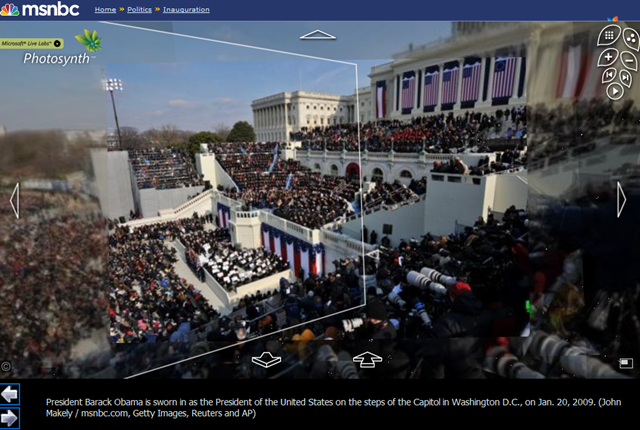
image WOW – this is so cool.
http://www.msnbc.msn.com/id/28661923

Photosynth enables people to take multiple photographs and in 3 dimensions lay those photographs out with depth.  One can not only see a panorama shot of a scene but also a deeper, closer shot of that same environment, depending of course on what photos have been taken.

Navigating Photosynth couldn’t be easier too.  It’s just point and click to the area you want to zoom in on.

We did a similar thing with CNN.  I’ve just never seen such good photography on a public site like this before.  Makes sense since it’s Getty, Reuters, and AP’s photos I suppose.  Professionals!  Gotta love ‘em.

Digg This

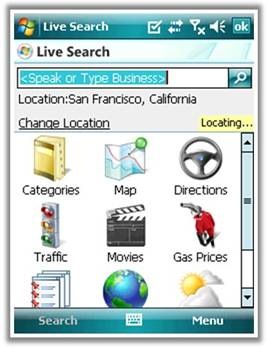
On January 7, to go along with Steve Ballmer’s announcement of Microsoft’s Mobile Search deal with Verizon at CES2009, we launched the latest and greatest version of Live Search for Windows Mobile.  So what’s new, you ask?

LOCALIZATION
Now available in France and Italy.

clip_image001

clip_image002

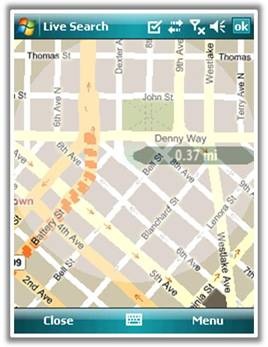
“LOCATE ME”
Quickly get your approximate location using nearest cell tower of your provider.

clip_image003

clip_image004

­­­­­­(p.s.  For Verizon Wireless customers, there’s a little more coming in the way of our “Locate Me” functionality based on our newly announced partnership.  Stay tuned.)

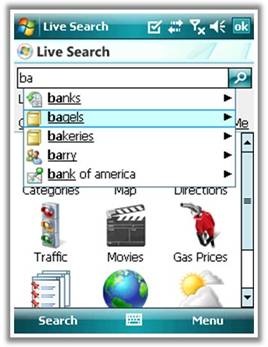
AUTOSUGGEST
Search suggestions including recent searches, address book contacts, business categories, popular businesses, and popular web searches.

clip_image005

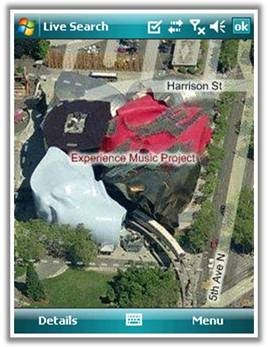
BIRD’S EYE IMAGERY
View landmarks from a 45 degree view just as you do on the desktop. 

clip_image007

And a few items more that don’t come with pretty screenshots…

  • IMPROVED SEARCHING
    Support for combined “what/where” queries, e.g. “pizza redmond wa” and ability to sort results by distance or by relevance.
  • BUSINESSES AS LOCATIONS
    Improved ability to get directions to a business and set a business as your current location.
  • BETTER SPEECH EXPERIENCE
    Higher accuracy and reduction in clicks when speech recognition confidence is high.

DOWNLOAD:
http://wls.live.com from your Windows Mobile phone.

Digg This

clip_image002Please find below a list of EPM 2007 webcasts in the coming months as well as on-demand webcasts (recorded in the past 4 months) . These webcasts are primarily targeted at IT Professionals and will present in details key aspects to consider when you evaluate, plan, deploy, and operate Project Server 2007.

On February 12th, Larry Duff will present the recently released Solution Connector for Microsoft Office Project Portfolio Server 2007 on MSDN Code Gallery to the developer community.

You need to register to each webcast by clicking their respective link (all free of charge); then you get emailed a link to sign on and participate in the web cast on its date and time.

Each webcast is recorded for later viewing (on-demand) which should be through the same registration URL.

For a listing of all EPM webcasts check the following link: http://www.microsoft.com/events/series/epm.aspx

Webcast Title

Abstract

Date

Microsoft Office Project Server 2007 – Server Administration

This webcast covers Microsoft Office Project Server 2007 Server Administration best practices. We discuss SharePoint’s Central Administration, Shared Service Provider Administration and Project Web Access Administration.  This webcast is part of a webcast series targeted at IT professionals.  In the series, we present in detail key aspects to consider when you evaluate, plan, deploy, and operate Project Server 2007.

Monday, January 19, 2009

1:00 PM Pacific Time

Project Server and Project Portfolio Server Advanced Customization

Attend this webcast to discover two of the latest solution starters produced for Microsoft Office Project Server 2007 and Office Project Portfolio Server 2007, the Solution Connector and the Project Server audit framework. The Solution Connector is a Microsoft ASP.NET Web service and Microsoft .NET class library, which provides a set of methods for programmatically creating, updating, or deleting projects and their attributes in Project Portfolio Server 2007. The Solution Connector was created to support both the Microsoft Enterprise Project Management (EPM) Capital Planning and Investment Control for Federal Government (CPIC) and Innovation Process Management (IPM) solutions. In these solutions, projects and ideas are captured in Microsoft Office SharePoint Server and at a specific point in the workflow the information is pushed to Project Portfolio Server 2007 (utilizing the new Solution Connector Web-service) for analysis. The Project Server audit framework solution gives you the ability to audit specific Project Server events within a framework. Join us to learn more.

Thursday, February 12, 2009

8:00 AM Pacific Time

Microsoft Office Project Server 2007 – Maintenance and Monitoring

This webcast covers Microsoft Office Project Server 2007 Maintenance and Monitoring best practices. This session will cover maintenance plans that should be put in place as well as performance counters that should be monitored.  We also discuss how to deploy software updates for both Project Server and Project Professional 2007. This webcast is part of a webcast series targeted at IT professionals. In the series, we present in detail key aspects to consider when you evaluate, plan, deploy, and operate Project Server 2007.

Wednesday, February 25, 2009

11:00 AM Pacific Time

Microsoft Office Project Server 2007 – Deployment into a SharePoint Server Intranet Farm

This webcast covers Microsoft Office Project Server 2007 Deployment best practices into a SharePoint Server intranet farm (out of the box Project Server 2007 is deployed on top of Windows SharePoint Services V3). We discuss SharePoint Server deployment pre-requisites, deployment scenarios and best practices. This webcast is part of a webcast series targeted at IT professionals. In the series, we present in detail key aspects to consider when you evaluate, plan, deploy, and operate Project Server 2007.

Wednesday, March 18, 2009

11:00 AM Pacific Time

Microsoft Office Project Server 2007 – Disaster Recovery

This webcast covers Microsoft Office Project Server 2007 Server Disaster Recovery options and best practices. We discuss how to recover from a catastrophic failure on your SharePoint/Project Server far;, this includes what are the options to recover from a loss of any component of your SharePoint/Project Server farm: SQL server, Application Server, Disk etc … We present farm and database restore options.  This webcast is part of a webcast series targeted at IT professionals. In the series, we present in detail key aspects to consider when you evaluate, plan, deploy, and operate Project Server 2007.

Wednesday, April  8, 2009

11:00 AM Pacific Time

Microsoft Office Project Server 2007 – Virtualization

This webcast covers Microsoft Office Project Server 2007 Server Virtualization best practices using Windows Server 2008’s Hyper-V. We discuss deployment best practices with respect to virtualization, including optimum architecture configuration (which component should be deployed on a  virtual environment and which ones should be deployed on a physical environment), and how to architect a high availability virtual farm.  This webcast is part of a webcast series targeted at IT professionals. In the series, we present in detail key aspects to consider when you evaluate, plan, deploy, and operate Project Server 2007.

Wednesday, April 29, 2009

11:00 AM Pacific Time

On-Demand Webcasts

———————–

Key Resources

Enterprise Project Management

Project Desktop

IT Professionals

Developers

Digg This

clip_image001
Tips and Tricks for the 2007 Microsoft Office System
Get the most out of Office 2007! You’re invited to attend a Live Meeting. Learn about timesaving features to help you in your day-to-day work. Suitable for beginner or intermediate users. Everyone will learn something!

The Ribbon
The Microsoft Office Fluent user interface, called ‘the Ribbon’ will help you find the features you need to complete tasks quickly and easily. This presentation will demonstrate useful tips and tricks for Outlook, Word, Excel and PowerPoint and help you get familiar with the Ribbon.

Save time
The time you take to attend this session can help save you time later. Past participants reported saving from 15 to over 30 minutes a day after attending a Tips and Tricks session. That adds up! Led by an expert Microsoft presenter, the session is not only informative, but entertaining.

Ask questions
Take advantage of our expert – join the live version of this meeting to ask your burning questions!

Tips & Tricks for the 2007 – Microsoft Office System
Schedule 2009 – All sessions are Office 100 Level

Please use your computer for the audio portion of the presentation for best results.

First Time Users:
To save time before the meeting, check your system to make sure it is ready to use Microsoft Office Live Meeting.

image
Top 5 Ways to Leverage Enterprise Social Networking to Gain Competitive Advantage

Date: Friday, February 27, 2009
Time: 10:00 AM – 11:00 AM PST (11:00 AM MST, Arizona)

Blogs, wikis, Twitter. Social networking is a consumer phenomenon moving to the Enterprise. The fastest growing demographic on Facebook is 25-34 year olds*. In a recent independent report**, Forrester Research writes that 56% of the companies surveyed use blogs, 47% participate in social networks and 44% use YouTube videos, while 24%, 22%, and 29%, respectively, plan to start using social networking tactics in the next 12 months.

How do you cobble these disparate social technologies into an effective social strategy that demonstrates value in a downturn economy?

This interactive webcast hosted by Microsoft will discuss ways you can leverage social networking in the Enterprise to make your company more competitive and gain deeper customer connections.

  • Forrester senior analyst and leading social computing expert Jeremiah K. Owyang will provide a practical framework on how to choose the right social technologies based on your target objectives, and how to measure value and results.
  • Microsoft Platform Strategy Group Product Manager Jamey Tisdale will share how the Microsoft platform is a familiar tool that Enterprises can leverage today to enable social computing across various job functions and divisions.
  • You will be given opportunities to share your thoughts and questions before, during and after the webcast through Facebook and Microsoft LiveMeeting.

Social media’s increasing influence in the Enterprise can be a source of untapped opportunity for organizations that choose to embrace it and potential threat to those that choose to ignore it. Join this webcast today to learn how to formulate a successful social networking strategy for your organization.

Who is this webcast for? Managers and Executives in Business Functions Interested in Social Networking (Sales, Marketing/Corporate Communications, Engineering, Operations, Product Management, Innovation, Human Resources, Finance)

Cost: $0 + Your time and engagement

Interested?

  • Register today to save your online seat
    (For managed customers only; contact me for details on registration)
  • Tell others! Please forward this webcast invitation to others in your organization who are interested in Enterprise social networking.

*faberNovel Consulting, faberNovel Analyses, 03.10.2007 Facebook Study, presented October 3, 2007, Paris, France
**“”Metrics for Social Applications in a Downturn”, Forrester Research, Inc., October 2008.

Speakers:

  • Jeremiah K. Owyang is a senior analyst at Forrester Research and a leading expert on Social Computing, social media, social media measurement, Web marketing, and interactive marketing. Jeremiah led the Social Computing program at Hitachi Data Systems from 2005-2006 as the online community marketing manager, then left to join PodTech Network, an online video and podcasting company as the director of corporate media strategy. According to Technorati, Jeremiah is one of the top 1% of bloggers, and his blog is listed as the 19th ranked blog according to Advertising Age (November 2007). A video blogger and podcaster, he speaks at a strategic level on Web marketing topics around the globe. He frequently publishes at the Web strategy blog. Jeremiah has a bachelor’s degree from San Francisco State University, with a focus on marketing.
  • Jamey Tisdale is Group Product Manager at Microsoft focusing on digital marketing strategy. Prior to Microsoft, Jamey worked as a Vice President of Business Development for TellThemNow.com. Jamey has a Bachelor of Science degree in Clinical Laboratory Science from East Carolina University, and did graduate work in creative writing.  In his spare time he helped create and maintains a global community for gamers aged thirty years old and older called GeezerGamers.com.
image
Desktop Optimization: Achieving Both Flexibility and Control

Microsoft and Pontis Research are pleased to invite you to a Desktop Optimization seminar where you will be joined by a group of your peers to discuss Microsoft’s approach to solving some of the unique challenges faced by IT organizations.

Desktop optimization means that an organization has attained the right balance in its desktop infrastructure—empowering employees with the flexibility they need to be productive, while providing IT the needed level of control, manageability, and security. Desktop optimization creates significant organizational benefits. Employees can be more productive with access to applications and data on demand—virtually wherever, whenever they need them. Desktop deployment, management, and support are dramatically simplified through virtualization, automation, and centralized administration.

Ultimately, desktop optimization is about providing an infrastructure that helps organizations control costs, improve systems availability, and enable greater business agility.

AGENDA:

  • Registration and Meal Service
  • Vision of the Optimized Desktop
  • Review of the Desktop Optimization Pack
  • Application Virtualization
  • Diagnostics and Recovery Toolset
  • Asset Inventory Service
  • Advanced Group Policy Management
  • Desktop Error Monitoring
  • Wrap up

Make an impact, gather and exchange effective ideas from others and network with your peers. We hope you will join this informational and educational forum to discuss the topics most relevant to you today!

WHO SHOULD ATTEND:

  • IT Executives who wants to learn how new capabilities can facilitate business efficiency
  • IT Leaders who are interested in hearing more about Microsoft’s vision application virtualization and other Desktop Optimization Tools

Register Now!  Choose one of the following sessions:

March 10, 2009
11:30 AM – 1:30 PM PST
Microsoft San Diego
9255 Towne Centre Dr., Suite 400
San Diego, CA 92121
Phone: (858) 909-3800
(Lunch included)
CLICK HERE to register

March 12, 2009
8:30 AM – 10:30 AM PST
Microsoft Irvine
3 Park Plaza
Suite 1600
Irvine, CA 92614
Phone: (949) 263-3000
(Breakfast included)
CLICK HERE to register

Digg This

Posted by: kurtsh | January 19, 2009

INFO: Sharepoint Resources from Start-to-Finish

A coworker compiled some information and listed some sites below which provides essential information for customers rolling out SharePoint across the organization.

Training and Adoption:

Compliance and Governance:

Utilities and Add-ons:

Technical White papers:

Books:

The following goods are worth reading – some are more reference-like, others are more on the tutorial side:

Digg This

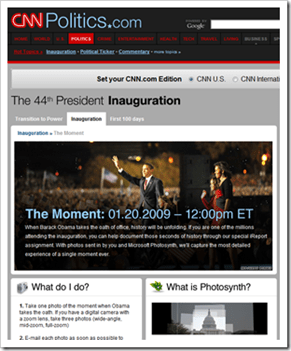
image_thumb3 We at Microsoft will be partnering with CNN over the next few days to Photosynth “The Moment” of next week’s Inauguration. 

The below link provides some initial details on CNN.com.  Expect to see more information broadcasted on CNN’s special programs like “Anderson 360” and “The Situation Room” over the next few days prior and post the Inauguration.

“When Barack Obama takes the oath of office, history will be unfolding. If you are one of the millions attending the inauguration, you can help document those seconds of history through our special iReport assignment. With photos sent in by you and Microsoft Photosynth, we’ll capture the most detailed experience of a single moment ever.”

For more on “The Moment” Photosynth:

For more information on Microsoft Photosynth, visit:

Digg This

image photoSuru is a tool that leverages the Windows Presentation Foundation to provide a rich experience for photo viewing and sharing.

It comes with a starter kit for individuals interested in learning how to develop applications that take advantage of the Windows Presentation Foundation.

Installation

1. Install Microsoft .NET Framework 3.5 SP1

2. Install photoSuru.

Build Your Own
Check out the starter kit source code, documentation and how-to content at WindowsClient.net.

Digg This

Posted by: kurtsh | January 16, 2009

NEWS: “We Are Expanding, Not Killing, the Zune”

Paul Thurrott write on his WindowsITPro column:

After a series of vague statements last week by Microsoft officials at the Consumer Electronics Show (CES), the software giant found itself at the center of yet another controversy: It was allegedly killing its Zune hardware devices, conceding defeat to the iPod, and moving the Zune software to other devices, like smart phones and the Xbox.

It’s not true, Microsoft says. Yes, the company has plans to expand the Zune platform from the PC, Web, and Zune devices to other portable devices, including smart phones, and to the Xbox 360. But it is not exiting the Zune hardware business, contrary to rumors.

"We are going to be in the hardware business going forward," Microsoft Zune marketing director Adam Sohn said.

More at http://windowsitpro.com/windowspaulthurrott/article/articleid/101214/microsoft-we-are-expanding-not-killing-the-zune.html

There’s a comment on Paul’s article at the bottom about "not wanting the wireless capability".  I really have to disagree with this and I think this is one of the single most short-sighted comments I’ve read in a long time.  The WiFi function in the Zune is absolutely CRITICAL to Zune’s success and just because you don’t use it today doesn’t mean that it doesn’t mean big things ithe future.  Here’s a few scenarios that the Wifi component could be extremely exciting in – but we just don’t have the software developed yet for it:

  • Wireless sharing with Xbox 360s that are hooked up to sound systems
  • Wireless file transfer to laptop PCs on Wifi networks
  • Wireless broadcasting from one device to 4 other Zunes or laptop users (like a DJ)

And my favorite:  Imagine if DRM was no longer used.  All of a sudden, the DRM encryption used for music sharing from device to device would no longer be necessary.  Oh wait a minute:  Apple just declared that they were going to end the usage of DRM on the iTunes Music Store.  Hmmm…

Lots of opportunity for the Zune here… and all because of the Wifi adapter that it has.

Digg This

« Newer Posts - Older Posts »

Categories