Turn raw spreadsheet data into actionable insights, visual dashboards, and KPIs in minutes with native Microsoft 365 Copilot integration in Excel:
NEW Agent Mode in Excelautomates complex analysis, creates pivot tables, and builds interactive dashboards without manual setup. Streamline text analysis, formula generation, and complex calculations right inside Excel
NEW COPILOT function for Excelcategorizes feedback, scores sentiment, or automates repetitive tasks directly within Excel cells
NEW Formula AI Autocomplete in Excelhelps you find the most suitable functions based on context or your own natural language descriptions & generates accurate formulas from plain language prompts
Watch Microsoft 365 Director Jeremy Chapman demonstrate all 3 of these new AI innovations, made available ONLY through Microsoft 365 Copilot:
For more videos on Microsoft 365 Copilot from Microsoft Mechanics, visit:
Announced at Microsoft Ignite 2025, Project Opal is a new way to get task-based work done. It combines an advanced reasoning model, computer use, and Windows 365 Cloud PC to tackle the time-consuming tasks and busywork that fill your day.
Here are the capabilities:
Task-First Experience: Start new jobs, re-run previous ones, or pick curated suggestions—all observable and steerable.
Advanced Reasoning Model: Turns your request into a dynamic plan, sequences the right tools, and adapts mid flow to complete the job.
Computer-Use: Executes certain steps in Microsoft Edge within a compliant Windows 365 for Agents Cloud PC.
Real-Time Observability: Watch jobs live or review later with a detailed plan, replay view, and activity timeline.
Steerability: Get notified when input is needed, take control, provide info, and let Opal resume.
Admin Controls & Security: Opt in with granular admin controls including allow lists, scenario starters, and context.
Demo of Project Opal: Automate web workflow & activity with natural language AI
If you need to get caught up quickly on all the announcements made at Microsoft Ignite 2025 for a particular technology area, check out the Microsoft Ignite “Book of News”.
INSTANT SUMMARIES: There are summaries that can be generated with the help of AI called “Instant Summaries”. Select “TDM” or “Builder” Please refer to the original BoN item for full details.
✅ Microsoft Ignite “Book of News” (The index of the book is in the image to the right.)
If you’ve been watching to the announcements coming out of Microsoft Ignite 2025, there was a pretty big announcement made during the opening keynote for customers that have licensed Microsoft 365 E5:
What is Security Copilot? Security Copilot s a generative AI-powered security solution that helps increase the efficiency and capabilities of defenders to improve security outcomes at machine speed and scale.
Security Copilot provides a natural language, assistive copilot experience. Security Copilot helps support security professionals in various end-to-end scenarios such as incident response, threat hunting, intelligence gathering, posture management, and more. For more information, see Security Copilot primary use cases.
Here’s an explanation of how Security Copilot works:
User prompts from security products are sent to Security Copilot.
Security Copilot then preprocesses the input prompt through an approach called grounding, which improves the specificity of the prompt to help you get answers that are relevant and actionable to your prompt. Security Copilot accesses plugins for preprocessing, then sends the modified prompt to the language model.
Security Copilot takes the response from the language model and post-processes it. This post-processing includes accessing plugins to gain contextualized information.
Security Copilot returns the response, where the user can review and assess the response.
Security Copilot iteratively processes and orchestrates these sophisticated services to help produce results that are relevant to your organization because they’re contextually based on your organizational data.
Details on the new Security Copilot inclusion in Microsoft 365 E5 For more information on the NEW benefit available from Microsoft 365 E5:
Video Explanation of the Security Copilot for Microsoft 365 E5 offer As you can imagine, this got a lot of gasps and applause/cheers during the Ignite keynote. Here’s a 3rd party video on the new offer from Rio, a Microsoft MVP for Cloud Security:
What about GCC/Microsoft 365 G5 customers? We are committed to making this available to our G5 licensees as well however an exact timeframe has not been announced.
Comments Off on OFFER: Microsoft Security Copilot now included with Microsoft 365 E5 licensing
As a large State & Local government organization over 500+ seats, if you’re looking to establish a relationship with or switch to a new Microsoft Licensing Solution Provider (LSP), the following organizations (as of 11/22/25) are available to contract through for Microsoft Enterprise Agreements: (includes both Microsoft 365 Government Community Cloud/GCC subscriptions & Azure Government)
CDW
Connection (formerly PC Connection)
Crayon
Dell
Hewlett Packard
Insight
Minburn Technology Group
PCM (also owns En Pointe Technologies)
SHI
SoftwareOne
Softchoice
Zones International
Notes:
No new LSPs will be added to this list. This list is locked down & if you are a large organization above 500+ users not currently working with one of the above LSPs for licensing, you will need to establish a relationship with one of the above to work with a Licensing Solution Provider.
If you are a customer of mine, ping me for contact details for one of the above government-qualified LSP.
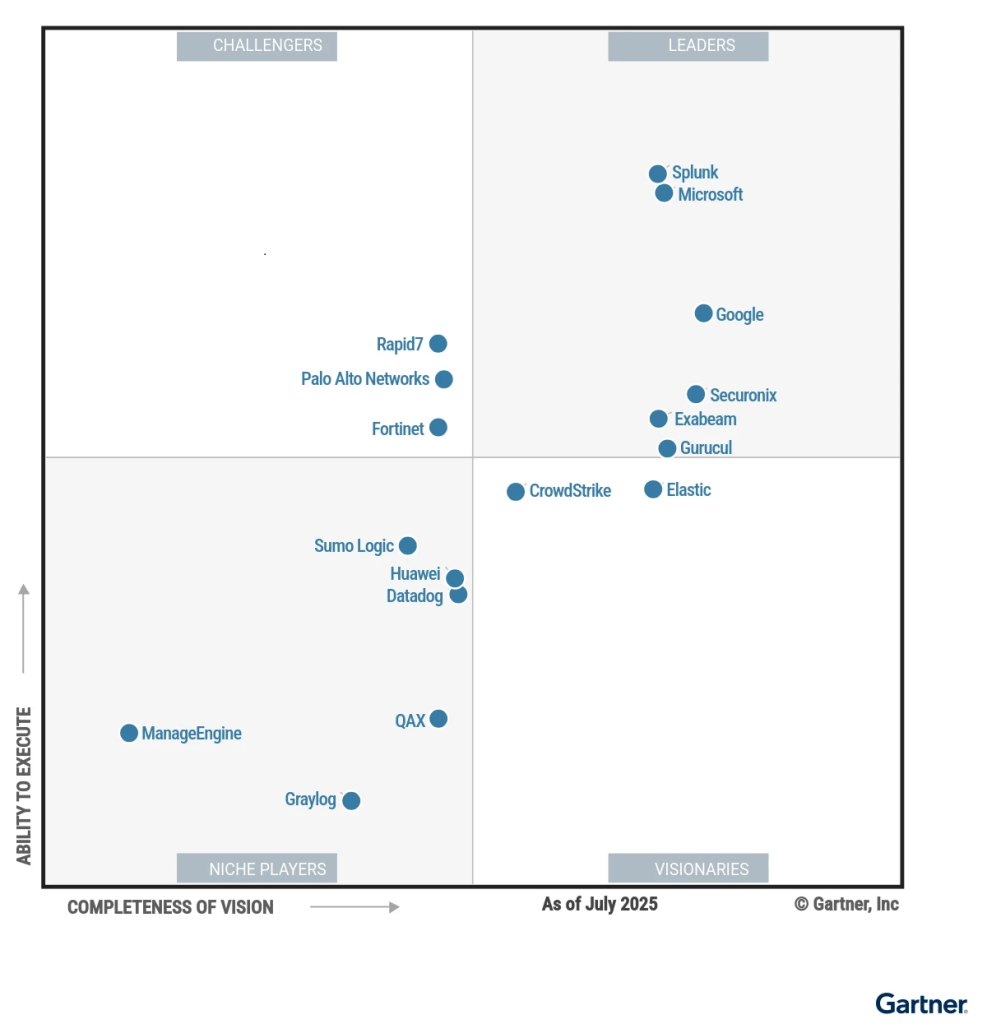
Learn why Gartner positioned GitHub as a Leader for the second year in a row—highest and furthest in both Ability to Execute and Completeness of Vision.
The era of AI-powered development is here. Gartner predicts that by 2028, 90% of enterprise software engineers will use AI code assistants, a massive leap from less than 14% in early 2024.
As organizations race to adopt AI, many encounter challenges such as tool sprawl, fragmented governance, and a lack of platform strategy. GitHub takes a different approach: by embedding GitHub Copilot into everyday developer workflows, enabling advanced capabilities like Agent Mode, and centralizing development on GitHub Enterprise Cloud, GitHub helps teams move faster, stay secure, and scale AI adoption with confidence.
The Gartner recognition, we feel, reflects the strength of this strategy.
Read the full Gartner report to discover how vendors we re evaluated and why GitHub was recognized as a Leader. (September 2025 report available below, licensed by Microsoft:
UPDATE 1/7/26: For GCC customers using M365 G3 or G5, Windows Autopatch doesn’t appear automatically in the suite. To enable Autopatch, customers need to activate their Windows Enterprise entitlement using the $0 Windows Enterprise (OLS) activation SKU.
After the customer’s admin orders the $0 activation SKU from their licensing vendor, they will receive a service activation email confirming that the Windows Enterprise license has been provisioned on the tenant. From there, the admin can assign the licenses to users using multiple methods (i.e., group‑based, seat‑level).
This step ensures the correct Windows service plans, including Autopatch, are provisioned in the tenant and aligns with the typical approach for most Windows Enterprise value in M365 G3/G5 for GCC customers. Once the activation SKU is applied and licenses are assigned, Autopatch will become available and no additional purchase is required.
ORIGINAL POST: 11/21/25 Keep devices at your government organization secure and productive with minimal disruption to users with Windows Autopatch!
MANAGED SERVICE FOR WINDOWS 10/11 PATCHING AT NO ADDITIONAL COST If you have a Microsoft 365 GCC cloud instance, you will be able to enroll in a true managed service, operated from the Microsoft cloud, fully funded by your Microsoft 365 licensing without any additional cost.
Windows Autopatch provides a rich set of automated patching/update services, driven by Microsoft Intune, that rolls out patches gradually via IT-defined “update rings” to ensure installation is safe, while providing telemetry around machines that do have problems so you can eliminate similar machines from your rollout. Updates can include OS version releases, quality updates, feature updates and drive/firmware updates with comprehensive reporting.
Windows Autopatch provides control over which content is approved for deployment to which devices through Windows Update.
Windows Autopatch groups help you automate a safe rollout process. You can distribute devices into rings and recommend release schedules, leaving you with the final say.
Get secure faster with hotpatching: apply security patches without waiting for a restart.
Pause or expedite monthly quality updates or drivers for groups of devices in your environment.
Simplify update compliance reporting. Windows Autopatch reporting tracks which devices have the latest updates installed with less than 4-hour latency.
DEPLOY WITH FASTTRACK FOR MICROSOFT 365 AT NO ADDITIONAL COST FastTrack for Microsoft 365 will provide customers both remote planning & guidance for the deployment of both Microsoft Intune & Windows Autopatch through a Deployment Engineer at no additional cost. Contact your Account team for details.
Microsoft has established new strategic partnerships with Anthropic and NVIDIA to help all 3 companies optimize all 3 layers of the AI ecosystem – silicon, systems, models – for cost, latency, performance by announcing:
Customers using Microsoft Foundry will be able to access Anthropic’s AI models
Microsoft will deliver access to Anthropic Claude across the Copilot family
Anthropic is committing to both leverage an initial Gigawatt of Azure cloud capacity for model training & partnering with Microsoft to deliver Enterprise AI solutions
Nvidia is establishing a strategic partnership to support Anthropic’s future growth through it’s accelerators to optimize future AI models
Watch Anthropic co-founder and CEO Dario Amodei, Microsoft Chairman and CEO Satya Nadella, and NVIDIA founder and CEO Jensen Huang discuss what’s coming in this 10min video.
Comments Off on NEWS: Anthropic, Microsoft & NVIDIA announce new partnerships


 kurtsh
 Kurt Shintaku's Blog
You must be logged in to post a comment.