In case you haven’t seen it yet, this was released by the co-creator of the infamous “405” video from long ago:  “World Builder”

http://vimeo.com/moogaloop.swf?clip_id=3365942&server=vimeo.com&show_title=1&show_byline=1&show_portrait=0&color=&fullscreen=1
World Builder from Bruce Branit on Vimeo.  (Taken from http://vimeo.com/3365942)

I’m sorry… Bruce is an absolute GOD.  I find myself watching “World Builder” as many times as I did “405” back in the late 90’s.  His movie actually evokes emotion when you see his friend walking through the world he’s created and realize why the main character is doing what he’s doing.

———————

imageWhy am I highlighting Bruce Branit’s amazing work?
(…besides the obvious reason that it’s cool as all hell!)
Everyone always marvels at the results of these genius creators but they don’t ask, “How did it get made?” 

Check out the equipment.  (See snapshot to the right)
In case you didn’t know:

…all operate on Dell Computers using only Microsoft Windows XP/Vista.

I hope Bruce gets a ton of FX work as a result of his company’s work on this movie.  Especially the flower work and the real time shadows… WOW that was just so cool.  Heh… I feel like a little kid marveling at this clip.

Digg This

image Microsoft and BTINS presents:
Introduction to System Center Configuration Manager Hands-on Workshop
Tuesday, April 7, 2009 8:30AM-4:30PM Los Angeles, CA
9:00am – 4:30pm Breakfast, lunch and parking provided

Description: Join Microsoft and BTINS for a 1-day seminar designed to deliver practical, hands-on information about Microsoft’s System Center Configuration Manager 2007.

This is a 1-day seminar designed to deliver practical, hands-on information about Microsoft’s System Center Configuration Manager 2007. Attendees will learn how to manage the ongoing operations using System Center Configuration Manager. Technology specialists from Microsoft, BTINS and Intel will cover the following topics: Introduction to System Center Configuration Manager 2007, Managing more than Microsoft in your environment, Asset Intelligence, Microsoft System Center: Vision and Roadmap, Intel VPro & SCCM Integration (led by Intel, Hands-on Labs.

We will also share best practices, methodologies and tools that will assist in the planning and implementation of a Microsoft System Center Configuration Manager solution.

Location:
Microsoft Los Angeles
333 S. Grand Ave. (Wells Fargo Building)
Suite 3300
Los Angeles, CA 90071

Registration:
If you are interested in attending and are one of my customers, please contact me and I’ll provide you with the registration link and code.

Digg This

image Is your IT Infrastructure fully dedicated to just one technology solution? Chances are you work in a heterogeneous environment that includes a variety of technologies from Microsoft®, Linux, MySQL and Apple. Integration becomes vital in order for your core business applications to maintain business flow and efficiency. How do you achieve identity integration? Run Open Source Software (OSS) on Windows Server® 2008? Ever wanted to leverage the power of SQL with your PHP applications? This innovative roadshow will answer these questions and many others to get your integrated environment up and running smoothly.

  • SESSION 1:  Windows Server 2008 Active Directory Interop with Linux & OS X
  • SESSION 2:  Running Open Source Software (OSS) on Window Server 2008
  • SESSION 3:  SQL Server® 2008 and PHP Web Application Infrastructure

LEARN MORE & REGISTER
visit www.technetevents.com/interop
or call 1-877-MSEVENT

Register and attend any roadshow event for your chance to win*:

  • Lenovo Thinkpad T61p Laptop. Approximate Retail Value (ARV) US $1,700
  • An Xbox 360® Video Game Entertainment System. ARV US $300
  • A 120 GB Zune® Digital Media Player. ARV US $250
  • A 8 GB Zune Digital Media Player. ARV US $150
  • A full copy of Microsoft Office Professional 2007 ARV US $499
  • A full copy of Windows Vista® Ultimate ARV US $399

FREE ADMISSION
To register, select desired location.

     AZ, Phoenix         6/9/2009
     CA, Mountain View     6/4/2009
     CO, Denver          3/31/2009
     DC, Washington          4/14/2009
     FL, Ft. Lauderdale     4/21/2009
     FL, Tampa          4/23/2009
     GA, Atlanta          4/28/2009
     IL, Chicago         5/7/2009
     IL, Downers Grove     5/6/2009
     MA, Boston          5/5/2009
     NY, New York City     4/30/2009
     PA, Philadelphia     4/16/2009
     TX, Dallas         4/7/2009
     TX, Houston         4/9/2009
     WA, Seattle         6/11/2009

REGISTER NOW, SPACE IS LIMITED.
* Open only to registered event attendees. Sweepstakes ends 6-11-09. See registration website for official rules. Due to government gift and ethics laws and Microsoft policy, government employees (including military and employees of public education institutions) are not eligible to participate in the sweepstakes drawing.    

REGISTRATION:
http://www.technetevents.com/interop/

Digg This

imageStarting March 15th with the NCAA Selection Show… NCAA Men’s Basketball March Madness will be broadcast live and on-demand using Microsoft Silverlight and Windows Media streaming!

Visit the link above to see whether or not your system is ready to be used with the CBS Sports HQ Media player, powered by Silverlight.

Why do you care?  Well, HD STREAMING is one reason.  Silverlight provides full 1980x1080p streaming directly to your desktop over 1.5Mbps connection.  Or less if you don’t have that kind of bandwidth.  Not to mention also that Windows Media is great for fast action live broadcasting. Being able to watch the movement of a basketball game with an uninterrupted 30fps is the best way to enjoy a tournament game over the Internet.

Not bad for a platform that Adobe CFO Mark Garrett claimed, “…has really fizzled out in the last 6-9 months.” (http://www.betanews.com/article/Adobe-Microsofts-Silverlight-has-really-fizzled/1234310146)

Other news articles:

WINDOWS MOBILE USERS:
…may want to read this article about getting March Madness news on their device.
http://www.microsoft.com/windowsmobile/en-us/totalaccess/columns/windows-mobile-march-madness.mspx

Oh and by the way… go UCLA Bruins!

Digg This

image

Interested in moving your Exchange Server messaging environment into the “cloud”?  Want to maintain an experience that’s seamless to your end users, allowing them to continue to use Outlook, while leveraging an automatically maintained Exchange environment in our datacenters?

Microsoft Online Services is very likely your easiest, most secure, & cost-effective answer.  Here’s a document that goes through the process of migrating existing on-premise Exchange mailboxes to Microsoft’s Exchange Online Services in “the cloud”.

Contents

  1. Introduction
  2. Understand Migration   
    1. Simple Microsoft Online Services   
    2. Microsoft Online Services Using Your E-Mail Domain   
    3. E-Mail Coexistence   
    4. Directory Synchronization   
    5. Mailbox Migration   
    6. Migration Tools   
  3. Plan Your Migration   
    1. Type of E-Mail Environment   
    2. Mailbox Information   
    3. E-Mail Client Software   
    4. E-Mail–Enabled Applications   
    5. Number of Objects to Be Synchronized   
    6. Network Bandwidth   
    7. Help Desk Resources   
    8. Required Permissions   
    9. Complex Environments   
  4. Prepare For Migration   
  5. Establish E-Mail Coexistence   
    1. Add Your Organization’s Domain to Microsoft Online Services   
    2. Enable Transport Layer Security (TLS)   
    3. Verify Your E-Mail Traffic Flow   
    4. Enable Directory Synchronization   
    5. Install and Configure the Microsoft Online Services Directory Synchronization Tool   
    6. Verify Directory Synchronization   
  6. Migrate Your Mailboxes   
    1. Install the Microsoft Online Services Migration Tools   
    2. Migrate Local Exchange Server Mailboxes   
    3. Migrate POP3 and IMAP4 Mailboxes   
  7. Complete Your Migration   
    1. Delete Mailboxes   
    2. Reroute Incoming ail   
    3. Decommission Your Local Exchange Server Environment   
    4. Other Migration Considerations   
  8. Advanced Topics  
    1. E-Mail Coexistence and E-Mail Migration   
    2. Directory Synchronization   
    3. E-Mail Migration   
    4. Migration CmdLet Reference   
  9. Appendix A: Sample Planning Documents

DOWNLOAD:
http://www.microsoft.com/downloads/details.aspx?displaylang=en&FamilyID=25350815-5c57-441a-b7fb-329ff5fe14b3

Digg This

Posted by: kurtsh | March 9, 2009

BETA: Microsoft Recite Technology Preview

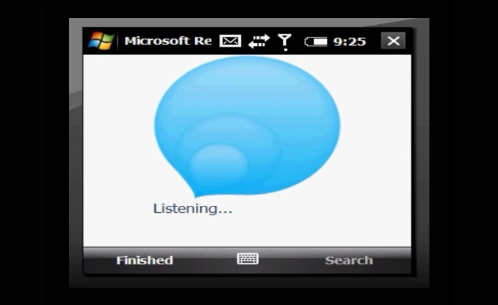
imageimage Be among the first to use Microsoft Recite! This new, free application makes it simple to use your mobile phone to record and retrieve voice notes.

Recite can help you remember driving directions, restaurant recommendations, exactly where you parked your car, and if you’re quick enough, even promises from your spouse. After you record a note, finding it is a snap: Press “Search,” say what you’d like to recall, and Recite will retrieve your thoughts!

  • Remember
    To start recording a remembrance, press the ‘Remember’ button, then say what you would like to record. Press ‘Finished’ to complete the recording and store the remembrance.
  • Search
    To search for a remembrance, click the ‘Search’ button and say what you would like to recall. Press ‘Finished’ to begin the search.
  • Results
    To scroll through your retrieval results, use your phone’s up and down arrow buttons. Results are ordered by match score. The darkness of the blue color and the score bars indicate the match score.

DOWNLOAD:
http://recite.microsoft.com/Pages/ReciteVideo.aspx

I just got through reading Brian Madden’s blog entry about the unsaid, unmentioned, and unseen cost that Enterprise’s incur by going down the path of VDI.  Here’s a really good article he wrote about the things “folks don’t tell you about VDI costs”.

<taken from Brian Madden’s blog>

How VMware is misleading everyone about the cost savings of VDI

image I just got out of my first breakout session here at VMworld Europe 2009. It was a session about the cost savings of VDI. The presenter was good and the content was basically good. In the session, the presenter walked step-by-step through a comparison of a traditional fat-client desktop computing model with a VMware View 3-based VDI model. She covered capex and opex expenses and looked at all the reasons customers could save money (both hard and soft costs) by going with VDI.

I agreed with MOST of the content of the session. However, I think VMware left out two very, very important things. In fact these omissions are so great that they would "break" VMware’s VDI cost savings model. But instead of addressing them, VMware just ignored them. (They weren’t even mentioned!) Most of the audience was new to VDI (as evidenced by the number of hands that went up when the presenter asked how many people had heard of VECD and who had used ThinApp.)

This is a big problem. After this presentation was over, 200 people walked out of that room thinking that VDI is great and provides great savings, but VMware mislead them all by not providing the complete picture.

Read more at:
http://www.brianmadden.com/blogs/brianmadden/archive/2009/02/23/how-vmware-is-misleading-everyone-about-the-cost-savings-of-vdi.aspx

Digg This

Posted by: kurtsh | March 9, 2009

VIDEOS: 2007 Office System Deployment Videos

image This is a series of five videos about how to deploy the 2007 Microsoft Office system. These videos are designed to help you understand the benefits of the 2007 Office system and the ways in which you can deploy the 2007 Office system.

  • Video 1, Introduction to Microsoft Office 2007 Deployment, introduces you to the 2007 Office 2007 system and describes the benefits and changes that have occurred since Office 2003 and previous versions of Office.
  • Video 2, Introducing Microsoft Office 2007, looks into benefits for both the end user and the IT administrator.
  • Video 3, Microsoft Office 2007 Deployment, provides an in-depth look into deployment management for the 2007 Office system, including how to deploy, how to manage, how you can make the best use of all the new Office features within your organization.
  • Video 4, Migrating to Microsoft Office 2007, describes the things you need to consider with the new file formats, the new user interface, whether you need to focus on document migration, macros, or add ins and solutions.
  • Video 5, Introduction to Microsoft Office 2007 and Virtualization, introduces you to new virtualization technologies and how they can be used to deploy and manage the 2007 Office system.

LINK:
http://www.microsoft.com/downloads/details.aspx?displaylang=en&FamilyID=8f3c4db6-4091-4c1d-a728-47f917fefbc6

Digg This

image Published: January 2009

At Microsoft, server virtualization has become a primary way to address data-center power consumption, to address space issues, and to rationalize server utilization. To optimize deployment and management of thousands of virtual machines, Microsoft Information Technology (Microsoft IT) has developed standards and best practices for configuring host servers, storage, and network infrastructure.

Microsoft IT has adopted a very aggressive approach for implementing virtualization on the Windows Server® 2008 operating system with Hyper-V� technology.

This case study describes the standards and best practices that Microsoft IT developed for configuring host computers, storage, and network infrastructure. This case study provides IT professionals and technical decision makers working in large enterprises with the information they need to plan and deploy server virtualization by using Windows Server 2008 Hyper-V.

Note: This case study assumes that readers have a good understanding of server virtualization and Windows Server 2008 Hyper-V. Readers who do not have this prerequisite knowledge should refer to Virtualization with Hyper-V, located at http://www.microsoft.com/windowsserver2008/en/us/hyperv.aspx.

WHITEPAPER:
http://download.microsoft.com/download/8/B/6/8B6BB81E-BAD4-45D1-8E1E-FEFFB6084A7D/0616HyperVHostInfrastructureTCS.doc

VIDEO/POWERPOINT:
http://msevents.microsoft.com/CUI/EventDetail.aspx?EventID=1032399927&Culture=en-US

TECHNET:
http://technet.microsoft.com/en-us/library/cc974012.aspx

Digg This

Posted by: kurtsh | March 9, 2009

WHITEPAPER: Silverlight Migration Guide

imageUpgrading Your Windows Media Player Online Experiences

For the past decade Windows Media technologies have been used for delivery of video and audio content over the Internet and within enterprise networks. The Windows Media-based ecosystem core advantages – low cost and scalable streaming servers, industry approved DRM protection, and high quality audio and video delivery – have ensured its continued popularity in the ever competing marketplace.

As the Internet has continued to evolve, we have seen higher demands placed on not just the core delivery of media content, but also on the quality of the user experience. This has in turn led to an evolution of web media players into Rich Interactive Applications (RIA). Microsoft Silverlight, a technology based on the eXtensible Application Markup Language (XAML) and .NET, provides a powerful development platform for building these modern, rich, interactive media experiences on the Web.

One of Silverlight’s core features is its support for the Windows Media ecosystem. Silverlight envelops the core technologies that make up Windows Media: the Advanced Systems Format (ASF) file specification, Windows Media Video (WMV) and Windows Media Audio (WMA) codecs, Windows Media Services (WMS) streaming, and Windows Media Digital Rights Management (WM DRM). In addition, Silverlight also embraces Windows Media-related technologies such as the SMPTE VC-1 video codec (based on WMV9) and PlayReady Digital Rights Management (DRM), an evolution of Windows Media DRM (WMDRM) 10.

With a strong emphasis on backwards compatibility, Silverlight is the logical choice for content providers, web application developers, designers and service providers with existing Windows Media infrastructures who wish to create rich, interactive media experiences on the Web. New capabilities such as support for cross-platform experiences, adaptive streaming for the highest quality delivery with the lowest cost of ownership, and protected advertising-based scenarios provide additional incentive to upgrade to Silverlight.

DOWNLOAD:
http://www.microsoft.com/downloads/details.aspx?displaylang=en&FamilyID=98bde5f5-d331-4337-9ce3-4c46867bc1b0

Digg This

« Newer Posts - Older Posts »

Categories