image Download a FREE full license of Project Publisher for any Microsoft Office Project Professional 2007 user or any
user that upgrades from Microsoft Office Project Standard to Microsoft Office Project Professional 2007.

Promotion ends June 31st, 2009
Discount Code: ProjPro

Product Overview
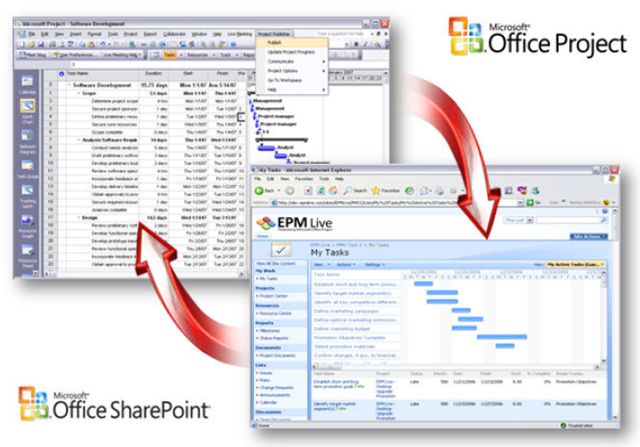
EPM Live’s Project Publisher connects Microsoft Office Project Professional 2007 and Windows SharePoint Services 3.0 (WSS) or Microsoft Office SharePoint Server 2007 (MOSS), to make working together on projects easier. By publishing Microsoft Office Project .mpp files to SharePoint, all team members can access and update their own tasks and key project information. It’s that easy.

  • Collaborate more effectively with Microsoft Office Project Professional 2007
    Take full advantage of Microsoft Office Project Professional 2007 and take it to the next level with EPM Live’s Project Publisher. Publish your schedules to any
    Windows SharePoint Services workspace and begin sharing and collaborating with your team.
  • Integrate teams, stay informed and stay in control
    Connect virtually anywhere in the world and keep teams up to date on all critical items affecting the
    project schedule. Publish assignments and tasks to your workspace to notify your team of new tasks
    and assignments. Keep your teams informed and notify them immediately of any critical schedule
    changes by publishing the latest schedule changes to the Workspace.
  • Get more from your teams
    Need to know the status of upcoming tasks? Empower team members with easy to use web based
    collaboration tools to get task updates and know when to get involved. Capture % Complete from
    team members to monitor progress more closely. Request progress and status on tasks, risks, and
    issues from team members and approve updates prior to updating your Microsoft Office Project
    schedule.
  • Use what you already own
    Project Publisher for Microsoft Office Project 2007 works with existing Windows SharePoint Services
    (WSS 3.0) or Microsoft Office SharePoint Server 2007 deployments.

LINK:  http://www.projectpublisher.com

(If you’re a customer of mine that’s interested, please contact me for details.  You know how to reach me.)

Digg This

Posted by: kurtsh | March 25, 2009

RELEASE: DHCP Server Events Tool

imageThis tool can be used by DHCP Administrators to view all the events generated by Windows DHCP Server 2008 R2. It supports newly added features – MAC Based Filtering and Activity Logs. It also supports System Events.

This tool is a MMC Snap-In and can be used to view the events from a Remote Server similar to the Remote Management Tools of DHCP Server. Multiple DHCP Servers can also be managed from a same console.

The tool will be able to extract all the events and present them in a readable fashion. Administrators will also be able to do different actions on these events like for MAC Filter events machines can be directly configured into the Allow/Deny list of DHCP Server from this tool.

MACFilters Logs:
Windows 2008-R2 DHCP Server creates event logs for all the users which are denied IP Address. This tool will extract this information from Event Logs and present them in a readable fashion removing duplicate entries in the Event Log. This feature will be really helpful in deploying the MACFIltering feature as Administrators can monitor what’s going on the network and can control the MACFilte configuration directly from this tool.

  • Filter Profile: Filter Profile column represents the current status of the machine. A machine can have following filter profiles.
    • Allow: Machine is in Allow list. Generally the machine will have this profile if machine is added recently or the logs are not removed after adding it to the Allow List.
    • Deny: Machine is in the Deny List
    • None: Machine is neither in Deny nor in Allow List
    • Deny (Wildcard): Machine is denied IP Address by a wild card entry in Deny List. Machines with this profile can’t be added to allow list.
    • Server Not Available: DHCP Server is not installed or dhcp service is not running on the server.
  • Actions Supported
    • Add To Allow List: Adds the user’s MAC address to Allow List.
    • Add To Deny List: Adds the user’s MAC address to Deny List.

Activity Logs:
This node will list out all the configuration changes done on the DHCP Server. Windows 2008-R2 DHCP Server creates event logs for all the configuration changes done on DHCP Server. This tool will extract that information and list it in a readable fashion.

  • Scope: This column represents the name of the scope on which the configuration change has happened. If the configuration change has happened on at the server level the scope name will be “Server”.
  • Administrator: This column will represent the name of the administrator who has done the change.

System Logs:
This node will list out all the System Events generated by DHCP server. This will extract all the DHCP Server related events from the System Node and present them in a readable fashion.

Common Actions:

  • Copy: Copy the selected rows to clipboard.
  • Filter: Filter out the events based on the text input.
  • Clear Filter: Will clear the filters.

Supported OS

  • Window7/Windows Server 2008 R2

Installation Steps:

  1. Install .NET 3.5 on your PC. For Windows7/Windows Server 2008-R2 .NET 3.5 is an optional component. This Snap-In can only work with .NET 3.5.
  2. UnZip the tool and copy the contents to %ProgramFiles%DHCPServerExtras
  3. Open a command shell with Administrator privileges
  4. CD to %ProgramFiles%DHCPServerExtras
  5. Run setup.cmd
  6. Verify the message on command shell that MMC Snap-In is successfully installed.
  7. Open mmc.exe
  8. Add “DHCP Server Extras” from File>Add/Remove Snap-In
  9. In MMC Add the DHCP Server you want to manage. If you are running this tool on DHCP Server, the local machine will be added automatically.
  10. For remote management make sure you are the member of Administrators or Event Log Readers group on the target server. Also make sure that Firewall Rule "Remote Event Log Management(RPC)" is enabled.

If you are a DHCP Administrator you can also add “DHCP” Snap-In to the same console which can be used to manage DHCP Server. Save the console to a local folder or desktop.

Trouble Shooting:

  • Make sure .NET 3.5 is installed.
  • If “DHCP Server Extras” does not show up in MMC please look into log file > %ProgramFiles%DHCPServerExtrasInstallUtil.InstallLog.
  • On expanding the node if you are getting error Message please verify that server name provided is correct. Please verify that you have proper permissions on the DHCP Server to view event logs remotely. If you are remotely managing the server you should be a member of Administrators or Event Log Readers.

DOWNLOAD:
http://blogs.technet.com/teamdhcp/archive/2009/03/20/tool-to-read-dhcp-server-events-for-windows-server-2008-r2.aspx

Digg This

Posted by: kurtsh | March 25, 2009

BETA: Network Monitor 3.3 beta now available

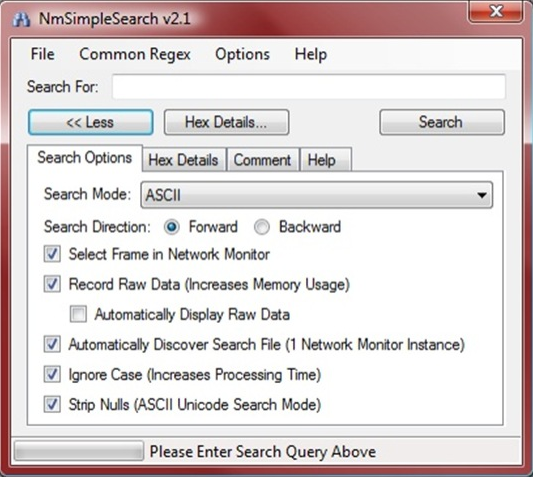
imageIt’s time again for a new Beta version of Network Monitor. Using your feedback we’ve added some compelling new features! One in particular is the ability to launch experts from the UI. And what use would this be without something to launch? We’ll also be releasing some cool experts, like Top Users and Simple Search. In fact Simple Search is already available, just use the Experts menu from a saved trace to connect to our Experts landing page. Return every so often to see what is new.

What’s an Expert? What is Simple Search?
An expert is a tool, run separately from Network Monitor that performs expert analysis on your trace data. For instance, Simple Search will allow you to search all trace data for strings and better yet, regular expressions! Need to find an email address or phone number, but don’t know exactly which one? A regular expression, using Simple Search, lets you find this type of string. Just launch the expert from the menu and search away.

But there’s so much more, so let’s list out what else is new.

What’s New in NM3.3 Beta
  • Ability to capture on WWAN and Tunnel interfaces on Win7
  • Critical fixes to NM3.3 to operate correctly with Hyper-V
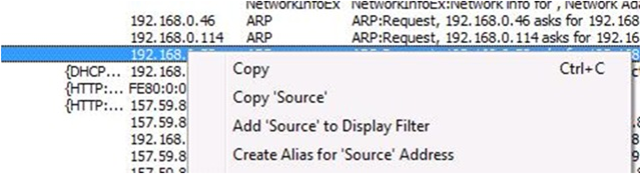
  • imageRight-click add to alias.   Right-click a frame in the Frame Summary window with an IPv4, IPv6, or MAC address to add that address as a new alias.
  • Right click go to definition:  Right-click a field in the Frame Details windows and select Go To Data Field Definition or Go To Data Type Definition to see where the field is defined in the NPL parsers.
  • Auto-scroll.   See the most recent traffic as it comes in.  In a live capture, click the Autoscroll button on the main toolbar to have the Frame Summary window automatically scroll down to display the most recent frames as they come in.  Click Autoscroll again to freeze the view in its present location.
  • Experts available online:  Experts are stand-alone applications that analyze Network Monitor capture data.   Various experts are available online at  http://go.microsoft.com/fwlink/?LinkID=133950.
  • image Frame Comments:  Attach comments to frames in a saved capture file.  Select the Frame Comments tab in the lower-right window to add, view, edit, or delete comments.
  • API Extensions:   API methods have been added to enable access to conversation information, properties, field display strings, and comments. 
  • Ability to open ETL files and correlate information by Network Tracing scenario.

Gimme, Gimme, Gimme!
The Beta is available on our connect site at https://connect.microsoft.com/site/sitehome.aspx?SiteID=216. But it is only available as a download if you join Connect. By joining you’ll also get updated when we release and be able to file bugs with us if you find issues. So give NM3.3 Beta a test drive and please let us know what you think!

Provide feedback at http://go.microsoft.com/fwlink/?LinkID=142458 (you will need to login with your Connect Network Monitor credentials to see the Beta survey). Our voting website, input.microsoft.com has an expired certificate that we are working to renew.  For now, you can tell your browser to ignore the expired certificate as we address this problem.

<stolen from the NetMon blog>

Digg This

clip_image001

clip_image003Become an IT Showcase Fan on Facebook!

IT SHOWCASE has joined the social media movement with the launch of our new…

Facebook fan page!

Now you and your peers can benefit even more from the ever growing IT Showcase knowledge base! Through Facebook, join us in discussions that give a unique inside view into how Microsoft plans for, deploys, and manages its global solutions.

Fans get real-time access to our content as it publishes, participate in discussions on hot IT topics, tell us what new topics they’d like Microsoft IT to cover, register for Webcasts and workshops, and so much more. Join today!

I want to be an IT Showcase fan!  How do I join Facebook?

I already use Facebook, so how do I become an IT Showcase fan?

Digg This

Well, here’s something that been a long time coming!  It’s a 21 page tutorial on how to create reports for SCCM2007 using the Report Builder 2.0 for SQL Reporting Services.

imageSQL Reporting Services – Tools and Features Part 1: Creating Configuration Manager 2007 Reports Using Report Builder 2.0

“I started off writing a post on a rather powerful functionality provided in SQL Reporting Services called Data Driven Subscriptions, but then decided to expand it to include a tutorial on how to create Configuration Manager 2007 reports using SQL Reporting Services 2008 Report Builder 2.0. The report we create in this tutorial forms the basis for creating a data driven subscription which will be described in Part 2 of this post. This post attempts to highlight some of the powerful authoring functionalities in Report Builder 2.0 and how it can be leveraged to author Configuration Manager reports.

I have included the tutorial portion of this post as an attachment since it carries quite a few illustrative screenshots which would potentially make this post a bit too long. Please click the CreatingCM2007ReportsUsingReportsBuilder.docx attachments link below to read the remainder of this post and let me know your comments and queries. Also stay tuned for Part 2 of this series since it explores another neat functionality offered by SQL Reporting Services – Data driven subscriptions.”

http://blogs.technet.com/configmgrteam/archive/2009/03/17/sql-reporting-services-tools-and-features-part-1-creating-configuration-manager-2007-reports-using-report-builder-2-0.aspx

DOWNLOAD:
http://blogs.technet.com/configmgrteam/attachment/3214260.ashx

Digg This

Posted by: kurtsh | March 24, 2009

BETA: Silverlight 3 Tools Beta released

<taken from our Web Development Tools blog>
Silverlight 3 Tools Beta for Visual Studio 2008 SP1 is now available for download.

This installer includes:

  • Silverlight 3 Beta SDK
  • Silverlight 3 Beta Developer Runtime for debugging
  • XAP Compression Improvements
  • Support for Caching Transparent Platform Extensions
  • New Page and Project Templates

imageXAP Compression Improvements
The Silverlight 3 SDK creates XAPs compressed up to 40% better than the Silverlight 2 SDK.

Support for Cached Transparent Platform Extensions
Reduce the size of your Silverlight XAP by referencing platform extensions (like DataGrid, Calendar, ScrollView, etc) hosted on Microsoft.com instead of packaging them in your XAP. This property is set on the Silverlight tab of the project properties.

New Project and File Templates
When you create a new Silverlight project, there is a new project template called “Silverlight Navigation Template” that will help you get started using the new navigation controls supported by Silverlight 3 like Frame and the new Page and ChildWindow file templates. Be sure to check out Corrina Black’s UX blog for new App.xaml files to re-skin this template.

image Build Data-Driven RIAs
We are simplifying the traditional n-tier application pattern by bringing together the ASP.NET and Silverlight platforms. The RIA Services provide a pattern to  write application logic that runs on the mid-tier and controls access to data for queries, changes and custom operations. It also provides end-to-end support for common tasks such as validation, authentication and roles by integrating with Silverlight toolkit components on the client and ASP.NET on the mid-tier. The toolkit components provide a rich set of controls for building LoB RIA applications.

Install the RIA Services CTP after you install Silverlight Tools

Note to Silverlight 2 Developers
The Silverlight 3 Tools are for creating Silverlight 3 projects only. You will not be able to release Silverlight 3 projects until Silverlight 3 RTW. To switch your development environment from Silverlight 3 back to Silverlight 2, you will need to uninstall the Silverlight 3 Runtime and Silverlight 3 Tools from Add/Remove Programs and re-install the Silverlight 2 Tools. If you’re going to be frequently switching between targets, check out this blog on Switching between Silverlight 3 and Silverlight 2 Tools.

DOWNLOAD:
http://go.microsoft.com/fwlink/?LinkID=143571

Digg This

<reposted from the Forefront blog>
image FSOCS provides fast and effective protection against IM-based malware for OCS 2007 and OCS 2007 R2 environments by including multiple scanning engines from industry-leading security partners. FSOCS also helps reduce corporate liability by blocking instant messages containing inappropriate content.

This release includes:

  • 64bit support
  • Support for OCS 2007 R2
  • Support for OCS 2007 Enterprise Edition server roles
  • Integration with OCS 2007 Access Edge role to protect corporate IM from external public IM threats
  • Localization in 11 languages

Like other Forefront server security products, FSOCS provides superior detection of the latest threats when compared to single engine solutions by using our multiple engine scanning technology. FSOCS has also been featured in a few of the OCS 2007 R2 virtual launch sessions that you should check out. Lastly, we are making available some new content including a new demo walk though, case studies from Sporton International and Convergent Systems, and a datasheet. Be on the lookout in the next few weeks for our Technet virtual hands on labs!

Secure your OCS deployments and download FSOCS today!

Digg This

image There’s a unique opportunity coming up next week.  On Thursday, March 26th, the IE team will host the Internet Explorer 8 FireStarter event.  This is a one-day conference with IE8 talks from John Hrvatin and other team members. 

“So you already downloaded Internet Explorer 8 and love the Web Slices feature. But did you know there’s lot more to IE8 than just Web Slices?

Come attend the Internet Explorer 8 FireStarter event in Redmond on March 26th and learn why Internet Explorer 8 is the browser designed for the way your customers really use the web.  Enhanced tools and options make it fast and easy for you to build add-ons or deploy in your organization. Learn about Accelerators, SmartScreen™ filter, deployment best practices, compatibility and migration issue, and much more…

This daylong event is targeted at both IT Professionals and Developers. Take a look at the agenda below and let me know if you have any questions.”

If you are local to Redmond, we invite you to attend the event in person.  Other options to attend are via Live Meeting or at a live streaming session hosted by your local user group.  (Check with your INETA or Culminis associated user group.)  Here is the schedule for the day (times are Pacific local time):

DATE/TIME:
Thursday, March 26, 2009 8:00 AM Pacific Time (US & Canada)

AGENDA:

REGISTRATION:
http://msevents.microsoft.com/CUI/WebCastEventDetails.aspx?EventID=1032408665&EventCategory=2&culture=en-US&CountryCode=US

Digg This

Posted by: kurtsh | March 22, 2009

BLOG: “Must-Have List of Free Microsoft Utilities”

image Greg Shields, columnist for Technet Magazine, wrote an awesome article about 19 “must-have” utilities for the IT Administrator – specifically for Active Directory Admins and the like.

He starts off with ADMX Migrator which is a tool that many forget about.  It upgrades older ADM files to the new ADMX file format.  (http://go.microsoft.com/fwlink/?LinkId=136657)

If you’re a Microsoft IT guy, this is definitely a list you’ll want to check out:

LINK:
http://technet.microsoft.com/en-us/magazine/2009.03.geekofalltrades.aspx?pr=blog

Digg This

image Powershell MVP Keith Hill has published an eBook which contains much of the contents of his blog.  It’s now downloadable from his blog on Spaces.

Here’s a sample of the contents:

  • Introduction
  • Item 1: Four Cmdlets that are the Keys to Discovery within PowerShell
  • Key #1: Get-Command
  • Key #2: Get-Help
  • Key #3: Get-Member
  • Key #4: Get-PSDrive
  • PowerShell 2.0 Update
  • Item 2: Understanding Output
  • Output is Always a .NET Object
  • Function Output Consists of Everything That Isn’t Captured
  • Other Types of Output That Can’t Be Captured
  • Item 3: Know What Objects Are Flowing Down the Pipeline
  • Item 4: Output Cardinality – Scalars, Collections and Empty Sets – Oh My!
  • Working with Scalars
  • Working with Collections
  • Working with Empty Sets
  • Item 5: Use the Objects, Luke. Use the Objects!
  • Item 6: Know Your Output Formatters
  • Item 7: Understanding PowerShell Parsing Modes
  • Item 8: Understanding ByPropertyName Pipeline Bound Parameters
  • Item 9: Understanding ByValue Pipeline Bound Parameters
  • Item 10: Regular Expressions – One of the Power Tools in PowerShell

DOWNLOAD:
http://keithhill.spaces.live.com/blog/cns!5A8D2641E0963A97!6930.entry

Digg This

« Newer Posts - Older Posts »

Categories