image The Microsoft IT Academy Student Pass is a special no-cost online learning opportunity for students. IT Academy Student Pass provides free e-learning courses to verified students who are interested in extending their technical skills with Microsoft technologies.

The IT Academy Student Pass offers 12 to 22 hours of FREE e-learning courses, aligned to the first set of topics you need to master for the first Microsoft certification exam within the track. Each track is unique, and most will require you to take additional e-learning courses to complete all of the topics you need to succeed on the certification exam.

The goal of the IT Academy Student Pass is to give you a head start by providing hours and hours of rich, award-winning e-learning content that sets the stage for the learning to come.

Students may also want to explore Microsoft technical certifications, and the IT Academy Student Pass is a perfect entry point to five different certification paths. Learn about Microsoft Certifications

The IT Academy Student Pass will be available initially in English, but additional languages are being considered for future releases.

LINK:
http://go.microsoft.com/?linkid=9663125

Digg This

image For those that are interested in how Microsoft deploys its virtualization, security, and database products within Microsoft itself, you’ll be interested in knowing about Microsoft’s IT Showcase announcements for this month.  It’s loaded with documentation on how we deployed Application Virtualization, Hyper-V, SQL Server, and various other topics.

Here’s some of the latest editions for this month:

IT Pro & IT Manager Videos
Brand new series from Microsoft IT Showcase on TechNet Edge!
IT Pro Webcasts & Podcasts
How Microsoft Does IT Webcast Series
IT Manager Webcasts & Podcasts
IT Manager Connection Webcast Series
TechNet Radio Discussions from Microsoft IT
Digg This

We recently released the Microsoft Learning Content Development System v2.3.
(a.k.a.  How to create your own eLearning course… for free.)

———————

image What is the LCDS?

The LCDS is a free tool that enables the Microsoft Learning community to create high-quality, interactive, online courses. The LCDS allows anyone in the Microsoft Learning community to publish e-learning courses by completing the easy-to-use LCDS forms that seamlessly generate highly customized content, interactive activities, quizzes, games, assessments, animations, demos, and other multimedia.

What does the LCDS offer?

image With the LCDS, the Microsoft Learning community can:

  • Develop and deliver content quickly, while it is timely and relevant.
  • Distribute content via the Web or in a learning management system.
  • Deliver Web content that conforms to Sharable Content Object Reference Model (SCORM) 1.2, and which can be hosted in a learning management system.
  • Upload or attach existing content. (LCDS supports multiple file formats.)
  • Choose from a wide variety of forms for authoring rich e-learning content and Silverlight-based interactive components.
  • Develop course structure and easily rearrange it at any time.
  • Once you have installed LCDS, you can download sample courses New
    (In order to view these, you must have already installed the LCDS tool)
    • What’s New in Windows Vista
      This course demonstrates some of the new features in Windows Vista. It uses the Click Table template to lay out different feature areas, and demonstrations to show users how to accomplish certain tasks.  Templates used in this course: Click Table, Drag and Drop, Tile Game, and Demonstration
      Windows Vista:  Download (.exe file, 12.6 MB)
      Windows XP:  Download (.exe file, 12.6 MB)

      New Features Of SQL Server 2008 Reporting Services
      This course introduces key features of Microsoft SQL Server 2008 Reporting Services. It uses interactive templates like the Sort Game and the Tile Flip to test users’ knowledge, and then uses a series of demonstrations to illustrate reporting in action.  Templates used in this course: Sort Game, Tile Game, Click Table, Demonstration, Multiple Choice, and Drag and Drop
      Windows Vista:  Download (.exe file, 9.35 MB)
      Windows XP:  Download (.exe file, 9.35 MB)

What’s new in LCDS version 2.3?

The new features of LCDS version 2.3 include the following:

  • Spell check for topics
  • Indexing for course search
  • Output to an Office Word document
  • New templates: Show/Hide and Click Table Animations
  • Compatibility with Internet Explorer 8 and Silverlight 2.0

For more information:

Digg This

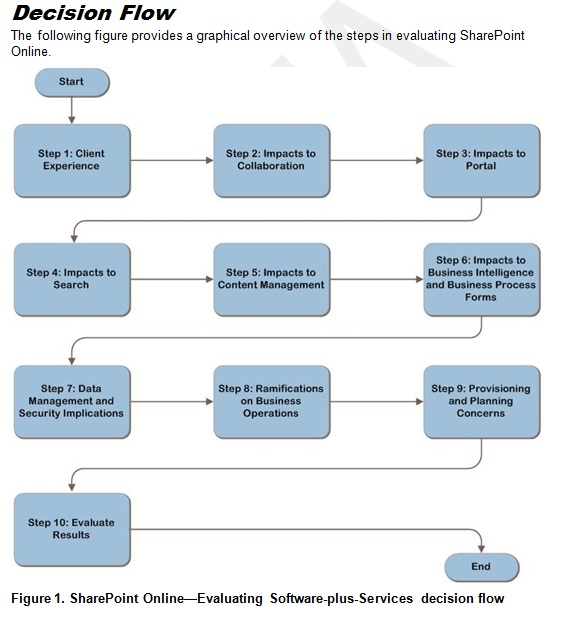
The Infrastructure Planning and Design team is working on a new guide: SharePoint Online—Evaluating Software-plus-Services. Get the beta by visiting the Connect Web site at:  https://connect.microsoft.com/InvitationUse.aspx?ProgramID=1587&InvitationID=IRSS-MRP9-7QCT&SiteID=14

Considering an online solution for your organization’s collaboration services? The SharePoint Online—Evaluating Software-plus-Services guide provides a clear comparison of SharePoint collaboration technologies across on-premises, standard hosting, and dedicated hosting scenarios. The guide can be used as a framework for evaluating the technical feasibility of Microsoft SharePoint Online and determining which SharePoint delivery model best suits the organization’s needs. Key steps guide you through the evaluation of the end user, SharePoint workload, and business considerations in a logical, sequential order. An overall scoring assessment provided for each option identifies key SharePoint workloads and requirements for the organization.

The Infrastructure Planning and Design Series streamlines the planning process by:

  • Defining the technical decision flow through the planning process.
  • Listing the decisions to be made and the commonly available options and considerations.
  • Relating the decisions and options to the business in terms of cost, complexity, and other characteristics.
  • Framing decisions in terms of additional questions to the business to ensure a comprehensive alignment with the appropriate business landscape.

Tell us what you think! Download the IPD for SharePoint Online Beta Guide and send us your valuable feedback!

Digg This

MAP4-pic1-small Are you getting ready for or evaluating a Windows 7 or Windows Server 2008 R2 migration?

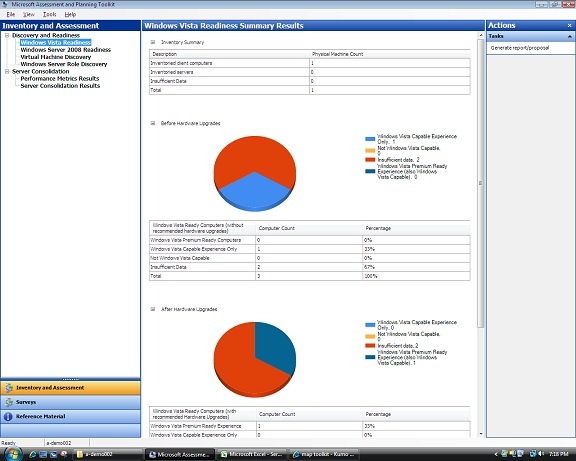
Join this beta program and test out the Microsoft Assessment and Planning Toolkit 4.0 that will help you with hardware inventory, OS compatibility assessment for Windows 7, Windows Vista, Windows Server 2008 and R2.  This free tool also helps you with virtualization assessment of potential candidates and PC security checks and assessments of your desktop enviornment.

The Microsoft Assessment and Planning (MAP) Toolkit is an integrated platform with tools and guidance that make it easier for you to assess your current IT infrastructure and determine the right Microsoft technologies for your IT needs. It offers quick inventory, powerful assessment and actionable recommendations for many major Microsoft products so you can save time and cost to plan your deployment projects:

  • Windows 7 (NEW!)
  • Windows Server 2008 R2 (NEW!)
  • Hyper-V for Windows Server 2008 R2 (NEW!)
  • Windows Vista
  • Windows Server 2008
  • Hyper-V for Windows Server 2008
  • SQL Server 2008
  • 2007 Microsoft Office
  • Microsoft Application Virtualization
  • Microsoft Online Services (e.g. Exchange Online)
  • Forefront Client Security and more

MAP-4-win7-proposal-1 Join the Beta Now!

<taken from the MAP blog>

Digg This

clip_image001Microsoft® Windows Deployment & Application Compatibility One-Day Workshop

Learn more about the optimized desktop, Application Management, and the Microsoft Tools and Technologies to help understand Windows Application Compatibility.

Join Microsoft’s Windows Client Specialist and Pontis Research for a one day session to learn more about the optimized desktop, application management and the Microsoft tools and technologies to help with Windows 7 application compatibility.

The Windows Deployment and Application Capability one-day workshop is geared to provide IT professionals with the knowledge necessary to:

  • Plan for the next Windows client migration
  • Learn about Windows Vista and Windows 7 changes that affect your applications
  • Understand how to make your applications work on Windows 7
  • Learn how to use key Microsoft technologies to make your migration easy

This session will discuss the application compatibility challenges using the methodology of assessment, remediation and application management.

  • Application Challenges
    Discuss the challenges facing application compatibility and how Windows Vista and Windows 7 changed the game and why these challenges are a one-time correction to how secure software is created.
  • Application Compatibility Assessment
    Learn how to use tools such as ACT and MAPS to acquire an inventory of applications and how to assess the results to create a rationalized list of applications to remediate.
  • Application Compatibility Remediation
    Understand the various remediation strategies and see each method in action. Learn the different approaches, understanding the challenges and pitfalls with the ultimate outcome of turning non-compatible applications into working applications.
  • Application Compatibility Management
  • Introduce the Application Management Lifecycle (ALM) and Application Platform Optimization (APO). Learn how formalizing application compatibility can prevent unexpected compatibility issues in the future.

Location:
Microsoft Irvine
3 Park Plaza
Suite 1600
Irvine, CA 92614

Date/Registration:
Please contact me if your a customer of mine that’s interested in attending this free workshop. I will provide you with registration details and the exact date this event is happening in June.

Agenda:

8:30 – 9:00

Sign-in and Breakfast

9:00 – 9:50

Session 1: Application Compatibility Challenges

10:00– 10:50

Session 2: Application Compatibility Assessment (Inventory)

11:00– 11:50

Session 2: Application Compatibility Assessment (Triage)

12:00– 1:00

Lunch & Vendor/Sponsor Presentation(s)

1:00 – 1:50

Session 3: Application Compatibility Remediation

2:00 – 2:50

Session 3: Application Compatibility Remediation (Lab/Demo)

3:00 – 4:00

Session 4: Application Compatibility Management

4:00

Q&A / End of Day

Digg This

image As promised at MMS2009 and posted at: http://blogs.technet.com/servicemanager/archive/2009/05/06/
system-center-service-manager-test-drive-now-available.aspx
 

The Service Manger Product Team has released a new hosted VM environment for customers to get familiar with System Center Service Manager without having to build a lab environment. Since the CTP2 release is only in the hands of TAP customers this is the only avenue until later in the summer for customers to evaluate this product.

What is SCSM?
A new Microsoft System Center product, System Center Service Manager is being designed to meet the needs of the modern IT help desk. By providing powerful new capabilities for incident, problem, asset, and change management, System Center Service Manager will support organizations as they seek to improve the service they provide to their users. This product will become the hub of IT management, IT technical and end user touch within the System Center Product Suite.

System Center Service Manager is still on schedule for a 1HCY10 release. As per MMS announcements licensing will be thru the new Client Management Suite or E-Cal and SMSE suite for servers, as well as available as individual CALs.

Per the Post:

We’ve put together a hosted virtual machine environment for you to test drive System Center Service Manager!

http://www.microsoftservicemanagertestdrive.com/

You can access it through a browser and even save state so you can come back to it later!   We’ve put together a demo walkthrough step-by-step guide to give you a quick tour of the product.  The virtual environment has hosted VMs for System Center Operations Manager and System Center Configuration Manager so you can evaluate the integration between all of these System Center products.

The version of Service Manager hosted in this virtual environment is the "CTP2" version which has only been released to TAP customers/partners until now.  This version is available to the public only in the hosted environment and is not downloadable from Connect.  Please use this opportunity to take a look at all the new features that have been added since the Public Beta and provide us feedback on the Service Manager Forum.

New features for the CTP2 release include:

  • Operations Manager integration (CI Connector, Alerts to Incidents, Distributed Applications to Service Maps)
  • Link back to OM web console for diagnosis resolution using alert view, knowledge, tasks, and health explorer
  • Role-based security and user experience
  • Knowledge management and full-text search
  • New setup with consistent System Center experience
  • New Data Warehouse/Reporting infrastructure capabilities
  • PowerShell administration cmdlets
  • Reports runnable from within Service Manager console
  • More reports (Incident Resolution, Incidents by Analyst)
  • Change request workflows & activity templates
  • Activity management
  • Inbound email to incident creation
  • CSV Import
  • Database grooming

The next public release is scheduled for late summer/early fall.

Digg This

[originally seen on Bink.nu]

According to Bink.nu, we’ve launched a new advertisement (I hadn’t seen it until now) focusing on Zune Pass versus iTunes featuring Finance & Investment Radio Talk Show host, Certified Financial Planner and public speaker, Wes Moss, and I gotta admit… it’s pretty good!

It makes the simple point:  Zune Pass makes good financial sense.

Digg This

Posted by: kurtsh | May 12, 2009

NEWS: Microsoft issues bonds to raise $3.75B

Microsoft was announced as the 1st company in over a decade to be issued Triple-A credit rating for it’s newly issued bonds.  Why is Microsoft getting into the bond market?  Watch this FT video for some insight:

Microsoft issues Bonds

Microsoft in landmark issue
By Richard Waters in San Francisco and Nicole Bullock in New York
Published: May 11 2009 17:48 | Last updated: May 11 2009 21:47

Microsoft passed a significant milestone in its financial history on Monday as it turned to the bond market for the first time to raise cash.

The landmark long-term debt issue signals a further break with the company’s traditionally conservative stance towards its balance sheet and the culmination of a six-year process since it began to adapt its financial strategy to the increasing maturity of its business. The software company set out on Monday to establish three benchmark bond offerings, with maturities of five, 10 and 30 years. These are expected to raise $3.75bn. Details of the pricing were set to be announced later in the day.

http://www.ft.com/cms/s/0/b4567b4a-3e48-11de-9a6c-00144feabdc0,dwp_uuid=e8477cc4-c820-11db-b0dc-000b5df10621.html?nclick_check=1

Digg This

imageToday, Bill Veghte announced Office 2010 at TechEd 2010 here in Los Angeles.  And it would appear that some of that Hollywood glitz rubbed off on him when he was last down here in Los Angeles.

Among the things you can get from the aforementioned site is the sign up/registration page for Office 2010’s Technical Preview.

imageThe Microsoft Office 2010 Technical Preview is a limited, invitation only program which will provide you with the opportunity to experience early, pre-release versions of Office 2010 which will include the following applications:  Word 2010, Excel 2010, Outlook 2010, PowerPoint 2010, OneNote 2010, Communicator 2010, Access 2010, InfoPath 2010 and Publisher 2010.

By registering you are signing up to be considered for the Technical Preview Program, you will be waitlisted for consideration to be invited into the Technical Preview Program. We will notify invitees in early to mid July.

REGISTER:
http://microsoft.crgevents.com/office2010themovie

Hmm.  Maybe it’s time for me to break out my ‘Clippy’ costume again, ‘eh?

Digg This

« Newer Posts - Older Posts »

Categories