clip_image001
Join RSA and Microsoft For a Complimentary Lunch Seminar:

An Integrated Approach to Information Protection:
Automating Rights Management with Data Loss Prevention

If you are charged with safeguarding sensitive information, please join RSA and Microsoft to discuss advancements in information protection throughout the infrastructure based on content, context,
and identity.

Learn, how Microsoft Active Directory Rights Management Services (AD RMS) and RSA Data Loss Prevention (DLP) Suite are working together to help customers discover, protect and securely share sensitive information both within and across company boundaries with an integrated approach to data security.

Reduce risk & exposure with the knowledge that your information remains an asset and never becomes a liability!

Seminar topics for discussion will include:

  • The Microsoft and RSA groundbreaking partnership – future ready to support RSA DLP enabled Microsoft products
  • Challenges, strategies and solutions – top criteria to consider as you evaluate DLP solutions
  • Case study – gain valuable insight into Microsoft’s own Data Loss Prevention deployment
  • Building a DLP implementation plan – best practices to help you develop a solid implementation plan

Date & Location
June 18 – 11:00 am -2:00 pm
Irvine, CA
(Lunch Served)


clip_image001[7]
Watch the RSA DLP Suite in Action!

Register

clip_image001
(http://info.rsasecurity.com/EventRegistration.asp?ID=Event_S_DLP_Seminar_West_Q209)

Space is limited. Register today to reserve your seat.
For more information on RSA and Microsoft solutions:
http://www.rsa.com/dlp and http://www.microsoft.com/ida

Digg This

imageWe posted Service Pack 2 for our current 6.0 operating systems to Microsoft Download site as previously mentioned.

There’s a heck of lot more information in the links below but apparently the thing getting the most play has been the fact that people that removed components of the operating system using an Internet based tool called vLite are effectively hosed.

Basically, if you’re lazy, here’s the long and short of the “workaround”:  Reinstall by doing an in-place upgrade.  It’s either that or wipe and reload.  Next time don’t mess with the installer.

Digg This

Posted by: kurtsh | May 25, 2009

NEWS: Netflix in Windows Media Center

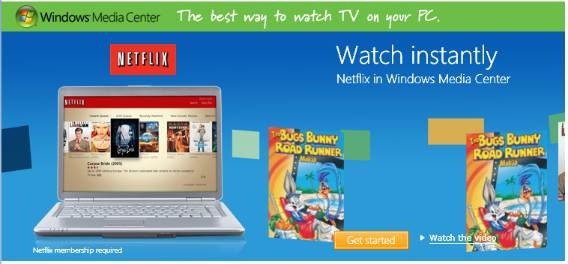
clip_image001Watch movies and TV shows whenever you want with Netflix in Windows Media Center.* More than 12,000 movies and TV episodes are instantly available to your PC—and you still get access to more than 100,000 DVD titles by mail.

All you need is a Netflix membership, a high-speed Internet connection, and a Windows Vista Home Premium or
Ultimate-based PC.

It’s easy. Here’s how to get started.
  • Launch Windows Media Center in Windows Vista Home Premium or Windows Vista Ultimate. Do you have it?
  • Go to Netflix in the TV and Movies section of Windows Media Center.
  • If you’re a Netflix member, enter your credentials and start watching. Otherwise, sign up for the FREE 14-day trial.
  • Browse the library and add titles to your instant queue.
  • Start watching.

LINK:  http://www.microsoft.com/windows/windows-media-center/netflix.aspx

(Works great when you manage your queue from your Windows Mobile device too:
http://www.microsoft.com/windowsmobile/en-us/totalaccess/software/software/netflix.mspx)

Digg This

[UPDATED 5/28/09 FOR “DAY 3" POST]

image Wanna read some vendor-to-vendor drama? 

  • Hyper-V Winning Daily; VMware FUD Reaching New Heights
    Out on the web, there’s an "anonymous" video purporting to show a Hyper-V crash. When I heard, I was surprised and immediately wanted to know more. I haven’t heard of any such incidents with Hyper-V and the Hyper-V R1 release has been incredibly stable and reliable. So, what did I find?

    Not much. Where are the details? There are no facts provided. What Hyper-V build was this? The beta? What was the configuration being tested? Who posted this? Why didn’t they contact Microsoft support? I mean there’s literally no data other than a defamatory statement at the beginning of the video implying that Hyper-V had something to do with some downtime at TechNet/MSDN. The SQL team and Operations responded to this days ago. In short, Hyper-V had nothing to do with the outage.
    So, why would someone create such a video? Let’s dig a little deeper. The poster, who doesn’t appear on the video, doesn’t state what company he works for or provide any context. Gee, I wonder where he works?
    …<drum roll please>…
    Introducing Scott Drummonds, VMware Product Marketing.
    http://blogs.technet.com/virtualization/archive/2009/05/09/hyper-v-winning-daily-vmware-fud-reaching-new-heights.aspx

  • Day Two of the Scot Drummond VMware FUD Fiasco
    Scott is still missing the most basic of information. What version of Hyper-V was this? Was this the version included with Windows Server 2008? If so, that’s the beta. Did you apply the RTM update? Did you use the final shipping Integration Components in the guests? Did you include the Linux Integration Components for the Linux guests?
    The way this information is dribbling out indicates a lack of methodology and systematic testing. Apparently, VMware has no problem ignoring these precepts when it suits them.
    http://blogs.technet.com/virtualization/archive/2009/05/09/day-two-of-the-scott-drummond-vmware-fud-fiasco.aspx
  • VMware FUD Fiasco Part 3…
    [VMWare Benchmarking guy Bruce Herndon claims the VMware’s YouTube was a mistake.]
    Why did TWO WEEKS PASS with next to no details about the video?
    Why, in the meantime, has VMware Sales Staff been contacting customers and would be customers telling them to "check out this video"?
    Why have your senior architects been Twittering to "check out this video on You Tube"?
    Why is this video still public?
    http://blogs.technet.com/virtualization/archive/2009/05/17/vmware-fud-fiasco-part-3.aspx

For some secondary commentary on this back and forth between us and this VMware Product Manager:

One person posted the following comment on VMware’s video relative to some efforts we’ve made:

“While there was some attempts to blast the quality of the Microsoft "FUD’ video production…it was not factually incorrect from a marketing stand point. VMWare’s video on the other hand is a complete staged hoax. His blog entry response shows a complete lack of understanding of Hyper-V or creating any valid test criteria. With Hyper-V you can use multi proc with Hyper-V and SUSE distros (and Windows 2003+). This takes advantage of the non-emulated VMBus architecture of Hyper-V. Simply put, VMWare can never overcome the limitation of their design and now rely on the gospel of "memory over commit" as their key value to the primarily windows shops. Trust me, memory is cheap! As a Microsoft focused partner, I definitely have my bias. IMHO, customers who have mixed 50/50 Linux should use VMWare because Hyper-V’s support for Linux has been slow. Most of the companies who needed that feature set have probably already bought it already. However, for the 90% of customers who don’t need to spend 30k a year in VMware support contracts to run a 98% Windows infrastructure…Hyper-V will run it faster, cheaper, and better support from a single vendor.”

Digg This

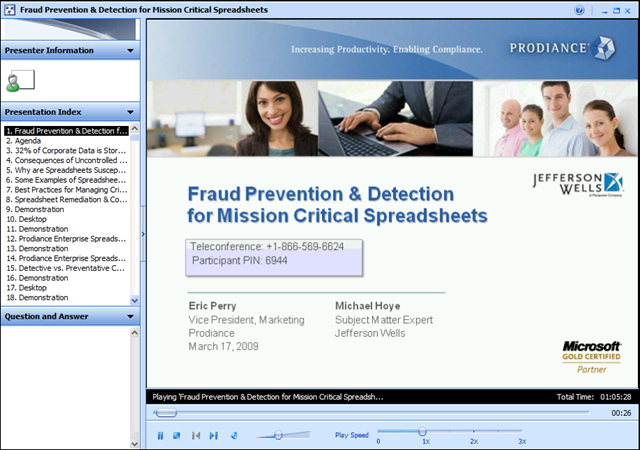
image Many of our customers are faced with regulatory compliance challenges, particularly when it comes to spreadsheets data that is sprawled across file servers and intranet sites within their organizations.

Microsoft Partner, Prodiance, presented a webcast that addresses this very challenge, entitled “Fraud Prevention & Detection for Mission Critical Spreadsheets” that was recorded for playback:

Digg This

image Steve Rosso, QuickStart’s lead SharePoint development instructor, will be demonstrating workflow for Information Workers, Administrators and Developers. Steve has taught hundreds of students, from end users to high end developers, how to use and develop in SharePoint. We expect this meeting to fill up, so please register early if you would like to guarantee a seat!
Topics Include:

  1. Information Workers
    • Using workflow
    • Show workflow history
  2. Administrators
    • Explain SharePoint Designer workflows (Conditions and Actions) and also appropriate uses.
    • Create a new workflow using SharePoint Designer 2007 that sends out an email with a hyperlink to a document in a document library.
  3. Developers
    • Highlight the use of XML Web Services called from a workflow.
    • How to create and use a State-Machine workflow.

Date: Wednesday, May 20, 2009
Time: 6:30pm – 8:00pm
Location: QuickStart Irvine – 16815 Von Karman Ave, Suite 100, Irvine, CA 92606 (www.quickstart.com/locations/irvine.aspx)

RSVP at www.quickstart.com/socalmoss
Food and drink will be provided.

Digg This

Notice that Windows Mobile’s sales share is 12% worldwide, still larger than iPhone.

For more info and coverage of these figures:
http://www.engadget.com/2009/03/13/gartner-posts-worldwide-mobile-os-numbers-for-2008/

Digg This

…Concerned about regulatory compliance around corporate files that contain important data?
…Interested in putting a technology into place that helps facilitate the classification of that data to ensure security & privacy restrictions are upheld?
…Wouldn’t it be great to be able to implicitly find sensitive data on your file servers and know about it immediately?
…Would you like to manage your file-based data based on business value instead by container?

image We’ve introduced a completely new technology in Windows Server 2008 R2 called “File Classification Infrastructure” which enables organizations to classify their files (assign properties to files) and then use capabilities within the Windows operating system to apply actions to files based on the file classification.

Out of the box, FCI in Windows Server 2008 R2 provides the ability to:

  • define classification properties
  • automatically classify files based on location & content
  • apply file management tasks such as file expiration & custom commands based on classification
  • produce reports that show the distribution of a classification property on the file server

For more information on this new & exciting technology, check out the Storage Blog’s post on this topic:

LINK:
http://blogs.technet.com/filecab/default.aspx

Digg This

OfficeCommunicator One of my customers – you know who you are – is being rapidly introduced to Office Communicator 2007.  (Welcome to the world of interoperable instant messaging guys!)  In the spirit of this, I thought I’d write something up, summarizing some of the add-ins/plug-ins I know of for Office Communicator that may make it more useful for you.

  • Communicator Add In for Outlook 2007
    This is an Add-In for Outlook 2007 which allows you to view and interact with your entire contact list from Office Communicator 2007. Business users spend a majority of thier day in Outlook, why should they have to toggle back and forth from Outlook & Communicator? This Add-In allows those business users to keep working in Outlook as well as view presence, call or instant message thier contacts.
    http://code.msdn.microsoft.com/Communicator4Outlook
  • Office Communicator 2007 Windows Vista Gadget
    This gadget that’s installable into your Windows Vista sidebar enables you to see all the current conversation threads you have going within your sidebar, instead of having each conversation clutter up your taskbar at the bottom of your screen.  It also provides easy access to the people you IM the most.
    http://www.codeplex.com/MOCVistaGadget
  • Communicator Plus!
    Eventure Communicator Plus! is one essential add-on for Microsoft Office Communicator 2007. It guarantees to improve your Communicator experience by leaps and bounds. You won’t just get a couple of new options, what you’ll get is a whole new dimension for Microsoft Office Communicator 2007 software.
    http://www.eventure.biz/site/Products/Complus.aspx

Here are some additional resources specific to Microsoft Office Communicator:

Digg This

image The Microsoft IT Academy Student Pass is a special no-cost online learning opportunity for students. IT Academy Student Pass provides free e-learning courses to verified students who are interested in extending their technical skills with Microsoft technologies.

The IT Academy Student Pass offers 12 to 22 hours of FREE e-learning courses, aligned to the first set of topics you need to master for the first Microsoft certification exam within the track. Each track is unique, and most will require you to take additional e-learning courses to complete all of the topics you need to succeed on the certification exam.

The goal of the IT Academy Student Pass is to give you a head start by providing hours and hours of rich, award-winning e-learning content that sets the stage for the learning to come.

Students may also want to explore Microsoft technical certifications, and the IT Academy Student Pass is a perfect entry point to five different certification paths. Learn about Microsoft Certifications

The IT Academy Student Pass will be available initially in English, but additional languages are being considered for future releases.

LINK:
http://go.microsoft.com/?linkid=9663125

Digg This

« Newer Posts - Older Posts »

Categories