 Do more with less. This has been the server manager’s mantra for several years but never more so than now. Fortunately, Windows Server® 2008 R2 has got your back with numerous and varied features designed specifically to address IT’s current challenges while making day-to-day life a little easier. Here are the top 10:
#1. Migrating VMs Without Service Interruption
Windows Server 2008’s Quick Migration was an adequate feature, allowing administrators to move VMs between physical hosts with only short downtime. Trouble is, even that delay was long enough to drop any currently connected users or applications and that tends to arouse helpdesk ire. Windows Server 2008 R2 meets this challenge with Live Migration.
Live Migration leverages Windows Clustering Services and the Cluster Shared Volumes technology to transfer VMs in milliseconds. That means no dropped connections and a much more dynamic data center management environment. We’ve also added Live Migration features to System Center Virtual Machine Manager, including the ability to perform migrations based on policy. It’s a brave new virtual world.
#2. Branch File Access Performance Up; WAN Costs Down
Branch offices can be the bane of both server and desktop administrators. Remote workers can’t find files due to lack of access or can’t get them fast enough because of bandwidth constraints. Enter another key Windows Server 2008 R2 feature: BranchCache™.
Administrators can use BranchCache to track file access requests at the branch office, and the files can be cached there. Files can be retrieved from other branch office client PCs (a peer-to-peer caching model, known as distributed mode) or from a dedicated BranchCache™ server at the remote site (also called hosted mode). A central BranchCache™ server keeps track of both existing file requests and file updates to ensure all requests receive only the most current content.
The result is an easy-to-configure and easy-to-maintain caching solution that speeds the servicing of remote client requests and lowers WAN bandwidth utilization at the same time.
#3. Self-adjusting Server and Data Center Power Management
Green IT may be the single hottest mandate from upper-level business management to IT in 2008, and the trend is likely to continue in 2009. To help harried IT managers go green quickly and easily, Microsoft is doing its part with new power management updates in Windows Server 2008 R2.
First, there’s an exciting new feature called Core Parking. When this feature is enabled, Windows Server 2008 R2 will constantly monitor the various workloads running across multi-core server systems. If certain processor cores are under-utilized or unnecessary, Core Parking can set just those cores into sleep mode, thus saving significant power. If workloads suddenly increase, R2 can spin up dormant cores in a matter of milliseconds. So a server with 64 logical cores can drop to just a 4-core machine during low-utilization times and rev back up to full CPU power as soon as workloads increase.
In addition, Windows Server 2008 R2 enables administrators to design active power policies that can cause servers to ‘throttle-down’ during off-hours by using DMTF-compliant remote management interfaces.
#4. Remote Server Management
Doing more with less includes traveling. Managing servers effectively no matter where they are physically located is always a problem. Windows Server 2008 R2 addresses this challenge with a Server Manager that can be installed on workstations and pointed at servers from afar. In addition, Server Manager has new management consoles devoted specifically to remote management tasks across all server roles.
#5. Squeeze the Most From Your Hardware
Virtualization might be a major boon when it comes to server consolidation, but the other half of that equation is squeezing every last drop of performance out of your virtualization hosts. Windows Server 2008 R2 has several new features designed to take full advantage of any hardware configuration.
First, because it takes advantage of the last two years of 64-bit server CPU manufacturing, Windows Server 2008 R2 is the first Microsoft server operating system to take only the 64-bit road. Your 32-bit applications will continue to run flawlessly on R2, but the 64-bit operating system is much better designed to take advantage of those high-end server CPUs from AMD and Intel.
And more of them, too—with Windows Server 2008 R2 scaling up to address as many as 256 logical processors in a single server, and Hyper-V in R2 is able to use more than 32 logical processors in a single VM. That’s twice the CPU support of Hyper-V 1.0! R2 can also take advantage of advanced CPU features, including Second Level Translation for much-improved memory management. It all adds up to more server muscle for your data center dollar. When combined with the consolidation power of Hyper-V, it means R2 can make a significant dent in your annual IT spend.
#6. Do Better At Managing Virtual Data Centers
Data centers have gone virtual with a speed that’s surprised even the experts. But although the technology’s potential is easily realized, tools to effectively manage large pools of virtualized resources have been slower to emerge. Windows Server 2008 R2 helps fill that void with a slick update to Hyper-V™.
The new Hyper-V™ sports numerous improvements over the old, including support for both 32- and 64-bit VMs, larger memory support (up to 64GB per VM), pass through disk access, and new hardware sharing architectures for resources like disk, networking, and video. But Hyper-V™ hasn’t left managers out in the cold—it includes new consoles for Live Migration and high-availability clusters, support for WMI management extensibility, and day-to-day tools to make life easier such as Virtual Machine snapshots. And last (but definitely not least), Hyper-V™ also sports a host of new support from PowerShell 2.0 with a slew of new dedicated cmdlets.
#7. Create Customized and Automated Management Tools
Canned management tools are great, but in large scenarios and especially vertical environments, being able to build your own management tool box is critical. Microsoft took an exciting step in this direction with the release of PowerShell 1.0 with Windows Server 2008. With Windows Server 2008 R2, we’ve reacted to the hugely positive customer feedback around this feature with a revamped and updated PowerShell version 2.0.
PowerShell v2 carries improvements across the board with improved remote management via WS-Management, better security with features like constrained runspaces, extended scripting functionality, and even improved script portability via XML. You’ll find a new Graphical PowerShell that adds pro developer-class IDE features, including colored syntaxing and better debugging tools for building your own cmdlets. And let’s not forget about the over 240 new cmdlets that ship with R2 right out of the box.
#8. Use Virtualization to Ease Desktop Management
The Hyper-V™ server virtualization feature is only half of the virtualization message in Windows Server 2008 R2. Desktop and application management has always been a troublesome task because of the distributed nature of its targets. With R2, however, Microsoft presents a centralized solution to many of these difficulties via presentation virtualization.
The new Virtual Desktop Infrastructure (VDI) in Windows Server 2008 R2 figures largely in this vision, and builds on the solid presentation virtualization foundation we built into Windows Server 2008’s Terminal Services. With the advent of Window Server 2008 R2, this is now called Remote Desktop Services under which VDI encompasses a centralized desktop delivery architecture that allows customers to centralize the storage, execution, and management of a Windows® desktop or application in the data center. This capability gives desktop and application administrators a whole new toolkit for better enablement of flexible work scenarios, including work-from-home and hot-desking as well as increased data security, compliance, and more efficient management of the desktop operating system and applications.
#9. Broaden Remote Access Adoption While Making it Easier to Manage
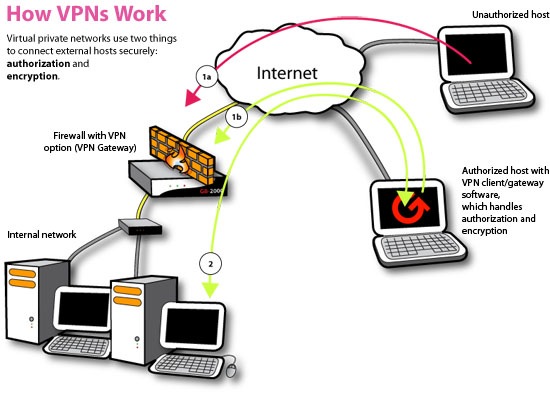
Green IT, skyrocketing gas prices, a slow economy, and a need to get the job done no matter where it might be—all these factors combine to make remote computing one of the most important and difficult IT management tasks at the moment. Windows Server 2008 R2 addresses this with an exciting new feature that seeks to turn your clunky VPN into something as easy to manage and reliable as a dial tone.
DirectAccess (DA) is a comprehensive anywhere access solution that enables organizations to provide always-on, secure connectivity to on-premise and remote users alike. It improves security and lowers total cost of ownership (TCO). DA eliminates the need to connect explicitly with the corporate network while roaming and provides organizations with the next generation of policy-based, secure connectivity. To end users, the concept of remote computing goes away because DA and Windows 7 combine to present them with an always-on connection to their corporate network whether they’re attached to a local, remote or even public network.
DA uses technologies already included with Windows Server 2008, including IPsec and IPv6, but combines these with an easy wizard-style configuration and management toolkit that enables administrators to build and maintain DA. To maintain reliability and security, DA also takes advantage of many of the innovations found in other Microsoft products and services such as Network Access Protection, Server and Domain Isolation, and Forefront™ Client Security. In addition, the Microsoft Forefront Intelligent Application Gateway (IAG) can enhance deployment and management.
#10. Take Your Web and Application Serving To The Next Level
Windows Server 2008 R2 includes many enhancements that make it the best Windows Server for Web applications and services yet, most notable of these: Internet Information Services (IIS) 7.5. Overworked server administrators will appreciate the updated Web server, which includes features that streamline management by extending the functionality of IIS Manager to include new configuration modules, by implementing a new Windows PowerShell Provider and task-based cmdlets for IIS, and by offering support for .NET on Server Core—that means not just more application flexibility with ASP.NET now available on Server Core, but remote administration through IIS Manager and Server Manager as well. IIS 7.5 also integrates new support and troubleshooting features, including configuration logging and a dedicated Best Practice Analyzer, and integrates many of the more popular extensions for IIS, including updated versions of Secure FTP and WebDAV.
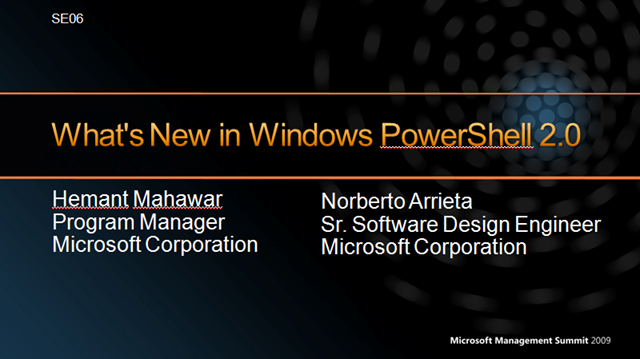 Microsoft Management Summit 2009, held in Las Vegas annually, has several sessions on PowerShell.
  MMS: Automating Your Infrastructure with Windows PowerShell 2.0





 kurtsh
 Kurt Shintaku's Blog
You must be logged in to post a comment.