imageApparently, if you have a multi-core processor, Windows Vista by default doesn’t recognize this at boot, despite both cores being available.  The OS will leverage only a single core until a certain point in the system startup process.

If you’re like to enable the ability to take advantage of all the cores on your multi-core processor during system startup, follow the instructions below.

[WARNING:  Doing the following can hose your system if you don’t know what you’re doing and/or make a mistake within the tool.  Consider yourself warned.]

  1. Click START & RUN
  2. Type MSCONFIG & click OK
  3. Click on the “Boot” tab
  4. Click on the “Advanced Options” button
  5. Ensure that “Number of processors” is checked
  6. Select the number of cores you have from the drop down below.
    This drop down will say “1” by default and can be changed to, say, 2.
  7. Click OK & OK
  8. Reboot

Don’t expect anything dramatic.  Startup’s bottleneck is primarily the hard drive and not CPU utilization.  That being said, you’ll find that this can help quicken the process of booting up, logging in, and getting to a usable desktop.

[adapted from content originating at Blorge.com]

Digg This

image Ever since I’ve been using Twitter for things like my adventures at CES2009 or the birth of my son, I’ve been running Chirpr, which is a a Windows Vista gadget which provides quick and easy posting to Twitter directly from the Vista Sidebar.  It’s met my needs for the most part.

Except that it doesn’t allow you to follow people from the UI.  Nor does it Retweet.  And it doesn’t have a very configurable font.  etc. etc.

Enter BuildAGadget. 

TWITTER EXPLORER, FACEBOOK EXPLORER RELEASES, ALL FREE
This month they released the v1.0 version of Twitter Explorer available for free from the Gadget Gallery on Microsoft.com and it’s quite good!  (See graphic to the right)

But that’s not all.  They also released:

  • Facebook Explorer, another professional looking Vista Gadget which provides rich access to Facebook
  • XM Online Radio Gadget, which provide the ability to tune into XM Radio over the Internet from your Sidebar
  • WoW Explorer, which enables people to monitor their World of Warcraft realm and search.

… and more.  There’s over 20 professionally designed gadgets for people to download and try. 

LINK: 
http://www.buildagadget.com/Products.php?Sort=Vista

Digg This

image The long awaited 64-bit version of Application Virtualization is finally here for testing.

Microsoft Application Virtualization (App-V) 4.6 Beta has been posted for download.  This is a seriously big deal because this is TRUE Application Virtualization (running applications in a virtualized OS environment, where the app believes it’s the only thing running, interfacing with synthetic operating system APIs and a synthetic file system) running on a 64-bit OS – for the first time ever!

From the App-V blog:

Today, I am happy to announce immediate availability of Microsoft Application Virtualization (App-V) 4.6 Beta. At TechEd EMEA we announced our commitment to ship the next version of App-V in H1 2010.  In March of this year, as part of the MDOP 2009 launch, we indicated that the development of App-V 4.6 was underway.  Today, we have reached a major milestone and are a step closer to our goal.

This will be the first version of App-V to support both x64 and x86 Windows platforms.  The primary focus of this release is to enable App-V to take advantage of 64-bit Windows platforms including Windows 7 and Windows Server 2008 R2.  We’ve also made some improvements in the App-V Sequencer such as simplifying the workflow for creating virtual applications and adding the ability to sequence true 64-bit applications, a first to market!  For customers running Windows XP or Windows Vista, you can also use App-V 4.6 Beta and take advantage of the support for Office 2010, 64-bit platform support and additional features in the release.

Customers who want to get familiar App-V 4.6 Beta can register and download via Microsoft Connect.  As always, we want to hear from you.  We build great products by including feedback from our customers, so go ahead, test App-V 4.6 and give us feedback via Connect.  

For customers who are currently using App-V 4.5 CU1 with their 32-bit Windows 7 systems, we will release an update to the 4.5 version of the product.  App-V 4.5 SP1 will be available within 90 days of Windows 7 general availability and provide full support for running App-V 4.5 and Windows 7 (32-bit) in production.  Enjoy!

http://blogs.technet.com/mdop/archive/2009/07/30/app-v-4-6-public-beta-now-available-for-download.aspx

ENROLL:  Microsoft Application Virtualization (App-V) 4.6 Beta
https://connect.microsoft.com/InvitationUse.aspx?ProgramID=3601&InvitationID=AV46-X6WJ-4DKR&SiteID=285

Digg This

image Wow.  Brian Madden can sure bring the lumber.  He wrote the following article recently shining a light on VMware View’s inferiority as a desktop solution for the Enterprise:

LINK: “How can VMware compete in the desktop space? “We have the best hypervisor” is not relevant anymore.”
http://www.brianmadden.com/blogs/brianmadden/archive/2009/07/16/how-can-vmware-compete-in-the-desktop-space-we-have-the-best-hypervisor-is-not-relevant-anymore.aspx

To emphasize how strong his opinion is regarding VMware View, his first paragraph comes out swinging:

“I am not impressed with VMware’s desktop products, and I have no idea how they expect to compete against Citrix and Microsoft. Furthermore, I think VMware is damaging the industry by implying that just because they’re the experts at “server virtualization,” they’ll also be good at “desktop virtualization.””

It’s clear that he’s frustrated at the hype that is fueling evaluations that customers are undertaking of VMware Virtual Desktop Infrastructure solutions.  Really, really good reading for those taking a look at virtualizing their business desktops.

Digg This

image [Ed. Note:  I’ve had this article sitting in my Windows Live Writer drafts folder forever waiting to be published.  I don’t know who to attribute this to because I’ve long lost the original creator (apologies), but props to whoever it was that originally figured this out. That being said, it’s about slow startup and shutdown times for Windows Vista SP1.] 

Q:  Have you noticed a degradation in startup & shutdown times of your Windows Vista SP1 workstation?

Basically, by applying the changes below, many folks have seen their startup and shutdown times increase by a factor of 2. when using Windows Vista SP1.

————–

CORRUPT READYBOOT MANIFEST
It turns out the issue has something to do with having a corrupt ReadyBoot plan that isn’t reconfiguring itself correctly post-application of Service Pack 1.  If you examine %SystemRoot%PrefetchReadyboot you’ll find trace files (.fx) that may be outdated – all the way back to a time prior to the application of Service Pack 1 on your machine.

This is because if you make any major changes to your systems configuration, you’re supposed to blank the WindowsPrefetch directory on the system drive to clear out any stale prefetch data that no longer applies to the new system configuration. Technically, we have this documented in an OEM performance whitepaper, but it certainly isn’t something that the average Joe would know to do after applying Service Pack 1.

NEED TO CYCLE MULTIPLE TIMES TO RELEARN
Doing this of course will ‘clear’ Windows Vista’s understanding of what sort of files it should prefetch off disk into memory to enhance performance of the system, but over time, it’ll relearn this.  Now in the case of Startup & Shutdown times you should be able to simply clear WindowsPrefetchReadyboot and be fine.

Cycling through a proper startup and shutdown multiple times (3-4) at this point should allow the prefetcher to know what files are important at boot time to improve performance gradually.

Personally, this has VERY noticeably sped up my startup & shutdown performance.  Hope it does the same for you.

Digg This

Posted by: kurtsh | August 5, 2009

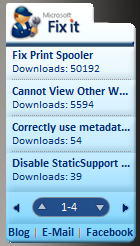
DOWNLOAD: Microsoft Fix It Gadget for Windows 7/Vista

image We have a little known Windows 7/Vista Gadget known as the “Fix It” gadget that list out the most popular “Fix It” routines that we’ve published on the Microsoft Support web site.  “Fix It” routines are pieces of executable code that you can run from our Support web site that automatically repair or configure your computer simply by downloading them.

And it’s a good thing too – there’s more than 260 Fix It routines that we’ve published to date, and a lot of them a really cool… but most don’t even know that a tenth of them exist.

Here’s a quick listing of some of the more useful “Fix It” routines available:

DOWNLOAD:  Fix It Gadget for Windows 7/Vista
http://support.microsoft.com/?scid=https%3a%2f%2ffixit.support.microsoft.com%2freporting%2fgadget%2ffixit4me.gadget

Digg This

image Ever wondered how to change the maximum number of connections in Internet Explorer 8.0? (a.k.a. “How can I download more than 2 files at the same time over HTTP?”)

I once wrote up this post up that did the same thing for Internet Explorer 7.0, but the instructions for Internet Explorer 8.0 are different.  Here’s the step by step for INCREASING THE MAXIMUM NUMBER OF CONNECTIONS INTERNET EXPLORER 8.0 CAN HANDLE:

  • Start Registry Editor.
  • Locate the following key in the registry:
  • HKEY_LOCAL_MACHINESOFTWAREMicrosoftInternet ExplorerMAINFeatureControlFEATURE_MAXCONNECTIONSPERSERVER
  • On the Edit menu, point to New, click DWORD Value, and then add the following registry values:
  • Value name: iexplore.exe
    Value data: 10
    Base: Decimal
    Note set this value to the connection limit that you want for HTTP 1.1 connections. By setting the value to 10, you increase the connection limit to 10.
  • Locate and then click the following registry subkey:
  • HKEY_LOCAL_MACHINESOFTWAREMicrosoftInternet ExplorerMAINFeatureControlFEATURE_MAXCONNECTIONSPER1_0SERVER
  • On the Edit menu, point to New, click DWORD Value, and then add the following registry values:
  • Value name: iexplore.exe
    Value data: 10
    Base: Decimal
    Note set this value to the connection limit that you want for HTTP 1.1 connections. By setting the value to 10, you increase the connection limit to 10.
  • Exit Registry Editor.

Incidentally, we provide an online “Automatic Fix It” for this modification on the Internet at: http://support.microsoft.com/kb/282402.  This “Fix It” is a download that will automatically apply the above registry changes to your computer for Internet Explorer 8.0.

(FYI:  We do this not to annoy you but to make it more difficult for viruses to propagate through HTTP connections over Internet Explorer.  Most people don’t need more than 2 connections and if a virus is constrained by 2 HTTP sessions, it greatly minimizes the ability of the malware to infect other clients.)

image The Microsoft Assessment and Planning Toolkit 4.0 Now Released!
Windows 7 and Windows Server 2008 R2 will be available in the near future. Are you thinking about deploying these new operating systems? Get a head start with the Microsoft Assessment and Planning Toolkit 4.0. Over 690,000 Microsoft customers and partners including Costco Wholesale Corporation, Continental Airlines, and Banque de Luxembourg have already downloaded and/or used this toolkit to date.

Introducing Microsoft Assessment and Planning (MAP) Toolkit
Microsoft Assessment and Planning Toolkit 4.0 is an integrated planning toolkit that makes it easier for Microsoft customers and partners to quickly identify what servers, workstations, and network devices are in their IT environment. This agentless and scalable toolkit has the ability to discover all computers within Active Directory and workgroup environments. It performs key functions that include hardware and device inventory, hardware compatibility analysis, and generation of actionable, environment-specific IT proposals for migration to most major Microsoft technologies including Windows 7, Windows Server 2008 R2, Hyper-V, SQL Server 2008, and much more.

What’s New with v4.0?
Version 4.0 of the MAP Toolkit has the following new features:

  • Windows 7 Hardware and Device Compatibility Assessment
  • Windows Server 2008 R2 Hardware and Device Compatibility Assessment
  • Virtualization Candidates Assessment for Hyper-V R2 Server Consolidation
  • Integration with the Microsoft Integrated Virtualization ROI Calculator
  • Inventory of VMware Server Hosts and Guests
  • User Interface and Proposal Customization for Partner co-branding
  • Enhanced SQL Instance Discovery
  • Enhanced Usability and Improved Inventory Performance

Additional Features

  • Virtualization Candidates Assessment for Hyper-V Server Consolidation
  • Windows Vista Hardware and Device Compatibility Assessment
  • Windows Server 2008 Hardware and Device Compatibility Assessment
  • 2007 Microsoft Office Readiness Assessment
  • SQL Server Instance Discovery
  • Desktop Security Assessment for Anti-virus and Anti-malware Programs Installation
  • Forefront Client Security/NAP Readiness Assessment
  • App-V Infrastructure Readiness Assessment
  • Power Savings “Green IT” Proposal

Benefits to Customers and Partners

  • Saves Planning or Pre-Sales Time. For most IT consultants and Microsoft Partners, a detailed network inventory and assessment of servers and desktops often takes days of manual labor. With the Microsoft Assessment and Planning Toolkit, you can now conduct an environment inventory of up to 100,000 computers in a matter of hours instead of days, giving you extra time to focus on critical planning or pre-sales tasks. For IT professionals, this toolkit can significantly reduce the time it takes to gather the information necessary to make the business case for client, server, and virtualization projects.
  • Provides Actionable Recommendations and Reporting. This toolkit provides valuable inventory and readiness assessment reports with environment-specific upgrade recommendations and virtualization candidate reports, making it easier for IT migration and deployment projects to get off the ground and running.
  • Covers Wide Range of Scenarios–from Desktops to Servers. This toolkit offers technology assessments and planning recommendations for many Microsoft desktop and server products including Windows 7, Windows Server 2008 R2, Hyper-V R2, Windows Vista, Windows Server 2008, Hyper-V, Virtual Server 2005 R2, 2007 Microsoft Office, SQL Server 2008, Forefront Client Security, Network Access Protection, Microsoft Application Virtualization (or App-V), and more.

Next Steps–How can I get Microsoft Assessment and Planning Toolkit 4.0?

Thank You!
Microsoft Assessment and Planning Toolkit Team – Solution Accelerators

Posted by: kurtsh | July 21, 2009

INFO: Upgrade SMS 2003 to SCCM 2007 for Windows 7

image

It’s highly encouraged that organizations with Systems Management Server 2003 that are looking to deploy Windows 7 or Windows Server 2008 R2, begin planning to upgrade to System Center Configuration Manager 2007.

Besides the fact that SMS2003 enters the extended maintenance next calendar year, System Center Configuration Manager 2007 is designed to support our next generation Operating Systems being released in the upcoming timeframe.

What other immediate benefits will they get by upgrading?

  • Vastly improved experience deploying patches using WSUS technology
  • Ensuring compliance using Desired Configuration Management
  • Ability to assign maintenance windows to insure proper scheduling of patches and app deployments
  • App-V integration to manage all application deployments from one toolset whether MSI, APP-V or patch
  • Comprehensive OS deployment using task sequences to simplify the process
  • Client OS based Distribution Points for Branch Office scenarios
  • Management that doesn’t stop at the Firewall/VPN using Internet Based Client Management
  • Improved Asset Management Capabilities and updated software DB
  • Simplify reporting by using SQL Reporting Services

WHITEPAPER: Why Upgrade from SMS2003 to SCCM2007
http://download.microsoft.com/download/9/9/9/9994213d-db9f-4b3b-93b1-3832f85aa555/System%20Center%20Configuration%20Manager%20Why%20Updgrade%20FINAL.pdf

WALKTHROUGH:  Virtual Lab for Upgrading from SMS2003 to SCCM2007:
http://msevents.microsoft.com/cui/webcasteventdetails.aspx?eventid=1032346653&eventcategory=3&culture=en-us&countrycode=us

LINK:  More general information on SCCM2007:
http://www.microsoft.com/systemcenter/configurationmanager/en/us/default.aspx

Digg This

In fairness, I should post the other Twitter clients for Windows that I examined before sort of settling on Sobee bDule.  There’s quite a few out there that aren’t dependent on you installing Adobe Air, yet another framework that you’ll have to be concerned about patching.

MainScreen WPF Witty – A Windows client for Twitter (XP/Vista) leveraging WPF

Features:

  • View recent Twitter statuses from the people you follow (auto-refreshing)
  • View recent replies to you
  • View a specific user’s timeline
  • Update your twitter status
  • View and respond to Direct Messages
  • Links will open in the user’s default browser

Code Specific Features

COMMENTARY: 
This is a really nice, compact Windows WPF .NET client for Twitter that takes advantage of the Windows platform without being too heavy.  It fits in the Systray and is the original WPF client for Twitter.  Great tool by some of the original awesome .NET developers at Vertigo.  The Windows Team Blog commented about it here:
http://windowsteamblog.com/blogs/windowsexperience/archive/2007/12/26/twitter-with-friends-using-the-wpf-client-witty.aspx

DOWNLOAD: 
http://code.google.com/p/wittytwitter/


image Blu Twitter – A .NET 3.5 based Windows Twitter client for XP/Vista/7

Features:

  • Unlimited tweets
    With blu you can view unlimited tweets. Just keep scrolling and more tweets will be loaded and displayed automatically.
  • New tweets and inline replies
    Click the update icon from the bottom menu and a new text entry field will appear.

    Tweets can only be a fixed number of characters per message. blu displays how many characters you have left using large numbers behind your tweet so you know when you’re about to run out of space.

    And replying to a tweet couldn’t be easier: just click the reply icon and the tweet you’re replying to will flip, revealing a entry field. Direct messages and re-tweets work the same way.

  • See the full conversation
    Here’s another great feature in blu. You get a tweet, but it’s a reply to something you said earlier and you can’t quite remember what it was you said.

    Usually, there isn’t a good way to see the first part of your conversation, but with blu, simply click on the arrow before the username and voila! Your tweet will flip in-place revealing the first part of your conversation.

  • Tiny url integration
    That’s right. We’ve added tiny url support. Simply type or paste a link into the update bubble and blu will convert it for you. No extra buttons, no extra box.

    Want to expand your link? Just click the ‘plus’ icon and blu will roll-back to the full url.

COMMENTARY: 

This is just a frickin’ sexy client and really demonstrates what people can do when they put their mind to designing a nice WPF .NET 3.5 application.  I keep going back and forth between this and bDule.  I’m  not totally convinced that this isn’t the client for me given that Twitter is more important to me than Facebook.

DOWNLOAD:
http://www.thirteen23.com/experiences/desktop/blu/# (10.4MB)


image Twitteroo – A simple Windows .NET Twitter client

Features:

  • Update your Twitter status from your Desktop
  • URL shortening via rurl.org
  • Double-click a status to message that user directly
  • Twitter notifications
  • View your Friends timeline or the Public timeline
  • Clickable links from status messages
  • Refreshes automatically or manually
  • Set refresh time and notification transparency
  • Support for international characters in status messages
  • Browse to Twitter user page or personal websites
  • Customize Twitteroo font size
  • Set transparency for main Twitteroo window and notifications
  • Optional sound notification when new tweets arrive
  • Profile icon caching for faster Tweeting
  • Bite-sized cookies made from real Twitter
  • COMMENTARY:
    This is the classic .NET based Twitter client from 2 years ago.  Development on it seems to have halted in favor of some of the newer clients however it remains the single thinnest Twitter clients that are native to Windows at a mere 400k.

    DOWNLOAD:
    http://rareedge.com/twitteroo/

    Digg This

    « Newer Posts - Older Posts »

    Categories