imageMicrosoft Exchange Server 2010 brings a new and rich set of technologies, features, and services to the Exchange Server product line. This is a list of many of the new features and functionality that are included in Exchange 2010 however the list isn’t comprehensive. It provides important information to use when you’re planning, deploying, and administering your Exchange 2010 organization:

BLOG ANNOUNCEMENT OF RELEASE CANDIDATE:
http://msexchangeteam.com/archive/2009/08/17/451974.aspx 

DOWNLOAD RELEASE CANDIDATE:
http://technet.microsoft.com/en-us/evalcenter/dd185495.aspx

TECHNET LIBRARY FOR EXCHANGE 2010 BETA: 
http://technet.microsoft.com/en-us/library/bb124558(EXCHG.140).aspx

EXCHANGE 2010 RELEASE CANDIDATE TECHCENTER:
http://technet.microsoft.com/en-us/exchange/2010/default.aspx

Digg This

Originally slated to get their code on the 19th, volume licensing customers received the RTM build on the 12th–a full week early. The second half of August was still the target for the rest of the world, but we’ve burned the midnight oil this week and the result is that the Windows Server 2008 R2 RTM bits are available today! The eval bits are publicly available for download on microsoft.com

Some quick details: The eval is good for 180 days, and once you install there’s a 10-day grace period before you’ll need to activate the software. Please note, however, that while product activation is required, the product key is actually built into the software so all you need to do is click "Activate Now."

TechNet and MSDN subscribers also get access to RTM in the form of full bits. This version requires you to enter a product key for activation, but that key is supplied when you download the code. Just log-in with your account credentials and start downloading. Enjoy the new server!

[taken from WindowsServer]

Digg This

Posted by: kurtsh | August 14, 2009

INFO: BING Cashback… back to school savings!

image Since the launch of Bing, more and more consumers are discovering that when it comes to shopping, Bing is helping them to make smarter decisions – and to save money.

Whether or not you’ve searched and shopped on Bing before, it’s a great time to check us out. You can now earn even more cashback – up to double the rebates on hundreds of merchants – using Bing cashback.

Bing cashback provides a unique way for you to save money when searching and shopping via Bing. For every purchase you make, you’ll earn a percentage of the product price as cashback.*
Get started by checking out some great savings from these cashback retailers:

Some of our other nearly 1,000 partners include: Walmart, Office Max, Barnes & Noble, Nordstrom, Sephora, Banana Republic, Saks, Newegg, TigerDirect, Foot Locker, J&R Electronics, Brookstone, CompUSA and eBags.

For those who haven’t used Bing cashback before, earning cashback is simple:

  1. Search: search on Bing.com for all of your back-to-school needs
  2. Shop: look for the cashback coins
  3. Save: click through to make your purchase. Every time you make an eligible purchase, we’ll email you to confirm your Bing cashback savings.**

FYI, the back to school cashback offers will expire in a very short time, so start searching, shopping and saving soon!

clip_image001[4]clip_image002
* It’s really important to us that you have a good experience with Bing cashback:

** We will send you an email within 48 hours to confirm your cashback award. If you do not receive an email within this time, please contact customer support. You can request your cashback about 60 days after your purchase (waiting period varies by store) and with at least $5 in your cashback account.

Digg This

image We are getting a lot of questions around the availability of Windows Server 2008 R2 bits.  The details of availability have been posted to the Windows Server Division Weblog (http://blogs.technet.com/windowsserver/archive/2009/07/22/when-to-expect-windows-server-2008-r2-rtm.aspx), which is a great place to begin.

The details are:

  • For Volume Licensing Customers:
    If you are a Volume License (VL) customer with an existing Software Assurance (SA) license, you will be able to download Windows Server 2008 R2 RTM on August 19th via the Volume License Service Center (VLSC). Volume License customers without a SA license will be able to purchase Windows Server 2008 R2 through Volume Licensing on September 1st.
  • IT Professionals:
    IT Professionals with TechNet Subscriptions will be able to download Windows Server 2008 R2 RTM in English, French, German, Japanese, Italian, and Spanish on August 14th and all remaining languages beginning August 21st.
  • Developers:
    Developers with MSDN Subscriptions will be able to download Windows Server 2008 R2 RTM in English, French, German, Japanese, Italian, and Spanish on August 14th and all remaining languages starting August 21st.
  • For Technical Enthusiasts:
    Starting on August 20, you can download the 180 day evaluation version of Windows Server 2008 R2 from http://www.microsoft.com/windowsserver2008/en/us/try-it.aspx
Digg This

clip_image001

Print

We’ve got so much to tell you, but we can’t, at least not yet anyway!  SharePoint Conference 2009 will be the first time Microsoft will publically share all of what SharePoint 2010 has to offer, but we know you want to know what you can expect to see and hear about during the conference – so here’s your SharePoint Conference 2009 session sneak peek!

Print

We have almost 250 sessions planned, and over 80% of them will be brand new 2010 content. That’s 15,000 minutes of SharePoint, SharePoint and more SharePoint that you’re simply not going to get anywhere else!

You’ll get to listen, talk and network with Microsoft Product experts, SharePoint MVPs, Customers, top Industry Analysts and over 140 SharePoint Partners.  There won’t be anywhere else on the planet with this concentration of SharePoint knowledge and experience in one place and at one time.

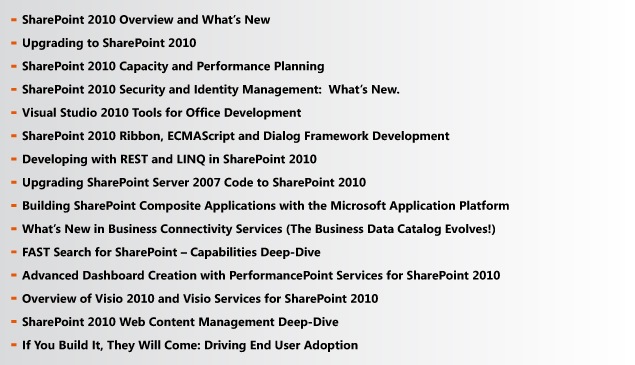
Here’s a little session sneak peek to give you taste of what’s coming…

Print

To help you get maximum value from the conference, we will be recording every session and publishing the files within 48 hours for registered attendees to watch, on demand, through the SharePoint Conference 2009 web site. Almost 250 sessions and you won’t miss a thing!

For more information visit www.mssharepointconference.com

Print

We look forward to seeing you in October!

The Microsoft SharePoint Conference 2009 Team | SPC@Microsoft.com


Print

Digg This

Take a look at this article from The Register summarizing the recent VB100 Antivirus test results:

Top vendors flunk Vista anti-virus tests
Outstandingly mediocre
http://www.theregister.co.uk/2009/08/06/vista_anti_virus_tests/

“Security vendors including CA and Symantec failed to secure Windows systems without fault in recent independent tests… Twelve of the 35 anti-virus products put through their paces by independent security certification body Virus Bulletin failed to make the grade for one reason or another and therefore failed to achieve the VB100 certification standard.”

“Microsoft’s new Forefront security scanner came out well in these proactive categories, a factor Hawes attributed to the effort Microsoft has thrown into improving the performance of its technology over recent months”

Microsoft Forefront Passes VB100
image What they’re referring to in that last sentence (“Forefront security scanner”) is the MSAV engine, which is in Forefront Client Security (now known as Forefront Endpoint Protection), Microsoft Security Essentials, Forefront Server products, etc.  It’s consistently come out in the very top tier of anti-malware products for the Enterprise, particularly for its “proactive detection ability” or it’s ability to recognize threats that are not yet defined or are undetectable through malware signatures, with as few false positives as possible.

Other coverage of the most recent tests:

Digg This

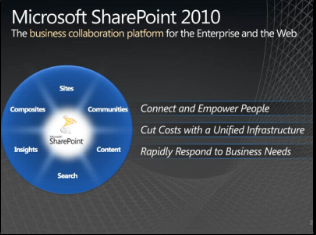
image We’ve posted an “first look” overview of Sharepoint 2010 technologies.  Up until now, we’ve been relatively secretive about the functionality we’re releasing in Sharepoint 2010 for a variety of reasons but this is the public’s first opportunity to see a few of the things we’ll be announcing in the upcoming product.

There are 3 usage scenario videos available for perusal:

The full announcement of Sharepoint 2010 will happen at the Sharepoint Conference in Las Vegas Nevada on October 19-22, at which point we’ll “open the kimono” completely to reveal what we’ve been working on over the past 3 years. 

If you are a Sharepoint Administrator, Developer, or Architect, I would strongly encourage you to attend this event and do it soon.  It fills up COMPLETELY every year.  Sign up for the conference at:
http://www.mssharepointconference.com/Pages/default.aspx

“Sneak Peek” Web site:
http://sharepoint.microsoft.com/2010/Sneak_Peek/Pages/default.aspx

Digg This

Posted by: kurtsh | August 8, 2009

INFO: Introducing Office 2010 Technical Preview

image “Microsoft® Office 2010 gives you rich and powerful new ways to deliver your best work – whether you’re at work, home, or school – on a computer, Web browser, or Smartphone. Grab your audience’s attention and inspire them with your ideas using enhanced tools, customizable templates, and photo editing capabilities. Work with multiple people from different locations at the exact same time using new co-authoring capabilities. By offering more ways to access your files from virtually anywhere, Office 2010 puts you in control.”

Video Announcement:
http://www.microsoft.com/presspass/presskits/2010office/Default.aspx

Office 2010 Beta Program:
If you’re interested in early notification about Office 2010’s Beta Program, sign up here:  https://microsoft.crgevents.com/Office2010TheMovie/Content/Default.aspx?p=Home&

Main web site:
http://www.microsoft.com/office/2010/

Digg This

image Any IT Professional worth his salt has a subscription to Technet Plus because it takes care of so many different needs.  Many of us with subscriptions take them for granted but for those poor unfortunate souls that haven’t partaken in Technet Plus before, here’s a rundown of the valuable resources an IT Professional gets with a subscription:

  1. BETA SOFTWARE
    Access to tons of Microsoft Beta software without http://connect.microsoft.com enrollment.
  2. EARLY RELEASE ACCESS
    Exclusive early access to new software releases, service packs, patches before public availability.
  3. TECH SUPPORT
    2 free technical support calls and 20% discounts on additional calls
  4. MANAGED NEWSGROUP SUPPORT
    Access to staff support newsgroups exclusive to Technet Plus users, with guaranteed response times.
  5. ELEARNING COURSES
    Access to Microsoft eLearning courses for training on dozens of products and services.
  6. TECHNET-ON-DVD
    Access to Technet reference material and books online through offline DVD replicas.
  7. ONLINE CONCIERGE
    24 hour online concierge to help you find answers quickly
  8. …annnnnnd of course:

    FULL VERSION EVAL SOFTWARE
    Full-version eval software with NO time limits or feature limits for over 70 products.

To subscribe at a discount, visit http://TechNetPlusTryWindows7Now.com, and use code: TNWIN7RTM for a 25% discount.

Digg This

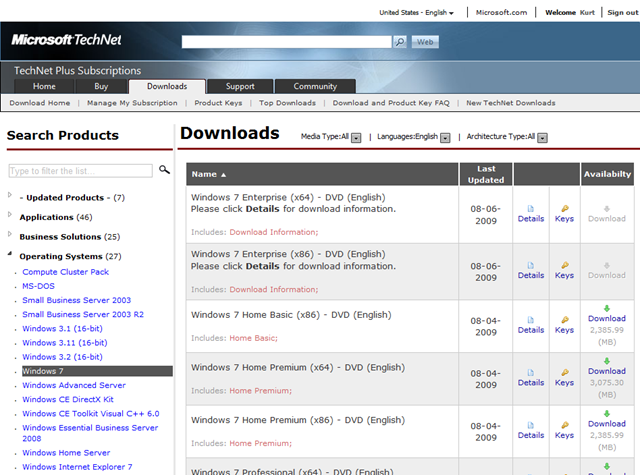
imageWindows 7 is now available with keys to Technet Plus subscribers through the download areas. 

The full DVD burnable .ISO images along with keys for most of the editions – Starter, Home Basic, Home Premium & Professional… along with both x86 & x64 versions for each. (Except Home Basic which doesn’t support x64)

This is full RETAIL software for you to learn on.  No time bomb.  All the keys are RETAIL keys. (Except for Home Starter which is and OEM key since there’s not such thing as a “Starter Retail key”.)

I’m downloading it ALL right now. Muhuhuhahaha.  That’s right.  Heck, I don’t even have this kind of access to retail .ISOs like this within Microsoft. 

I feel like a king in front of my computer.  Kneel.  Kneel before Zod.

———–

image PSST.  WHAT ABOUT WINDOWS 7 ULTIMATE & ENTERPRISE?
Here’s the thing:  Technically, I don’t think Technet Plus provides Ultimate & Enterprise software .ISOs or keys.  I think we draw the line at those two editions. 

So if you go to the standard Technet Plus DOWNLOADS page above you’ll see that the download link and the keys link are greyed out for these editions.

But if you’re a subscriber, check this page out and you will notice something interesting. (Snapshot above)
https://technet.microsoft.com/en-us/subscriptions/securedownloads/cc137106.aspx

And that’s all I’m going to say about that.

———–

WAHWAHWAH!  BUT I DON’T HAVE TECHNET PLUS!
Well, sucks to be you then.  Just kidding.  It’s not too late… you can still be one of the first to get your own test copy of Windows 7.  A subscription usually costs $349 for download access only, and $599 for regular DVD shipments. 

But here’s how to get a Technet Plus subscription for 25% off the $349 price (or the $599 price).

  1. Visit http://technetplustrywindows7now.com
  2. Click the Buy or Renew Now button
  3. Use the code:  TNWIN7RTM (Offer expires October 31, 2009)
    Your purchase price should now be $261.75 for the Direct Subscription or $449.25 for the regular DVD shipment price.

So stop whining, and get on it man!  What are you waiting for?  I’m totally teeing you up here.  What part of “WINDOWS 7 IS NOW AVAILABLE TO TECHNET PLUS SUBSCRIBERS” don’t you understand?

Man, this is such an awesome subscription, it’s disgusting…

Digg This

« Newer Posts - Older Posts »

Categories