UPDATE:  9/8/10:
The URL changed for the demo site and it now requires a secure username and password in order to access it.  See below for updated information.

UPDATE 9/9/09:
We have a demo of the installed Productivity Hub available for perusal at the following web site in case you’re interested in taking a look at the full blown product.  Remember:  This is free and completely extensible for your own applications such as line of business tools or important 3rd party apps like Adobe Photoshop or something.

————-

Microsoft has developed the Productivity Hub to help support your ongoing end user training efforts.

The Hub is a SharePoint Server 2007 site collection that serves as a learning community and is fully customizable. It provides a central place for your training efforts, and includes training content from Microsoft’s core products. Microsoft also provides ongoing and updated content packs.

The Hub uses SharePoint Server’s social networking capabilities, such as blogs and discussion groups. In addition, it offers the Coach program, a change management feature to help you train end users to self-help, reducing the burden on your training and IT staff. The Coach program impacts productivity in a collaborative and positive way.

What the Productivity Hub is:

  • Format: Pre-loaded SharePoint site collection, optimized for Web 2.0 functionality and easily deployed within SharePoint Server 2007 environment.
  • Content: Convenient end user productivity training in a variety of formats (documents, videos, podcasts, etc.). Receive free quarterly updates of content that you will learn about through the Productivity blog.
  • Blog: The Productivity blog offers tips and tricks for end user productivity. Use it as is, or your training staff can use the posts as their own to help them get started in running an internal blog.
  • Train the trainer: Includes IT/Manager section to aid with deployment of the site collection, and guidance to develop the Coach program.
  • Products: Office 2007 System applications including SharePoint Server 2007. Windows 7 and others will be added in the future.

imageOut of the box, we provide ‘Help modules’ that contain How-To videos, quick reference guides, step-by-step documentation, and other aids for the following products:

  • Fluent (The “Ribbon”)
  • Word, Excel, Powerpoint, Outlook, Access
  • Sharepoint
  • OneNote
  • Groove
  • LiveMeeting
  • Communicator
  • Infopath
  • Publisher
  • Project
  • Visio
  • Windows

You can also download additional content packages that expand the training materials you can make available through the Hub.  We have 4 updates already planned along with Office 2010 specific content on the way, including a migration path for customers that would like to move to Sharepoint Server 2010.

DOWNLOAD:  Microsoft Productivity Hub (383MB)
http://www.microsoft.com/downloads/details.aspx?displaylang=en&FamilyID=277fefca-d62f-41bc-943d-79002254cfee

Digg This

The System Center Configuration Manager team would like to announce that the following has been released and available for download:

Configuration Manager 2007 Service Pack 2 Release Candidate
This is the official Release Candidate build for Configuration Manager 2007 SP2.

What’s New?
ConfigMgr07 SP2 will include new OS support along with improving on the Intel AMT integration.

New Operating System Support

  • Windows 7
  • Windows Server 2008 R2
  • Windows Server 2008 SP2
  • Windows Vista Sp2

*Branch Cache a new Windows and Windows Server 2008 R2 feature for peer to peer content distribution will be support

New Features in Out of Band Management
Configuration Manager 2007 Service Pack 2 improves on the Intel AMT integration provided in Service Pack 1. SP2 adds full feature support for computers that have the Intel vPro chip set and AMT firmware versions 4 & 5. In addition to providing feature parity with SP1 and AMT firmware versions 3.2.1, 4.0 and 5.0, the following new features are supported:

Wireless Management (mobile only)

  • Up to eight (8) wireless profiles per out of band service point
  • Profiles support SSID, WAP2-Enterprise or WAP-Enterprise security, AES or TKIP encryption, client authentication options of EAP-TLS or EAP-TTLS/MSCHAPv2 or PEAPv0/EAP-MSCHAPv2
  • Versions of AMT earlier than 3.2.1 are supported with the Intel translator

Authenticated Wired 802.1x Management

  • Single profile
  • Profile supports client authentication options of EAP-TLS or EAP-TTLS/MSCHAPv2 or PEAPv0/EAP-MSCHAPv2
  • Versions of AMT earlier than 3.2.1 are supported with the Intel translator

Audit Logging

  • Supported on AMT versions 4 and 5
  • Select which out of band management features to audit (critical events not supported)
  • Enable or disable audit logging per computer after provisioning
  • View, clear, and export to file the audit log entries by using the out of band management console

Power State Configuration

  • Enable configuration of the power settings to specify whether out of band management activity is supported when the host is on (S0), host is on (S0) or in standby (S3), or always on (S0-S5)

Data Storage

  • Save up to 4096 bytes in ASCII characters in the AMT data storage of each computer
  • View and save to the data store by using the out of band management console

Additional information:

  • Hotfixes included in SP2 article can be found on the primary Configuration Manager MSConnect page at https://connect.microsoft.com/content/content.aspx?ContentID=12645&SiteID=16.
  • Deployment guides for BranchCache and the new AMT features are available in the download section.
  • The new OpsMgr07 R2 ConfigMgr07 Management Pack can also be downloaded, this supports 64bit OpsMgr client agents.
  • Please review the Release Notes before performing any installation and upgrade.

Feedback and Support:

  • All registered Sp2 Open Beta users can submit bugs, design change requests (DCR’s), and other feedback. See the help link on the ConfigMgr MSConnect homepage for more instructions.
  • Newsgroups are a great way to post questions and receive general support question answers.

If you experience any issues with the download or the MSConnect site please contact, sccmtap@microsoft.com

Registration:

  1. Go to http://connect.microsoft.com
  2. Login with a Windows Live ID (http://www.passport.net if you don’t have one already)
  3. Click on CONNECTION DIRECTORY
  4. Search for System Center Configuration Manager 2007
  5. Click on APPLY NOW next to “Configuration Manager 2007 Service Pack 2 Open Beta Program”
Digg This

image As of the beginning of this month, all customers that either purchase licenses of Windows Server 2008 RDS CALs or own Windows Server 2008 R2 RDS CALs by having their Terminal Services CALs be on Software Assurance, will immediately get the rights to use App-V for Terminal Services for all their CALs at no additional charge.

That’s right:  If you have Terminal Services CALs on maintenance, you’ve been granted the right to use App-V for Terminal Services.

So for all you folks worried about application compatibilities between installed apps on a Terminal Server… worry no more!  App-V will virtualize the OS to each application making it’s installation & execution completely invisible between applications… and between running terminal sessions!

If you haven’t already figured it out:  This is a really big deal for customers looking for a more manageable alternative to Virtual Desktop Infrastructure. 

Customers can now:

  • Deliver presentation layer Windows experiences to thin clients over a remote desktop protocol without worrying about installation collisions between applications
  • Be confident that applications that are executed in different sessions won’t interfere with each other
  • Provision the “desktop experience” with applications dynamically (and de-provision them if required)

———-

Microsoft Application Virtualization for Terminal Services now included as part of Windows Server 2008 RDS CAL
As of September 1, 2009, all users or devices connecting to Windows Server 2008 R2 Remote Desktop Session Host Server or Windows Server 2008 Terminal Server managed with Microsoft Application Virtualization for Terminal Services no longer need to acquire a separate Microsoft Application Virtualization CAL for Terminal Services.
See more details.

Server growth is a costly issue for organizations that rely on Terminal Services. To avoid application conflicts, applications must undergo significant testing to determine which applications will collide and, therefore, must be separated and run on different Terminal Server silos-a time-consuming and costly process.

Running multiple separate terminal servers for each application routinely results in servers being underutilized because each one is locked into a specific configuration, capable of serving only a limited set of non-conflicting applications, typically using just 25 percent of capacity. Often, 20 servers are required to support 1,000 users. Microsoft App-V for Terminal Services completely changes this situation. Microsoft Application Virtualization for Terminal Services offers the following features and benefits:

  • Consolidate servers and end server siloing, increasing server farm ROI: App-V’s application virtualization allows any application to run alongside any other—even applications that normally conflict, multiple versions of the same application, and many applications that previously could not run under Terminal Services. This eliminates the need for server silos and significantly improves server utilization. As a result, the number of servers needed is much lower, operational costs for managing the remaining servers are reduced, and the server farm ROI is increased. For instance, it has enabled Russell Investment Group and Fidelity National Financial to shrink their application server farms by 33 to 40 percent.
  • End application conflicts and regression testing: By eliminating the need to permanently install applications on servers, and shielding the operating system and applications from changes created when installed applications run, Microsoft App-V for Terminal Services prevents problems that hinder deployments. The need to perform lengthy regression testing is also significantly reduced.
  • Accelerate application deployment: Applications that use App-V only need to be packaged once for desktop or terminal services platforms. This reduces the need for "double packaging" or creating two different processes and packages when providing the choice for running an application on a desktop or via a terminal server.
  • Reduce Deployment Risk: Installing a new application on a terminal server was traditionally a risky process; first you had to ensure all users were logged off, then you had to change the mode of terminal server, followed often by reboots. Software updates and uninstalls provide even great complexity and risk. With Microsoft App-V applications can be deployed and updated on demand to users without having to reboot or log users off.
  • Simplify Profile Management: Microsoft App-V allows application settings and data to be stored in a single network location. This ensures a user’s application settings are available no matter what terminal server is used—without the need for roaming profiles. Additionally this feature makes mandatory profiles a viable option for TS scenarios—OS settings remain locked within the mandatory profile while per application settings can still be modified by the user. This dramatically simplifies the complexities of managing profile data.

LINK:  http://www.microsoft.com/systemcenter/appv/terminalsvcs.mspx

Digg This

Picture1

System Center Virtual Machine Manager 2008 R2 is now available to TechNet Subscribers. Visit this link to access the software. The VMM 2008 R2 software can be found in the “Servers” section of the page. Enjoy!

LINK:
https://technet.microsoft.com/en-us/subscriptions/securedownloads/default.aspx

Digg This

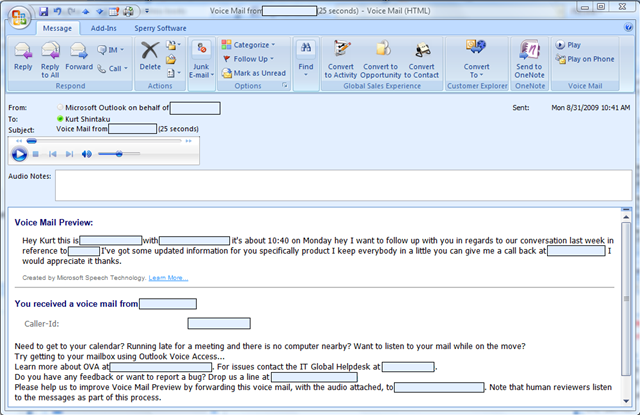
This morning I got a phone call while I was on a conference bridge.  The bridge was pretty important so I couldn’t drop to pick it up so I let it go to voice mail.  A minute later this is what showed up in my Outlook 2007 inbox:

image

Exchange Server 2010 & Office Communication Server 2007 R2’s Voice-to-Text Voicemail Transcription

That’s right:  Exchange Server 2010 provided a full transcription of this person’s voice mail

So cool, it’s disgusting.  I didn’t even have to listen to the voice mail to understand why this person was calling me.  It recorded the caller ID as well as the phone number that the person left me. (How often have you SCRAMBLED ABOUT FRANTICALLY trying to take down the phone number that a person is telling you on a voice mail?)

From here, I can:

  • Replay any part of the voice mail
  • Play the voice mail back directly on my phone
  • Click on the caller ID and call him back
  • Reply back to him in email directly from this voice mail if I have his email address in my contacts list
  • Forward the voicemail to someone else who can respond

And you know what’s even more phenomenal?  It’s all built into the Exchange Server 2010 Enterprise CAL.

READ MORE AT:
http://www.microsoft.com/exchange/2010/en/us/unified-messaging.aspx

image

We released our free-to-use virtualization hypervisor, Hyper-V Server 2008 R2 for download by poeple that don’t have the luxury of owning Windows Server 2008 R2 for it’s Hyper-V services.

It’s very cost effective for customers on Select with Windows Server 2003 that don’t have the luxury of moving to Windows Server 2008 R2, or simply don’t intend on moving to Windows Server 2008 R2 but still want to reduce the cost of server or client hardware virtualization licensing in their organizations.  A quote from our product site:

With Microsoft Hyper-V Server 2008 R2, customers get increased availability with support for planned and unplanned downtime scenarios with live migration and host clustering support. All of these features are available at no additional charge and enables customers to deploy cost-effective virtualization compared to competitive offerings.

  • Available as a free download
  • Support for live migration for “zero downtime” planned migrations
  • Support for host clustering for unplanned downtime protection
  • Lower total cost of ownership compared to VMware ESX 3i

And here’s some key details on the new R2 feature set:

  • Support for up to 64 Logical Processors –increasing the logical processors support from 24 to 64 enables customers to achieve higher consolidation ratios and more scalable virtualization scenarios on Windows Server than ever before.
  • Processor Compatibility Mode for live migration– allows live migration across different CPU versions within the same processor family, (e.g.”Intel Core 2-to-Intel Pentium 4” or “AMD Opteron-to-AMD Athlon”) enabling migration across a broader range of Hyper-V host hardware.
  • VM Chimney (TCP Offload) and VMQ support are disabled by default
  • Improved scalability with support for 1 TB host memory and up to 8 sockets
  • Support for up to 64 Logical Processors –increasing the logical processors support from 24 to 64 enables customers to achieve higher consolidation ratios and more scalable virtualization scenarios on Windows Server than ever before.
  • Processor Compatibility Mode for live migration– allows live migration across different CPU versions within the same processor family, (e.g.”Intel Core 2-to-Intel Pentium 4” or “AMD Opteron-to-AMD Athlon”) enabling migration across a broader range of Hyper-V host hardware.
  • VM Chimney (TCP Offload) and VMQ support are disabled by default
  • The following are new Hyper-V Server 2008 R2 features that were also in the R2 beta.
  • Live Migration
  • Jumbo Frame Support
  • Hot Add/Remove of storage (VHDs and Pass Through Disks)
  • Second Level Address Translation (SLAT) processor support for both Intel (EPT) and AMD (RVI)
  • Core Parking
  • Improved network performance via support for TCP Chimney and VMQ (specific hardware NICs required)
  • Improved VHD performance for dynamic and difference disks

DOWNLOAD:  Hyper-V Server 2008 R2
http://www.microsoft.com/downloads/details.aspx?displaylang=en&FamilyID=48359dd2-1c3d-4506-ae0a-232d0314ccf6#tm

LINK:  Hyper-V R2 Product Web Site
http://www.microsoft.com/hyper-v-server/en/us/r2.aspx

LINK:  Hyper-V TechCenter for IT Professionals (Planning, Deployment, Management, Support)
http://technet.microsoft.com/en-us/windowsserver/dd448604.aspx

Digg This

imageSince 1991, the Professional Developers Conference (PDC) has been Microsoft’s premier gathering of leading-edge developers and architects. Attendees come from around the world to learn about the future of Microsoft’s platform, exchange ideas with Microsoft technology experts and network with fellow professionals.

What you’ll get at the PDC
  • Hear from keynote speakers who help set the direction for Microsoft and the industry, and see them unveil our new products and technologies
  • Immerse yourself in 4 days of deep, technical session and workshop content delivered by Microsoft and industry luminaries
  • Get one-on-one access to over 1,000 Microsoft experts at the Ask The Experts reception and onsite throughout the conference
  • Try out the latest platform technologies in our Hands-on-Labs and get a jump start on planning your company’s products and technology investments
  • Network with other leading-edge developers and architects
  • Walk away with the pre-release bits

image Since the beginning, the PDC has been the epicenter of Microsoft’s biggest platform announcements, including Microsoft .NET, Windows® XP, Windows Vista®, and Windows 7®. This year, you’ll hear more details about our services platform, the future of Windows, the web, devices, and our next generation of developer tools. And as always, some of the most exciting announcements are closely-guarded secrets until the event. Join us at PDC09 and be among the first to see the future of Microsoft’s developer platform.

REGISTER:
http://www.microsoft.com/events/pdc/default.aspx

Digg This

image More interesting news from CIO highlighting our focus and practices around Cloud Security.

Five Lessons from Microsoft on Cloud Security
The software titan reviewed its security approach to cloud computing and developed new strategies. Here’s what one Microsoft cloud expert says he’s learned.

clip_image001

Tue, August 25, 2009CIO — While Google, Amazon and Salesforce have gotten the most attention as cloud service providers, Microsoft—with its 300 products and services delivered from its data centers—has a large cloud bank all its own.

In May, the company released a paper on its approach to cloud services and how the company plans to secure those services. The paper—penned by Microsoft’s Global Foundation Services, the group responsible for overseeing the company’s software-as-a-service infrastructure—spells out the current dangers for online services, including a growing interdependence between customers and the companies that serve them and more sophisticated attacks on Internet services.

clip_image001[1]

[For timely cloud computing news and expert analysis, see CIO.com’s Cloud Computing Drilldown section. ]

Microsoft argues that its approach to security, which it carved out with its Trustworthy Computing Initiative in 2002, works as well for online services, with some modification.

"If I take the traditional security principles, that hasn’t changed in terms of discipline and approach," said Charlie McNerney, general manager for business and risk management at Microsoft’s GFS. "What has expanded is the amount of controls we have applied."

In recent interviews, McNerney and other cloud providers shared their thoughts on Microsoft’s approach to securing cloud services and the data centers that power such services.

1. Discuss risk with customers
The security of cloud services worries many customers, and it should, said McNerney. Figuring out where the responsibilities lie with respect to a customer’s data is an important conversation, he says.

"What are the defect scenarios and the responsibilities that parties have in that environment when it breaks," McNerney says. "That is the type of thing that large enterprise companies want to talk about the most."

But Microsoft has found that security is not just a worry for their biggest clients. Web sites and e-mail are central to the brand of any company and have to be protected, he says.

"I don’t find anyone casual on trust," McNerney says. "The small guy operating on the Web with his commerce site is just as passionate about security as the big guys."

READ MORE:
http://www.cio.com/article/500505/Five_Lessons_from_Microsoft_on_Cloud_Security

Digg This

Print

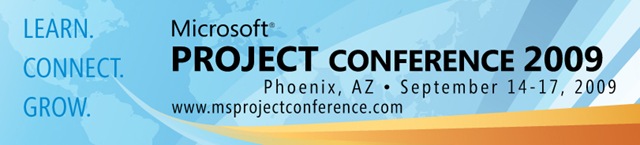
With only 3 weeks left until Microsoft Project Conference 2009 don’t miss your chance to enjoy the clip_image002

extended early bird savings of only $699!  Early Bird Rates will expire on August 31, 2009 and the rate will go up to $849 so act quickly and secure your spot at this year’s event!

The Microsoft Project Team is pleased to announce exciting updates for the 5th Project Conference in Phoenix, Arizona from September 14-17, 2009. 


Print

NEW for 2009!  Project Conference 2009 announces the addition of MyPC – the main hub of online activity for pre-event, onsite and post-event conference information and session details!  Attendees can build their event schedules & calendars, search through conference sessions & speakers, read up on all the latest news, comment on forum boards, network with other conference attendees, fill out evals and most importantly view all PPTs and session recording files within 48 hours of each session.   With the ability to access this information for 3 months post-event, this is an incredible added value for all conference attendees! 


Print


Online registration is now open for conference attendees to take Office Project 2007 Technical Specialist exam 70-632 and/or 70-633 for free!  Develop your expertise in Office Project 2007 techniques and strategies as well as expand your project management skills by achieving these valued certifications. Use promotional code OFPROJ27 to receive your savings.   Hurry!  Register soon to take advantage of this limited offering!


Print


No other conference will come close to delivering the quantity and quality of content and experiences found at Project Conference 2009, nor the number of value added benefits and offers that will resonate throughout the year. We’re delighted to announce:

  • Receive a free licensed copy of Project Professional 2010! Registrants will receive their copy of Microsoft Project Professional 2010 after the release of the full commercial version. The offer is extended to all registered attendees by Project Management Practice Inc. and Keystone Learning SystemsClick here for more information!
  • Receive free Project Professional 2007 e-learning! The offer is extended to all registered attendees by Project Management Practice Inc. and Keystone Learning SystemsClick here for more information!
  • Free certification testing! Take the Project 2007 Technical Specialist exam 70-632 and/or 70-633 for free at Project Conference 2009.
  • PMI Credential Holders: earn up to 32.25 PDUs with Project Conference 2009 registration!
  • Register by August 31 and save over 15%. We’ve extended our lowest registration offer to make it more affordable to attend!  Rates will go up to $849 on September 1, 2009.


Print


Project Conference 2009 is the one conference your company should attend this year!  For more information, please visit the Project Conference Website at http://www.msprojectconference.com.

LEARN what can be achieved today and what’s coming tomorrow with the next release.

CONNECT with your peers, industry practitioners, certified partners and the Microsoft Project team to share experiences.

GROW your skills and investments to realize remarkable cost reductions, enhance efficiencies and move your business forward.

Don’t miss your chance to attend Project Conference 2009!  See you in September!

clip_image007


The Microsoft Project Conference 2009 Team | projconf@microsoft.com

Digg This

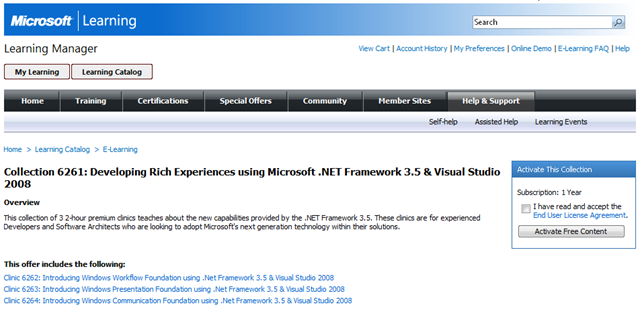
imageInterested in a set of free online courses to teach you all about creating user interfaces with Visual Studio 2008?

This collection of 3 2-hour premium clinics teaches about the new capabilities provided by the .NET Framework 3.5.

These clinics are for experienced Developers and Software Architects who are looking to adopt Microsoft’s next generation technology within their solutions.

This offer includes the following:

Digg This

« Newer Posts - Older Posts »

Categories