Posted by: kurtsh | July 20, 2023

NEWS: Microsoft 365 Copilot Pricing

imageMicrosoft 365 Copilot brings a whole new way of working – reasoning over all your business data in the context of your enterprise, including the ability to ask questions and get answers from the web.

We’re excited to announce that Microsoft 365 Copilot will be available for $30 per user per month for Microsoft 365 E3, E5, Business Standard, and Business Premium customers.

Microsoft 365 Copilot is built on Microsoft’s trusted and comprehensive approach to enterprise-grade security, privacy, identity, compliance, and responsible AI—so you know it’s enterprise ready. This means:

  • Copilot inherits your existing Microsoft 365 security, privacy, identity, and compliance policies.
  • Your data is logically isolated and protected within your Microsoft 365 tenant, and always within your control.
  • At the tenant level, Copilot respects individual and group permission policies.

Resources:

imageIn partnership with the Cybersecurity and Infrastructure Security Agency, we’re announcing new steps to protect our customers and improve the security of Microsoft cloud platforms.

Today we are expanding Microsoft’s cloud logging accessibility and flexibility even further. Over the coming months, we will include access to wider cloud security logs for our worldwide customers at no additional cost. As these changes take effect, customers can use Microsoft Purview Audit to centrally visualize more types of cloud log data generated across their enterprise.

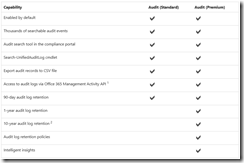
Microsoft Purview Audit enables customers to centrally visualize cloud log data generated across their enterprise, thus helping them effectively respond to security events, forensic investigations, internal investigations and compliance obligations. Thousands of user and admin operations performed in dozens of Microsoft 365 services and solutions are captured, recorded and retained in customers unified Purview Audit logs.

For Microsoft Purview Audit (Standard) customers (E3/G3), Microsoft will now provide:

  • Detailed logs of email access and more than 30 other types of log data previously only available at the Microsoft Purview Audit (Premium) subscription level
  • Increasing the default retention period from 90 days to 180 days

For Microsoft Purview Audit (Premium) customers already have:

  • All available audit logging events, including “Intelligent Insights”, which help determine the scope of potential compromise by using the Audit log search – only available to Audit Premium
  • 1 year default retention periods (licensable to 10 yrs retention) and automation support for importing log data into other tools for analysis  

Microsoft will begin rolling out these logging updates in September 2023 to all government and commercial customers.

Learn how this will help defend against nation-state cyber threats:

Learn the differences between Purview Audit Standard & Premium here:

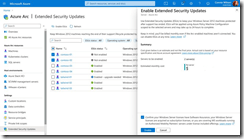
imageToday we announced Extended Security Updates enabled by Azure Arc, for Windows Server 2012/2012 R2 & SQL Server 2012 (years 2 and 3) – as a pay-as-you-go subscription!

This is enabled in the Azure Portal and is charged as a Pay As You Go service – perfect for securing older workloads outside of Azure that you’re planning to upgrade, migrate or decommission.

Check your Azure portal for pricing.

Posted by: kurtsh | July 18, 2023

BETA: Bing Chat Enterprise

clip_image001

Employees are looking to use AI tools to help them unlock creativity and productivity at work—70% say they would delegate as much work as possible to AI according to our Work Trend Index1. But using AI tools that aren’t built for the enterprise inadvertently puts sensitive business data at risk. As organizations adopt AI, they want to be confident their data is protected.

Bing Chat Enterprise gives your organization AI-powered chat for work with commercial data protection. With Bing Chat Enterprise, user and business data are protected and will not leak outside the organization. Chat data is not saved, and no one at Microsoft can view customer data. Additionally, data is not used to train the models. 

Just like Bing Chat, Bing Chat Enterprise is grounded in web data and provides complete, verifiable answers with citations, along with visual answers that include graphs, charts, and images, and is designed in line with our AI principles2.

Bing Chat Enterprise is now rolling out in preview at no additional cost as part of Microsoft 365 E3, E5, Business Standard, and Business Premium subscriptions.

Get started today:

  1. Review the Bing Chat Enterprise documentation on Microsoft Learn for guidance on how to turn on Bing Chat Enterprise for your organization.
  2. Once Bing Chat Enterprise is turned on, users in your organization will be able to access it from Bing.com/chat , the sidebar in Microsoft Edge, and soon from Windows Copilot, just by signing in with their work accounts.

Reference links:

  1. https://www.microsoft.com/en-us/worklab/work-trend-index/will-ai-fix-work 
  2. https://www.microsoft.com/ai/our-approach?activetab=pivot1:primaryr5
Posted by: kurtsh | July 18, 2023

INFO: GitHub Copilot for PowerShell

imageAre you an IT Professional?Do you automate things in PowerShell?

Wouldn’t it be cool to have an AI agent watch your comments and provide you with PowerShell code that fulfills the objective of what you’ve written?  Kinda like Autocomplete for PowerShell?

Enter GitHub Copilot for PowerShell.

Install & start your free trial of GitHub Copilot: https://aka.ms/get-copilot

More info:
https://github.com/features/copilot

Quick startup guide: https://docs.github.com/en/copilot/quickstart

I’ve posted the following .PDF files because I can’t find them anywhere and they’re super-useful to folks trying to make heads or tails of what’s in the different suites that Microsoft customers can purchase:

  • Enterprise
      • Microsoft 365 E3, E5, E5 Security & E5 Compliance
      • Office 365 E1, E3, E5
      • EMS E3, E5
      • Windows 11 Pro, E3, E5
      • Microsoft 365 F1, F3, F5 Security, F5 Compliance, F5 Sec+Comp
  • Government
      • Microsoft 365 G3, G5, G5 Security, G5 Compliance
      • Office 365 G1, G3, G5 suites & F3
      • EMS G3, G5
      • Windows 11 G5
      • Microsoft 365 F1, F3, F5 Security, F5 Compliance, F5 Sec+Comp

You can download the documents below:

imageThere is also a documented called “Licensing Guide Microsoft 365 Enterprise” that is available directly off Microsoft.com that may be useful for folks trying to understand what contracting vehicles are necessary to get this licensed:

Imagine an Azure Storage emulator you can install & run locally for free to test against.

That’s Azurite.

The Azurite open-source emulator provides a free local environment for testing your Azure Blob, Queue Storage, and Table Storage applications. When you’re satisfied with how your application is working locally, switch to using an Azure Storage account in the cloud. The emulator provides cross-platform support on Windows, Linux, and macOS.

Find the emulator download and instructions here:

imageIt’s of course directly accessible using the Azure Storage Explorer.  Download the Storage Explorer here:

[Microsoft 365 and Azure AD admins! This one is for you in case you missed the Message Center announcement.]

imageIn today’s landscape, organizations and users utilize various authentication methods with varying levels of security. Unfortunately, users often select less secure MFA methods, even when more secure options are available. This may be due to convenience, lack of awareness, or technical limitations.

To encourage the use of the strongest available method, we are introducing system-preferred authentication for MFA. This system prompts users to sign in with the most secure method they’ve registered and the one that’s enabled by admin policy. This transition from choosing a default method to always using the most secure method will promote better security practices. If users can’t use the prompted method, they can choose an alternative MFA method.

We will begin rolling out in early July (previously late June) and expect to complete by early August (previously late July).

We launched this with Microsoft-managed set to disabled. As mentioned above, we will be setting "Microsoft-managed" to enabled from the first week of July 2023. While we highly encourage you to adopt this feature for your entire tenant, should you need to you can either scope the feature for a segment of your user population or disable it if necessary. The feature will ultimately be set to Microsoft-managed (enabled) for all tenants, with no option to disable it.

Deploying this feature with the rollout controls is highly encouraged to enhance security and ensure users always use the most secure authentication method first. The feature is now available from your tenant.

Up until now in Excel Desktop for Microsoft 365 Apps, you could create and modify automations using JavaScript and TypeScript using the Office Scripts Code Editor.

With the Action Recorder, you can automate repetitive worksheet tasks without needing any programming experience.

  1. Open any existing workbook.
  2. Select Automate >Record Actions (Preview).image
  3. Record actions in your workbook.
  4. When you’re done recording, click the Stop recording button in the Record Actions (Preview) task pane to save the recorded actions into a script that you can run at any time on any workbook.

Not all actions are recordable at this time—we are continuing to add support to increase the number of recordable actions. We encourage you to continue trying to record actions useful to your workflow as that will help us prioritize the order in which we add support.

(Note: This feature requires Microsoft 365 E3/E5 or A3/A5)

Read more about this new feature in Excel here:

clip_image002As your digital footprint continues to expand with more identities, resources, apps, and endpoints to secure, identity and access must evolve.

We hope you will join us on July 11, 2023, as we introduce the next stage of our vision at Reimagine secure access with Microsoft Entra. Register for this digital event to hear from Microsoft Security leaders about the latest innovations and current best practices in identity and access. You’ll hear announcements about new products and capabilities, see demonstrations, and get insights about the future of identity and access.

Join this digital event to explore ways to:

  • Provide secure access for any identity to any application or resource across your on-premises and multicloud environment.
  • Keep up with a rapidly expanding and evolving cyberthreat landscape by optimizing your tech stack.
  • Reduce your attack surface while improving experiences for all users—no matter where they are.

Have questions for experts? Ask them during the live Q&A chat.

  • DATE/TIME:
    Tues, July 11, 2023, 9:00 AM – 10:30 AM PT

« Newer Posts - Older Posts »

Categories